
Got a product that is missing its description, tags, or image alt text? StoreAgent can fill those gaps in one click. This article shows you where the Complete with AI button lives, what it fills in, and what to check before you use it.
What Complete with AI does
Complete with AI looks at a single product, finds the content fields that are still empty, and runs the matching StoreAgent AI agents to fill them. It only works on fields that are empty, so anything you have already written by hand is left untouched.
It can complete the following, each handled by the same agent you can also run on its own:
- The long product description, using the Product Description AI agent.
- The short description or product summary, using the Product Summaries AI agent.
- Product tags, using the Product Tags Generator AI agent.
- Alt text for product images that have none, using the Image Alt Tags AI agent.
- Upsell and cross-sell suggestions, using the Product Upsells AI agent.
Because it runs the same agents, completing a product uses your StoreAgent AI credits the same way running each agent individually would. See how StoreAgent calculates your usage.
Before you start
- StoreAgent installed and connected to your store.
- The AI agents you want to use enabled in StoreAgent (a disabled agent is skipped).
- Permission to edit the product you are working on.
How to complete a product
- Open the product you want to complete in Products → All Products, then click the product name.
- In the Publish panel on the top right, click Complete with AI.
- StoreAgent runs the matching agents and fills each empty field. Wait for it to finish.
- Review the generated content, adjust anything you want, then click Update to save the product.
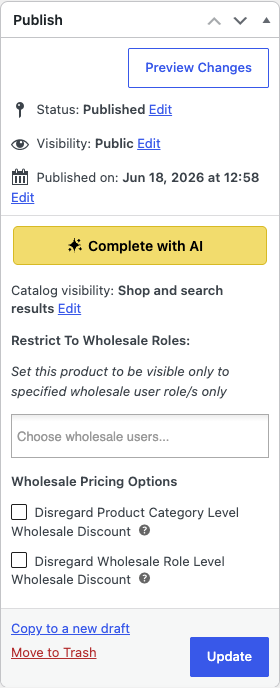

StoreAgent may also show a Complete with AI prompt automatically on a product that still has empty fields, reading This product has fields StoreAgent AI can complete. Complete it with AI?. You can act on it or dismiss it the same way.
Frequently asked questions
Will it overwrite content I already wrote?
No. Complete with AI only fills fields that are empty. Fields that already have content are skipped.
Why is a field not being filled?
Either the field already has content, or the agent for that field is turned off. Enable the agent in StoreAgent and try again.
Does it use credits?
Yes. It runs the same AI agents you can run individually, so it uses AI credits in the same way.
What’s next
Need help?
If you have a question or run into any issues, we’re here to help.
- Premium users: Open a support ticket
- Free users: Visit our community forum

