
SEO-friendly, accessible alt text for your entire product image library in minutes. StoreAgent looks at each image, reads the product it belongs to, and writes what is actually there.
No more blank alt attributes, no more filenames like IMG_4821.jpg standing in for a description.

 Product photo 1
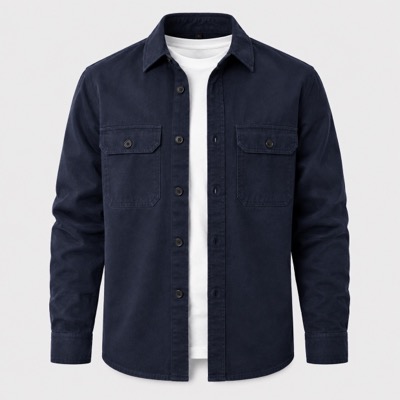
Navy midweight organic cotton overshirt with two buttoned chest pockets, shown buttoned over a white tee on a plain background.
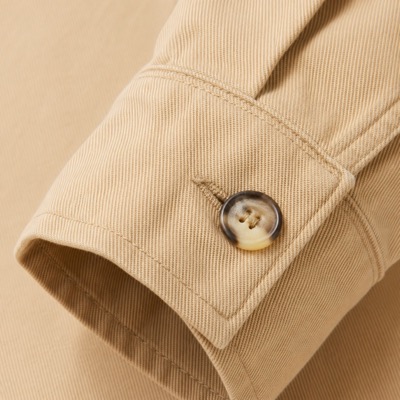
Close-up of sand-coloured cotton twill showing the weave texture and a horn button on the cuff.
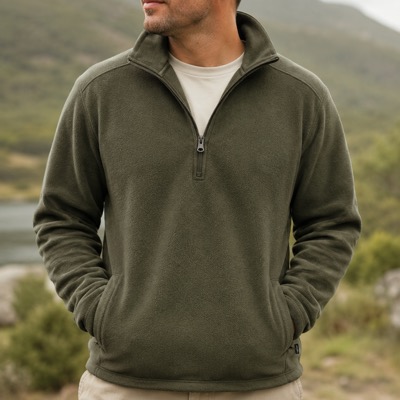
Olive half-zip fleece pullover worn by a model outdoors, with the zip pulled halfway and hands in the front pockets.
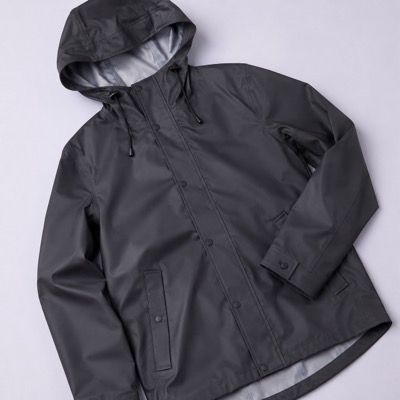
Charcoal waterproof rain coat laid flat, showing the storm flap, drawcord hood and taped seams.
alt="" — empty, on 240 of your images
It is a small attribute doing two jobs at once: telling search engines what your product photos show, and telling shoppers who cannot see them.
Product photos are how a lot of people shop, and image search needs words to work with. Without alt text, your best photo is invisible to the one place a shopper is browsing purely on looks.
Descriptive alt text gives every product image something to rank on, and gives your product pages another relevance signal for free.
A screen reader reads the alt text out loud. Empty alt attributes turn your gallery into silence, or worse, a string of filenames.
Alt text on every image is also a baseline requirement in WCAG accessibility guidelines — the standard most accessibility rules and audits point back to.
The AI looks at the image itself and cross-checks it against the product it belongs to — so the alt text says “navy overshirt with chest pockets”, not “a piece of clothing”.
Colour, shape, angle, what is in the frame and how the product is being shown.
Title, attributes, variation and category, so the words match the product you actually sell.
Straight onto the image in your WordPress media library, ready for you to review or edit.
Run it across a category, a tag, or only the images with no alt text at all. This is the difference between a rainy-afternoon task and a job you never finish.
The same plugin writes the rest of the product page too. Same plan, same allowance, no extra tools to buy.
Descriptive alt text on every product image, written from the photo and the product.
Long and short copy for the whole catalog, in bulk.
Product description generator ›Sensible tags so related products and on-site search stop coming up empty.
The honest gist of what reviewers said, without scrolling forty reviews.
Every alt text generation counts as one AI content task, drawn from the same allowance as your descriptions and tags.
See all featuresThe free plan gives you 25 AI content tasks to use whenever you like. One task is one generated piece — an alt text, a description, a set of tags.
Enough to alt-tag a small gallery and see the quality before you spend anything.
For a real image library — and the descriptions, chatbot and insights that come with it.
It is a tool that writes the alt text for your product images automatically. StoreAgent runs inside your WordPress dashboard, looks at each image alongside the product it belongs to, and saves descriptive alt text to your media library.
Yes. Select a category, a tag, only the images that currently have no alt text, or your entire catalog, start the job and come back to a finished library. Most stores use this to clear years of empty alt attributes in one pass.
Yes. It reads the image itself and cross-checks it against your product data — title, attributes, variation, category — so the alt text describes what is in the frame in your product’s own words, not a generic guess from the filename.
No. The AI is included in your StoreAgent plan. There is no key to obtain or paste, and no separate bill from an AI provider.
Always. It is saved as normal WordPress alt text on the image, so you can change it in the media library or the product editor like any other field.
Descriptive alt text gives search engines something to index for each product image, which is how image search finds your photos at all. It also adds relevance signals to the product page — and it is a baseline accessibility requirement, which is worth doing regardless.
StoreAgent’s bulk tool has a “missing alt text only” filter, so you do not need a separate audit: run the job on that filter and it fills only the gaps. If you want to see the gaps first, our guide to finding and fixing missing alt text walks through auditing your store step by step.
Yes. In StoreAgent’s settings you choose which fields to generate by default — alt text, caption, title, description — and new images get them automatically as you upload. Existing images are covered by the bulk tool.
Install the plugin, connect your store, and generate alt text across your product images. Free plan, no credit card, no OpenAI API key.
The AI is included — there is no OpenAI key to buy or paste.


PO BOX 4362
Gumdale QLD 4154
Australia

© 2026 Rymera Web Co Pty Ltd. All Rights Reserved. ABN 51 604 474 213.