
StoreAgent gives you powerful tools to generate content, manage product data, and interact with customers through chat. To make sure everything runs smoothly, usage is measured in three simple categories: AI Tasks, Vector Items, and Chat Messages.
This article explains what each of these categories means and how StoreAgent calculates them. By understanding this, you’ll have clarity on what counts toward your plan limits.
You’ll also see how StoreAgent keeps things simple by tracking usage in the background, so you don’t need to worry about technical details. Each limit is designed to be predictable and easy to follow.
With this guide, you’ll be able to confidently monitor your usage, avoid surprises, and get the most value out of your StoreAgent subscription. Whether you’re creating product content, storing items in AI Memory, or having AI Chat handle customer conversations, you’ll know exactly how it’s measured.
AI tasks
What it is: AI Tasks are any non-chat related AI action that StoreAgent tools perform.
Examples include: Generating a product description, creating review summaries, producing product tags, image alt tag generation, AI coupon creation, AI review approvals, or running automations and bulk runs.
How it’s measured: Each time you an action is performed, it counts as one AI Task/Action.
AI memory
What it is: Items stored in AI Memory that StoreAgent can use for context in chat conversations and other AI tasks.
Examples include: One product, post, page, or custom post type object equals one memory slot.
How it’s measured: Each product stored takes one AI memory slot. If you edit a product or post, it doesn’t consume a new slot — instead, StoreAgent updates that item in memory. Updates are processed asynchronously a few times a day so as not to disrupt your store.
AI chat replies
What it is: Replies in conversations that your customers have with StoreAgent Chat.
Examples include: Answering a customer’s product question.
How it’s measured: Only the AI’s replies are counted. Each AI response in the chat deducts one Chat Reply from your usage. Customer messages don’t count toward your total.
How to check your usage
You can easily check your usage at any time from your StoreAgent account.
- Go to My Account > Plan Details
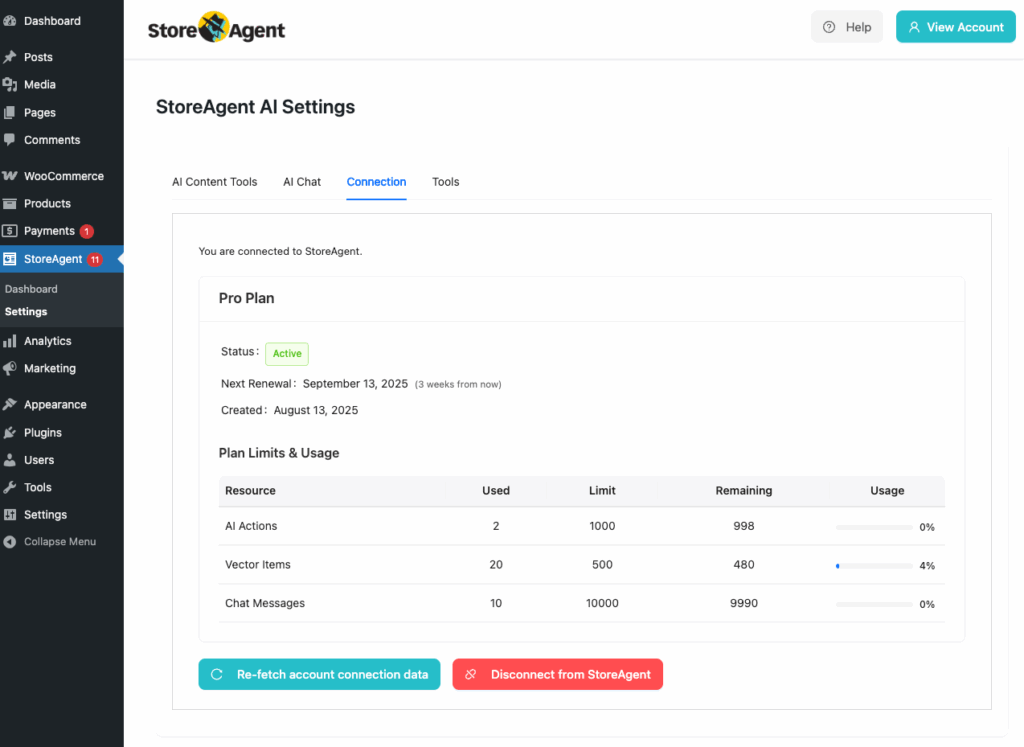
- Or open the Connection tab in your StoreAgent settings in your WordPress Dashboard
- In the header of any StoreAgent page in your WordPress Dashboard
Here, you’ll see a clear breakdown of your plan limits and current usage, including:
- AI Tasks/Actions – number of StoreAgent Tasks you’ve run.
- AI Memory/Vector Items – how many items you’ve stored in AI Memory.
- Chat Messages – the number of StoreAgent Chat Replies used.
Each resource shows how much you’ve used, your total limit, what’s remaining, and your usage percentage, so you always know where you stand.
Faq
Do unused AI Tasks or Chat Replies roll over?
No. Your usage resets at the start of each new billing cycle.
What happens if I reach my limit?
StoreAgent will pause your account until your next billing cycle begins, or you upgrade your plan to continue right away.
Lite plan usage is one-time and does not reset. Upgrade to access monthly credits.
Can I upgrade or downgrade my plan anytime?
Yes. You can change your plan anytime directly from your account settings.
You can free up AI Memory items in two ways:
- Deleting the item in WordPress: When you delete products, posts, pages or custom post types that are syncing from your store to AI Memory, their associated stored AI memory item will also be removed.
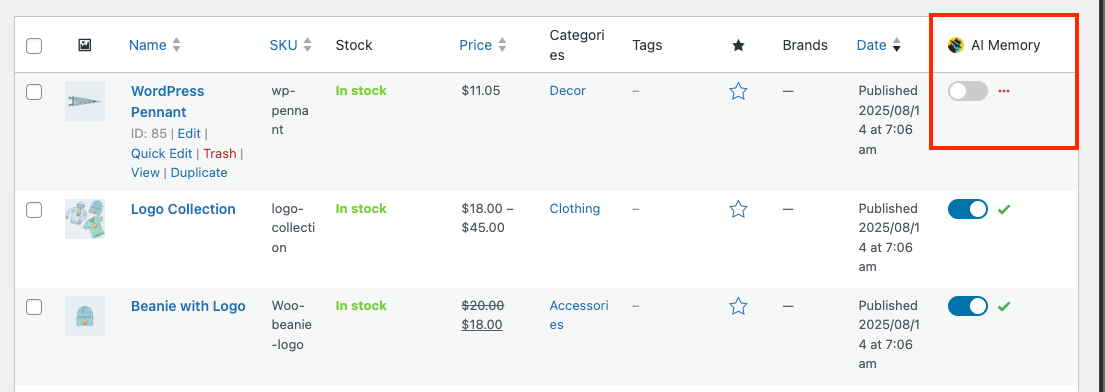
- Disable AI Memory for that item: Go to the Products page in your WordPress Dashboard and toggle off AI Memory for the products, posts, pages, or custom post types you no longer want tracked. This can be done on an individual basis and will free up slots in AI memory when it syncs.
- Disable post types in settings: You can also disable entire post types in the StoreAgent Settings page. From here you can also search and add items to the exclusion list on a per-post type basis.
In both cases, there’s up to a 24hr delay before the slots may be actually freed up in AI Memory. If you delete or disable AI Memory on multiple items in the same day, the cleanup is processed in one go on the next sync cycle.
Help and support
We have a dedicated support team for StoreAgent, experienced with our AI-powered tools, WooCommerce, and eCommerce best practices. Whenever you need a hand, we’re here to help.
Support Team
If you’re using StoreAgent Lite, you can reach us through our WordPress.org Support Forum. Our team regularly monitors this channel and will be glad to assist. Once you upgrade you can access premium support.
Paid Users
If you’re on a paid plan with StoreAgent, you can submit a support ticket to reach our team directly. We’re happy to assist with any questions or technical issues you may run into.
Knowledge Base
You might also find what you’re looking for in our knowledge base. It’s packed with step-by-step guides, FAQs, and troubleshooting tips to help you get the most out of StoreAgent.
We’re committed to making your experience with StoreAgent smooth and successful. Don’t hesitate to reach out—we’re always here to support you!

