
The first time you connect StoreAgent to your WooCommerce store, an onboarding wizard runs to get the basics set up in one pass — which AI Tasks you want, how the AI Chat Bot should treat your content, and a quick look at the AI Task allowance on your current plan. This guide walks you through each step so you know what every option does before you click.
The wizard has four stages: Welcome, Choose AI Tasks, Set up AI Chat, and Review. You can skip it and configure StoreAgent manually instead, but running through it once is the fastest way to a working setup.
Prerequisites
- StoreAgent installed and activated on your WordPress site.
- Your store connected to a StoreAgent account. If you haven’t done that yet, see Getting started with StoreAgent.
- WooCommerce active with at least one published product (the wizard’s chat-setup step references your product catalog).
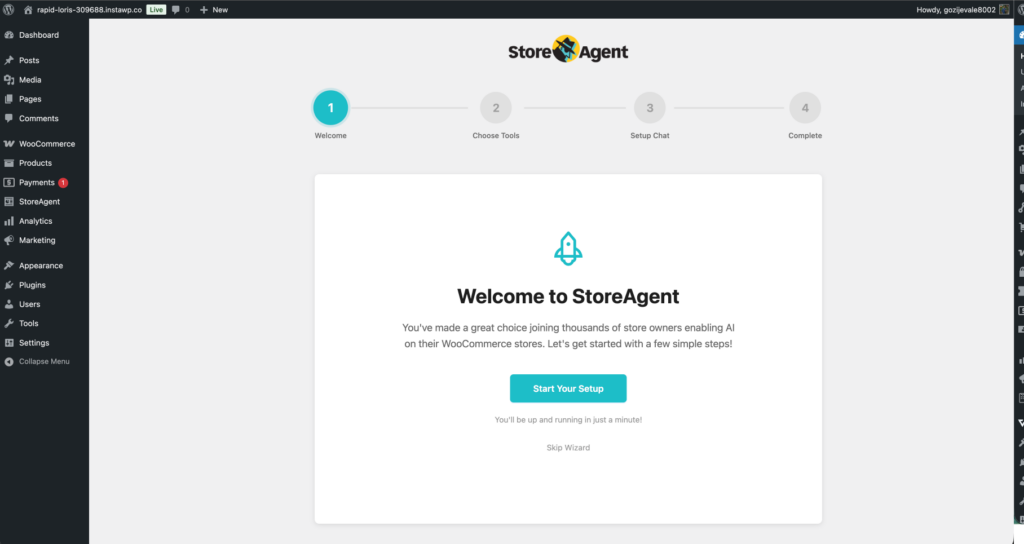
Step 1: Welcome to StoreAgent
The Welcome screen confirms your account is connected and you’re ready to enable AI across your store.
- Click Start Your Setup to begin the guided configuration.
- If you’d rather configure StoreAgent yourself, click Skip Wizard. We recommend running through the wizard once — you can always change every setting later from StoreAgent → Settings.
Step 2: Choose your AI Tasks
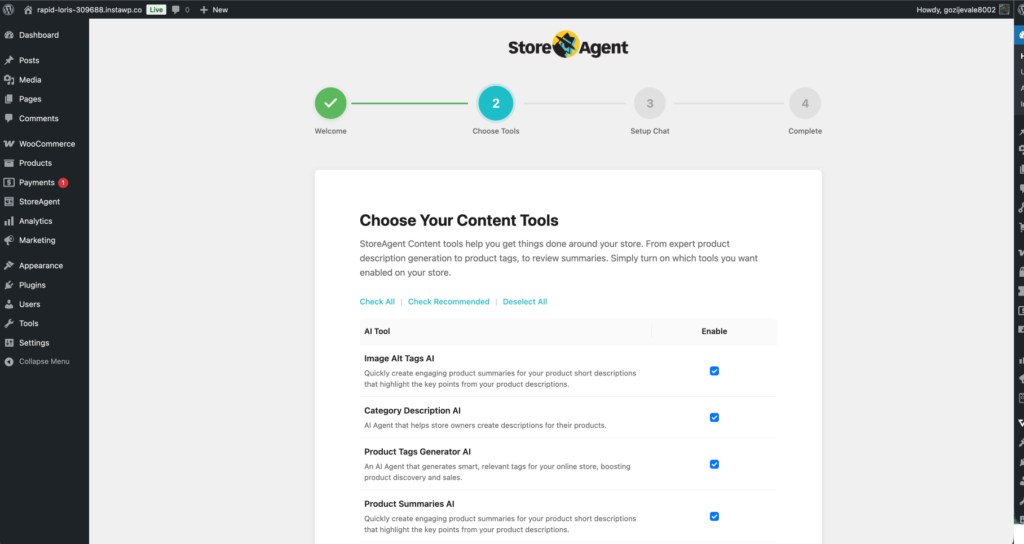
This step lets you turn on the AI Tasks that automate copywriting, tagging, and other content work across your store. Each task is opt-in — you only consume AI Tasks on what you actually want help with.
The wizard lists every available AI Task. On a fresh install, you’ll see:
- Product Upsells AI — scans your catalog nightly and suggests upsell and cross-sell pairings for products that don’t have any set.
- Coupon Description AI — writes concise marketing copy for your existing WooCommerce coupons based on their configuration.
- Review Moderation AI — flags incoming product reviews that look like spam, fake content, or inappropriate material.
- Image Alt Tags AI — automatically generates accessible, SEO-friendly alt text for product images.
- Category Description AI — writes descriptions for your product category pages.
- Product Tags Generator AI — suggests and applies relevant tags so shoppers can find products more easily.
- Product Summaries AI — writes short, scroll-stopping product summaries for cards and listings.
- Product Description AI — generates full, SEO-friendly product descriptions from your existing product data.
If you have these integration plugins active, additional AI Tasks appear automatically:
- Advanced Coupons: AI Coupon Generator — appears when the Advanced Coupons plugin is active. Generates ready-to-use coupon templates from a plain-English prompt.
- WC Vendors: Product Moderator AI — appears when the WC Vendors plugin is active. Reviews vendor-submitted products against your store policies.
On a fresh install, every available AI Task is pre-selected by default, so the fastest path is to leave them all on and click Next Step. Integration-specific tasks (Advanced Coupons, WC Vendors) are only pre-selected if their plugins are active.
To complete this step:
- Review the pre-selected AI Tasks and uncheck any you don’t want enabled.
- Tick the checkboxes under the Enable column for any other AI Tasks you want to use.
- Use the quick-select links at the top of the list if you want to bulk-toggle: Check All, Check Recommended (our most popular picks), or Deselect All.
- Click Next Step to continue.
Step 3: Set up the AI Chat Bot
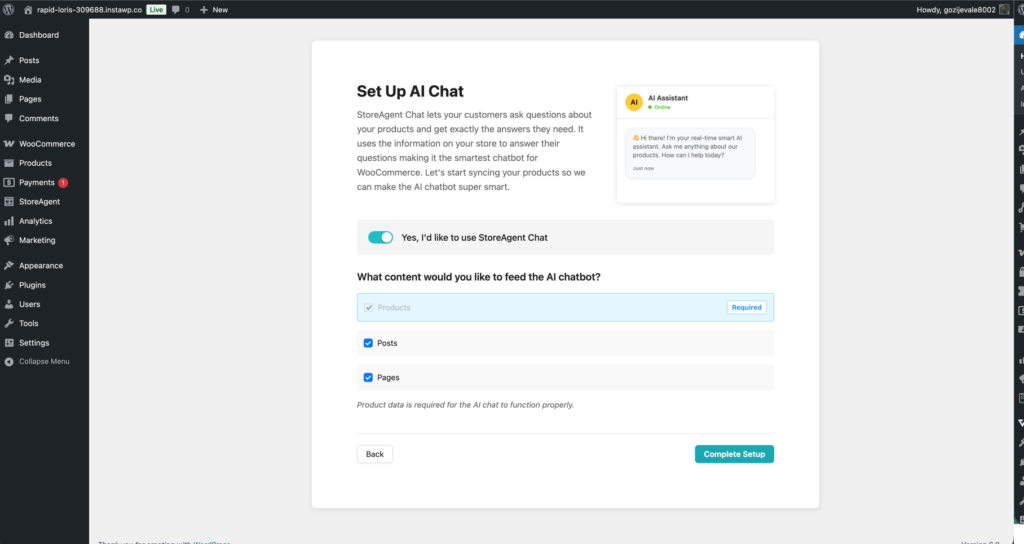
The AI Chat Bot is a 24/7 storefront assistant that answers shopper questions using your store data. This step turns it on and tells it which content to learn from.
The AI Chat Bot learns from your store content. Choose which sources it should reference:
- Products (required) — needed for the bot to answer stock, price, and feature questions.
- Posts — lets the bot answer questions based on your blog content.
- Pages — lets the bot reference your FAQ, shipping, returns, and policy pages.
To complete this step:
- Click the toggle for Yes, I’d like to use StoreAgent Chat to enable the AI Chat Bot.
- Under What content would you like to feed the AI chatbot?, tick the data sources you want the bot to learn from (from the list above).
- Click Complete Setup to finalise your configuration.
Step 4: Review your setup
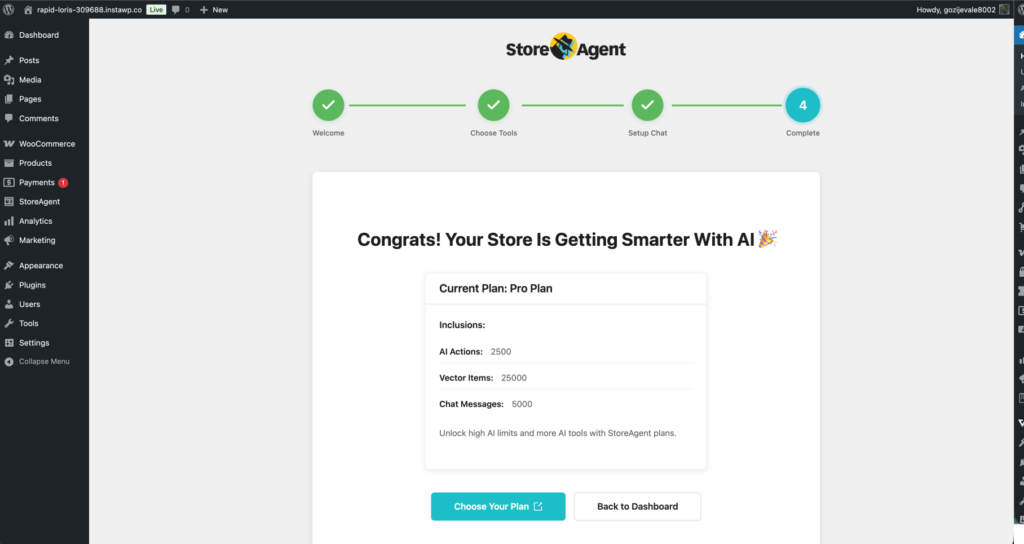
Your setup is complete. The final screen shows a summary of your Current Plan so you know what’s available.
- AI Actions — your monthly allowance for AI Tasks (descriptions, tags, summaries, and so on). On the free StoreAgent Lite plan, this is 200 AI Tasks one-time rather than monthly — see the pricing page for higher-tier allowances.
- Vector Items — how many items of store data the AI Chat Bot can index in AI Memory. Lite plan: 1,000 memory items.
- Chat Messages — your AI Chat Bot reply allowance. Lite plan: 50 chat replies one-time.
Click Back to Dashboard to head to your StoreAgent admin. If your catalog is large and you need higher limits, click Choose Your Plan to upgrade.
Troubleshooting
I clicked Skip Wizard and want to run it again
The wizard only auto-launches on the first connection. To relaunch it, go to StoreAgent → Settings → Tools and click Relaunch Onboarding Wizard. Your current settings are preserved, so completing the wizard a second time only updates the choices you change.
An AI Task I expected is missing from Step 2
Integration-specific tasks only appear when their parent plugin is active. The AI Coupon Generator needs Advanced Coupons active, the WC Vendors Product Moderator needs WC Vendors active. Activate the plugin, reload the wizard, and the task will appear.
Step 3 won’t enable — Yes, I’d like to use StoreAgent Chat toggle is stuck off
The Chat toggle requires a connected StoreAgent account. If it’s stuck off, go to StoreAgent → Settings → Connection to confirm your store is connected, then return to the wizard.
What’s next
- Getting started with StoreAgent AI Tasks — the full guide to enabling, running, and refining each AI Task in your store.
- Getting started with the AI Chat Bot — customise the chat widget, train it on extra knowledge, and review chat history.
- How to bulk run StoreAgent AI Tasks in WooCommerce — run any AI Task across your full catalog in one operation.
Need help?
If you have a question or run into any issues, we’re here to help.
- Premium users: Open a support ticket
- Free users: Visit our community forum

