
A shopper asks for a copy of everything you hold about them, or asks you to delete it. If you sell to customers in the EU, that answer has to include the conversations they had with your AI Chat Bot. StoreAgent AI for WooCommerce connects the chat to the WordPress privacy tools you already use. This article explains what the chat collects, where it is stored, how long StoreAgent keeps it, and how to answer an access or erasure request from wp-admin.
What GDPR asks of your store
GDPR gives people several rights over their data. Three of them drive most of the requests a store gets: to know what you collect, to get a copy of it, and to have it erased. Your store is the data controller, so those requests arrive with you, not with the plugins you run.
WordPress ships tools for exactly this: the Policy Guide, Tools > Export Personal Data, and Tools > Erase Personal Data (see the WordPress privacy documentation). Plugins that hold personal data are expected to hook into them, and StoreAgent does.
These tools support your GDPR compliance. They do not replace your own privacy review, and they do not make the chat compliant by themselves. What they do is put chat data into the same process you already run for the rest of your store.
What the AI Chat Bot collects
When a visitor sends a message, your store sends StoreAgent the message, a chat session identifier, the page the visitor is on, whether they are signed in and, for signed-in shoppers, their WordPress user ID. It does not add the shopper’s name or email address to the request, but anything the shopper types in a message is sent as typed. For signed-in shoppers, the chat can also send summaries of their orders so it can answer questions about them. The chat itself is covered in Getting Started with StoreAgent Chat.
Your store also sets a browser-session cookie (saai_guest_session) with a random value to recognise a guest’s chat. It keeps the visitor’s IP address for up to 30 minutes after their last message to limit repeated support emails from guests. Neither is sent to StoreAgent as part of the transcript.
StoreAgent keeps a chat transcript for 30 days after the last message in the conversation, then deletes it. The period is fixed and cannot be changed.
The policy text StoreAgent adds to your Policy Guide names OpenAI and Anthropic as the AI sub-processors that generate replies. The StoreAgent Data Processing Addendum lists sub-processors by category and names the current provider in each category on request. StoreAgent’s privacy policy says its AI providers work under terms that let them keep what they receive only briefly, to detect abuse of their service.
StoreAgent does not use your shoppers’ data to train, fine-tune or improve any AI model, and it does not let its sub-processors do so either. This does not cover an AI assistant you connect to your store yourself through MCP, such as Claude or ChatGPT. That provider is not a StoreAgent sub-processor, and its own terms decide what it keeps and whether it trains on the data.
To answer a request, your store also needs to know which transcripts belong to which shopper. StoreAgent cannot find a shopper’s transcripts by WordPress user or email address, so your store keeps its own list of a shopper’s chat session IDs in that shopper’s user profile. Entries not used for 32 days are removed the next time that shopper’s chat activity is recorded. The 32 days sit just past the 30-day transcript window, so an older entry no longer points at a transcript. An erasure request removes the list once StoreAgent confirms the transcripts are deleted.
Transcripts are held on the StoreAgent platform, not in your WordPress database. Your store keeps only the session IDs that point at them, so a backup of your site does not contain the conversations, and restoring a backup does not bring them back.
Your own account is separate. StoreAgent holds your subscription and billing details, and the plan and usage counts shown in StoreAgent > Settings. Those relate to you as the customer, not to your shoppers, and they never appear in a shopper’s export.
Where StoreAgent runs and where your data is stored
The StoreAgent plugin runs inside your WordPress site. The AI that writes the chat replies does not. It runs on StoreAgent’s hosted service, so your server never runs an AI model.
StoreAgent is based in Australia, and the chat data your store sends it is stored in the United States. On the way, it can pass through sub-processor networks in other countries. If you sell in the EU, the UK or Switzerland, those transfers are covered by the EU Standard Contractual Clauses, with the UK International Data Transfer Addendum for UK transfers and the Swiss adaptation of the clauses for Swiss transfers. The details are in section 9 of the StoreAgent Data Processing Addendum.
Key concepts
Data controller
Your store. You decide why the chat data is collected and you answer the request.
Data processor
A company that handles data on the controller’s behalf. StoreAgent acts as processor for the chat data your store sends it.
Sub-processor
A company the processor uses to do part of the work. The suggested policy text names OpenAI and Anthropic as StoreAgent’s AI sub-processors.
Data Processing Addendum
The contract covering how chat data is handled between your store and StoreAgent. It lives at storeagent.ai/dpa/.
Retention
How long data is kept. Transcripts stay at StoreAgent for 30 days after the last message. Your store drops a session ID once that session has not been used for 32 days, and runs that clean-up the next time the shopper’s chat activity is recorded.
Add the chat to your privacy policy
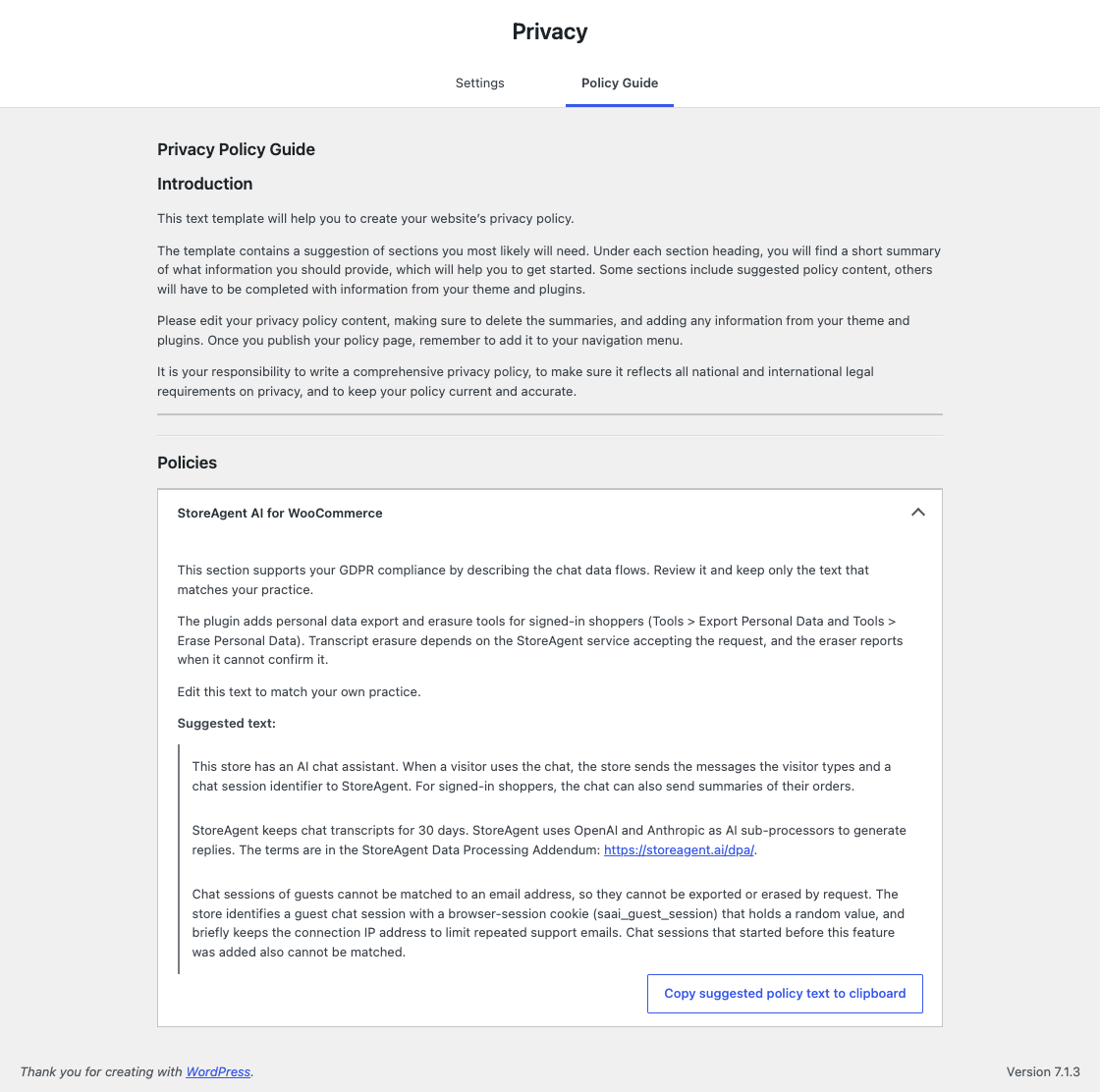
The Policy Guide holds suggested wording for every plugin that registers it, and StoreAgent adds a section of its own.
- Go to Settings > Privacy.
- Open the Policy Guide.
- Find the StoreAgent AI for WooCommerce section.
- Click Copy suggested policy text to clipboard.
- Paste the text into your privacy policy page.
- The section only appears while the chat widget is enabled. Turn the widget off and it drops out of the Policy Guide.
- Some lines are notes for you, such as “Edit this text to match your own practice.” They are left out when you copy, so only the shopper-facing text lands on your policy page.
Answer an access request
An access request is a shopper asking for a copy of their data. WordPress handles the request; StoreAgent supplies the chat part of the export.
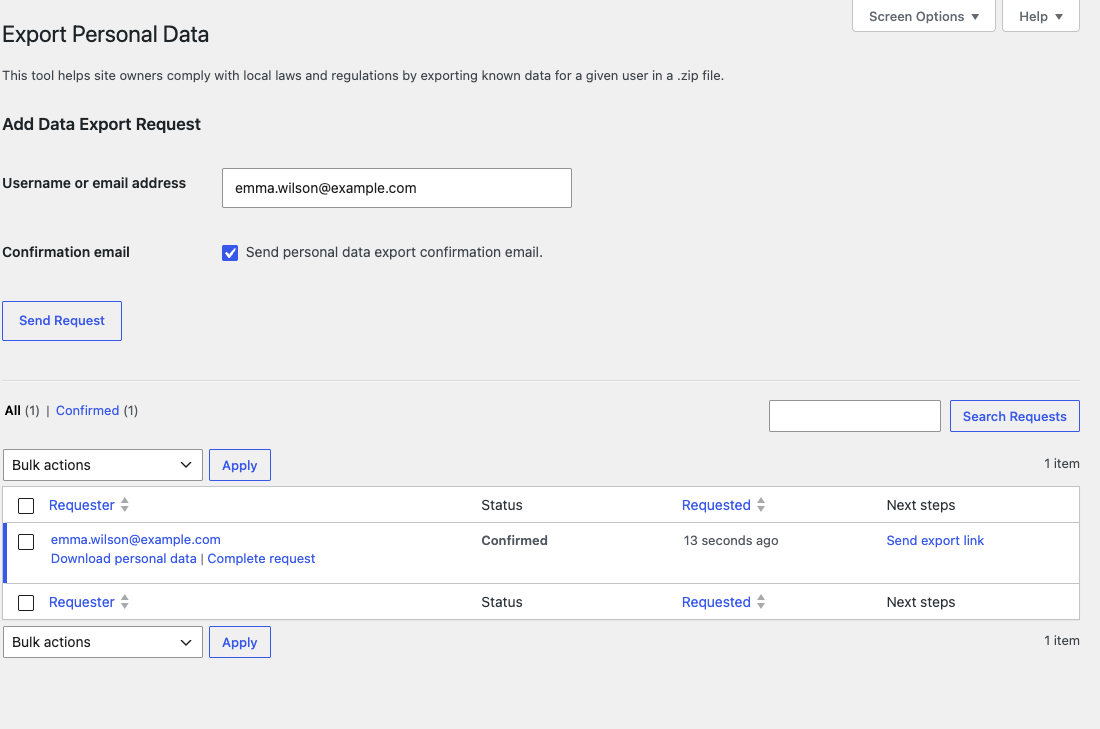
- Go to Tools > Export Personal Data.
- Enter the shopper’s username or email address in Username or email address.
- Clear Send personal data export confirmation email if you already have the shopper’s confirmation.
- Click Send Request.
- Hover the request’s row, then click Download personal data.
- Clearing the confirmation checkbox marks the request as confirmed straight away, so you can download it without waiting.
- Leaving it ticked emails the shopper, and the request waits for them to confirm.
If the shopper has used the chat, the export includes a StoreAgent Chat group. Each row shows the Session, the Date, the Sender (Shopper or Assistant) and the Message.
Only that shopper’s sessions appear. StoreAgent fetches them one session at a time, so a shopper with a long chat history does not time out the export. If StoreAgent cannot return a session, the export shows a Note row with the reason instead of the messages, so you can run the export again later. Very long sessions stop at 5,000 messages and say so.
Answer an erasure request
An erasure request is a shopper asking you to delete what you hold about them.
- Go to Tools > Erase Personal Data.
- Enter the shopper’s username or email address in Username or email address.
- Clear Send personal data erasure confirmation email if you already have the shopper’s confirmation.
- Click Send Request.
- In the Next steps column, click Erase personal data.
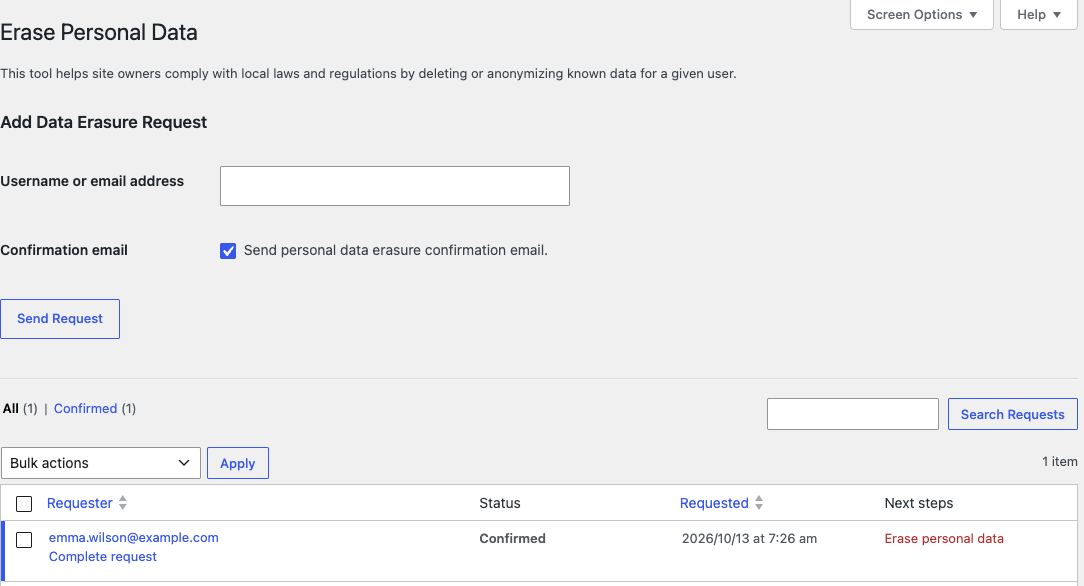
The eraser first removes the links between the shopper’s account and their chat sessions. It then asks StoreAgent to delete the transcripts, in batches, and clears each session ID from the shopper’s profile once StoreAgent confirms the deletion.
If StoreAgent does not confirm the deletion, the result says so. The result reports how many transcripts were retained and gives the reason, and those sessions stay on the shopper’s record so you can run the erasure again later. Erasing one shopper does not touch anyone else’s chats.
Which chats the tools cannot reach
Two kinds of chat cannot be matched to an email address, so they cannot be exported or erased on request.
- Guest chats. A visitor who never signs in has no account for WordPress to match, so there is nothing to attach their chat to.
- Chats from before this feature. The list of session IDs starts when the feature arrives on your store, and there is no backfill for older conversations.
The suggested privacy policy text tells shoppers about both cases. Both kinds of chat fall under the same 30-day transcript retention.
Reduce what the chat sends when it looks up an order
Order lookups are the other place the chat touches shopper data. An order lookup carries the order number, status, dates, totals, payment method, line items, shipping method, and the state and country of the billing and shipping address. It does not send customer names, email addresses, phone numbers, street addresses, cities, postcodes, order notes or customer IDs. On stores with WooCommerce Subscriptions, the chat can look up a shopper’s subscriptions the same way, with the same fields left out.
Order lookups only work for signed-in shoppers checking their own orders. A guest session, or a shopper asking about someone else’s order, is refused.
If you would rather the chat stayed out of orders and subscriptions entirely, turn lookups off.
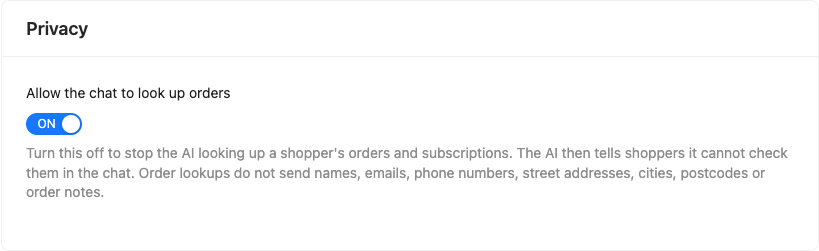
- Go to StoreAgent > Settings > AI Chat.
- Open the General tab.
- In the Privacy card, turn off Allow the chat to look up orders.
- The setting is on by default.
- While it is off, the AI tells shoppers it cannot check orders or subscriptions in the chat.
Related features
- Getting Started with StoreAgent Chat
- How StoreAgent Chat Accesses Your Product Data
- StoreAgent Chat Settings Reference
Frequently asked questions
Does this make StoreAgent GDPR compliant?
No plugin can. The tools support your compliance by documenting what the chat collects and letting you answer access and erasure requests from wp-admin. Your own privacy review still decides what you publish and how you handle requests.
Do I need to turn anything on?
No. The exporter and eraser ship with StoreAgent AI for WooCommerce 1.2.0 and later, so they are active as soon as you update. The suggested policy text appears while the chat widget is enabled.
How long does StoreAgent keep chat transcripts?
30 days after the last message in the conversation. The period is fixed and cannot be changed. Your store removes a shopper’s session IDs not used for 32 days the next time their chat activity is recorded, and an erasure request removes the rest once StoreAgent confirms the deletion.
Can I export or erase a guest’s chats?
No. A guest chat has no email address attached, so WordPress cannot match it to a request. Guest chats fall under the same 30-day retention.
What happens if the erasure cannot reach StoreAgent?
Your store’s own records are still removed. The result reports the transcripts as retained with the reason, and the sessions stay on the shopper’s record so you can run the request again.
Which AI providers does the privacy policy text name?
OpenAI and Anthropic, as AI sub-processors, with a link to the StoreAgent Data Processing Addendum.
Where is chat data stored?
In the United States, on the StoreAgent platform. Transfers from the EU, the UK and Switzerland are covered by the EU Standard Contractual Clauses, the UK International Data Transfer Addendum and the Swiss adaptation of the clauses, as set out in the StoreAgent Data Processing Addendum.
Is my shoppers’ data used to train AI?
Not by StoreAgent. StoreAgent does not use your shoppers’ data to train, fine-tune or improve any AI model, and it does not let its sub-processors do so. This covers the chat and everything else StoreAgent processes for your store. If you connect an AI assistant such as Claude or ChatGPT to your store through MCP, that provider is not a StoreAgent sub-processor. Its own terms decide what it keeps and whether it trains on the data, so check them before you connect.
How do I delete my StoreAgent account and all its data?
Account deletion is not self-service. Open a support ticket and include your account email. Ask for your account and its data to be deleted. StoreAgent deletes or de-identifies your store data within 90 days of the account ending, and often sooner, unless the law requires it to keep some of it. Your contact details and account records are kept for five years after the account ends, to meet Australian tax, accounting and legal obligations.
To stop the plugin sending data, go to StoreAgent > Settings > Connection and click Disconnect from StoreAgent. Disconnecting is not the same as deleting your account, and the content you generated stays in WooCommerce. The StoreAgent privacy policy states that disconnecting permanently removes the AI memory StoreAgent indexed for your store.
Need help?
If you have a question or run into any issues, we’re here to help.
- Premium users: Open a support ticket
- Free users: Visit our community forum

