Reviewed by
StoreAgent just shipped a new one-click button in the WooCommerce product editor called Complete Product with AI. Click it once, and StoreAgent’s content agents fill in the product’s description, short description, tags, image alt text, and upsells together, instead of you running each tool on its own.
Each of those has always been its own StoreAgent tool, tucked in a different panel of the editor. Finishing one product meant opening five tools one at a time, which is why plenty of products end up published with a title, a price, and little else. The new button collapses those five steps into one.
In this article, we’ll cover what the button does, the content it fills in, how to run it step by step, and the control you keep over content you’ve already written. So, let’s get started!
What Is Complete Product With AI?
Complete Product with AI is a single button in the WooCommerce product editor that runs StoreAgent’s product content agents for one product at once. In a single click, it generates the product description, short description, tags, image alt text, and upsell suggestions for whatever that product is missing. Instead of opening each tool on its own, you finish the whole product in one action.
Think of it as the “finish this listing” button you always wanted. It bundles the tools StoreAgent already gives you into the one moment they matter most: when you are adding a product and want it done. Pretty handy, right?
Table of Contents
Why We Built It
We built it because completing a product meant hunting for five separate buttons scattered across the editor. Each StoreAgent agent lived in its own panel, so fully finishing one product was a job most store owners skipped after the first handful. That is how catalogs fill up with products carrying a title, a price, and nothing else.
This means the slow part of adding a product now takes one click. You get a description, a short summary, tags, alt text, and upsells in the time it used to take to find the first button. And because it runs inside your product editor, the content feels like part of your store, not an off-the-shelf add-on.
The payoff shows up on the storefront. Complete listings give shoppers the details they need to buy, and Baymard Institute’s product page research found that shoppers often abandon otherwise-suitable products over fixable page problems. Missing content is one of the most fixable of all.
What It Fills In For You
The Complete with AI button fills in five pieces of product content: the description, the short description, the product tags, the image alt text, and the upsell recommendations. Each one comes from a StoreAgent agent trained for that specific job, so the output drops straight into the matching WooCommerce product fields instead of a generic block of text you have to reformat.
- Product description: the full, SEO-ready body copy for the product. If you want the detail on this one, here’s how StoreAgent handles SEO product descriptions.
- Short description: the tight summary that sits near the price and the add-to-cart button. See how the short description generator writes it.
- Product tags: relevant tags for filtering and related-product links. Here’s a walkthrough of the product tags generator.
- Image alt text: descriptive alt text for the product images, which helps both accessibility and image search. The W3C’s alt text guidance is the standard it writes toward.
- Upsell recommendations: suggested products to show alongside this one, so a single sale can turn into a bigger basket.
That’s five content jobs, handled from one button. Each still exists as its own tool if you want to run it alone, but the one-click run is there for when you just want the whole product done.
How To Use Complete Product With AI
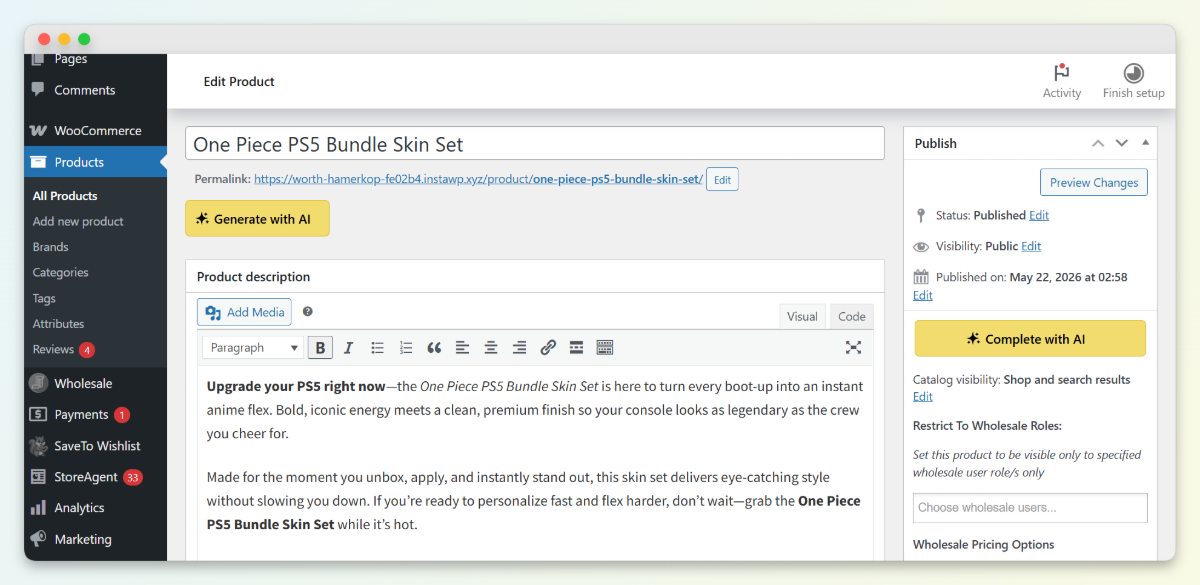
To use it, open a product in the WooCommerce editor and click the Complete with AI button in the Publish box. A panel lists the agents that will run, shows you a credit estimate, and waits for you to start. You watch each agent finish, then reload the product to see the new content in place.
Step 1: Open the product and click Complete with AI
In the product editor, look to the Publish box on the right. The Complete with AI button sits right there, next to your usual publish controls. Click it to open the panel.
Step 2: Review what will run, then start
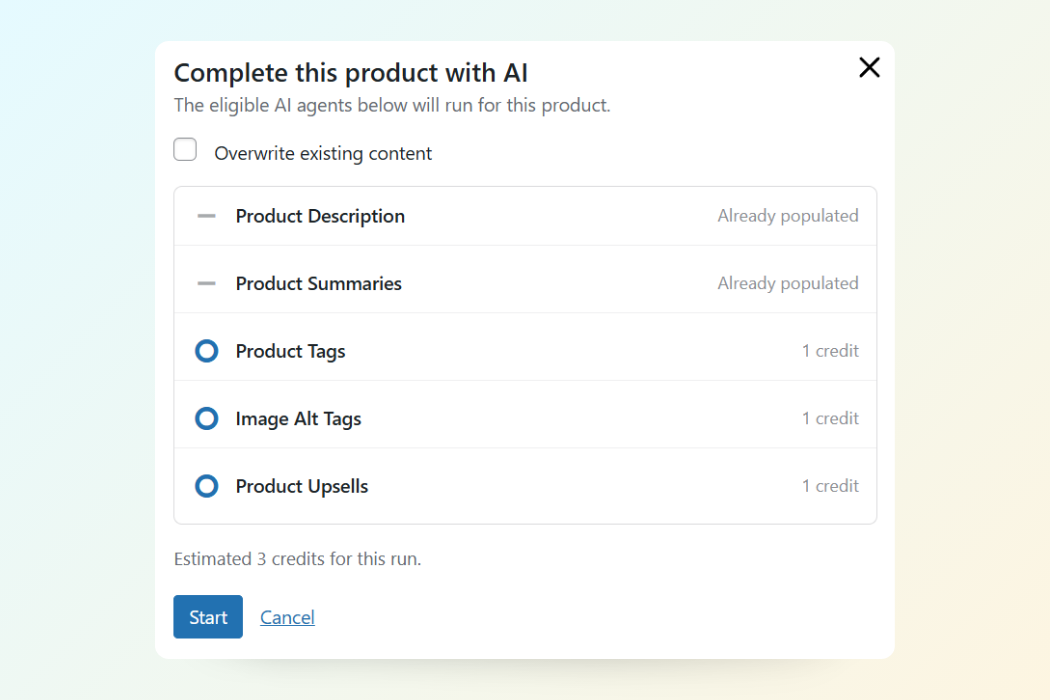
The panel shows each agent and its status. Fields you have already filled in are marked Already populated and skipped, the rest show a per-agent credit cost, and the total estimate sits at the bottom. If you want to redo content that already exists, tick Overwrite existing content first. When it looks right, click Start.
Step 3: Watch it finish, then review
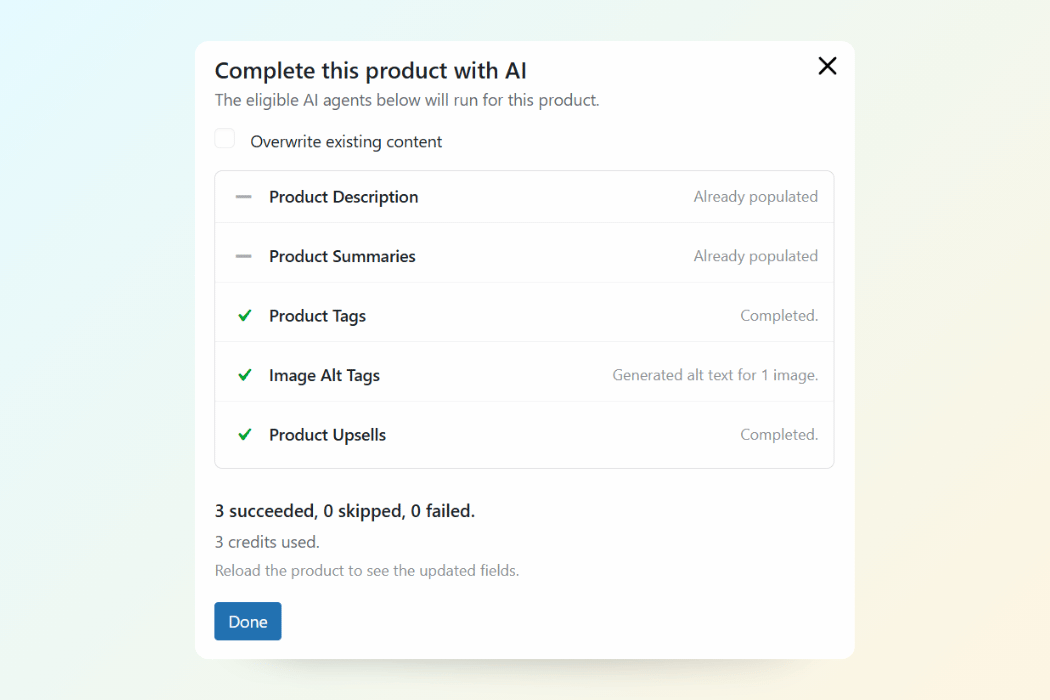
Each agent reports back as it completes, and you get a summary showing how many succeeded, how many were skipped, and how many failed, plus the credits used. Reload the product to see the generated content in its fields, then review and tweak anything you want before publishing.
💡 Practical tip: publishing a product that’s still thin? StoreAgent can prompt you to complete it right then, so an empty listing never slips live by accident. Say yes, and the same one-click run finishes it before it reaches shoppers.
What It Won’t Do
The button won’t overwrite content you already have unless you tell it to. It skips any field that is already filled and only runs the agents a product actually needs, so you never pay to redo work that’s done. You stay in control of what changes, and nothing runs without your click.
On cost, each agent that runs consumes credits, and you see the exact total estimate before you start. Skipped fields cost nothing, and if your remaining credits are low, StoreAgent warns you before the run rather than after. All you do is review the estimate and decide.
Get Started
Finishing a WooCommerce product used to mean five tools and a lot of good intentions. The new Complete with AI button turns it into one click, so your listings go live complete instead of half-done.
Here’s what we covered:
- What Complete with AI is and where to find it
- The five content pieces it fills in for each product
- How to run it, from the button to the finished summary
- How it protects your existing content and your credits
If you’re ready to finish every listing in one click, update StoreAgent, open a product, and try Complete Product with AI on your next addition. New to StoreAgent? Explore our plans and pricing today and start completing your catalog.
Frequently Asked Questions
Which plans include Complete Product with AI?
Complete Product with AI is part of StoreAgent’s content tools, which are available across StoreAgent plans, including the free Lite plan. What you can run with Complete Product with AI comes down to your available credits and plan limits, so heavier catalog work fits better on a paid plan. You can start on the free plan and upgrade when you need more.
Does Complete Product with AI overwrite my existing product content?
No, Complete Product with AI does not overwrite existing content unless you tick the overwrite option first. By default, Complete Product with AI only fills fields that are empty and skips anything already populated. That keeps your hand-written copy safe while it finishes the rest.
How many credits does Complete Product with AI use?
Complete Product with AI charges credits for each agent that runs on a product, and it shows the exact total estimate before you start. Fields that are skipped because they are already filled cost nothing. If your credits are running low, StoreAgent flags it before Complete Product with AI runs, so there are no surprises.
What does Complete Product with AI fill in?
Complete Product with AI fills in the product description, the short description, the product tags, the image alt text, and the upsell recommendations. Each field is handled by the StoreAgent agent built for it, so the results fit WooCommerce’s own product structure. You can review and edit everything Complete Product with AI generates before you publish.
Can I still run the individual AI tools instead of Complete Product with AI?
Yes, every tool that Complete Product with AI bundles still works on its own whenever you want to run just one. Use the individual agents when you only need to refresh a description or regenerate tags, and use Complete Product with AI when you want the whole product done at once. Both draw on the same StoreAgent agents.