Reviewed by
You can build a fully functional AI stack for your WooCommerce store without spending a dollar. In 2026, free AI tools cover chatbots, content generation, SEO optimization, and image enhancement, all tailored specifically for ecommerce.
However, most “free tool” roundups are misleading. Half the tools listed are 7-day trials. Others require API keys that rack up charges the moment you exceed a tiny free tier. This guide is different. Every free AI tool here has been tested on live WooCommerce stores, and each one is clearly labeled as truly free, freemium, or limited trial so you know exactly what you are getting.
In this guide, you will find a recommended zero-cost stack covering chat, content, SEO, and design, along with honest limitations for every free AI tool on the list.
Table Of Contents
- What Does “Free” Actually Mean for AI Tools?
- Free AI Chatbots for WooCommerce
- Free AI Content Generators for WooCommerce
- Free AI SEO Tools for WooCommerce
- Free AI Image and Design Tools
- How to Build a Complete Free AI Stack
- When Should You Upgrade from Free to Paid?
- Tool-by-Tool Quick Reference
- Frequently Asked Questions
Tool-By-Tool Quick Reference
Each free AI tool below is classified by category, best use case, free limit, and honest limitation so you can match tools to your actual needs at a glance.
| Tool | Category | Best For | Free Limit | Honest Limitation |
|---|---|---|---|---|
| StoreAgent Chat | Chatbot | WooCommerce AI chat | 50 chats (one-time) | Requires free StoreAgent.ai account; small stores only at free tier |
| WoowBot Free | Chatbot | Basic FAQ bot | Unlimited (rule-based) | Not AI; rule-based only |
| ChatGPT Free | Chatbot (planning) | Script drafting | Generous | Not a plugin; no store integration |
| StoreAgent Content | Content | Descriptions, tags, alt text, summaries | 200 AI tasks (one-time) | Requires free StoreAgent.ai account; small catalogs only at free tier |
| AI Product Tools | Content | Bulk descriptions | 250 credits/mo | BYOK carries hidden API costs |
| WriteText.ai | Content | SEO meta generation | 35 credits/14 days | Trial only, not a free tier |
| Google Gemini | Content | Manual generation | Generous | No WooCommerce integration |
| StoreAgent Lite | SEO + Content | Alt tags, product tags, descriptions | 200 AI tasks, one-time (shared with content) | Requires free StoreAgent.ai account |
| Google Search Console | SEO | Search analytics | Unlimited | Not AI-powered |
| TinyPNG | Images | Compression | 500/mo | Web interface only on free tier |
| Canva Free | Design | Graphics, banners | Templates + basic AI | Best AI features are Pro-only |
| Remove.bg | Images | Background removal | Low-res free | High-res requires payment |
What Does “Free” Actually Mean For AI Tools?
Not all free AI tools are equal, and understanding the difference saves you from unpleasant surprises. Truly free means no cost and no time limit. Freemium means a permanent free tier with paid upgrades available. Finally, limited trial means free for a set period, then paid only.
| Classification | What It Means | Example |
|---|---|---|
| Truly Free | No cost, no time limit, no credit card | Google Search Console |
| Freemium | Free tier with real functionality; paid upgrades available | StoreAgent Lite (50 chats and 200 AI tasks, one-time) |
| Limited Trial | Free for a set period or credit count, then paid | WriteText.ai (35 credits over 14 days) |
According to Master of Code, 82% of consumers prefer interacting with chatbots over waiting for a human agent. If you install a “free” chatbot that expires in two weeks, you are creating a dependency your customers will miss when it disappears. The classification above helps you plan which free AI tools are permanent fixtures and which are simply test drives.
Free AI Chatbots For WooCommerce
WooCommerce store owners now have several free AI tools for adding conversational chat to their storefronts. According to Mordor Intelligence, the AI chatbot market is projected to reach $454.8 million by 2027, and free tiers have become genuinely functional for everyday store use.
1. StoreAgent Chat
StoreAgent Chat is an AI chatbot for WooCommerce that reads your product catalog, order data, and store policies in real time. The free Lite plan gives you 50 AI-powered chat replies as one-time credits that do not renew. No API key is required and no credit card is needed. However, you will need to create a free StoreAgent.ai account to activate the AI features. Setup takes under five minutes. Classification: Freemium.
Beyond the chat limit, the Lite plan includes a floating chat widget, a shortcode embed for placing chat on specific pages, and built-in feedback collection. On the memory side, StoreAgent ingests up to 100 product memory items directly from your WooCommerce database. As a result, it knows product prices, stock levels, and shipping details the moment you activate it. No feed uploads, no manual configuration, and no third-party API management are required.
Honest limitation: Lite’s 50 chat replies are one-time credits that do not renew, so they suit testing AI chat on your store before you commit. An active store will use them quickly. The Growth plan ($19/month, 500 chats) or Pro ($49/month, 5,000 chats) handle higher volumes. That said, the free tier is genuinely permanent, not a trial disguised as “free.”
See all StoreAgent pricing tiers
2. WoowBot
WoowBot’s free version is a rule-based chatbot, not an AI chatbot. It follows pre-programmed decision trees and keyword matching. In other words, it does not understand natural language or generate dynamic responses. Classification: Truly Free (rule-based).
That said, it is not useless. For stores needing a basic FAQ bot or guided product search, WoowBot handles simple tasks adequately. However, if you are expecting conversational AI that understands “Do you have this in blue and can it ship by Friday?”, the free version will not deliver. For more on this distinction, see our breakdown of rule-based chatbots vs. AI chatbots.
For more on this distinction, see our breakdown of rule-based chatbots vs. AI chatbots.
3. ChatGPT Free Tier
ChatGPT’s free tier provides a powerful AI model, but it is not a WooCommerce plugin. There is no widget for your storefront, no product catalog integration, and no way for customers to interact with it directly on your site. Classification: Truly Free (not a plugin).
Where it genuinely helps: planning chatbot scripts, drafting FAQ responses, brainstorming customer service workflows, and writing canned replies for your support team. Think of ChatGPT as a behind-the-scenes preparation tool rather than a customer-facing chatbot. It gets more useful once it can see your store: StoreAgent’s WooCommerce MCP, free on the Lite plan, lets you connect ChatGPT to your real products and orders.
Free AI Content Generators For WooCommerce
Writing product descriptions for dozens or hundreds of items is one of the most tedious WooCommerce tasks. Fortunately, several free AI tools handle descriptions, meta text, and product tags without requiring any upfront investment.
4. StoreAgent Content (Lite Plan)
StoreAgent’s Lite plan includes 200 AI content tasks, one time alongside the 50 chat replies. Specifically, those WooCommerce AI tasks cover product descriptions, category descriptions, product tags, product summaries, review summaries, and image alt tags, all generated from your existing WooCommerce product data. Classification: Freemium.
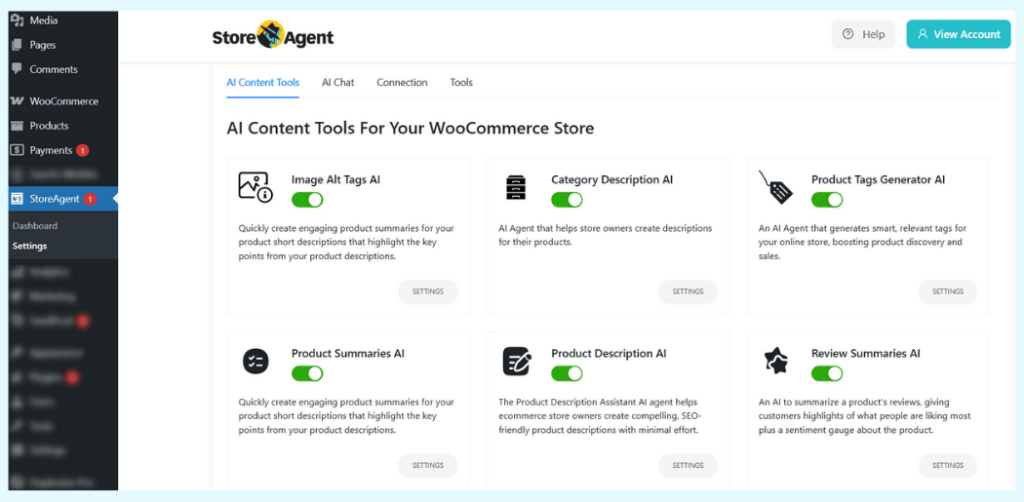
We tested this on a store with 40 products. Lite’s 200 one-time AI tasks are enough to refresh all 40 descriptions and still leave credits for tags and alt text. Furthermore, the AI pulled from product attributes, categories, and existing descriptions to generate useful output, not generic filler. It also suggested long-tail keyword tag variations that improved organic visibility over time.
Honest limitation: Lite’s 200 AI tasks are one-time credits that do not renew, and every generator draws on the same pool. That covers a first pass on a small catalog. Stores with 500 or more products will want the Growth plan ($19/month, 500 AI tasks a month).
Learn more about WooCommerce AI content generation.
5. AI Product Tools
AI Product Tools offers 250 bulk content credits per month on its free plan, which sounds generous. However, its bring-your-own-key (BYOK) model means you pay OpenAI directly for every generation beyond those credits. Classification: Freemium (with hidden costs).
The 250 free credits are genuinely free. But once you exceed them and switch to BYOK, your “free” tool now carries a variable monthly cost. API charges vary by model and token usage, so monitor your OpenAI dashboard carefully if you go this route and budget accordingly.
6. WriteText.ai
WriteText.ai offers 35 credits over a 14-day trial period, enough for roughly 5 to 7 product descriptions with metadata. After 14 days or 35 credits, whichever comes first, paid plans start at $90/month. Classification: Limited Trial.
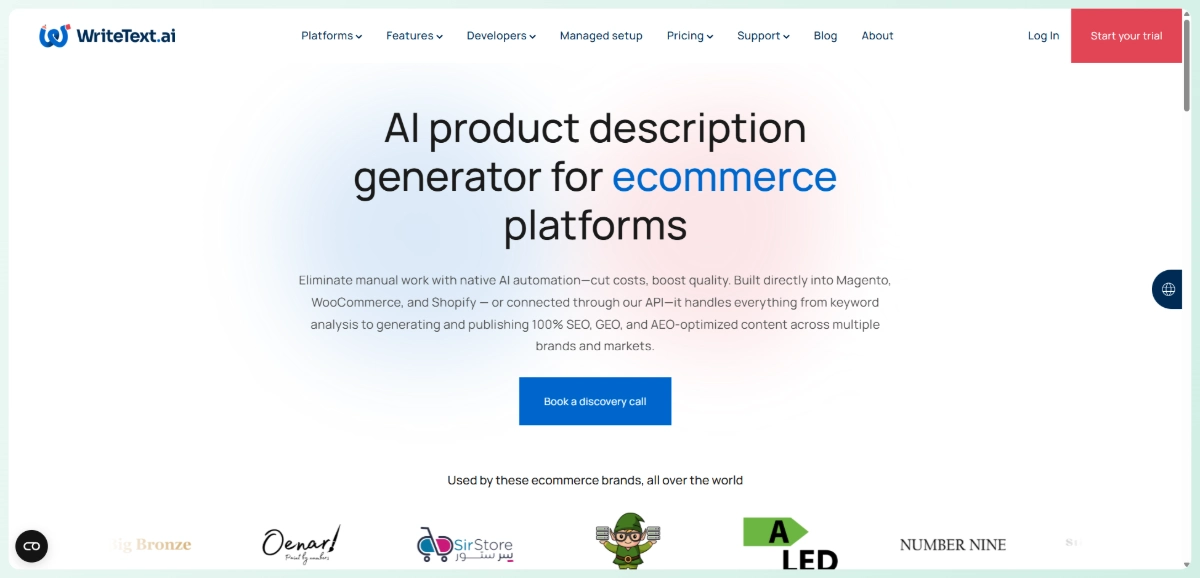
This is a trial, not a free tier. It is worth testing if you are actively evaluating content tools, but do not build your workflow around it unless you are prepared to pay. Descriptions cost 2 credits, meta titles 1 credit, and keyword analysis 6 credits.
7. Google Gemini
Gemini is free and capable of generating product descriptions, meta text, and marketing copy. The catch, like ChatGPT, is zero WooCommerce integration. You will copy product details in, generate the text, and paste it back manually. Classification: Truly Free (not integrated).
For a handful of products, that workflow is fine. For 50 or more items, however, the manual copying becomes the bottleneck rather than the writing itself. Gemini works well as a supplement, not a primary content tool for larger catalogs.
Free AI SEO Tools For WooCommerce
Free AI tools deliver some of the most immediate revenue impact for WooCommerce stores. According to Statista, average ecommerce conversion rates sit between 1 and 3%, so even modest improvements in organic traffic translate to real sales gains.
8. StoreAgent Lite (Built-In SEO Features)
StoreAgent’s Lite plan includes several built-in free AI tools that directly affect on-page SEO. Alt tag generation keeps product images discoverable in Google Image Search. Product tags help search engines understand product relationships and site structure. Additionally, AI-generated product and category descriptions give each page unique, keyword-relevant copy, which reduces the thin content issues that hurt WooCommerce stores in organic rankings. Classification: Freemium.
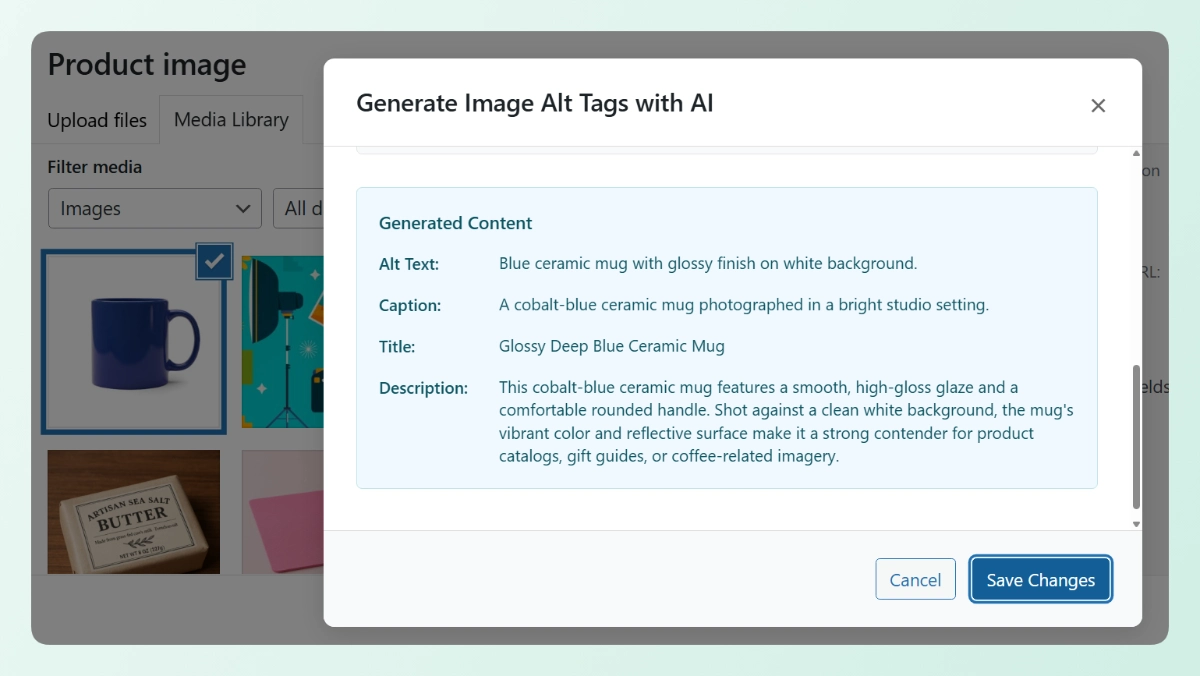
In practice, these three content features address the most common on-page gaps WooCommerce stores face: missing image alt text, duplicate or empty descriptions, and untagged products. All three are available on the free Lite plan with no paid upgrade required.
Bonus: If you want a quick one-off diagnostic before setting up the plugin, StoreAgent also offers free web-based audit tools at storeagent.ai/free-tools, including a Product Page Rater and SEO Keywords Extractor, that require no account to use.
9. Google Search Console
Google Search Console is completely free, built by Google, and provides data no other tool can replicate: search queries driving traffic to your store, ranking positions, click-through rates, indexing issues, and mobile usability problems. Classification: Truly Free.
It is not AI in the traditional sense, but it provides the data foundation that every SEO tool depends on. Pair it with StoreAgent’s free AI tools: use the alt tag generator and description tasks to address content gaps, then track whether your fixes moved the needle inside Search Console.
10. TinyPNG and ShortPixel
Page speed is a confirmed ranking factor, and product images are usually the biggest drag on WooCommerce load times. TinyPNG offers 500 free compressions per month via its web interface, while ShortPixel’s free WordPress plugin compresses 100 images per month. Classification: Freemium.
According to the Spiegel Research Center, 95% of shoppers examine product images before purchasing. Fast-loading images directly impact whether visitors stay or bounce. Both tools use intelligent compression that reduces file size without visible quality loss.
Free AI Image And Design Tools
Product images sell products. These free AI tools help you create better visuals without a design budget, covering everything from promotional graphics to clean background removal.
11. Canva Free
Canva’s free plan includes Magic Write for text generation, basic background removal, and access to a massive template library. For WooCommerce owners, it is useful for social media graphics, promotional banners, and basic product image enhancements. Classification: Freemium.
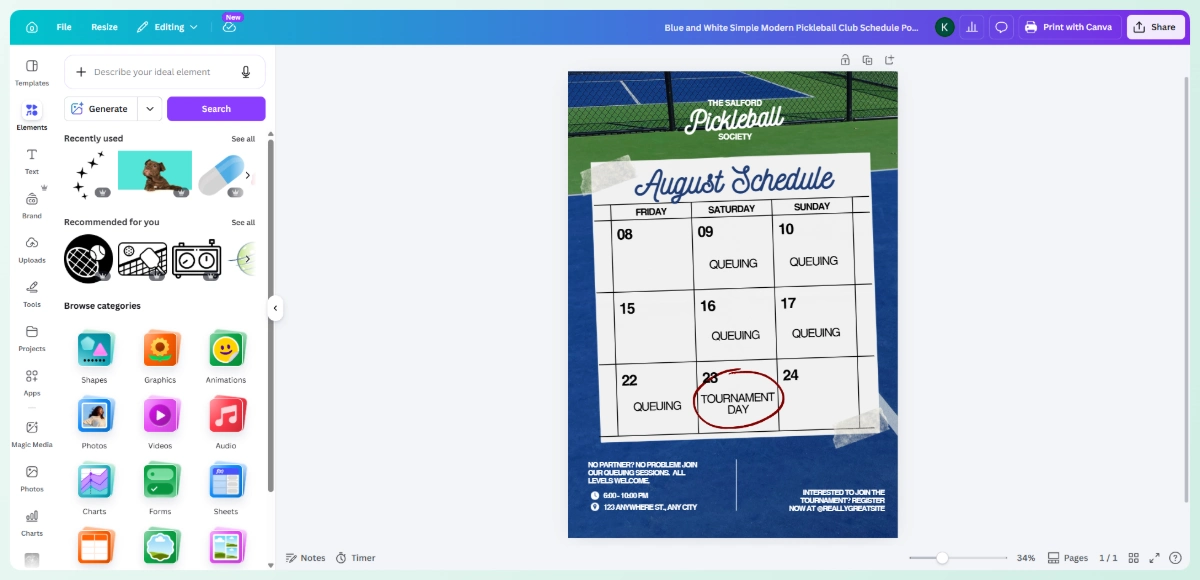
Honest limitation: Canva’s best AI features, including Magic Eraser, full-quality Background Remover, and Magic Resize, require Pro at $12.99/month. The free tier gives you a taste of what is possible, but power users will feel those limits quickly. For quick promotional graphics or social posts driving traffic to your store, however, the free plan handles the basics well.
12. Remove.bg and Cleanup.pictures
Remove.bg removes image backgrounds with one click. The free tier processes images at lower resolution (up to 0.25 megapixels), which is often sufficient for web-sized product thumbnails. Similarly, Cleanup.pictures lets you remove unwanted objects from product photos. Classification: Freemium.
Both tools offer limited free processing with paid upgrades available for higher resolution or bulk work. For a small WooCommerce store needing clean product images on white backgrounds, the free tiers are a practical and immediate starting point.
How To Build A Complete Free AI Stack
You do not need to pick just one tool. The following free AI tools stack covers chatbot, content, SEO, and images at $0 per month, with each tool handling a distinct function.
| Function | Free Tool | What You Get |
|---|---|---|
| AI Chatbot | StoreAgent Lite | 50 AI chat replies (one-time), WooCommerce-native |
| Content Generation | StoreAgent Lite | 200 AI tasks (one-time) across 6 content types |
| SEO Optimization | StoreAgent Lite | AI-generated alt tags, product tags, and descriptions |
| Search Analytics | Google Search Console | Full search performance data |
| Image Compression | TinyPNG / ShortPixel Free | 100-500 compressions/month |
| Graphic Design | Canva Free | Templates, basic AI features |
| Background Removal | Remove.bg Free | Low-res background removal |
Here is what that same stack would cost using paid equivalents:
| Function | Free Tool | Free Cost | Paid Equivalent | Paid Cost |
|---|---|---|---|---|
| AI Chatbot | StoreAgent Lite | $0/mo | Amio AI Expert | ~$385/mo |
| Content Generation | StoreAgent Lite | $0/mo | WriteText.ai Pro | $149/mo |
| SEO Optimization | StoreAgent Lite | $0/mo | Ahrefs Lite | $129/mo |
| Search Analytics | Google Search Console | $0/mo | Google Search Console | $0/mo |
| Image Compression | TinyPNG Free | $0/mo | ShortPixel Paid | $4.99/mo |
| Graphic Design | Canva Free | $0/mo | Canva Pro | $12.99/mo |
| Total | $0/mo | $680+/mo |
The free AI tools stack above covers the same core functions that could cost over $680 per month with paid tools. Free versions have lower limits and fewer advanced features, but for stores starting out or operating on a tight budget, they provide real AI capabilities at zero cost.
Moreover, tools like StoreAgent make this stack particularly easy because the Lite plan bundles chat, content generation, and SEO-ready copy in a single WooCommerce plugin. There is no need to juggle multiple accounts or manage separate integrations.
When Should You Upgrade From Free To Paid?
Upgrade when the free tier’s limits cost you more than the paid plan would. Three clear signals tell you it is time: you are consistently maxing out monthly limits, manual workarounds eat hours of your time, or you can see lost sales you could recover with better tools.
- First, pay attention if you are hitting limits consistently. If you max out StoreAgent’s 50 free chats by mid-month, customers are engaging and you are leaving conversations on the table.
- Second, consider upgrading when manual workarounds cost more than the tool. Spending 3 hours weekly copying text between Gemini and WooCommerce? That time has a dollar value. A $19/month tool saving you 12 hours monthly is a clear financial win.
- Third, act when you are losing measurable sales. If Search Console shows growing organic traffic but conversions are not keeping up, better content and AI chat support could close the gap.
StoreAgent’s Growth plan at $19/month is the natural next step, offering 500 chats, 500 content tasks, and all Lite features with significantly higher limits.
Conclusion
Building a functional AI stack for your WooCommerce store does not require a budget. It requires knowing which free AI tools actually deliver. The recommended stack in this guide (StoreAgent Lite + Google Search Console + Canva + TinyPNG + Remove.bg) covers chat, content, SEO, and images at $0 per month.
Start with StoreAgent’s free Lite plan. It takes under five minutes to set up, requires no API key and no credit card, and immediately gives you AI chat, content generation, alt tags, and SEO-ready product copy in a single plugin. From there, add Google Search Console for search data, then layer in Canva and TinyPNG for visual assets. That sequence delivers quick wins, data, and automation in the right order.
Ready to build your free AI tools stack? Start with StoreAgent’s free Lite plan: 50 chat replies, 200 AI tasks, and AI-powered SEO features.
Frequently Asked Questions
Are free AI tools safe for a WooCommerce store?
The tools in this list are established products with documented privacy policies. StoreAgent and WoowBot are WordPress plugins in the official repository, meaning they have passed WordPress’s code review process. For third-party web tools like Remove.bg, be mindful of what data you upload. Product images are low-risk, but avoid uploading files containing customer data.
Do free AI tools require an API key?
Most tools on this list work without one. StoreAgent, WoowBot, Google Search Console, TinyPNG, and Canva all function without an API key on their free tiers. However, StoreAgent does require a free StoreAgent.ai account to activate its AI features, so that account creation step is part of setup. AI Product Tools is the exception: its BYOK model requires an OpenAI API key, which means you will need an OpenAI account and will incur API charges beyond the 250 free credits.
Can free AI tools actually improve my sales?
Yes, though indirectly. Free AI tools help you improve product pages through better descriptions, optimized tags, and accurate alt text, which in turn improves SEO and user experience. Better SEO drives more organic traffic, and better page quality means higher conversion rates. The tools do not make sales directly. Instead, they improve the conditions that lead to sales.
What’s the catch with free AI tools?
Lower limits and fewer features: that is the honest trade-off. Free tiers exist to let you evaluate the product and get started without financial risk. You typically trade volume (fewer monthly uses), feature depth (basic vs. advanced), or output quality (lower resolution, shorter generations). This guide labels each tool’s specific limitations so you know exactly what you are trading before you commit.
Which free AI tool should I try first?
Start with StoreAgent’s free Lite plan. It covers chat, content, and SEO features in a single plugin, requires no API key or credit card, and only takes a few minutes to set up with a free StoreAgent.ai account. After that, add Google Search Console for a performance baseline, then use StoreAgent’s content tasks to generate optimized descriptions, tags, and alt text across your catalog. That order gives you quick wins first, then data, then sustainable automation.