A shopper on a monthly plan asks your WooCommerce chatbot when the next payment comes out. Until now your AI assistant reached for the order that started the subscription, read the date sitting on it, and answered with complete confidence. The date was wrong.
Your assistant now reads the subscription record itself. Ask it when subscription #482 renews and it comes back with the real renewal date, the real recurring amount, the billing period and the items the subscription covers, straight out of WooCommerce Subscriptions.
In this article, we’ll cover what your shoppers can ask, what the assistant reads and what it leaves alone, how it keeps one customer’s subscription away from another, why it explains cancelling rather than doing it, and what happens on stores that do not run WooCommerce Subscriptions. So, let’s get started!
- What Your Shoppers Can Ask Now
- Why Subscription Answers Used To Go Wrong
- What The Assistant Reads From A Subscription
- What Happens To Prices In The Answer
- One Customer, One Subscription
- It Explains Cancelling, It Does Not Cancel
- Stores Without WooCommerce Subscriptions
- Do You Need To Turn Anything On?
- For Developers
- Get Started
- Frequently Asked Questions
What Your Shoppers Can Ask Now
Your assistant handles questions about a specific subscription, the ones that used to land in your inbox:
- When does my subscription renew?
- How much is my next payment?
- Is subscription #482 still active?
- What is included in my subscription?
- How often am I billed?
The shopper gives the subscription number, the assistant looks it up, and the answer comes back in the conversation.
Give it a bare number without saying what it is and the assistant asks whether that is an order number or a subscription number, rather than guessing which one to look up. Ask about something the record cannot answer and it says so instead of filling the gap.
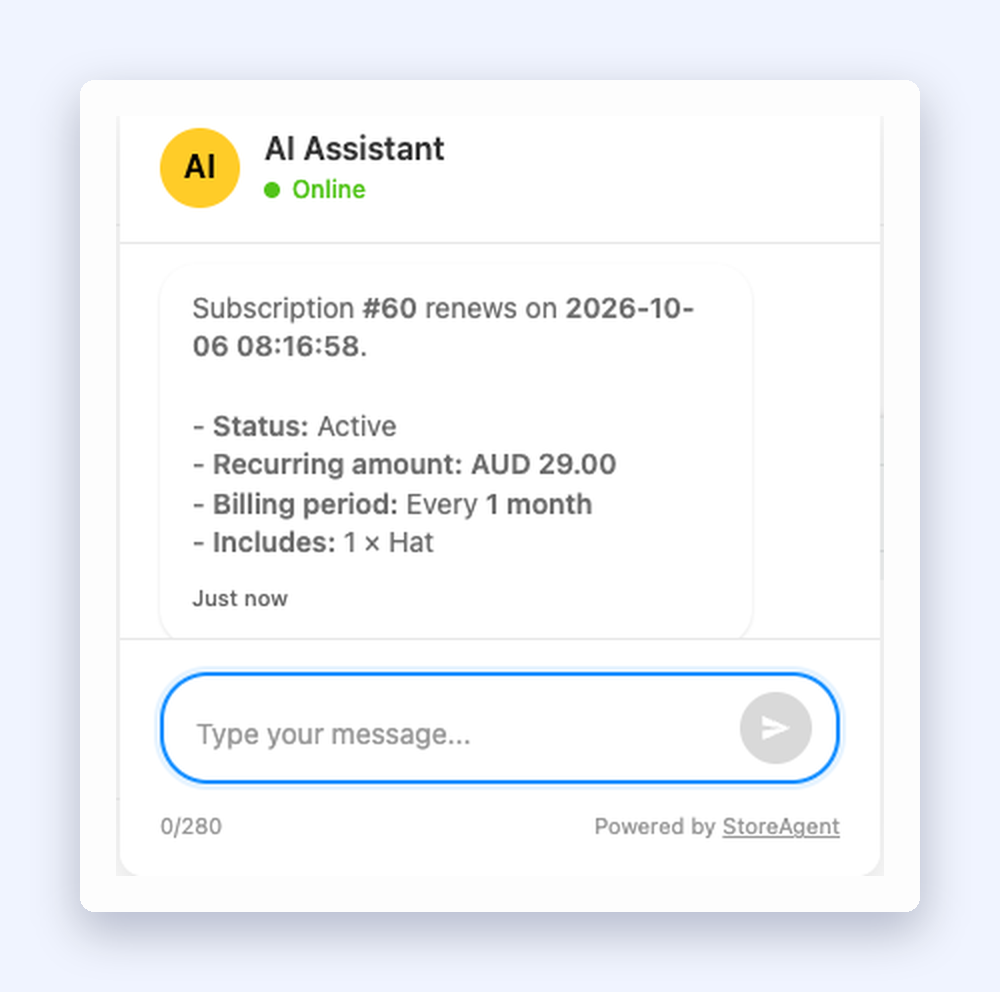
Your assistant builds the reply from the live subscription record. It estimates nothing, and it never mentions the machinery behind the answer. Your shopper sees a straight answer, the same way they do when they ask about a product in chat.
Why Subscription Answers Used To Go Wrong
A subscription and the order that created it are two different records in WooCommerce. The order is a snapshot of the day the shopper signed up. The subscription is the living thing: it has its own status, its own next payment date, its own recurring total, and it changes every billing cycle while the order never moves.
Before this release the assistant only had an order lookup. A subscription question went to that lookup, it resolved the parent order, and the assistant answered from the wrong record. The status could be “completed” when the subscription was on hold. A customer on a monthly plan who signed up in March would be told their subscription dated to March. The total quoted would be the first payment, including any sign-up fee, rather than what comes out next. It read as a confident answer, which made it worse than no answer at all.
The assistant now has a separate subscription lookup, and its instructions forbid answering a subscription question from an order. It reports the renewal date it reads and never works one out from an order date.
What The Assistant Reads From A Subscription
When the lookup runs, the assistant receives:
- The subscription number and its current status
- Start date, next payment date, last payment date, trial end date, end date and cancellation date, all in your store’s timezone
- Billing period and interval, so “every 1 month” or “every 3 months” is accurate
- The recurring total and currency
- The payment method on file
- The order that created the subscription
- The ten most recent renewal orders
- The line items on the subscription, with quantities
That last cap matters on long-running subscriptions. A plan running for four years has a lot of renewal orders behind it, and only the ten newest are passed through.
Personal details stay out of it. Names, email addresses, phone numbers and postal addresses are not part of what the assistant receives, so they cannot turn up in a reply.
What Happens To Prices In The Answer
The recurring amount is what the shopper pays you, so it always comes through. Your catalogue prices are treated separately.
If you have switched off Include prices in responses under StoreAgent → Settings → AI Chat → General, StoreAgent strips the current catalogue price out of the subscription’s line items before the assistant sees them. Your assistant can still tell a shopper their plan bills at AUD 29.00 a month, because that is their agreement with you, and it will not quote what the same item sells for on your shop page today.
One Customer, One Subscription
Subscription details only go to the person who owns the subscription.
A shopper who is not signed in gets a short, friendly nudge rather than a lookup. The assistant repeats the number they asked about so the reply reads specific instead of canned, and points them at sign-in. No lookup runs for that turn.
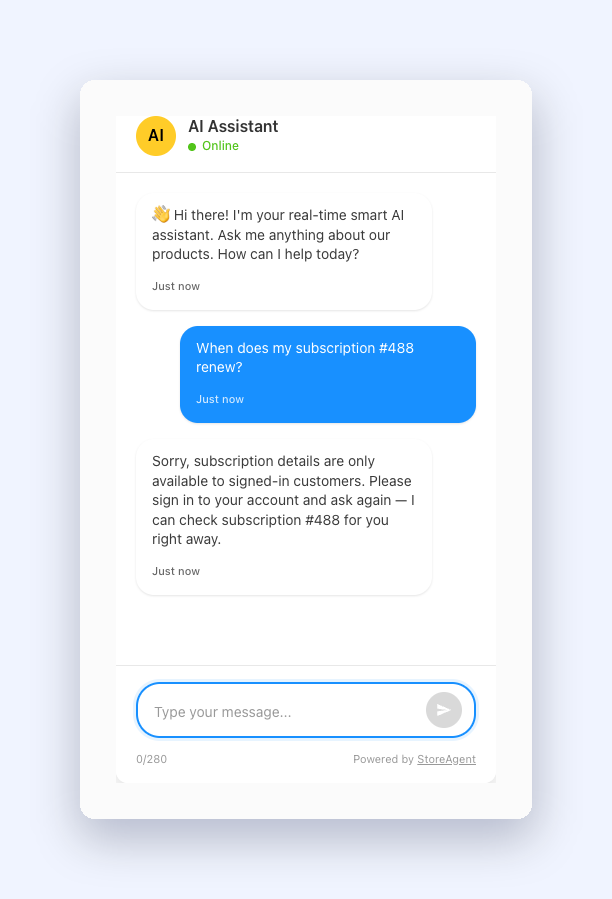
If your store has a login URL configured, the assistant includes it as a link. If it does not, the assistant points the shopper at their account page in general terms and will not invent a URL, so nobody gets sent to a login page that does not exist.
If a signed-in customer asks about a subscription that belongs to someone else, the assistant tells them it could not find that subscription on their account and asks them to check the number.
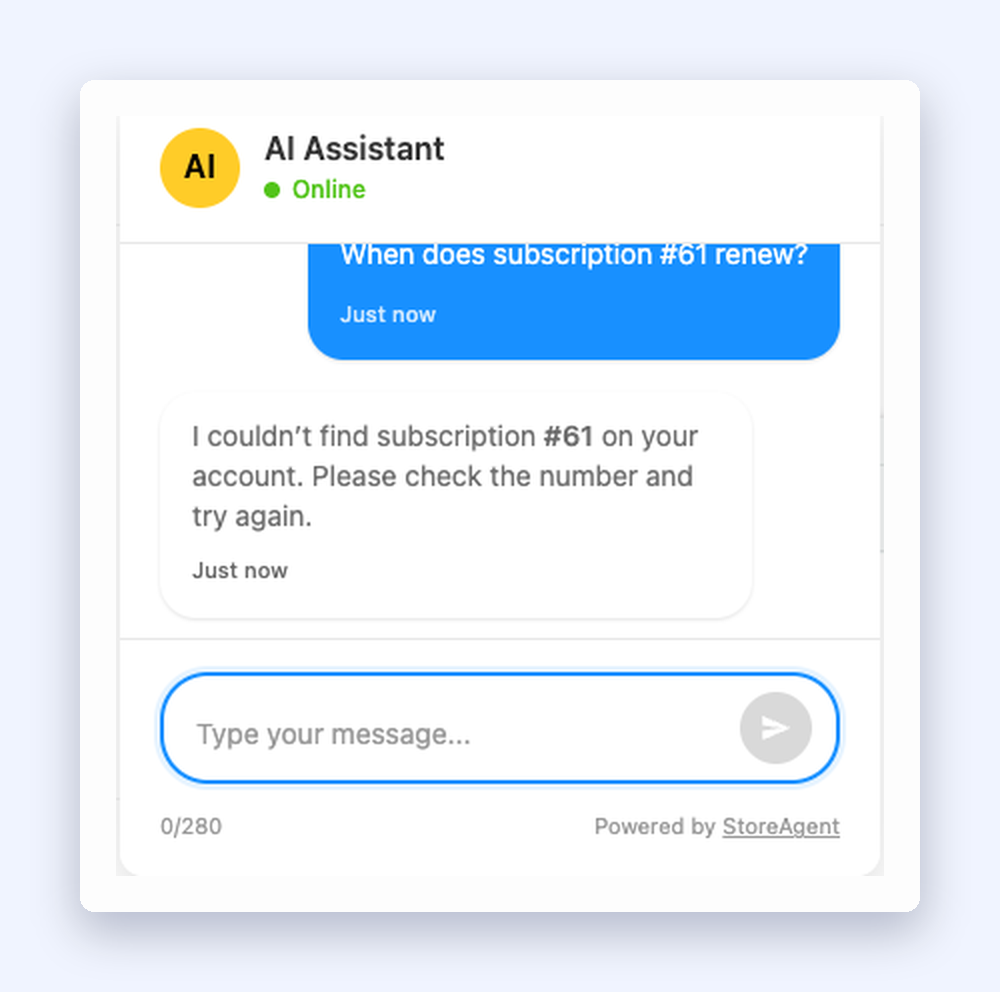
Read that reply closely. It does not say the subscription exists somewhere else, and it does not say the lookup failed. Both of those leak something. Your customers hit a dead end, which is what should happen.
It Explains Cancelling, It Does Not Cancel
Ask the assistant to cancel or pause a subscription and it will walk the shopper through doing it from the Subscriptions area of their account page. It will not perform the change, and it will not imply that it has.
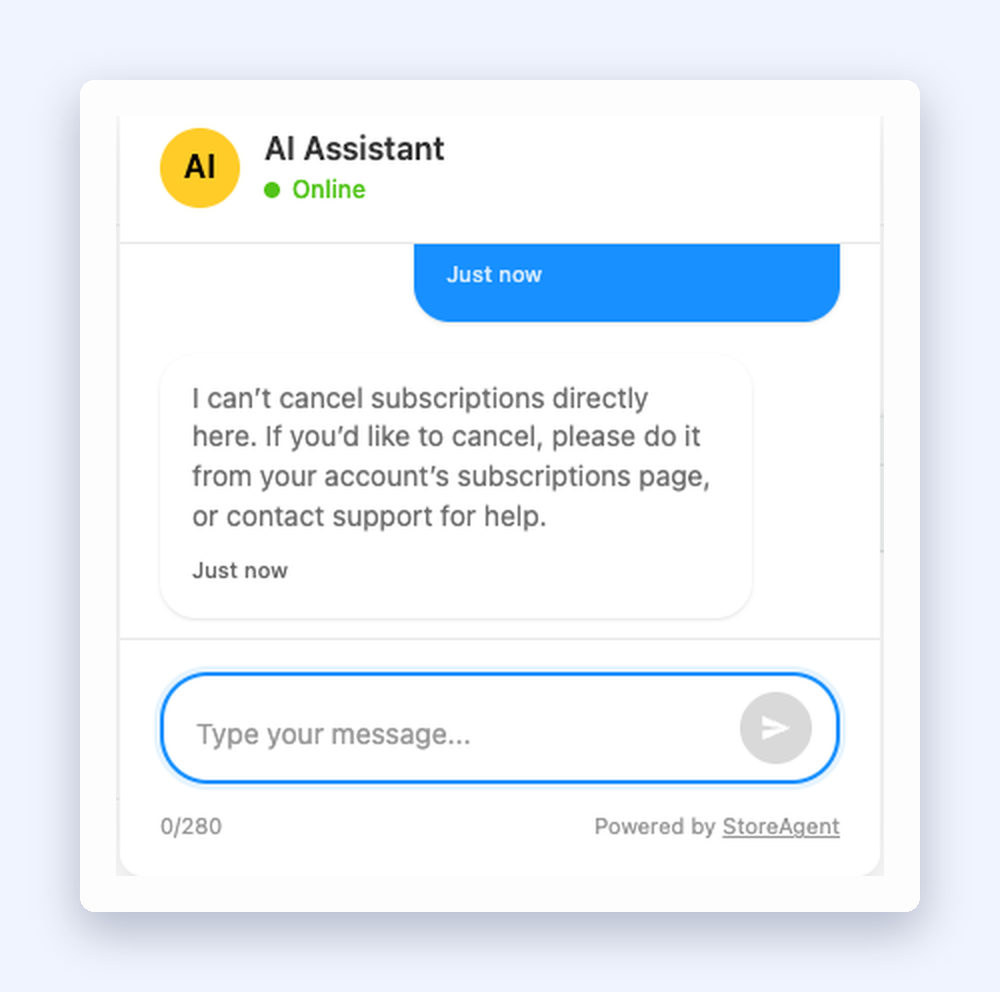
Reading a subscription is safe. Changing someone’s billing from a chat window needs its own authorisation design before it goes near your store. For now the lookup is read-only, and your customers keep their hands on the controls.
Stores Without WooCommerce Subscriptions
Most WooCommerce stores do not sell subscriptions, and nothing about this release changes them.
If WooCommerce Subscriptions is not active, your store answers that subscription lookups are not available, and the assistant says it cannot check subscription details here. It does not guess, and it does not fall back to an order lookup to produce something that looks like an answer. On a store with no subscriptions, a shopper asking about one gets told plainly that this is not something the assistant can check.
This release supports WooCommerce Subscriptions. Other subscription plugins are not covered by this version.
Do You Need To Turn Anything On?
No. There is no setting for this.
If WooCommerce Subscriptions is active on your store and your chat widget is running, your assistant can answer subscription questions. That is the whole setup.
Show the widget where these questions come up. A customer chasing a renewal date is already on their account page hunting for it. On the Display tab of your chat widget settings, tick Show chat widget on My Accounts and the widget appears across the account pages for signed-in customers.
For Developers
Two filters give you control over the lookup.
Turn the subscription lookup off for your store without touching anything else:
add_filter( 'saai_chat_subscriptions_available', '__return_false' );The filter can only switch the lookup off. It cannot switch it on when WooCommerce Subscriptions is missing.
Adjust what the assistant receives before it builds a reply, which is the hook to use if you run a plugin that adds its own data to a subscription:
add_filter( 'saai_subscription_data', function( $data, $subscription ) {
    // Modify $data here.
    return $data;
}, 10, 2 );
Price stripping runs after this filter, so a callback cannot put a catalogue price back into a reply when you have prices switched off.
Get Started
Renewal dates and next payment amounts are the most repetitive questions a subscription store gets, and they arrive from customers who are already paying you every month. Answer them in chat and your team never opens the email, while the customer gets a date in seconds instead of the next business day.
If you already run StoreAgent on a store with WooCommerce Subscriptions, there is nothing to switch on. Sign in as a test customer, ask your own widget when a subscription renews, and check the answer against the subscription in your WooCommerce admin. Your assistant answers product questions from your real catalogue once product indexing has read your store into its AI memory.
Not using StoreAgent yet? Have a look at the plans and see what a WooCommerce AI assistant does with your store behind it.
Frequently Asked Questions
Which subscriptions plugin does this work with?
WooCommerce Subscriptions. The assistant checks for it on your store and only offers subscription lookups when it is active.
Does the shopper have to be logged in?
Yes. Subscription details are only available to signed-in customers. A logged-out shopper gets a reply asking them to sign in, with the subscription number they mentioned repeated back so they can pick up where they left off.
Can the assistant cancel or pause a subscription?
No. It explains where to do it from the shopper’s account and leaves the action to them. It will never claim to have cancelled, paused or changed anything.
What if a customer asks about someone else’s subscription?
The assistant says it could not find that subscription on their account. It does not confirm the subscription exists, and it does not hint that it belongs to another customer.
Does it know the renewal history?
It sees the ten most recent renewal orders on the subscription, along with the last payment date.
Will it quote the wrong date if a subscription is on hold?
It reports the status and dates exactly as WooCommerce Subscriptions holds them. It is not allowed to work a renewal date out from an order date, which is where the old wrong answers came from.
Does turning off prices in chat hide the subscription amount?
No. The recurring amount the customer pays still comes through, because that is their own billing information. What gets removed is the current catalogue price of the items inside the subscription.
What happens on a store that does not sell subscriptions?
The assistant says it cannot look up subscription details there. It will not answer from order data instead.
Does it work with other subscription plugins?
This release supports WooCommerce Subscriptions. Other subscription plugins are not covered by it.
What if the lookup fails?
The assistant apologises, says the lookup is temporarily unavailable and suggests trying again shortly. It does not tell the customer to re-check a number that was fine, and it does not invent a renewal date to fill the gap.