Reviewed by
Gift shoppers ask more questions than regular customers, and they ask worse ones. They’re buying something they don’t own, for someone whose taste they’re guessing at. Usually there’s a deadline too. Open a WooCommerce gift registry and that multiplies by every guest at the event.
The questions aren’t hard. They’re just relentless, and most of them are about products rather than orders.
I’ve seen stores treat this as a staffing problem when it’s really a content problem. The same twenty questions arrive over and over. The answers usually already exist in your product data.
This guide covers how an AI assistant absorbs that volume during a gifting season. It also covers what to set up beforehand. Then how the two plugins divide the work, and where the limits honestly sit.
Table of Contents
- What A WooCommerce Gift Registry Does To Your Support Queue
- How An AI Assistant Answers Product Questions
- Setting Up A WooCommerce Gift Registry With The SaveTo Wishlist Addon
- How To Prepare StoreAgent For Registry Season
- Step 1: check what your AI memory already knows
- Step 2: turn on the Ask A Question widget
- Step 3: add the chat widget where gift traffic lands
- Step 4: add sources for the questions that aren't about products
- Step 5: check your plan limits against expected volume
- Step 6: set up escalation and review the history
- How The Gift Registry Addon And StoreAgent Work Together
- What StoreAgent Won't Do For A WooCommerce Gift Registry
- What To Track On Registry Support
- Start Handling WooCommerce Gift Registry Questions With AI
- Frequently Asked Questions: WooCommerce Gift Registry
What A WooCommerce Gift Registry Does To Your Support Queue
Registry traffic produces a distinct question mix. It’s predictable enough to prepare for. The pattern is dominated by product-fit questions from people who have never bought from you.
The volume tracks guest count. A hundred-guest event means up to a hundred first-time shoppers in a compressed window. Per The Knot Worldwide’s 2026 Real Weddings Study, the average wedding cost $34,000 in 2025. Couples spent an average of $292 per guest, drawn from 10,474 self-reporting US couples.
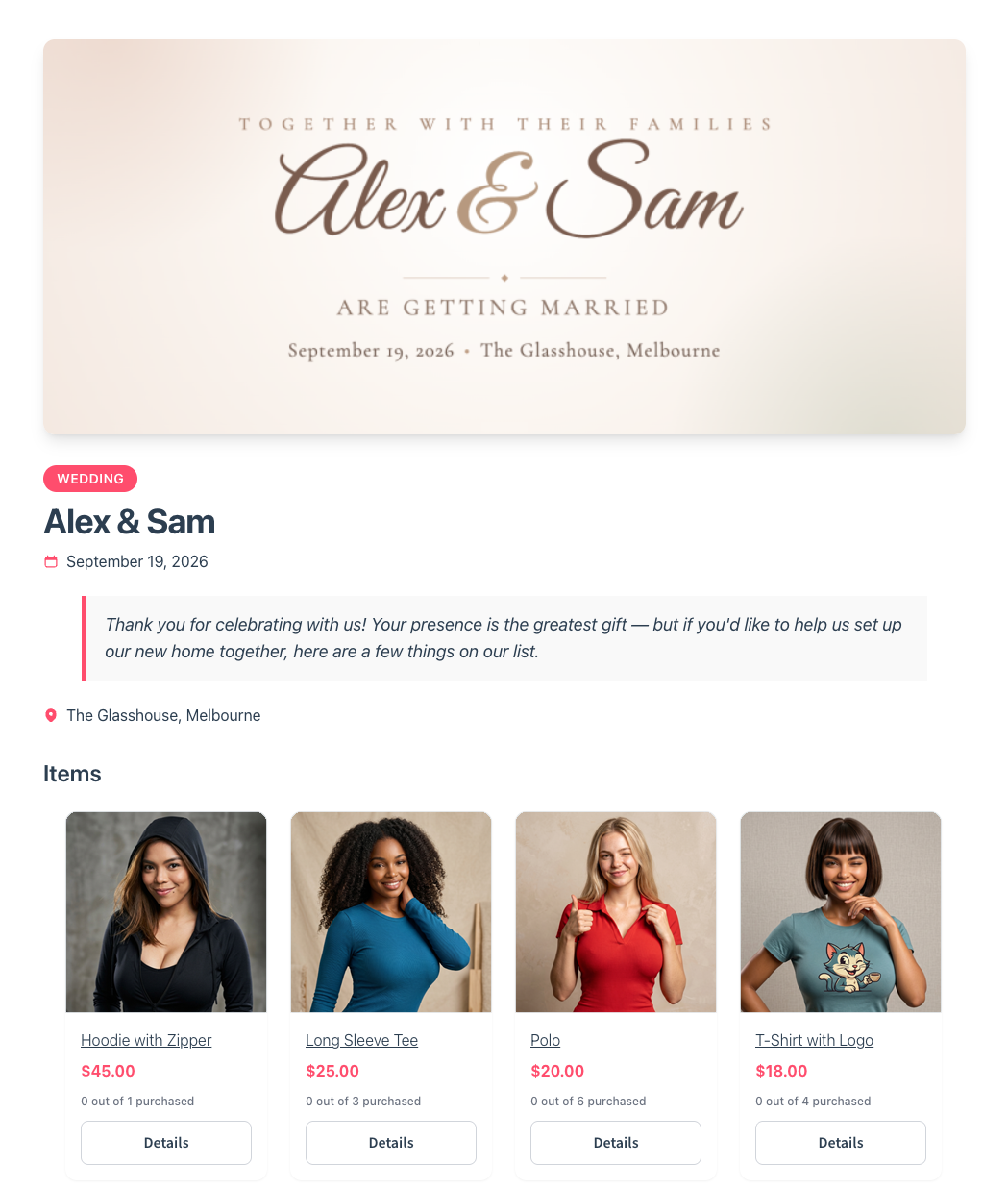
What they ask, roughly in order of frequency:
- Product specifics: dimensions, materials, colour accuracy, what’s included in a set.
- Suitability: whether two items work together, whether a size is the common one.
- Shipping and timing: whether it arrives before the event date.
- Gifting logistics: whether a receipt is included, whether packaging is discreet.
Notice that only the last two are really support questions. The majority are product questions. Those are exactly what an assistant grounded in your catalogue can handle without escalation.
Why product-page answers beat a support ticket
A shopper with an unanswered question about a gift usually doesn’t email you. They leave and buy elsewhere. The deadline is real and your response time is unknown.
So answering at the point of hesitation beats answering well an hour later. That’s the whole argument for a question widget on the product page. A contact link asks too much of someone in a hurry.
How An AI Assistant Answers Product Questions
An AI assistant answers customer questions using knowledge of your actual products. It doesn’t follow a scripted decision tree. The distinction matters, because a rules-based bot only answers what someone wrote a rule for.
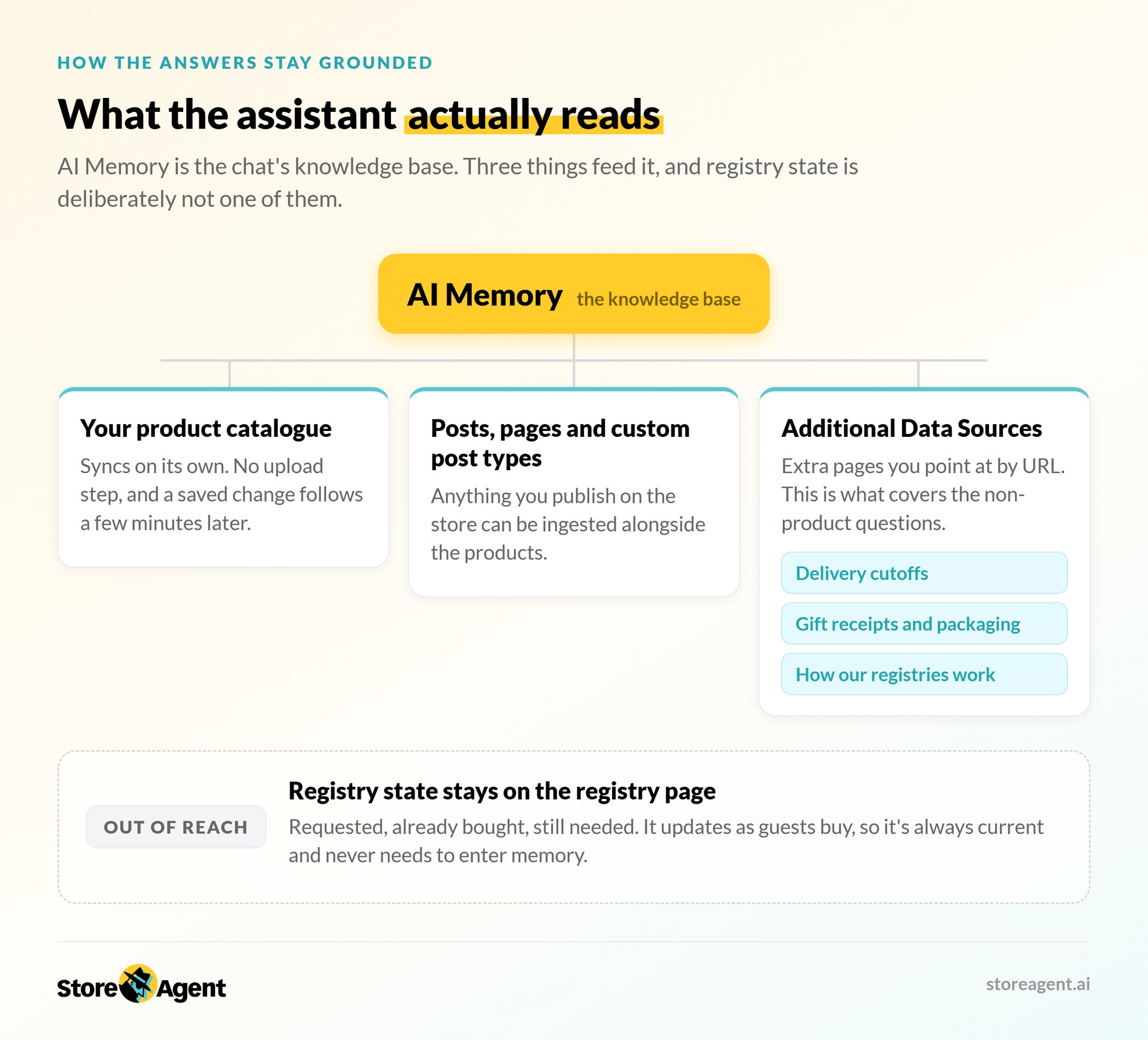
StoreAgent calls that knowledge AI Memory, and it works as the chat’s knowledge base. Your product catalogue syncs to it automatically, so there’s no manual upload step. Updates are queued a few minutes after you save a product. There’s a 3 to 5 minute debounce window before the upload fires.
Answers stay grounded in your catalogue rather than generic guesses. Technically that’s retrieval-augmented generation, and it’s why a thin description produces a thin answer. That grounding separates a useful assistant from a large language model improvising.
Two surfaces do most of the work:
- A floating chat widget on your storefront, included from the free plan, with control over which page types show it.
- Product Questions AI, an “Ask A Question” button on the product page itself, so shoppers don’t go looking for help.
The second suits gift shoppers particularly well. Their questions are almost always about the product in front of them.
For anything that isn’t on a product page, there’s Additional Data Sources. You point it at extra pages by URL, which covers shipping rules and return policies. That matters because two of the four question types above aren’t product questions.
🔍️ One thing we commonly see: stores turn on a chat widget the week the traffic arrives. The memory is thin, so the assistant answers vaguely. Shoppers stop trusting it, and the load lands on a human anyway. Enrich your product data and test the answers before the season.
Setting Up A WooCommerce Gift Registry With The SaveTo Wishlist Addon
The SaveTo Wishlist Gift Registry Addon lets customers turn any wishlist into a shareable registry. The reason it’s relevant here is simple: it brings a lot of new people to specific product pages at once.
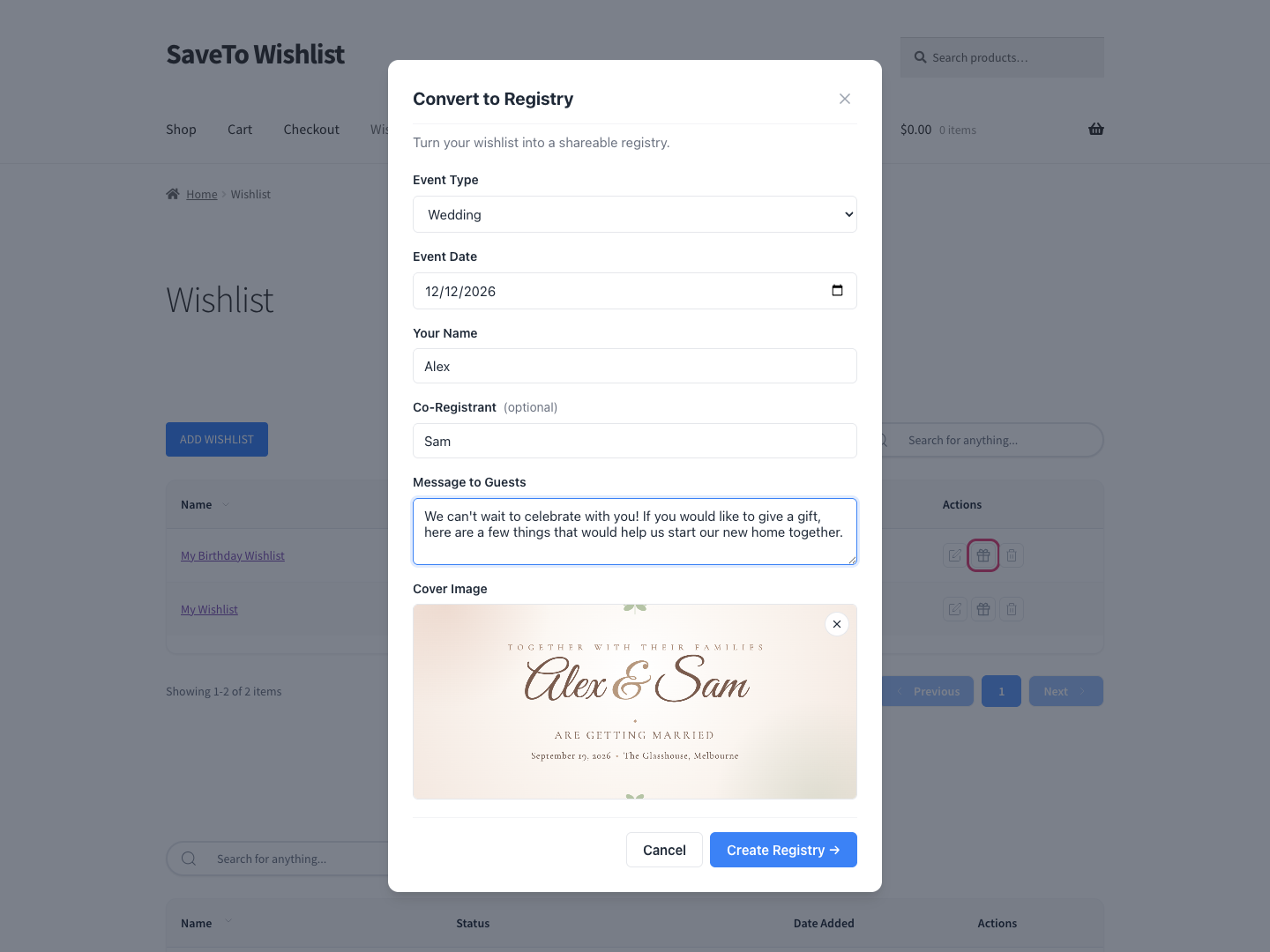
What the addon does, and what each part changes for you:
- Turns any wishlist into a registry, with an event type, event date, registrant names, and a cover image. Customers do this themselves, so it costs you nothing per event.
- Gives each registry a shareable link, plus a share button for copying, emailing, or posting to social. Every share is a group of buyers arriving with a specific product in mind.
- Tracks quantities per item. Guests see how many were requested, how many are already bought, and how many are still needed. That’s what stops two guests buying the same gift.
- Shows a “Fully purchased” badge once an item is fully bought, replacing the add-to-cart control. Guests can’t order something the couple already has.
- Publishes a “Find a Registry” search page on activation, so guests can look one up by the registrant’s name. They don’t have to email you for the link.
- Gives owners a dashboard in My Account showing who bought what, with thank-you tracking. That’s the feature registry owners stay for.
- Sends email notifications to the owner on purchase or refund, and to admins on registry creation. Nobody has to keep refreshing the page.
Every one of those shared links is a group of guests heading to your product pages. Commercially, that’s good news. Operationally, it’s a support spike, which is the case for having the assistant ready first.
The addon is available on the SaveTo Wishlist Plus and Business plans. Plus is $99.50 for the first year, renewing at $199. Business is $199.50 for the first year, renewing at $399. Neither the free Lite tier nor the Growth plan includes it.
For reference, Growth runs $49.50 for the first year and $99 on renewal. Current figures are on the SaveTo Wishlist pricing page.
How To Prepare StoreAgent For Registry Season
Preparation is mostly about memory quality. An assistant is only as good as the product data behind it.
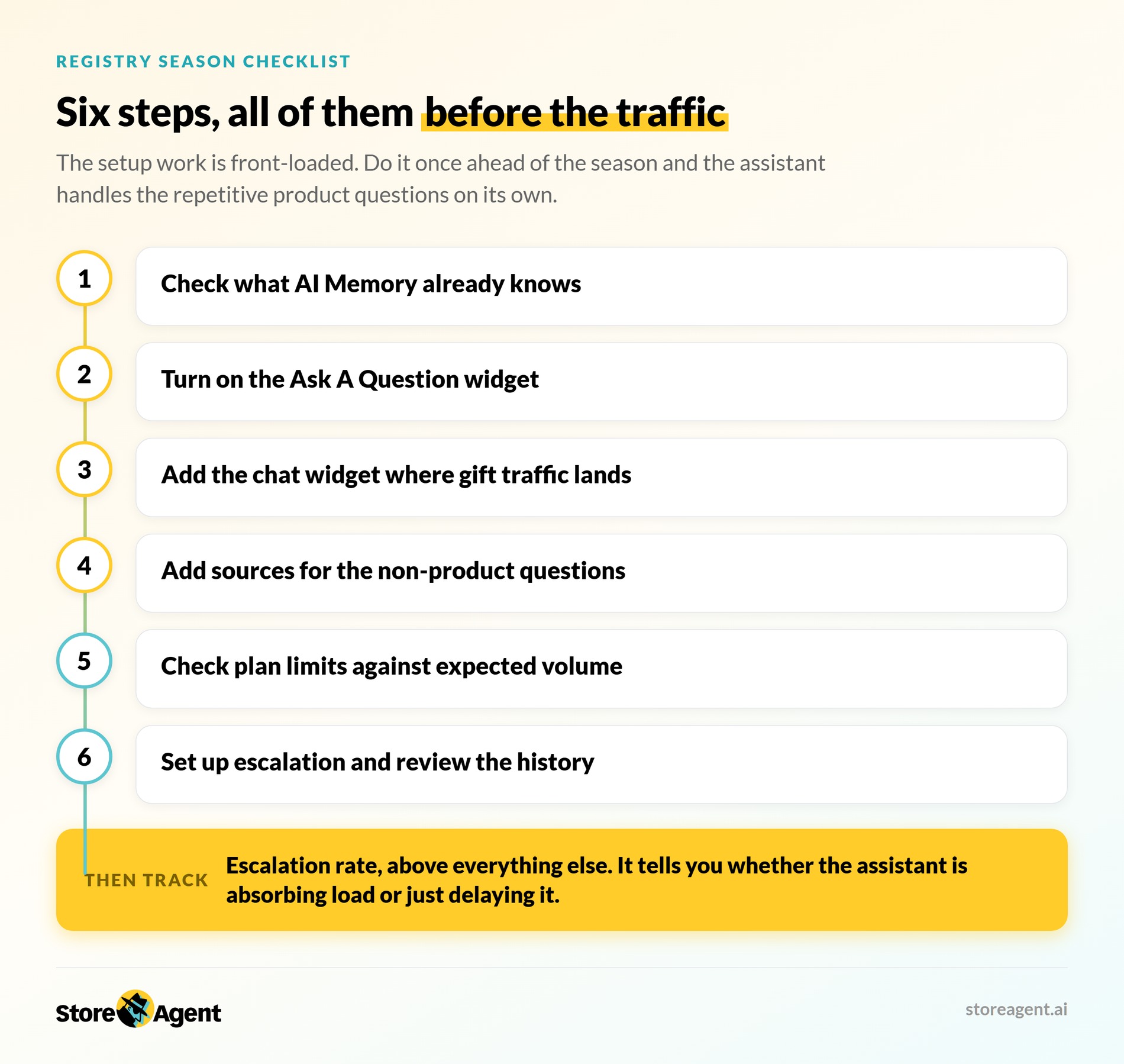
Step 1: Check what your AI memory already knows
Your catalogue syncs to AI Memory on its own, so there’s nothing to upload. What matters is whether the products heading for registries carry enough detail. A gift category with thin descriptions will produce thin answers.
That’s a content problem the assistant can’t solve for you. So spend the time on descriptions, dimensions, and materials before the season. Every channel benefits from that work, not just the chat.
Step 2: Turn on the Ask A Question widget
Enable the product-page widget under StoreAgent > AI Tools > Product Questions AI > Ask A Question Widget. It’s scoped to product pages rather than the whole site. You can place it bottom right as a circular button, or mid-right as vertical text.
There’s also a choice worth making deliberately. You can approve answers before they go live, or let the assistant respond automatically. Approval is safer for a first season, though it costs you the speed advantage.
Step 3: Add the chat widget where gift traffic lands
The floating chat widget is included from the free plan, and you choose which page types show it. A registry landing page or a gift guide is a sensible spot for a deliberate placement.
Step 4: Add sources for the questions that aren’t about products
Shipping timing and gift receipts won’t be in a product description. Additional Data Sources lets you point the assistant at extra pages by URL. Your delivery cutoffs and returns policy become answerable that way.
This is the step that turns “most of the questions” into “nearly all of them”. Two of the four question types above live in policy pages rather than product data.
Step 5: Check your plan limits against expected volume
This is the step most stores skip, and gifting season is exactly when it bites. Plan allowances are:
| Plan | Price | AI chat replies | Memory items |
|---|---|---|---|
| Lite | Free | 50 (one-time) | 1,000 |
| Growth | $19/month | 500 | 5,000 |
| Pro | $49/month | 5,000 | 25,000 |
| Business | $249/month | 50,000 | 100,000 |
If a single event brings a hundred first-time shoppers, Lite’s one-time allowance won’t survive week one. So work out your expected reply volume before the traffic arrives.
Step 6: Set up escalation and review the history
Decide now where an unanswerable question goes, because the chat can escalate to your team on every plan. Chat History, the ability to browse past conversations, is listed on the Pro and Business plans. Growth doesn’t include it.
On Pro or Business, reviewing the first week’s transcripts finds gaps in your product data fast. Feedback collection is worth turning on at the same time. That one is included from the Growth plan up.
How The Gift Registry Addon And StoreAgent Work Together
The split is clean: the registry owns registry state, and the assistant owns everything about the products on it. These are two separate plugins with no dedicated integration. Nothing passes registry data to the assistant.
That sounds like a limitation until you look at what each one is for. The connective tissue is that both live on your store, on pages you control.
That last point is the practical one. AI Memory ingests posts, pages, and custom post types alongside your products. Additional Data Sources takes URLs. So the pages explaining your gifting operation are all teachable:
- Your delivery cutoffs. The most common registry question is whether a gift arrives before the event date. That answer lives in a shipping policy, not a product description.
- Your gift receipt and packaging policy. The other question type that isn’t about products at all.
- A short “how our registries work” page. Worth writing once. It answers guests who’ve never used a registry, and gives the assistant something to draw on.
Link your Find a Registry page from your main menu or footer while you’re at it. Guests can’t search a page they can’t find, and neither can anything else.
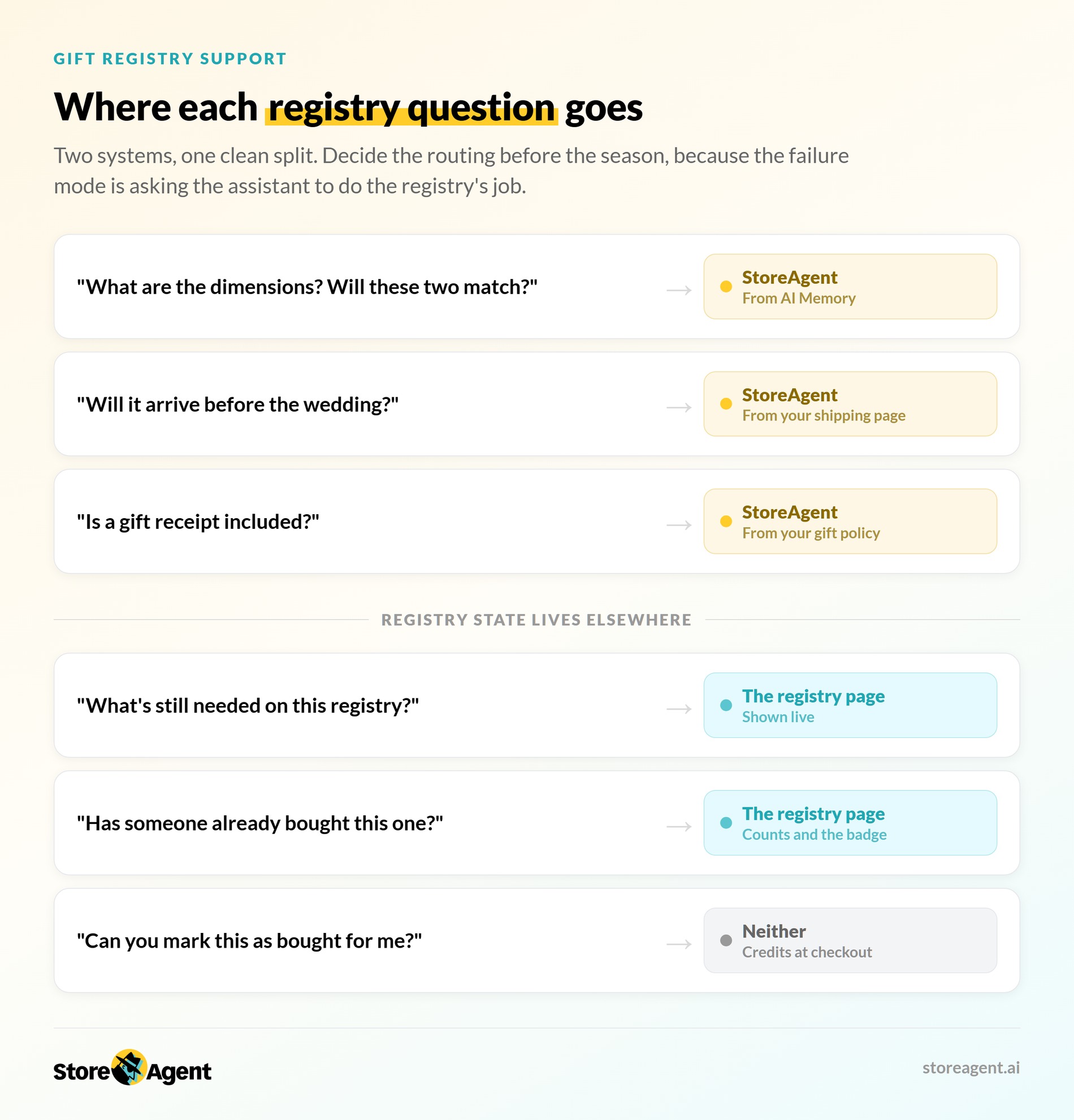
Which system owns which answer
Decide this before the season, because the failure mode is asking the assistant to do the registry’s job.
| Guest asks | Answered by |
|---|---|
| What are the dimensions? Will these two match? | StoreAgent, from AI Memory |
| Will it arrive before the wedding? | StoreAgent, from your shipping page as a data source |
| What’s still needed on this registry? | The registry page, which shows it live |
| Has someone already bought this one? | The registry page, via the counts and the “Fully purchased” badge |
| Can you mark this as bought for me? | Neither. Purchases credit automatically at checkout |
Anything about a specific registry belongs on the registry page. It’s already shown there and always current. Point guests there rather than teaching the assistant to approximate it.
Two traps worth knowing before the season
Adding a gift to a cart doesn’t reserve it. Items count as bought when the order actually goes through. If two guests check out the last unit at the same moment, both purchases complete. That’s deliberate, because the alternative is failing someone’s payment at the till. Still, a popular item can occasionally be over-bought.
The owner is emailed either way, and a refund puts the item straight back on the list.
Counts update on page load. A guest who leaves the registry page open in a tab won’t see changes until they refresh. So if someone asks why the numbers look wrong, it’s usually a stale tab rather than a bug.
Neither of these is something the assistant can prevent. Both are worth knowing so your support replies are accurate.
What StoreAgent Won’t Do For A WooCommerce Gift Registry
Being straight about this saves you a support incident. Concretely, the assistant cannot:
- Look up a specific registry or tell a guest what’s still unpurchased on it.
- Report how many of an item are still needed on a given registry.
- Change a registry, mark a gift as purchased, or send a thank-you note.
Those all live in the addon, on the registry page and the owner’s dashboard. What the assistant does handle is the bulk of the question volume: the products themselves. So point registry-specific questions at the registry page, where availability already shows.
What To Track On Registry Support
Track your escalation rate first. It tells you whether the assistant is absorbing load or just delaying it. Divide conversations escalated to a human by total conversations.
Four other measures worth watching:
- Questions per product page: the pages with the most questions usually have the weakest descriptions.
- Reply volume against plan allowance: so you find out you’re near a limit before you hit it.
- Feedback ratings on answers: the fastest signal that your product data needs work.
- Conversion rate on pages with the question widget versus pages without it.
Chat History makes the first two measurable rather than anecdotal. It’s listed on the Pro and Business plans. Export Chat Logs is included from Growth up, so a Growth store can still pull its transcripts for analysis.
Start Handling WooCommerce Gift Registry Questions With AI
The setup work is all front-loaded, which is why it belongs before a gifting season rather than during one. Check the memory, turn on the widgets, add your extra sources, and confirm the plan limits. After that, the assistant handles the repetitive product questions on its own.
Here’s the short version:
- Expect mostly product questions from first-time shoppers.
- Answers come from your synced catalogue, not from scripts.
- Enrich thin descriptions before the season, not during it.
- Enable both widgets and check your reply allowance.
- Add your shipping and gift policies as data sources.
- Send registry-specific questions to the registry page, which already shows what’s left.
- Watch escalation rate above everything else.
If you don’t run registries yet, the Gift Registry Addon is what creates this traffic in the first place. It ships with the SaveTo Wishlist Plus and Business plans, and customers build the registries themselves.
Want the assistant answering product questions before your next gifting season? The StoreAgent pricing page shows the reply allowances and memory limits for Growth, Pro, and Business side by side.
Frequently Asked Questions: WooCommerce Gift Registry
Can an AI assistant answer questions about a specific gift registry?
No. There’s no dedicated integration between StoreAgent and the Gift Registry Addon. The assistant can’t look up a registry or report what’s left on it. The registry page shows that itself, live, and it’s always current. The assistant takes the product questions instead, which are the bulk of what gift shoppers ask.
Where should the question widget go for gift traffic?
On the product page, using Product Questions AI. Gift shoppers ask about the item in front of them, usually against an event deadline. Answering at that moment is worth far more than answering later. The floating chat widget is a useful addition rather than a replacement.
Which StoreAgent plan suits a gifting season?
It depends on expected reply volume rather than store size. The free Lite tier includes 50 AI chat replies as a one-time allowance. A real gifting season will exhaust that quickly. Growth includes 500 replies monthly, Pro includes 5,000, and Business includes 50,000.
Do I have to upload my product data before the assistant works?
No, and there’s no import step to run either. StoreAgent pulls your catalogue into AI Memory by itself. It then refreshes a product shortly after you save changes to it. That refresh isn’t instant, so a last-minute edit won’t reach the assistant straight away. You can force it from the Products list if you’re in a hurry.
What happens when the assistant can’t answer?
The chat can escalate the conversation to your team, on any plan. On Pro and Business, StoreAgent records conversations under Chat History for review afterwards. Those transcripts are usually the fastest way to find which pages need better descriptions.
Which WooCommerce gift registry plugin addon creates this traffic?
The SaveTo Wishlist Gift Registry Addon, available on the Plus and Business plans. It lets customers convert a wishlist into a shareable registry. Each shared link sends a group of gift shoppers toward specific products in your store.
Will it invent an answer if the product description is thin?
Answer quality tracks the quality of what’s in memory. If a description doesn’t state a dimension or material, that gap shows up in the answers. The fix is improving the product data rather than the assistant. Reviewing your first week of transcripts is how you find those gaps.