Reviewed by
Seven out of ten shoppers who add items to their WooCommerce cart leave without buying. That’s a 70.19% abandonment rate, according to Baymard Institute, and it costs the average store thousands in lost revenue every month. The good news: you can reduce cart abandonment without overhauling your store, by answering the questions that drive shoppers away in the first place.
Most shoppers don’t bail because they’ve changed their minds. They bail because they have unanswered questions about shipping, costs, or product fit. Abandoned cart emails try to pull them back after they’ve left. An AI chatbot answers those questions while they’re still on the page, which is a much shorter path to a completed checkout.
In this article, we’ll cover why shoppers abandon WooCommerce carts, how AI chatbots reduce cart abandonment by addressing each major trigger, how to set up StoreAgent Chat on your store, and the conversation patterns that turn hesitant browsers into buyers. So, let’s get started!
Why Do Shoppers Abandon WooCommerce Carts?
Cart abandonment is driven by unanswered questions, not disinterest. Baymard Institute’s research across 49 studies shows that the top reasons shoppers leave (unexpected costs, forced account creation, and trust concerns) are all problems a real-time AI chatbot can solve.
Most WooCommerce stores aren’t equipped to address these reasons in the moment they matter. Let’s look at what the data actually says.
What does the Baymard Institute data reveal?
The top abandonment triggers are informational gaps an AI chatbot can fill in seconds. Nearly half (48%) of shoppers cite unexpected costs as their reason for leaving, while trust concerns and checkout friction account for most of the rest.
Here’s a breakdown of the top reasons and how a chatbot intervenes. Abandonment percentages are from Baymard Institute; chatbot interventions and impact levels are illustrative.
| Abandonment Reason | % of Shoppers | Chatbot Intervention | Impact Level |
|---|---|---|---|
| Extra costs (shipping, tax, fees) too high | 48% | Answer cost questions instantly with real store data | High |
| Forced account creation | 24% | Guide shoppers through the guest checkout option | Medium |
| Complicated checkout process | 18% | Provide step-by-step checkout assistance | Medium |
| Could not calculate total cost upfront | 16% | Surface shipping, tax, and totals in the chat window | High |
| Did not trust site with payment info | 18% | Reassure with security details and return policies | High |
| Delivery timeline too slow | 15% | Provide delivery estimates based on stated location | Medium |
Notice the pattern. Almost every reason is a question that went unanswered. The shopper needed information, couldn’t find it fast enough, and left.
How do WISMO queries drive cart abandonment?
“Where Is My Order?” (WISMO) queries erode the trust that drives repeat purchases, which makes returning customers more likely to abandon future carts. New customers who can’t find a clear delivery timeline during checkout also bail, because they assume the worst.
According to Master of Code, 82% of consumers prefer interacting with a chatbot over waiting for a human agent. That makes instant delivery answers a competitive advantage, not a nice-to-have.
If you want a broader look at how chatbots fit into your conversion strategy, see our guide on how to increase your ecommerce conversion rate.
How Do AI Chatbots Reduce Cart Abandonment?
AI chatbots reduce cart abandonment by providing instant, contextual answers at the exact moment a shopper hesitates. Instead of hoping a follow-up email brings someone back, you resolve their concern while their credit card is still in hand. Here’s how that plays out for each trigger.
How do chatbots handle shipping and cost questions?
A WooCommerce chatbot with access to your store data answers the number one abandonment question (unexpected costs) before checkout even begins. Baymard’s data shows 48% of shoppers leave because of surprise fees, so this is the single highest-impact place to reduce cart abandonment.
When a chatbot is connected to your store, it handles questions like:
- “How much is shipping to [zip code]?”
- “Is there free shipping over a certain amount?”
- “What’s the total cost including tax?”
No page navigation, no guesswork. The shopper gets a clear answer in the same window. Easy, right?
How do chatbots resolve product questions?
Product pages can’t cover every question, and a chatbot trained on your catalog fills those gaps instantly. The difference between answering a compatibility question in seconds versus hours is often the difference between a sale and an abandoned cart.
Shoppers frequently ask questions that descriptions don’t cover:
- “Will this case fit my iPhone 15 Pro Max?”
- “Is this compatible with my existing setup?”
- “What’s the difference between the 500ml and 750ml version?”
A chatbot pulls details from product descriptions, attributes, and variation data to answer these on the spot.
How do chatbots build purchase trust?
Trust concerns account for 18% of cart abandonment, and a conversational interaction builds more confidence than static trust badges alone. When a chatbot explains your return policy in plain language (“You can return any unopened item within 30 days for a full refund, no questions asked”), it signals transparency.
That kind of reassurance feels personal. It tells the shopper your store is accessible and willing to stand behind its products.
Can chatbots prevent WISMO-related abandonment?
Yes. A chatbot with order data access answers “Where is my order?” instantly, which preserves the trust that brings customers back for repeat purchases. That cuts your support ticket volume and keeps returning customers buying.
For new customers, the chatbot can share delivery expectations on request: “Orders placed before 2 PM EST typically ship same day and arrive within 3-5 business days.” That specificity turns browsing into buying. Providing this kind of instant clarity helps eliminate the friction that drives post-purchase WISMO inquiries and protects your brand’s reputation.
What We’ve Seen: Across StoreAgent Chat sessions, the most common pre-purchase questions cluster into three buckets: shipping timelines, product compatibility, and return policies. Stores that answer those three categories well see the biggest drop in cart abandonment.
According to Klarna, their AI assistant manages two-thirds of all customer service chats, which is roughly the equivalent of 700 full-time agents. You don’t need that scale, but the principle is the same. AI handles the repetitive, purchase-blocking questions that would otherwise go unanswered.
To understand how AI chatbots compare to simpler alternatives, read our comparison of rule-based chatbots vs. AI chatbots.
Want to see how StoreAgent Chat answers your customers’ questions in real time? Start with 50 free AI chat replies. No credit card, no API key.
How To Set Up StoreAgent Chat On Your Store
StoreAgent Chat is WooCommerce-native, so there’s no AI API key to manage and no separate platform to learn. You install the plugin, connect your free StoreAgent.ai account, and the chatbot starts ingesting your product catalog and pages automatically. Here’s how to get it running.
Step 1: Install and activate StoreAgent
- In your WordPress admin, go to Plugins > Add New.
- Search for “StoreAgent AI for WooCommerce” and click Install Now.
- Activate the plugin, then complete the setup wizard and connect your StoreAgent.ai account.
Because StoreAgent is built specifically for WooCommerce, it reads your product data and pages from activation. No CSV uploads, no manual training data, no third-party AI key.
Step 2: Build your AI memory
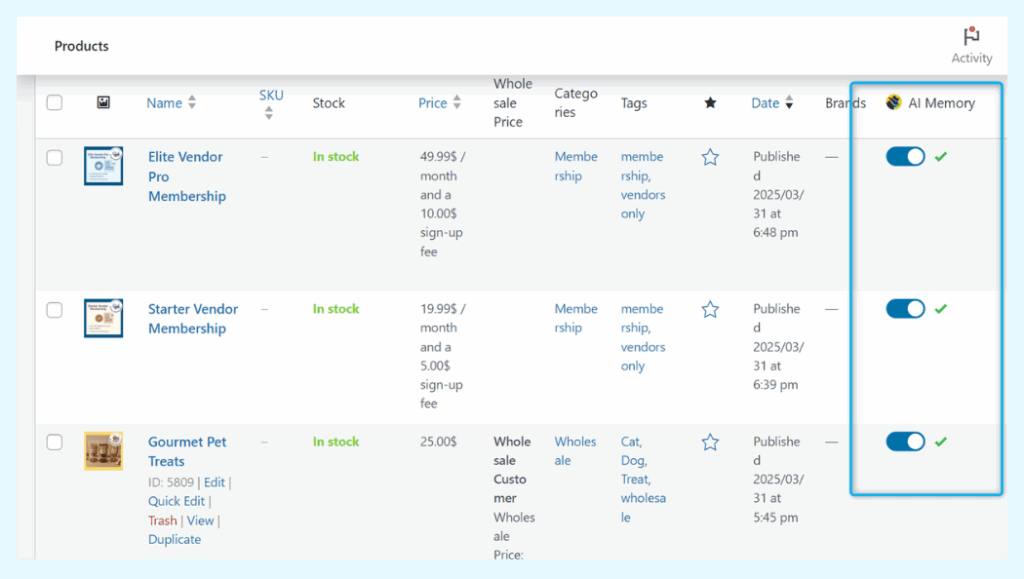
StoreAgent’s AI Memory is what lets the chatbot answer accurately about your products and policies. When you start the chat setup, the plugin syncs your product catalog and any selected pages (return policy, shipping info, FAQs) into the AI memory. New products and edits sync automatically going forward.
- Open StoreAgent > Dashboard and click Start AI Chat Setup.
- Choose the post types you want to include (products, pages, posts).
- Let the scheduled action complete. Larger catalogs may take a few cycles.
You can see the sync status for individual products in the AI Memory column on the Products screen, so you always know what the chatbot can speak to.
Step 3: Customize the chat widget
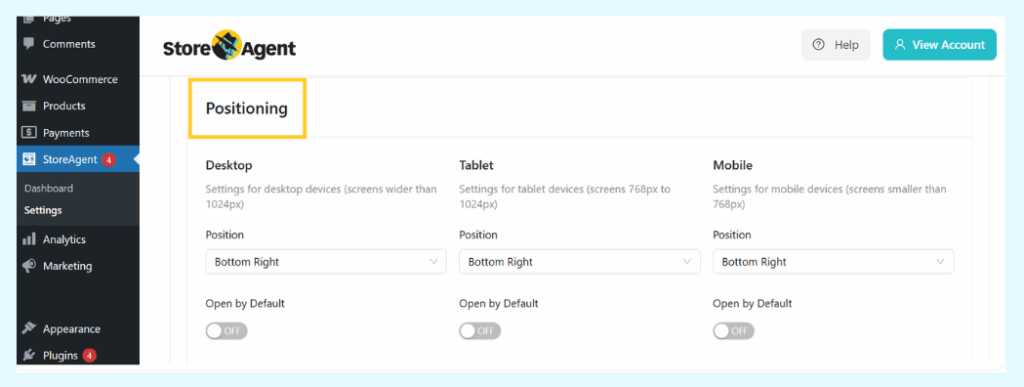
The chat bubble is always visible to shoppers, so the customization that matters most is the welcome message, the assistant’s name, and where the widget sits on the page. A friendly greeting in your brand voice is what turns a passing visitor into someone who clicks.
- In the chat widget settings, set a greeting like “Hi! Got a question about shipping or sizing before you check out?”
- Set an assistant name that fits your brand (think of it as a member of your team).
- Pick a widget position. Bottom-right is the convention; bottom-left works if your theme already lives there.
StoreAgent Chat reads the current page context automatically, so when a shopper opens the widget on a product page, the AI already knows which product they’re looking at. That’s the piece that makes answers feel relevant, not generic.
Step 4: Turn on order data lookup for WISMO
For returning customers and WISMO queries, order data lookup turns your chatbot into a 24/7 first-line support agent. Authentication runs on a secure session token, so customers see their own order status without exposing data to anyone else.
Enable the order lookup tool inside the StoreAgent dashboard. From that point, returning customers can ask “Where is my order?” in chat and get an accurate status without opening a support ticket. This is the single fastest way to reduce cart abandonment driven by delivery uncertainty for repeat buyers.
For more detailed guidance, see our chatbot best practices for WooCommerce stores.
Ready to install? Set up StoreAgent Chat on your WooCommerce store.
Conversation Patterns That Reduce Cart Abandonment
These five conversation patterns map to the specific questions that drive abandonment. Use them as a guide for the kinds of answers your AI chatbot needs to deliver. Each one is shaped to be direct, helpful, and revenue-positive.
Pattern 1: The shipping cost objection
When it happens: Shopper asks about shipping costs or hesitates on the cart page.
Chatbot: “Shipping to [detected location] for your current cart is $[amount]. Orders over $[threshold] qualify for free shipping. You’re $[difference] away. Want me to suggest an item that gets you there?”
This answers the cost question, introduces the free shipping threshold, and creates an upsell opportunity in a single message.
Pattern 2: The product comparison question
When it happens: Shopper asks how two products compare or has viewed multiple similar product pages.
Chatbot: “Comparing the [Product A] and [Product B]? Here’s the quick breakdown: [Product A] is better for [use case], while [Product B] is ideal for [use case]. Which use case matches yours?”
Instead of leaving the shopper to flip between tabs, the chatbot synthesizes the comparison into a decision-ready summary.
Pattern 3: The trust and security concern
When it happens: Shopper asks about payment security, returns, or store legitimacy.
Chatbot: “Your payment is processed through [payment processor] with full SSL encryption, and we never store your card details. Every order comes with our [X]-day return policy. Want me to walk you through the return process?”
Specificity builds trust. Naming the payment processor, mentioning SSL, and offering to explain returns makes the response feel transparent.
Pattern 4: The sizing or compatibility question
When it happens: Shopper asks about sizing, fit, or compatibility.
Chatbot: “For the
, here’s what I’d recommend based on our sizing data: [specific recommendation]. If you’re between sizes, most customers find that [sizing advice]. And remember, our return policy has you covered.”
This combines product data with a safety net, which reduces the perceived risk of choosing wrong.
Pattern 5: The “is this worth it?” hesitation
When it happens: Shopper has been on a product or cart page for a while without action and finally engages.
Chatbot: “Still thinking it over? The
is one of our [best sellers / highest rated items], with [specific proof point like ‘4.8 stars from 200+ reviews’]. Is there anything specific I can help you decide?”
Social proof delivered conversationally feels more genuine than a static review widget.
How Do You Measure Chatbot Impact On Cart Abandonment?
Record your baseline abandonment rate before turning the chatbot on, then compare chatbot-assisted conversion against your non-assisted rate. Without a baseline and segmented data, you can’t attribute the lift to the chatbot.
How do you establish a baseline?
Track your abandonment rate for at least two weeks before enabling the chatbot, so you have reliable comparison data. You can do this in WooCommerce a few different ways.
- Google Analytics 4: Set up “begin_checkout” and “purchase” events. Abandonment rate = 1 minus (purchases divided by begin_checkout).
- WooCommerce Analytics: Built-in reports show orders vs. sessions for a rough proxy.
- Dedicated tracking plugins: Tools like CartFlows or Metorik give you WooCommerce-specific abandonment tracking.
What KPIs should you track?
Focus on chat engagement rate, chatbot-assisted conversion rate, and revenue influenced by chat as your core KPIs to reduce cart abandonment over time. These let you isolate the chatbot’s impact from other variables.
Benchmarks below are illustrative industry targets, not guaranteed results.
| KPI | How to Measure | Benchmark | Where to Track |
|---|---|---|---|
| Cart abandonment rate | 1 minus (completed orders / initiated checkouts) | 70% (industry avg) | GA4 / WooCommerce Analytics |
| Chat engagement rate | Chat sessions / total site sessions | 5-15% | StoreAgent dashboard |
| Chatbot-assisted conversion rate | Purchases after chat / total chat sessions | 15-30% | GA4 + StoreAgent |
| Customer satisfaction (CSAT) | Post-chat feedback rating | 4.0+ / 5.0 | StoreAgent chat feedback |
| Revenue influenced by chat | Total revenue from chatbot-assisted orders | Track monthly trend | GA4 + WooCommerce |
According to Grand View Research, the AI chatbot market is projected to reach $454.8 million by 2027, driven largely by the measurable ROI businesses see from chat-based customer engagement.
💡 For a deeper dive into which metrics matter most, see our guide on chatbot KPIs for ecommerce.
Conclusion
Cart abandonment isn’t random. It’s driven by unanswered questions about shipping, costs, trust, and product fit. An AI chatbot trained on your WooCommerce data intercepts those moments of hesitation and resolves them in seconds, before the shopper leaves.
Here’s a quick recap of what we covered:
- Why 70.19% of shoppers abandon WooCommerce carts
- How AI chatbots reduce cart abandonment for each major trigger
- How to install StoreAgent Chat and turn on AI memory and order lookup
- Five conversation patterns that move hesitant shoppers to checkout
- The KPIs to track so you can prove the impact
Start by identifying your biggest abandonment trigger. For most stores, that’s shipping cost questions on the cart page. Set up StoreAgent Chat, let it ingest your catalog, and measure the impact over two weeks.
If you’re ready to reduce cart abandonment on your WooCommerce store, StoreAgent Chat gives you an AI assistant that knows your products, prices, and policies. Start free with 50 AI chat replies, no credit card, no API key.
Frequently Asked Questions
Does a WooCommerce chatbot work for small stores?
Yes, and small stores often see proportionally larger impact. Without dedicated support staff during off-hours, an AI chatbot gives you 24/7 coverage for purchase-blocking questions. StoreAgent’s free Lite plan includes 50 AI chat replies to get started, which is enough for many small stores to see whether the format works for their audience.
How long does it take to set up an AI chatbot on WooCommerce?
With a WooCommerce-native plugin like StoreAgent, the install and basic setup take minutes. You install the plugin, connect your free StoreAgent.ai account, and start the AI memory sync. Larger catalogs take a few sync cycles to finish, but you don’t have to upload training data or paste in an AI API key.
What is the difference between a chatbot and an abandoned cart email?
A chatbot is proactive. It engages shoppers while they’re still on your site. An abandoned cart email is reactive, sent after they’ve already left. The two are complementary. Use the chatbot to reduce cart abandonment in the first place, and use cart emails as the safety net. The chatbot addresses the cause; the email addresses the symptom.
Can AI chatbots handle complex product questions accurately?
AI chatbots trained on your actual store data (products, attributes, variations, and policies) can answer most product questions accurately. The key is native WooCommerce integration so the chatbot pulls from real product data rather than generic scripts. For edge cases it can’t resolve, a good chatbot escalates to a human.
What is a good chatbot-assisted conversion rate?
Industry benchmarks for chatbot-assisted conversion rates in ecommerce land between 15% and 30%. Of shoppers who engage with the chatbot, 15-30% complete a purchase. Compare that to your overall site conversion rate (usually 2-3%) to see why chat is such a strong lever to reduce cart abandonment on engaged shoppers.