Reviewed by
A Customer Service AI Agent is software that understands a customer’s question in natural language, looks up the answer from your store’s data, and resolves the request on its own, escalating to a human only when needed. For WooCommerce, you can add one by installing an AI chat plugin that connects to your store. Here’s what it is and how to set it up.
“Chatbot” undersells what these tools now do. Older bots followed scripts. An AI agent interprets intent, takes an action (like checking an order), and decides whether it can resolve the issue or hand it off. For a store owner, that shift is the difference between a bot that frustrates customers and one that actually closes the loop.
What Makes A Customer Service AI Agent Different From A Chatbot
Three things. It understands natural language, so customers don’t have to phrase things a certain way. It can take actions (look up an order, fetch a live price, answer from your product data) rather than only serving canned replies. And it makes a judgment about whether it can resolve the request or should escalate. A rule-based chatbot does none of these. It just matches keywords to pre-written answers.
That line holds up outside WooCommerce too. According to Google Cloud, AI agents can reason, plan, use tools, and take actions toward a goal, while chatbots stay reactive and conversational. A Customer Service AI Agent applies that same model to your store.
It’s also worth drawing a line between a support agent and a sales assistant. They can be the same tool, but the jobs differ: a customer service agent resolves questions and issues, while an AI sales assistant also guides shoppers toward a purchase. This article is about the support side.
What A Customer Service AI Agent Does For A Store
- Answers product, shipping, returns, and policy questions instantly, 24/7.
- Looks up live order status and product pricing, and answers stock and product questions from your synced store data.
- Handles many conversations at once, with no queue.
- Escalates complex or sensitive cases to a human with full context (on paid plans).
Speed is the point. According to HubSpot’s customer service research, 67% of consumers expect their support ticket resolved within three hours. A Customer Service AI Agent that answers in seconds clears that bar without you staffing for it.
What we’ve seen: store owners expect an “AI agent” to need configuration like a developer tool, defining intents, training models, wiring APIs. With a WooCommerce-native agent, that whole mental model is wrong. You connect a free account, click to start setup, and it learns your store on its own. The most common surprise is how little setup there actually is.
Because native integration eliminates these technical barriers, evaluating the top AI customer service software comes down to comparing how effectively each platform handles real-time catalog syncing and order lookups rather than complex setup requirements.
💡 If you’re still evaluating which tool fits your store, see how the leading AI customer service software options compare for WooCommerce before you commit to one.
StoreAgent: A Customer Service AI Agent Built For WooCommerce
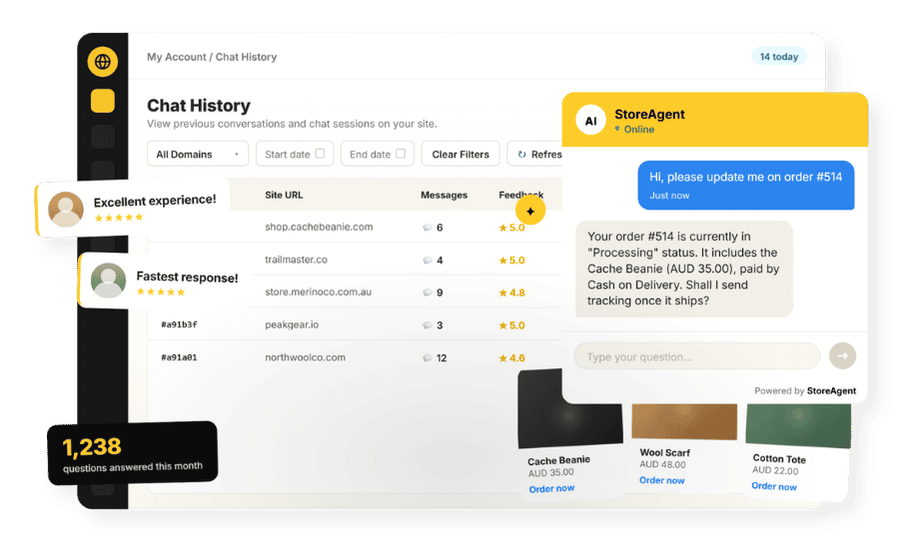
StoreAgent is a Customer Service AI Agent built specifically for WooCommerce. It installs as a plugin, connects to a free StoreAgent.ai account, and answers customer questions straight from your live store data. It runs inside the store you already manage. The same store can also be run from Claude or ChatGPT through the WooCommerce MCP, which StoreAgent includes free.
Because it’s WooCommerce-native, it knows your store the way a good support rep would. It reads your products, pages, and policies into its AI memory, looks up live order status and pricing when a customer asks, and keeps its answers current as you add products or change prices. That means shoppers get accurate replies about availability, shipping, and returns without anyone on your team typing them out.
When a request is too complex or sensitive for the agent to close on its own, it hands the conversation to a human with full context (on paid plans). You start free on the Lite plan, and the setup takes minutes.
Here’s how to get it running.
How To Add A Customer Service AI Agent To WooCommerce
- Install the plugin and connect a free StoreAgent.ai account.
- Start AI Chat setup so it ingests your products, pages, and policies automatically, with no manual training.
- Set escalation rules so complex cases reach a human with context (paid plans).
- Add the chat widget to your store and go live.
No coding, no model training. If you’re weighing whether an agent fits your store at all, our guide to the benefits of AI in customer service covers the case in more depth.
If you’re ready to add a Customer Service AI Agent to your store, start free on the Lite plan today.
Frequently Asked Questions
What is a Customer Service AI Agent?
A Customer Service AI Agent is software that understands a customer’s question in natural language, looks up the answer from your data, and resolves the request on its own, escalating to a human when needed. It goes beyond scripted chatbots by interpreting intent and taking actions.
How is an AI agent different from a chatbot?
A rule-based chatbot matches keywords to pre-written replies. An AI agent understands natural language, takes actions like order lookups, and decides whether to resolve the issue or escalate it.
How do I add one to WooCommerce?
Install an AI chat plugin like StoreAgent, connect a free account, and start setup so it ingests your store. It begins answering from your live data with no coding or training.
Does it replace my support team?
It handles the high-volume, routine requests and escalates complex cases to a human with context on paid plans. It augments your team rather than replacing it.
Do I need technical skills to set it up?
No. A WooCommerce-native agent like StoreAgent installs as a plugin and learns your store from a one-click setup, with no intent mapping, model training, or code.