Reviewed by
Your AI chatbot now waits until your store is indexed before it goes live, so shoppers only reach it once it can actually answer. StoreAgent holds the chat widget back during AI chatbot product indexing, shows you how far along it is, and only lets the widget serve customers when it’s ready. It turns a “still setting up” bot into one that’s clearly ready before anyone talks to it.
Behind every good chatbot answer is your store’s own data. StoreAgent reads your products into its AI memory first, and until that finishes, the assistant has little to work with. This update makes that step visible and gates the widget on it.
In this article, we’ll cover what product indexing is, why the widget stays hidden until it’s done, how to tell when your chatbot is ready, and what to do if indexing is still running. So, let’s get started!
What Is AI Chatbot Product Indexing?
AI chatbot product indexing is the step where StoreAgent reads your products into its AI memory so the chatbot can answer questions from your real catalog. Each product’s details are turned into searchable knowledge the assistant draws on, which is what lets it give accurate answers about your items. Until indexing finishes, the chatbot simply doesn’t have enough of your store to work with.
StoreAgent’s WooCommerce AI chatbot is only as good as the store data behind it, and Nielsen Norman Group’s chatbot research shows how quickly a weak answer erodes trust. Indexing is what connects your WooCommerce products to the assistant’s answers.
Table of Contents
Your Chatbot Stays Hidden Until It’s Ready
StoreAgent keeps the chat widget off your storefront until product indexing reaches a ready state, so no shopper meets a bot that can’t answer yet. While indexing runs, the widget stays hidden and your setup screen shows the progress instead. Once it’s ready, the widget goes live for customers.
This means the first impression your customers get is a chatbot that already knows your catalog. You control the go-live moment, and it happens on purpose rather than before your store data is in place.
How To Tell When Your Chatbot Is Ready
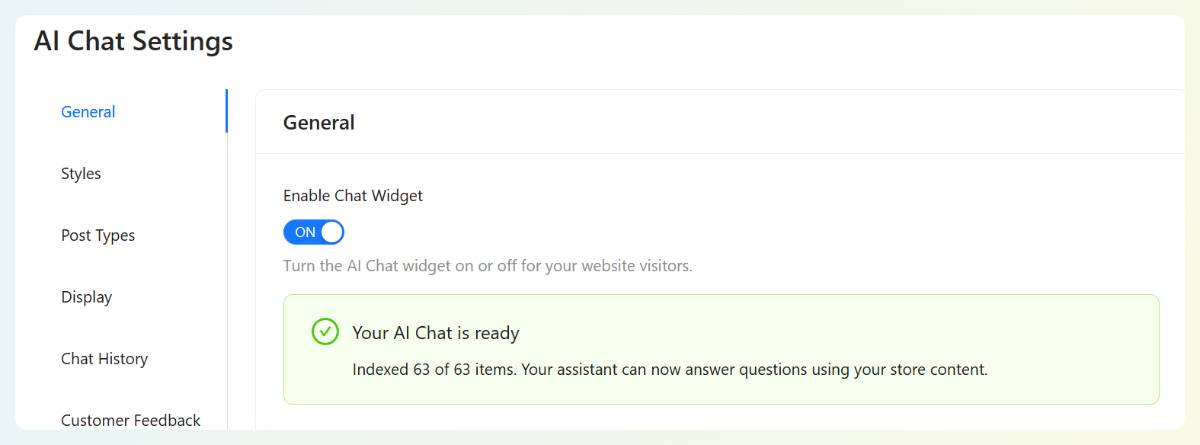
You’ll know your chatbot is ready when the AI Chat settings show “Your AI Chat is ready,” along with the number of items indexed, such as “Indexed 63 of 63 items.” At that point the assistant can answer questions using your store content, and the widget is cleared to go live. The item count tells you exactly how much of your catalog is in AI memory.
What If Indexing Is Still Running?
If indexing is still running, StoreAgent shows an “Indexing, X% done (N of M products)” progress state and keeps the widget hidden until it reaches the ready threshold. Large catalogs can go live once enough of the store is indexed, rather than waiting for every last item. You are never locked out, either: you can force the widget on, with a clear warning that indexing is still in progress.
If indexing stalls instead of finishing, StoreAgent flags it rather than spinning forever, and gives you a Resume action to pick it back up. That way a paused sync is something you can see and fix, not a silent dead end.
Get Started
A chatbot that answers from your real catalog starts with indexing, and now that step is visible and in your control. Your AI chatbot goes live when it’s genuinely ready, not before.
Here’s what we covered:
- What product indexing is and why it matters
- How the widget stays hidden until your store is ready
- How to tell when your chatbot is ready, with the item count
- What the progress and Resume states do while indexing runs
If you’re ready to put a chatbot that knows your catalog on your store, connect StoreAgent and let AI chatbot product indexing finish before you go live. New to StoreAgent? Explore our plans and pricing today.
Frequently Asked Questions
What is AI chatbot product indexing in StoreAgent?
Product indexing is the process where StoreAgent reads your products into its AI memory so the chatbot can answer from your real catalog. Each product becomes searchable knowledge the assistant uses to give accurate replies. Until indexing finishes, the chatbot has too little of your store to answer well.
Why isn’t my AI chatbot showing on my storefront yet?
Your AI chatbot likely isn’t showing yet because product indexing hasn’t reached the ready threshold, so StoreAgent is holding the widget back. This keeps shoppers from meeting a bot that can’t answer yet. Once indexing is ready, the widget goes live automatically.
How do I know when my AI chatbot is ready?
You know your AI chatbot is ready when the AI Chat settings show “Your AI Chat is ready” and the indexed item count, like “Indexed 63 of 63 items.” That confirms your catalog is in AI memory and the assistant can answer from it. The widget is then cleared to serve shoppers.
Can I turn the chatbot on before indexing finishes?
Yes, you can force the chatbot on before indexing finishes, and StoreAgent shows a clear warning that indexing is still in progress. It’s there so you’re never locked out, but it’s usually best to let indexing reach the ready threshold first. That way your chatbot answers from a complete view of your catalog.
What happens if product indexing stalls?
If product indexing stalls, StoreAgent flags it instead of spinning indefinitely and offers a Resume action to continue. You can see that indexing has paused and pick it back up, rather than being left guessing. This keeps a stalled sync visible and fixable.