
Need to step away from StoreAgent for a while or close your account entirely? You cancel your subscription in your StoreAgent.ai account, not in your WordPress admin. This guide shows where to find the cancel option, what the cancel status looks like, and how to come back later.
Before you cancel
When you cancel, your subscription is scheduled to end on your next renewal date. You can reactivate any time before that date. Before you start, it’s worth checking whether a smaller change would solve what you’re trying to solve.
Plan too big for your current usage? Downgrade to a smaller plan instead of cancelling. See the pricing page for a side-by-side of what each plan includes.
Hitting plan limits and seeing the “Plan Limit Exceeded” notice? That’s a usage cap, not a billing problem. Upgrading lifts the cap. Cancelling won’t make the cap go away on a different plan.
Looking for a refund? You can request a refund within 14 days of a new purchase. Renewal payments are not refundable. Reach out to support first, and check the refund policy article for the details.
Unhappy with a specific feature or behaviour? Open a support ticket first. We can often fix the issue or point you at a setting that helps. Cancelling without telling us means we can’t make it better.
Prerequisites
- An active StoreAgent.ai account.
- The email address you signed up with.
How to cancel your subscription
The cancel option lives in your StoreAgent.ai account portal. You don’t need to be logged into your WordPress admin to do this. Billing and the WordPress plugin are separate.
- Go to app.storeagent.ai and log in with the email address you signed up with.
- Click My Subscription in the left menu. The subscription page opens with its status and the Cancel button.
- In the Actions row, click Cancel.
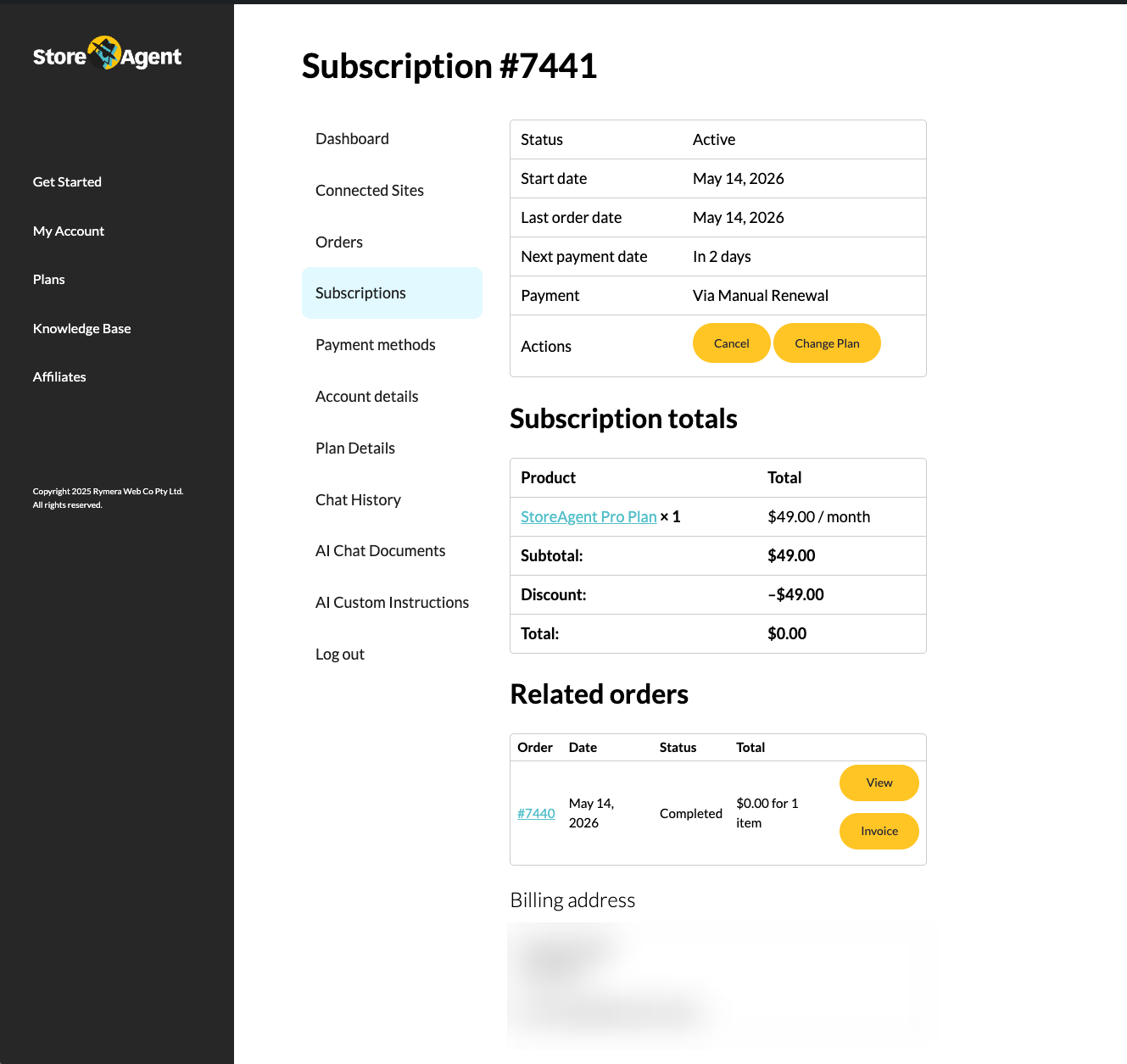
Clicking Cancel starts the cancellation process. Follow each step until the process is finished. Your subscription is only cancelled once you finish, so don’t close the window partway through if you mean to cancel.
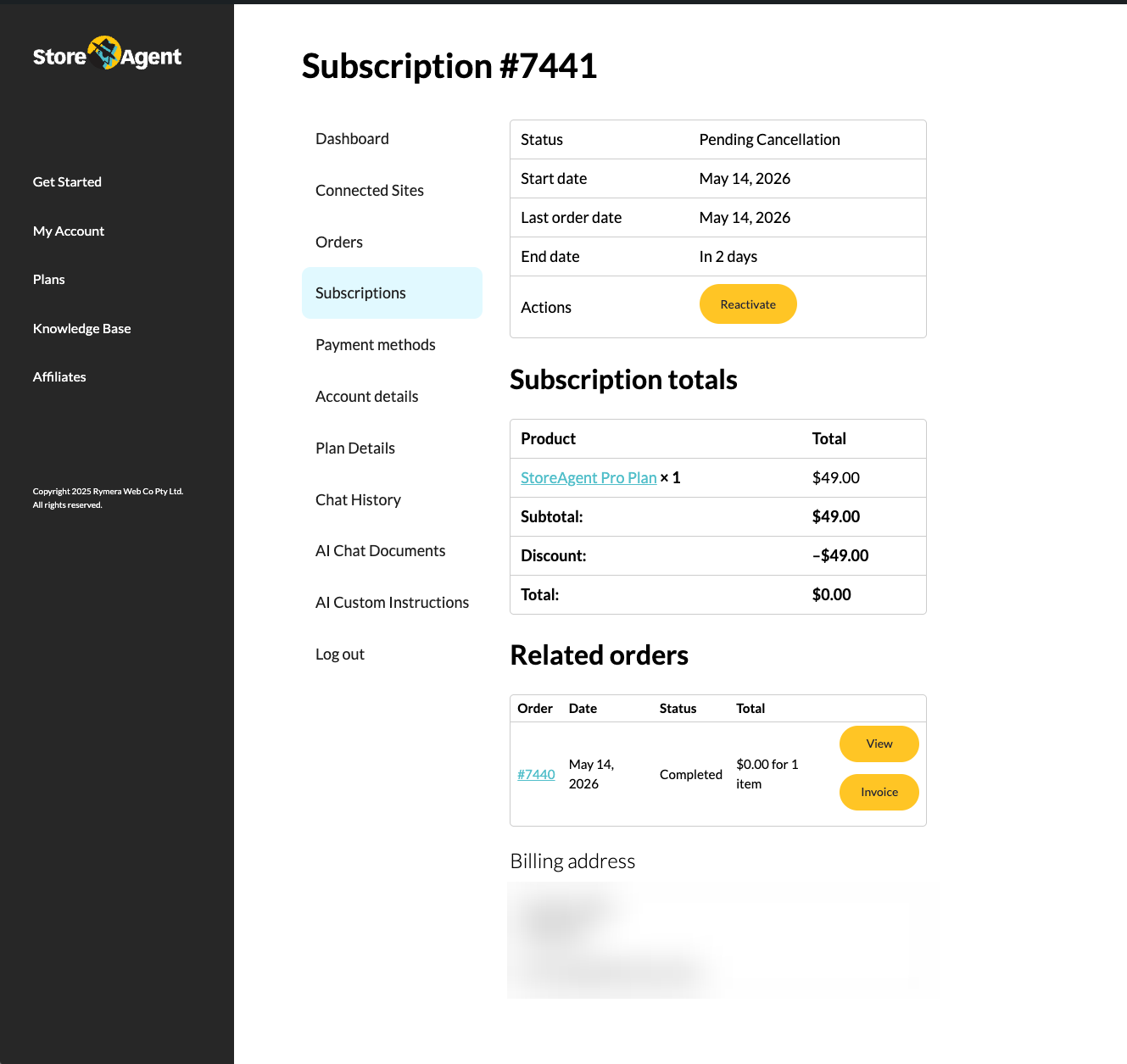
Once you finish the process, the subscription status changes to Pending Cancellation and an End date appears (your next renewal date).
How to come back later
You don’t need to start from scratch if you change your mind. While the subscription is in Pending Cancellation and the End date hasn’t passed, open the subscription in app.storeagent.ai and click Reactivate in the Actions row. The subscription returns to Active, and you’ll see a “Your subscription has been reactivated” confirmation.
Reactivating during the Pending Cancellation window resumes your existing subscription. It doesn’t create a new one, and your renewal date stays the same.
Troubleshooting
I cancelled but premium features still work in WordPress
Check these in order:
- Check the End date in your StoreAgent.ai account.
- Log in to app.storeagent.ai and confirm your plan status shows as Pending Cancellation. If the cancellation didn’t complete there, cancel it again from your account.
I want a refund, not just to cancel
Reach out to support first. Refunds are available within 14 days of a new purchase. Renewal payments are not refundable. Check the refund policy article for eligibility.
I can’t find the cancel option in my account portal
Confirm you’re logged into the StoreAgent.ai account that’s tied to your subscription. The email in the Account row under StoreAgent → Settings → Connection should match the email you used to log into app.storeagent.ai. If you have multiple StoreAgent accounts, you may be looking at the wrong one. If the email matches and you still can’t find the option, open a support ticket with your account email and we’ll cancel it for you.
Frequently asked questions
Do I need to uninstall the WordPress plugin after cancelling?
Not unless you want to. You can leave it installed. If you do want to remove it entirely, deactivate and delete it from Plugins → Installed Plugins in your WordPress admin.
Can I cancel and re-subscribe in the same month?
Yes. If you cancel and then change your mind before the End date, click Reactivate on the subscription. This resumes your existing subscription on the same billing cycle, and your renewal date doesn’t change.
Need help?
If you have a question or run into any issues, we’re here to help.
- Premium users: Open a support ticket
- Free users: Visit our community forum

