Reviewed by
WooCommerce chatbot coupon offers are now live in StoreAgent Chat.
With a single toggle in your AI Chat settings, your WooCommerce chatbot coupon offering is live. Your chatbot can now recommend and offer real discounts to customers mid-conversation. When a customer hesitates, asks about pricing, or signals they’re close to leaving, the AI steps in with a relevant discount at exactly the right moment.
This is a chatbot built for sales, not just support. Your AI assistant already answers product questions and retrieves order data. Now it can close the deal. In this article, we’ll walk you through what’s new, how it works, and how to set it up in three steps.
What’s New: The “Allow AI To Offer Coupons” Toggle
The adds a new setting to StoreAgent’s AI Chat tab: “Allow AI to offer coupons.” It’s available on all plans, including the free plan, as long as you have active usage credits.
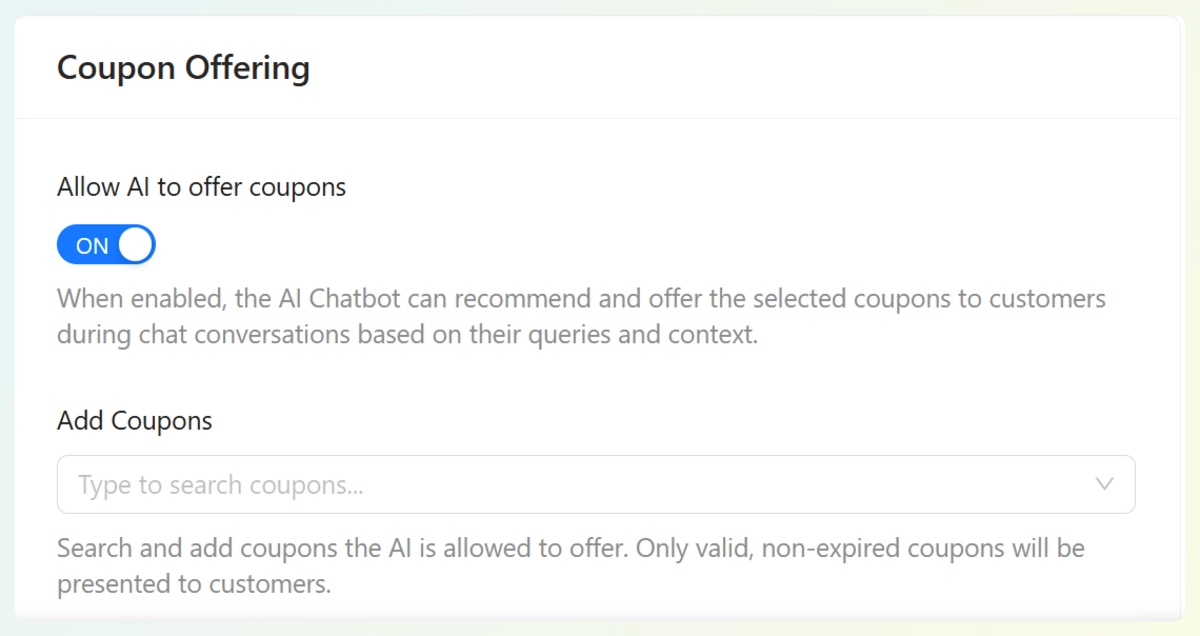
When enabled, the AI Chatbot can recommend and offer available coupons to customers during chat conversations based on their queries and context. You don’t write scripts, rules, or conditions. You flip the toggle, and the AI handles the rest using the coupons you already have set up in WooCommerce.
This is the same pattern StoreAgent already uses for product descriptions, alt text, and coupon generation. You stay in control of what exists. The AI decides when to use it.
How Does The AI Decide Which Coupon To Offer?
The AI reads each conversation in context. It looks at what the customer is asking, what’s in their cart, and how they’re browsing. Then it matches that context against your available coupons and their descriptions to decide whether offering a discount makes sense.
Here’s the key detail: the AI receives each coupon’s code, description, discount type, amount, and conditions. The description is what tells the AI what the coupon is for. Without it, the AI is guessing. With it, the AI can confidently match the right offer to the right customer at the right moment.
The AI only ever offers valid coupons. It won’t surface expired discounts, coupons that have hit their usage limit, or offers that don’t apply to the customer’s situation. It reads the conversation first and only offers something when it actually makes sense.
How Do You Set It Up? 3 Steps
Getting started takes under five minutes. Here’s how:
Step 1: Set up your coupons in WooCommerce as usual
Create your discounts, set the codes, configure the conditions, and publish. Nothing about your standard WooCommerce coupon workflow changes.
Step 2: Add a description to each coupon
Go to each coupon in WooCommerce and fill in the description field. Write a plain-language explanation of what the coupon is for and when it should apply.
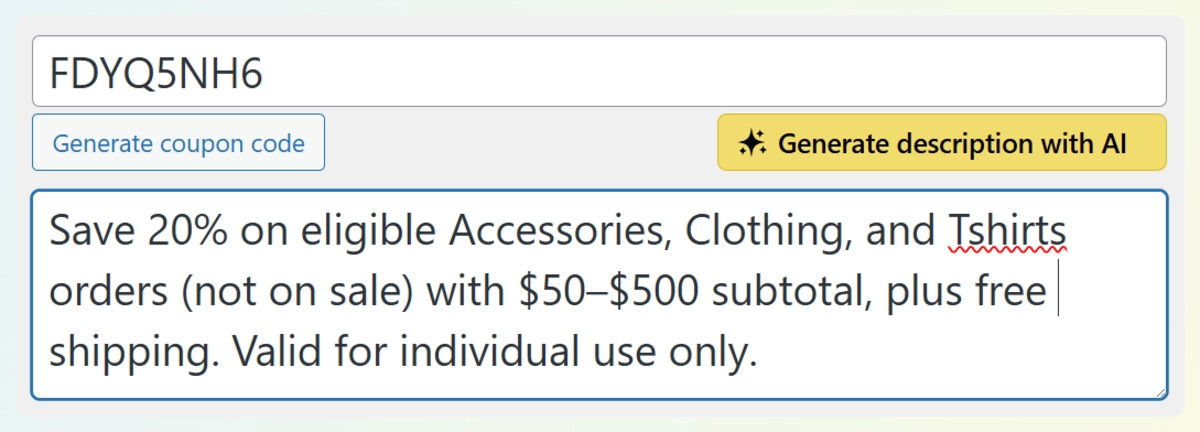
For example:
- “10% off for first-time buyers”
- “Free shipping on orders over $50”
- “15% off for customers who ask about our bundle deals”
For Advanced Coupons users, your existing setup carries over with no changes needed. The chatbot coupon feature works with both standard WooCommerce coupons and Advanced Coupons out of the box, and it plugs directly into StoreAgent’s existing AI Coupon Generator integration.
💡 Tip: This is the most important step. The AI uses coupon descriptions to understand when each offer is relevant. Coupons without descriptions are much less likely to be offered accurately. If you’ve already been using StoreAgent’s Auto-Generate Coupon Description feature, you likely have this done already.
Step 3: Go to StoreAgent > AI Chat > Coupon Offering
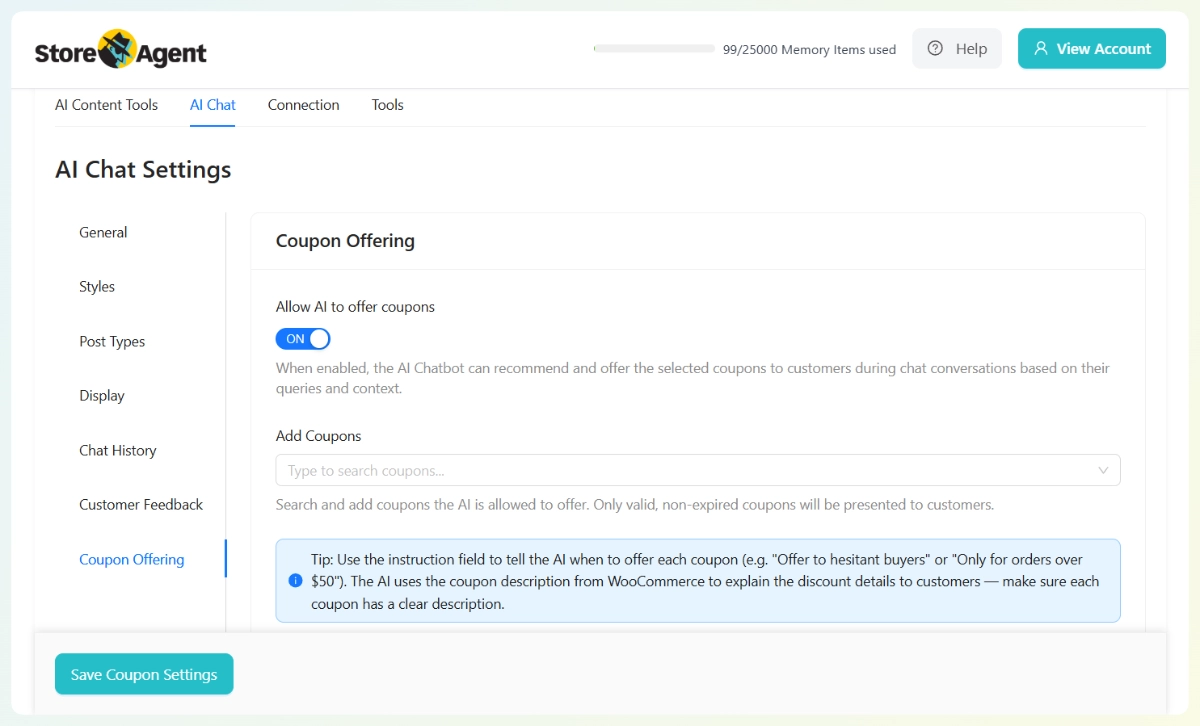
In your WordPress dashboard, open StoreAgent and click the AI Chat tab. From the left sidebar, select Coupon Offering. You’ll see the “Allow AI to offer coupons” toggle at the top of the panel. Switch it on.
The setting description confirms: “When enabled, the AI Chatbot can recommend and offer the selected coupons to customers during chat conversations based on their queries and context.”
Step 4: Add your coupons and write an instruction for each one
Once the toggle is on, use the Add Coupons search field to select which specific coupons the AI is allowed to offer. Only the coupons you add here will be surfaced in chat. This keeps you in full control of the offer pool.
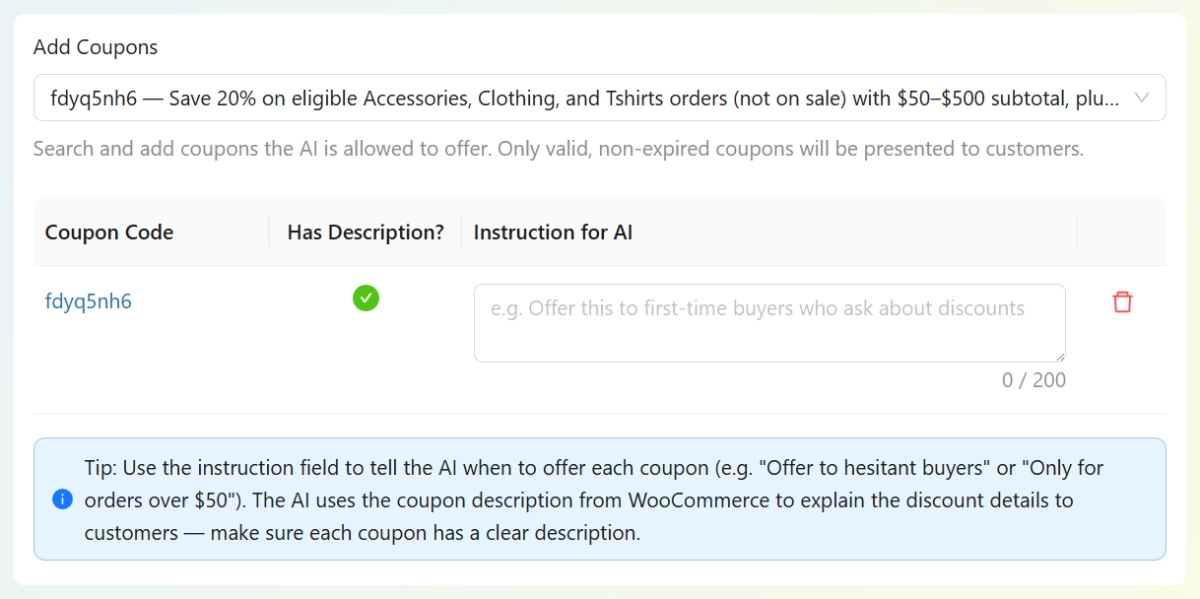
After adding a coupon, you’ll see two things in the table: a Has Description? column showing whether your WooCommerce coupon already has a description, and an Instruction for AI field. Use the instruction field to tell the AI when to offer that specific coupon. For example:
- “Offer this to first-time buyers who ask about discounts”
- “Only for orders over $50”
- “Offer to hesitant buyers who mention the price”
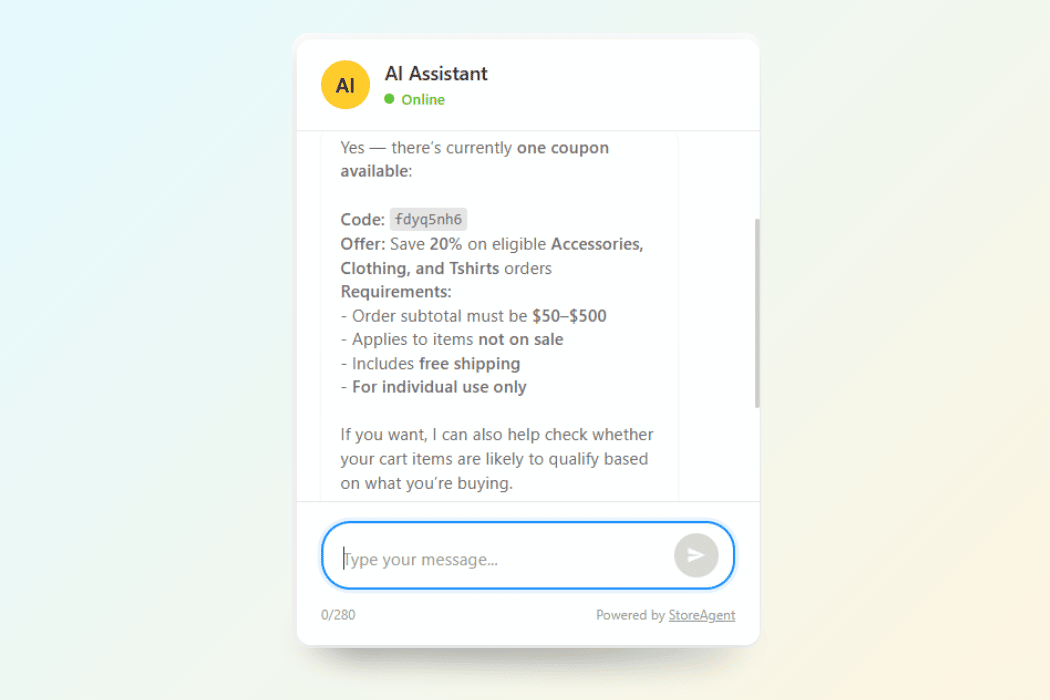
💡 Tip: The instruction field and the coupon description serve different purposes. The WooCommerce coupon description explains what the discount is (the details). The Instruction for AI tells the chatbot when to offer it (the trigger). Fill in both for best results.
What Will The AI Not Do?
The coupon chat feature has clear boundaries, and they’re intentional.
- The AI cannot create new coupons
- The AI cannot modify existing coupons
- The AI cannot offer expired coupons or coupons that have exceeded their usage limits
- The AI will not blanket-offer coupons to every customer regardless of context
The AI has read-only access to your coupon data. Your WooCommerce chatbot coupon pool is exactly what you define — the AI picks from what’s valid and available, nothing more.
Where Does This Feature Help Most?
This is where the chatbot increase sales potential becomes concrete. The coupon offer triggers naturally in conversations where a customer is on the fence.
Some real scenarios where this plays out well:
- Cart hesitation: A customer asks “is there a cheaper option?” or “do you have any deals on this?” The AI can respond with a relevant offer from your coupon library.
- Pricing objections: A customer mentions the price feels high. Rather than losing the sale, the AI can offer a discount tied to their cart value.
- Browsing context: A customer who’s viewed a specific product category multiple times during their session can be offered a category-specific coupon, without you scripting anything.
- First-time visitors: If your coupon description says “for first-time buyers,” the AI can offer it when the conversation signals the customer is new to your store.
This is upsell using AI chatbot logic at its most practical. There’s no if/then rule-building, no flowchart, and no manual handoff. The AI reads the room and acts on what it knows.
Get Started
The WooCommerce chatbot coupon feature is available now in StoreAgent! Update your plugin, write your coupon descriptions, and flip the toggle in AI Chat Settings.
If you haven’t set up StoreAgent yet, check our plans to find the right plan.
Already on a plan? Your chatbot can start offering coupons today. For full coverage of the customer journey, pair it with AI Chatbot Escalation And Feedback Collection. The two features work well together: the AI tries to close the sale first, and if something still goes wrong, escalation catches it before the customer walks away.