Reviewed by
If you want to reduce customer support costs on your WooCommerce store, you’re not alone. Support has a way of quietly becoming one of your biggest line items. You watch the same ‘where’s my order?’ emails pile up, hire another part-time agent, and wonder why margins keep shrinking even as sales climb.
AI automation changes that equation. This is a step-by-step playbook to reduce customer support costs with AI on your WooCommerce store, starting with the changes that deliver the biggest savings first. One example store cut monthly support spend from $4,500 to $1,249, saving over $39,000 a year. You can follow the same five steps, starting today.
In this article, we’ll cover how to audit your current support spend, sort tickets by cost and volume, roll out AI on your highest-volume queries first, measure your deflection rate, and project your savings as you scale. So, let’s get started!
Table Of Contents
- Why Do Support Costs Spiral as Your WooCommerce Store Grows?
- Step 1: Audit Your Current Support Costs (The 30-Minute Exercise)
- Step 2: Categorize Your Tickets by Cost and Volume
- Step 3: Implement AI for Your Highest-Volume Queries First
- Step 4: Measure Your Deflection Rate and Adjust
- Step 5: Project Your Savings and Scale
- Real-World Example: From $4,500/Month to $1,249/Month
- Start Cutting Support Costs This Week
- FAQ
Why Do Support Costs Spiral As Your WooCommerce Store Grows?
Support tickets grow faster than order volume because every new SKU, customer, and seasonal spike compounds the number of inquiries hitting your inbox. Double your orders and your ticket count can nearly triple.
At 50 orders a month, you handle support yourself. At 100, the founder-as-support-agent model breaks. By 500 orders, you’re hiring part-time agents and paying for helpdesk software, and support becomes a top-three expense.
How much does a single support ticket actually cost?
The average WooCommerce support ticket costs $15 to $25 when you factor in agent time, tool subscriptions, and the opportunity cost of delayed responses (Zendesk Customer Service Benchmark Report). At 300 tickets a month, that’s $4,500 to $7,500 walking out the door every single month.
Your customers feel it too. According to Gartner’s research on customer service, most consumers now prefer instant self-service over waiting hours for a human reply (Gartner Customer Service Research). The fix isn’t hiring more people. It’s automating the repetitive queries that eat up 60 to 70 percent of your support time.
Step 1: Audit Your Current Support Costs (The 30-Minute Exercise)
You need a clear baseline before automating anything, and this audit takes 30 minutes, not 30 days. Pull up your helpdesk dashboard, your email inbox, and your WooCommerce order notes, then count every customer interaction from the past 30 days.
Fill in this worksheet with your real numbers:
| Cost Category | Your Monthly Cost | Example (250 orders/mo) |
|---|---|---|
| Part-time agent wages | $ _______ | $2,250 |
| Helpdesk/ticketing software | $ _______ | $50 |
| Your own time (hours x hourly rate) | $ _______ | $1,500 |
| Live chat tool subscription | $ _______ | $30 |
| Phone/SMS support tools | $ _______ | $20 |
| Refund/return processing time | $ _______ | $400 |
| Total Monthly Support Cost | $ _______ | $4,500 |
| Total Tickets Last Month | _______ | 300 |
| Cost Per Ticket | $ _______ | $15.00 |
Cost-per-ticket formula: Total Monthly Support Cost / Total Tickets = Cost Per Ticket.
What costs do most store owners miss in their audit?
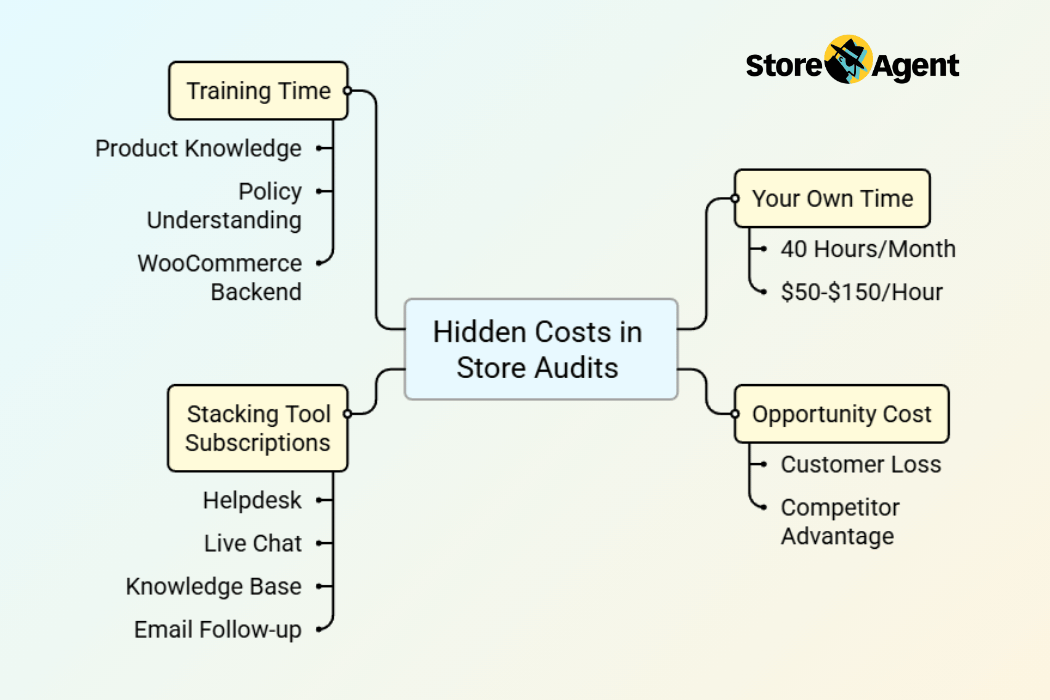
Most owners count agent wages and software but miss their own time, opportunity cost, and stacking tool subscriptions. These hidden costs typically double the real cost per ticket.
Here’s what to include:
- Your own time. If you spend 10 hours a week on support, that’s 40 hours a month. Value it at what you’d earn doing revenue-generating work instead ($50 to $150/hour for most store owners).
- Opportunity cost of slow replies. A customer who waits 6 hours for a pre-sale answer often buys from a competitor.
- Stacking tool subscriptions. Helpdesk, live chat, knowledge base, and email follow-up tools add up fast.
- Training time for new agents learning your products, policies, and WooCommerce backend.
Action item: Complete the audit worksheet with real numbers from your last 30 days. Don’t skip the “your own time” row.
Step 2: Categorize Your Tickets By Cost And Volume
Break your tickets into a simple priority matrix based on volume and complexity, then automate the high-volume, low-complexity categories first for the biggest immediate savings.
Use this framework:
- High volume + low complexity = Automate first (biggest savings, easiest wins)
- High volume + high complexity = Automate partially, escalate to humans
- Low volume + low complexity = Automate when convenient
- Low volume + high complexity = Keep human (custom issues, edge cases)
Which WooCommerce support categories can AI handle?
Five categories account for 70 to 85 percent of all WooCommerce support tickets, and AI can handle every one of them either fully or with human escalation for edge cases.
| Category | % of Tickets | AI Suitability | Priority |
|---|---|---|---|
| Order status (WISMO) | 25–35% | Excellent | 1 |
| Returns & refunds | 15–20% | High | 2 |
| Product information | 15–25% | High | 3 |
| Shipping questions | 10–15% | Excellent | 4 |
| Account issues | 5–10% | Moderate | 5 |
Start with category one and work down. Each category you automate compounds your savings. For a deeper look at how these ROI numbers work in practice, see our guide on The ROI of AI Customer Service: What WooCommerce Store Owners Need to Know.
Action item: Tag your last 100 tickets by category. Identify which category has the highest volume. That’s where you start.
Step 3: Roll Out AI For Your Highest-Volume Queries First
Start with your single highest-volume, lowest-complexity category rather than trying to automate everything at once. For 90 percent of WooCommerce stores, that means order status queries (WISMO).
Why should you start with order status queries?
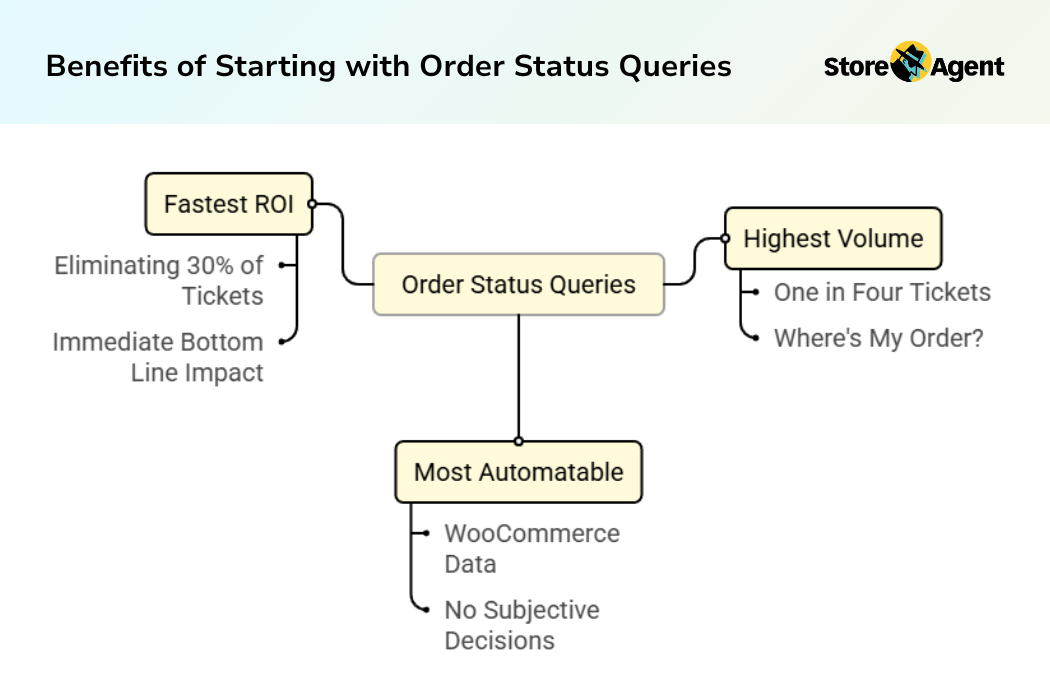
WISMO questions are the ideal starting point because they represent 25 to 35 percent of all tickets, require zero judgment calls, and deliver measurable savings within the first week.
Three reasons WISMO wins:
- Highest volume. One in four support tickets is some variation of “where’s my order?”
- Most automatable. The answer lives in your WooCommerce order data, like order status, line items, totals, and shipping address. No subjective decisions required.
- Fastest ROI. Eliminating 30 percent of tickets in week one shows up on your bottom line immediately.
According to Klarna’s press release, their AI assistant handles the equivalent workload of 700 full-time agents. You don’t need that scale, but the principle applies. AI handles the repetitive volume so humans handle work that actually needs a human.
How do you set up AI support for maximum deflection?
Install the StoreAgent plugin from your WooCommerce dashboard, let it sync your product catalog and order data, and enable the chat widget. The entire process takes minutes, not days.
Here’s the step-by-step:
- Install the StoreAgent plugin from your WooCommerce dashboard.
- Verify your product catalog syncs. StoreAgent automatically reads your products, categories, and order data.
- Enable the chat widget on your storefront.
- Test with real queries. Ask “where is order #1234?” and confirm the AI pulls the correct order details from your store.
- Set up escalation. Add a support URL for handoffs, choose whether to offer escalation after negative feedback, and have conversation summaries emailed to your team. (Escalation is available on the Growth plan and up.)
If you’re still weighing whether AI chat or traditional live chat is the right fit, our comparison of WooCommerce AI Chatbot vs. Live Chat: Which Is Right for Your Store? breaks down the key differences.
Action item: Install StoreAgent’s free tier (50 one-time AI chat replies) and run 10 test queries against your real WooCommerce data.
Step 4: Measure Your Deflection Rate And Adjust
Your deflection rate is the percentage of support queries AI resolves without any human involvement, and it’s the single most important metric for tracking how much you reduce customer support costs over time.
Deflection rate formula: (Tickets resolved by AI / Total tickets) x 100
What deflection rate should you expect?
Expect 30 to 40 percent deflection in week one, climbing to 65 to 80 percent by month three as you optimize store content and refine escalation rules.
| Time Period | Expected Deflection Rate | Optimization Action |
|---|---|---|
| Week 1 | 30–40% | Monitor unresolved queries, identify gaps |
| Month 1 | 45–55% | Refine product descriptions, add missing shipping info |
| Month 2 | 55–65% | Expand automation to returns and product queries |
| Month 3+ | 65–80% | Fine-tune escalation rules, seasonal adjustments |
If your deflection rate stalls below 50 percent after month one, the problem is usually missing information on your store, not the AI. Check for product pages without size or dimension details, a missing return policy page, shipping info buried in footer links, or missing estimated delivery times at checkout.
In our testing, adding a detailed shipping policy page and updating product descriptions with common pre-sale questions boosted deflection rates by 10 to 15 percentage points within a week.
What We’ve Seen: The most common reason for low deflection rates isn’t the chatbot, it’s thin store content. Store owners often expect the AI to answer questions their website doesn’t contain the answer to. We regularly see stores jump from 40% to 60%+ deflection just by adding a proper return policy page, filling in missing product attributes, and including estimated delivery times on product pages.
Action item: Set a calendar reminder for 7 days post-install. If deflection is below 30 percent, review unresolved queries to find content gaps.
Step 5: Project Your Savings And Scale
Combine your audit data from Step 1 with your deflection rate from Step 4 to project actual dollar savings. The formula to reduce customer support costs is simple: Current Monthly Support Cost multiplied by Deflection Rate, minus AI tool cost.
How much can different store sizes expect to save?
Here’s what this looks like in practice (example data, these savings projections are illustrative estimates based on typical WooCommerce support patterns, not from a specific store):
| Store Size | Monthly Orders | Current Support Cost | Projected Deflection | AI Tool Cost | Net Monthly Savings |
|---|---|---|---|---|---|
| Starter | 50–150 | $1,000–$2,500 | 50–65% | $0–$19/mo | $200–$500/mo |
| Growth | 150–500 | $3,000–$7,000 | 60–75% | $49/mo | $800–$2,000/mo |
| Established | 500–2,000 | $7,000–$20,000 | 70–80% | $49–$249/mo | $3,000–$8,000/mo |
These projections assume you keep at least one human agent for escalated issues. AI doesn’t replace your entire support team. It eliminates the repetitive work that burns agents out and costs you the most.
Real-World Example: From $4,500/Month To $1,249/Month In Support Costs
Here’s a composite example based on patterns across WooCommerce stores: a home goods store processing 250 orders per month with roughly 300 support tickets per month.
Before AI automation
| Cost Item | Monthly Cost |
|---|---|
| 2 part-time support agents | $3,000 |
| Helpdesk software | $50 |
| Owner time (15 hrs/mo x $100/hr) | $1,500 |
| Total | $4,500 |
| Cost per ticket | $15.00 |
After AI rollout (month 3)
| Cost Item | Monthly Cost |
|---|---|
| 1 part-time support agent (escalations only) | $1,200 |
| StoreAgent Pro plan | $49 |
| Owner time (0 hrs/mo) | $0 |
| Total | $1,249 |
| Cost per ticket (human-handled only) | $17.35 |
Results:
- Deflection rate: 76%
- Tickets reaching humans: 72/month (down from 300)
- Net monthly savings: $3,251
- Annual savings: $39,012
- ROI on StoreAgent Pro: 6,533%
The cost per human-handled ticket went up slightly, but that’s expected. The agent now handles only complex issues that justify the cost, while 228 tickets per month are resolved instantly by AI.
Curious how this ROI math scales for your store size? Our deep look at The ROI of AI Customer Service: What WooCommerce Store Owners Need to Know walks through the full calculation framework.
Start Cutting Support Costs This Week
Reducing customer support costs with AI isn’t a six-month project. It’s a series of small, measurable steps that compound week over week, starting with the queries that cost you the most.
Here’s a quick recap of what we covered:
- Audit your current costs (30 minutes with the worksheet above)
- Categorize tickets by volume and complexity
- Roll out AI for WISMO queries first
- Measure your deflection rate weekly
- Project savings and scale to more categories
The stores that see the biggest savings start small and expand. Begin with order status queries, prove the deflection rate on your own data, then roll AI into returns, product questions, and shipping inquiries.
StoreAgent’s free Lite plan gives you 50 one-time AI chat replies with full WooCommerce integration and zero setup friction. That’s enough to run the test, measure your baseline deflection rate, and build the business case for scaling.
If you’re ready to see how StoreAgent can reduce customer support costs for your WooCommerce store, explore our plans and pricing today.
Frequently Asked Questions
How much can AI really save on WooCommerce customer support?
Most WooCommerce stores see a 50 to 75 percent reduction in support costs within three months of rolling out AI automation. For a store spending $4,000 per month on support, that translates to $2,000 to $3,000 in monthly savings. The exact figure depends on your ticket volume, current cost structure, and how well your store content supports AI deflection.
Will customers be frustrated by an AI chatbot instead of a human?
Not if the AI actually answers their questions accurately. Research from Gartner shows consumers increasingly prefer instant self-service over waiting hours for a human reply. The key is using AI that connects to your real WooCommerce data, like order status, product details, and policies, rather than a generic bot that gives scripted non-answers.
How long does it take to set up AI customer support on WooCommerce?
With StoreAgent’s WooCommerce chatbot, setup takes minutes. Install the plugin, let it sync your product catalog and order data, and the chat widget goes live. No API keys, no developer, no manual training required. You can start seeing deflection results within the first week.
What happens when the AI can’t answer a question?
Your customer can hand off to your team. StoreAgent lets shoppers request a human at any point in the chat, and if a customer leaves negative feedback, the chat can automatically offer them an escalation option. The conversation summary is emailed to your team so they can pick up where the AI left off. (Escalation is available on the Growth plan and up.)
Do I need an OpenAI API key or developer to get started?
No. StoreAgent connects to your WooCommerce store directly through the plugin, with no third-party API keys to manage and no developer setup. The 3-step onboarding wizard auto-detects your products and gets the chat widget live without any code.