Reviewed by
You see an exciting AI plugin demo, install it, spend an hour configuring it, and never use it again. This happens more often than anyone admits, and it usually comes down to choosing the wrong WooCommerce AI features for your store. The plugin looked amazing with sample data, but it fell apart with your actual product catalog, your pricing structure, and your customer base.
The problem isn’t the technology. It’s how store owners evaluate AI plugins. Most “best AI plugin” lists are affiliate-driven rankings that prioritize commission over fit. Demo-based evaluations don’t reflect real-world usage. And generic WordPress plugin advice doesn’t address AI-specific concerns like API keys, model quality, and data privacy.
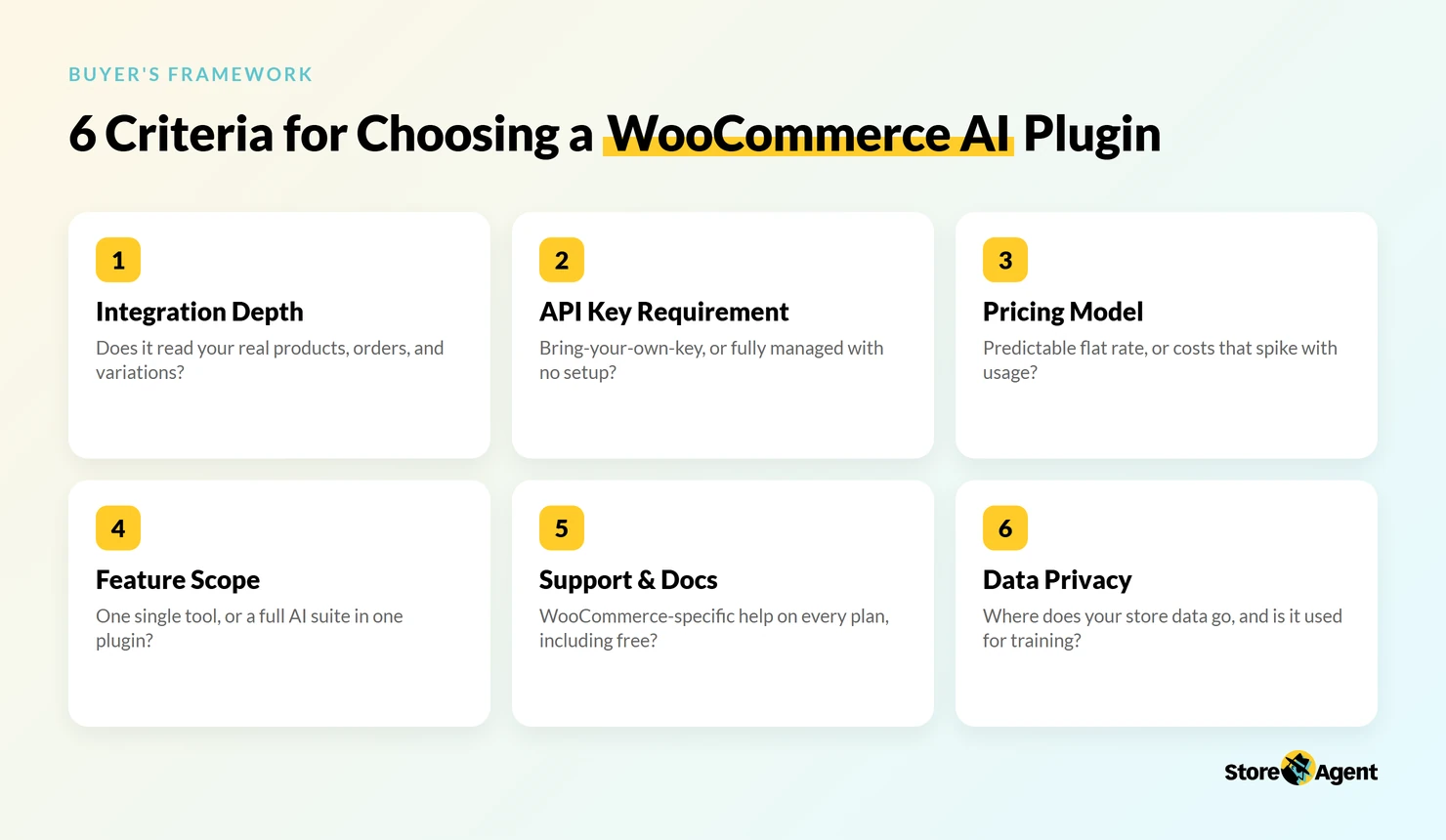
This framework gives you six criteria that tell you whether a plugin’s WooCommerce AI features will actually work for your store or just become expensive shelfware. In this guide, we’ll walk through each criterion, give you a scoring checklist, and show you how to evaluate any plugin, including our own WooCommerce AI plugin.
Why Most “Best AI Plugin” Lists Are Useless
Affiliate-driven rankings sort tools by revenue share, not by fit. A plugin paying 40% commission will outrank a better tool paying 20%, regardless of which one actually solves your problem. Demo-based evaluations are equally misleading because every AI plugin looks impressive when the questions are scripted.
What you need instead is a framework that evaluates the things that actually determine long-term value. Not feature counts, not AI model names, not marketing promises.
The six criteria below come from looking closely at the WooCommerce AI features that matter and watching which plugins store owners keep using after the first month.
💡 For specific head-to-head comparisons, see our detailed StoreAgent vs Tidio comparison and our WooCommerce AI plugin comparison.
Criterion #1: WooCommerce Integration Depth
What “integration” actually means
Not all WooCommerce integrations are equal. There are three levels:
- Surface integration: The plugin sits on WordPress and accesses basic post data. It knows your site exists but doesn’t understand your store.
- Medium integration: The plugin reads WooCommerce products and categories. It can reference your catalog but misses variations, attributes, pricing tiers, and inventory levels.
- Deep integration: The plugin accesses products, orders, customers, variations, attributes, pricing, and inventory in real time. It understands your store the way you do.
Why depth matters
A chatbot that can’t look up orders can’t answer “where’s my order?” A content tool that doesn’t know your product attributes generates generic copy that could apply to any store. WooCommerce’s own product documentation shows how much structured data sits inside a variable product, with its own price, SKU, stock level, and attributes per variation, and shallow integrations miss most of it.
The difference shows up fast in real conversations. A surface-level chatbot answers “Do you have this in blue, size large?” with a generic “Please check our product page.”
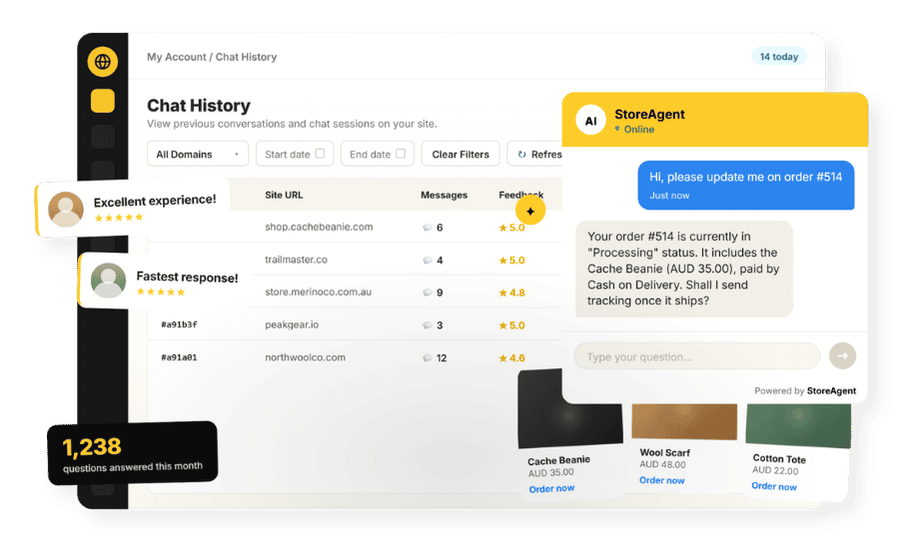
A deeply integrated WooCommerce chatbot like StoreAgent Chat pulls the answer straight from your product data in seconds, including current stock status.
Questions to ask
- Does it read WooCommerce order data in real time?
- Does it understand product variations (size, color, material)?
- Can it access customer purchase history?
- Does it work with WooCommerce-specific extensions (subscriptions, memberships)?
Scoring: Green = full product/order/customer access. Yellow = product data only. Red = WordPress post data only.
Criterion #2: API Key Requirement
BYOK (bring your own key) vs. managed SaaS
Some AI plugins require you to provide an API key from OpenAI, Anthropic, or Google. You create a developer account, generate a key, paste it into the plugin, and pay the AI provider directly for every request. Other plugins handle all AI processing themselves. You pay one subscription and never touch an API key.
The hidden costs of BYOK
The sticker price of a BYOK plugin is misleading because it doesn’t include API costs. According to Geekflare’s analysis of BYOK AI strategy, usage-based API billing creates unpredictable monthly costs that can vary significantly based on conversation volume and content length.
Beyond cost, BYOK adds complexity:
- You manage API key security, rate limits, and model updates
- If the AI provider changes pricing or deprecates a model, your plugin breaks until you reconfigure
- Troubleshooting involves two vendors (the plugin developer says “it’s an OpenAI issue” and OpenAI says “we don’t support third-party plugins”)
When BYOK makes sense
BYOK can work if you need access to specific fine-tuned models, if you have very high volume and can negotiate API pricing directly, or if you have technical staff to manage the configuration. For most WooCommerce store owners, managed AI is simpler and more cost-effective.
That trade-off is exactly why more merchants now look for AI without API key setups before they ever compare feature lists.
Questions to ask
- Does this plugin require an API key?
- What’s the estimated monthly API cost at my usage level?
- What happens if the API provider changes pricing or deprecates the model I’m using?
Scoring: Green = no API key needed, flat pricing. Yellow = API key optional. Red = API key required, no alternative.
Criterion #3: Pricing Model
Per-use vs. flat rate vs. freemium
Three pricing models dominate the WooCommerce AI plugin space:
- Per-use: Pay per message, per generation, or per API call. Costs scale linearly with usage, which means your busiest months are also your most expensive.
- Flat rate: Fixed monthly fee regardless of usage. Predictable, but may feel expensive at low volume.
- Freemium: Free tier with paid upgrades. Best for testing before committing, and ideal for small stores that can stay within the free limits.
The real cost calculation
Don’t compare sticker prices. Compare cost per outcome: cost per chat resolved, cost per description generated, cost per support query deflected. A $49/month flat-rate plugin that handles 500 chats costs $0.10/chat. A $29/month plugin plus $40/month in API fees that handles 300 chats costs $0.23/chat.
Factor in time cost too. A plugin that takes two hours to configure costs more than one that works in five minutes, even if the subscription is cheaper.
Questions to ask
- What’s the total monthly cost at my expected usage level?
- Are there per-message or per-generation fees on top of the subscription?
- Is there a free tier to test before committing?
Scoring: Green = free tier plus predictable paid tiers. Yellow = flat rate only. Red = per-use with no cost cap.
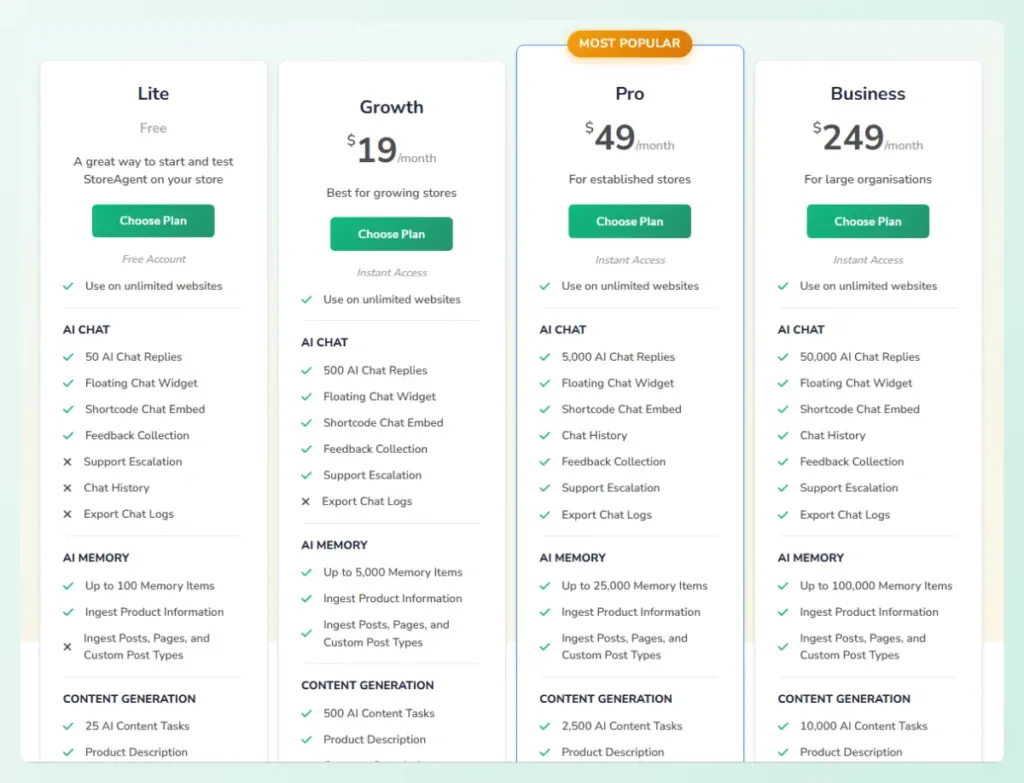
StoreAgent checks these boxes: no API key, a free Lite tier with one-time starter credits (200 AI tasks and 50 AI chat replies), and flat-rate paid plans that scale predictably. See plans.
Criterion #4: Feature Scope
Single-purpose vs. multi-feature suite
The WooCommerce AI features you need fall into two camps:
- Single-purpose: Does one thing well (chatbot only, or content generation only). These tools often go deeper on their specific feature.
- Multi-feature suite: Combines chatbot, content generation, insights, and other AI capabilities in one plugin. Fewer plugins to manage, one shared data layer, and usually one subscription.
When each makes sense
Choose single-purpose if you already have tools covering other needs and just want to fill a specific gap. Choose a multi-feature suite if you want one plugin to handle multiple AI use cases without juggling subscriptions, configurations, and data silos.
The trade-off question is whether the suite sacrifices depth for breadth. Test each feature individually. A suite that does three things at 80% quality is often more valuable than three separate plugins at 95% quality, because you eliminate integration headaches and get shared context across features.
Questions to ask
- What specific AI features do I need today? In six months?
- Would multiple single-purpose plugins overlap or conflict?
- Does the suite sacrifice depth for breadth in any feature area?
Scoring: Green = multiple features, each with genuine depth. Yellow = strong in one area, basic in others. Red = breadth without depth in any area.
See StoreAgent’s full feature set, which covers chatbot, content generation, alt text, and insights, each with deep WooCommerce integration.
Criterion #5: Support Quality And Documentation
WooCommerce-specific documentation
Generic WordPress documentation is not enough for a WooCommerce AI plugin. You need setup guides that reference products, orders, and catalog data. You need troubleshooting docs that address WooCommerce-specific issues like variable products, custom attributes, and extension conflicts.
Support responsiveness
Can you get help from someone who understands WooCommerce, not just WordPress? Is support included on all plans, or gated behind premium tiers? Free-tier support matters because that’s when you’re most likely to need help during initial setup.
Questions to ask
- Is the documentation WooCommerce-specific?
- What’s the average support response time?
- Is support available on all plans, including free?
Scoring: Green = WooCommerce-specific docs plus responsive support on all plans. Yellow = generic docs plus support on paid plans only. Red = no documentation plus no support.
Criterion #6: Data Privacy And Security
Where your data goes
This varies by architecture:
- BYOK plugins: Your product and customer data goes to the API provider (OpenAI, Google, etc.) when the plugin sends requests. You’re subject to the AI provider’s data policies.
- Managed SaaS plugins: Your data goes to the plugin provider’s servers. The plugin developer controls how data is processed and stored.
Training and data usage
The critical question is whether the provider uses your store data to train AI models. Your product catalog, customer information, and order data are business assets. If a provider trains on your data, that information could influence responses for other users, including competitors. If you serve EU customers, GDPR also governs how that data can be collected, processed, and stored.
Questions to ask
- Where is my data processed and stored?
- Does the provider train on my store data?
- Is the plugin GDPR compliant?
- Can I export or delete my data on request?
Scoring: Green = clear privacy policy, no training on your data, GDPR compliant. Yellow = privacy policy exists but vague on training. Red = no privacy policy or confirmed data training.
Your WooCommerce AI Features Evaluation Checklist
Use this checklist to score the WooCommerce AI features of any plugin you’re considering. Mark each question Green (yes), Yellow (partial), or Red (no):
| Question | Score |
|---|---|
| Does it access WooCommerce product data (titles, descriptions, attributes)? | |
| Does it access WooCommerce order data in real time? | |
| Does it understand product variations (size, color, etc.)? | |
| Does it work without an external API key? | |
| Is the monthly cost predictable at your usage level? | |
| Is there a free tier to test before committing? | |
| Does it combine multiple AI features (chat, content, insights)? | |
| Is the documentation WooCommerce-specific? | |
| Is support available on your plan level? | |
| Does the privacy policy address data training? | |
| Is it GDPR compliant? | |
| Can you export or delete your data? |
How to read your results: Mostly green means the plugin is a strong candidate. Any red answers deserve investigation before you commit. Multiple reds suggest you should look elsewhere.
What We’ve Seen: Across the WooCommerce AI plugins we’ve looked at, two criteria most reliably predict long-term value: integration depth and API key requirement. Plugins with shallow WooCommerce integration tend to produce generic, unhelpful AI responses, because the AI doesn’t know enough about your store to be useful. And BYOK plugins often surprise store owners with unpredictable costs in month two or three, once the novelty wears off and usage climbs. The plugins store owners keep using are the ones that deeply understand WooCommerce data and price predictably.
💡 Want to see how StoreAgent scores on this checklist? Try it free, no commitment, no API key. Get started with StoreAgent’s WooCommerce AI chatbot.
Start Evaluating With The Right Framework
The WooCommerce AI plugin you choose should be based on your store’s specific needs, not on which plugin has the flashiest marketing or the longest feature list. Integration depth and pricing predictability are the two factors that separate tools you’ll actually use from tools that become shelfware.
Here’s what to act on:
- Check integration depth first because shallow integration means generic, unhelpful AI
- Verify the API key requirement to avoid surprise costs and setup complexity
- Compare total cost of ownership, not sticker prices
- Run through the full checklist before committing to any tool
StoreAgent was built to score well on this checklist: deep WooCommerce integration, no API key, a free tier, and chatbot plus content plus insights in one plugin, backed by WooCommerce-specific documentation and clear data privacy. In short, it is a WordPress AI agent that works from your store data, not a general writing tool.
If you’re ready to choose with confidence, try it free and evaluate its WooCommerce AI features against any other tool using the framework above.
FAQ: Choosing A WooCommerce AI Plugin
Which WooCommerce AI features matter most when choosing a plugin?
The WooCommerce AI features that matter most are deep store integration and a predictable pricing model. An AI chatbot that reads live order and product data answers real customer questions, and flat-rate pricing keeps your costs steady month to month. Features like content generation, alt text, and insights add value too, but only when they pull from your actual WooCommerce data. The same test applies to a WooCommerce MCP server, which lets Claude or ChatGPT work on that live data for you.
Do I really need a WooCommerce-specific AI plugin?
Yes, if you want the AI to understand your products, orders, and customers. Generic WordPress AI plugins treat your store like a blog. They can’t answer “where’s my order?” or generate product-specific content because they don’t read WooCommerce data. For chatbot best practices for WooCommerce, WooCommerce-specific integration is non-negotiable.
Is a free AI plugin worth using?
It depends on what’s limited. A free tier with real functionality (like StoreAgent’s Lite plan with starter AI task and chat credits) is a genuine tool for small stores. A “free” plugin that requires a $20/month API key isn’t actually free. Check the total cost, not just the plugin price.
Should I choose a plugin that uses the latest AI model?
Model version matters less than integration depth. The latest model with shallow WooCommerce access produces worse results than a well-integrated plugin using any capable model. Focus on data access, not model marketing.
How many AI plugins should I install on my WooCommerce store?
As few as possible. Each plugin adds page load time, potential conflicts, and maintenance overhead. A multi-feature suite that handles chatbot, content, and insights is preferable to three separate plugins doing the same work independently.
What’s the biggest mistake store owners make when choosing an AI plugin?
Choosing based on the demo instead of the framework. Every AI plugin looks impressive with sample data. Evaluate how it works with your actual products, your actual order volume, and your actual budget. The 10-minute test matters more than any feature comparison table.