Reviewed by
Most WooCommerce product page SEO problems follow the same pattern: the product description is decent, but everything else is either missing or left on WooCommerce defaults. Alt text? Empty. Meta descriptions? Pulled from the first sentence of the product description. Product tags? Either none, or a random assortment that matches no search terms anyone actually types.
A WooCommerce product page has at least 12 elements that affect its search ranking. Most store owners optimize two or three of them and wonder why they’re stuck on page three. The gap between a partially optimized and a fully optimized product page is where rankings are won or lost.
This guide covers every product page SEO element on a WooCommerce store, from title tags to schema markup. For each one, you’ll see what good optimization looks like and which elements WooCommerce AI tools like StoreAgent can handle automatically. So, let’s get started!
Table of Contents
The Anatomy Of A WooCommerce Product Page (SEO Edition)
Every WooCommerce product page contains multiple SEO-relevant elements, and each one sends signals to search engines about what the page is about and whether it deserves to rank.
Here are the 12 elements that matter:
- Title tag: What appears in search results and browser tabs
- Meta description: The snippet below the title in search results
- URL slug: The web address of the product page
- Product description: The main body content for the product
- Short description: The summary that appears above the fold
- Product images + alt text: Visual content with descriptive attributes
- Product tags: Keyword labels that create archive pages
- Product categories: The organizational structure of your catalog
- Schema markup: Structured data for rich search results
- Internal links: Connections to other pages on your site
- Customer reviews: User-generated content and social proof
- Page speed: How fast the product page loads
Most store owners focus on the product description and maybe the title tag. The remaining ten elements are either ignored or left on WooCommerce defaults, which are rarely optimized for search.
Title Tags And Meta Descriptions
Title tags and meta descriptions are what shoppers see in search results before they ever visit your product page. Getting them right directly impacts your click-through rate.
Title tag best practices for product pages
Your title tag should include the product name, a primary keyword, and a differentiating detail, all within 50 to 60 characters. WooCommerce’s default title format is usually just the product name followed by the site name, which wastes valuable characters.
A well-optimized product page title looks like this:
- Default: “Blue Running Shoes | Your Store Name”
- Optimized: “Blue Running Shoes for Men | Lightweight, Size 7-13”
The optimized version includes the product, a keyword qualifier (“for Men”), and a feature that encourages clicks. You can control title tags through an SEO plugin like AIOSEO or Yoast. Both let you set custom title templates for product pages and override individual titles when needed.
Meta description optimization
Meta descriptions don’t directly affect rankings, but they influence whether someone clicks your listing. Keep them between 120 and 155 characters, lead with the primary product keyword, and include a call-to-action.
Honest gap: StoreAgent does not currently generate meta titles or meta descriptions. For this element, pair StoreAgent with an SEO plugin. AIOSEO and Yoast both offer meta description templates and AI-assisted generation for product pages.
Product Descriptions: The SEO Workhorse
Product descriptions carry the most SEO weight on a product page. Google uses this content to understand what the product is, who it’s for, and which searches it should appear in.
What Google looks for in product descriptions
Google prioritizes unique, detailed content that matches the searcher’s intent. Its helpful content guidance rewards pages that avoid simply copying or rewriting other sources and instead add “substantial additional value and originality,” which is exactly the problem with reusing a manufacturer’s description.
The key requirements:
- Unique content: Not copied from the manufacturer’s description (which dozens of other stores are using)
- Keyword relevance: Natural inclusion of terms shoppers actually search for
- Sufficient length: Typically 150 to 300 words for a standard product page
- User intent alignment: Addressing the questions a buyer has before purchasing
How AI generates SEO-optimized descriptions
StoreAgent’s AI product description tool generates descriptions using your existing product data: name, category, attributes, price, and any existing content. The output is unique per product, which solves the duplicate content problem that plagues stores using manufacturer descriptions.
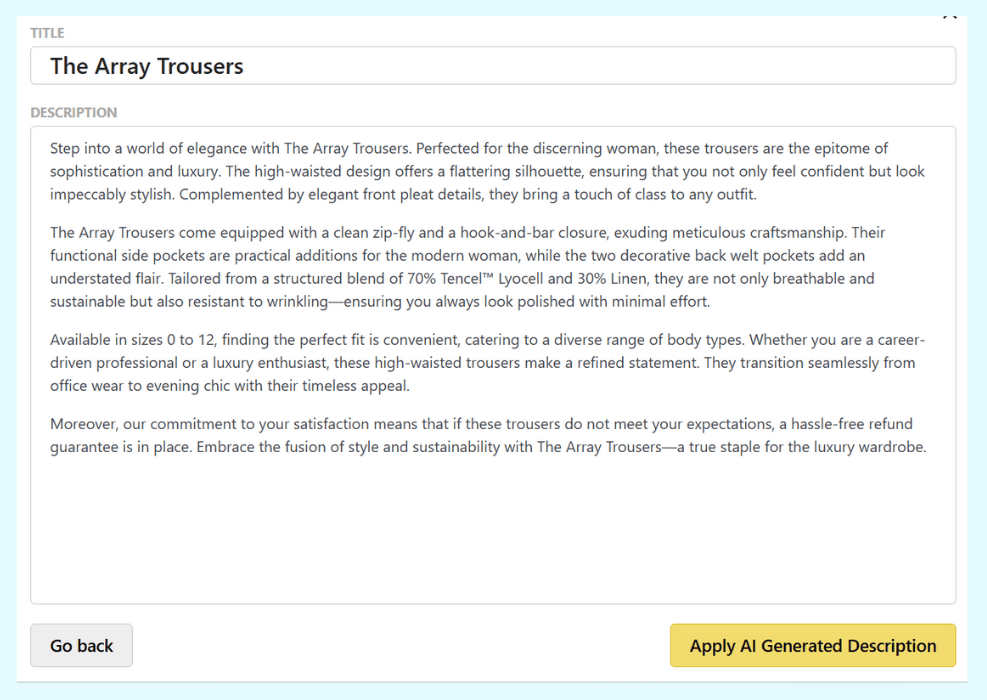
Here’s a before-and-after example:
Before (manufacturer copy used by 40+ stores):
“Premium blue running shoes. Lightweight design. Available in sizes 7-13.”
After (AI-generated, unique to your store):
“These lightweight blue running shoes are designed for daily training on road and track surfaces. Available in men’s sizes 7 through 13, they feature a breathable mesh upper and responsive cushioning that holds up through long runs. The reinforced heel counter adds stability without adding weight.”
The AI-generated version is unique, includes natural keyword variations (“lightweight blue running shoes,” “men’s sizes,” “daily training”), and gives Google more content to index. For bulk optimization across your catalog, see our guide to SEO product descriptions.
Short Descriptions And Their SEO Role
The short description appears above the fold on WooCommerce product pages, typically next to the product image and price. Search engines encounter this content first in the page’s HTML structure, which gives it extra weight.
A good short description is 40 to 80 words, includes the primary product keyword, and summarizes the key selling point. Think of it as a search-optimized elevator pitch.
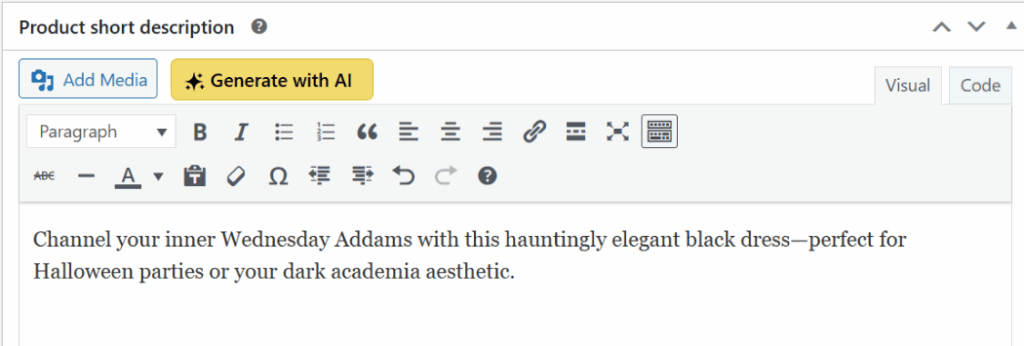
StoreAgent’s short description generator creates concise, keyword-rich short descriptions that complement the longer product description without duplicating it. This matters because Google penalizes pages where the same content appears in multiple sections.
Product Image Optimization And Alt Text
Product images influence both regular search rankings and Google Image Search visibility, which accounts for a significant share of all web searches. Google’s image SEO documentation advises descriptive filenames and “useful, information-rich” alt text that stays in context of the page.
File names, compression, and dimensions
Before uploading product images:
- Rename files descriptively: Use “blue-running-shoes-mens.jpg” instead of “IMG_4532.jpg”
- Compress images: Tools like ShortPixel or Imagify reduce file size without visible quality loss. Large images slow down product pages, which hurts rankings.
- Use consistent dimensions: Set a standard size (e.g., 800×800 or 1000×1000) for all product images so they load predictably
Alt text: the most neglected SEO element
Alt text describes what’s in an image for search engines and screen readers. Across the WooCommerce stores we see, most product images have no alt text at all, often between 60% and 80% of them. That’s a huge missed opportunity.
Good alt text is specific and natural:
- Empty (common): (no alt text)
- Too generic: “Product image”
- Optimized: “Blue men’s running shoe with white sole, side view”
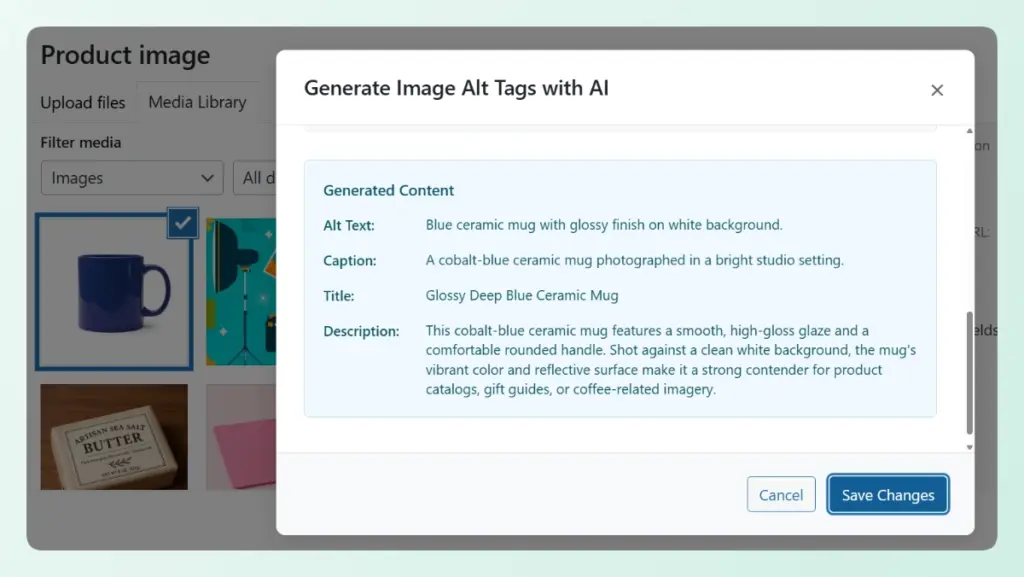
StoreAgent’s AI image alt text generator analyzes product images and generates descriptive alt text automatically. For stores with hundreds of products, this turns a multi-day manual task into something that runs in minutes.
💡 For a detailed walkthrough on fixing missing alt text across your store, see our guide on how to find and fix missing alt text. You can also read our broader guide on how to optimize images for SEO.
What We’ve Seen: Adding AI-generated alt text to product images that previously had none consistently leads to measurable Google Image Search traffic within two to four weeks. For stores with 100 or more products, this is the single highest-ROI product page SEO fix because it’s easy to automate and the competition is low. Most competing stores have empty alt text too.
Product Tags And Categories For SEO
Tags and categories do more than organize your catalog. They create archive pages that can rank for broader search terms, and they build the internal linking structure that helps Google understand your site’s topical hierarchy.
Categories should follow a clear, hierarchical structure:
- Shoes > Running Shoes > Men’s Running Shoes
- Shoes > Running Shoes > Women’s Running Shoes
Tags should target specific attributes or use cases that shoppers search for:
- “lightweight,” “waterproof,” “trail running,” “wide fit”
Common mistakes include using too many tags (creating thin archive pages), inconsistent naming (mixing “Blue” and “blue” as separate tags), and ignoring category descriptions entirely.
StoreAgent’s product tag generator suggests tags based on your product data and existing catalog structure. The AI category description generator creates unique content for category archive pages, which are often left completely blank on WooCommerce stores.
Schema Markup And Rich Snippets
Product schema markup is structured data that tells search engines specific details about your product: price, availability, ratings, and more. According to Google’s product structured data documentation, adding it can make your listings eligible for richer search results that show price, availability, and review ratings, which helps your listing stand out and earn more clicks.
WooCommerce SEO plugins handle product schema automatically. AIOSEO and Yoast both generate Product schema that includes price, availability, review ratings, and brand information. If you’re using either plugin, your basic product schema is likely already in place.
Where most stores fall short is ensuring the schema data matches the on-page content. If your schema says a product is “In Stock” but the product page shows “Backordered,” that inconsistency can lead to schema validation warnings.
Note: StoreAgent does not handle schema markup. This is one of the elements where an SEO plugin is the right tool. AIOSEO and Yoast both offer this out of the box.
Internal Linking From Product Pages
Internal links from product pages distribute link equity across your site and help Google discover related content. WooCommerce includes some built-in internal linking through related products, upsells, and cross-sells, but these are often left at default settings.
Three internal linking opportunities most WooCommerce stores miss:
- Product description links to blog content: If you have a blog post about “How to Choose Running Shoes,” link to it from your running shoe product descriptions. This connects your informational and commercial content.
- Category breadcrumbs: Make sure breadcrumb navigation is enabled and visible. It creates automatic internal links up your category hierarchy.
- Cross-sell and upsell configuration: Manually set related products rather than relying on WooCommerce’s automatic suggestions, which are often irrelevant.
URL Structure And Technical SEO
Clean URLs help search engines and shoppers understand what a page is about. WooCommerce gives you control over permalink settings, but the defaults aren’t always optimal.
Best practices for WooCommerce product URLs:
- Remove the “/product/” base: In WooCommerce settings, you can simplify your product URLs. A URL like
yourstore.com/blue-running-shoesis cleaner thanyourstore.com/product/blue-running-shoes - Keep slugs short and keyword-rich: Remove filler words. Use “blue-running-shoes-mens” instead of “the-best-blue-running-shoes-for-men-2026”
- Handle variable products carefully: WooCommerce generates parameter-heavy URLs for product variations. Make sure canonical tags point to the parent product page to avoid duplicate content issues.
Both AIOSEO and Yoast handle canonical tags automatically for WooCommerce variable products, so this is typically managed if you have either plugin installed.
The Complete Product Page SEO Checklist
Here’s every product page SEO element, prioritized by impact, with AI automation status:
| SEO Element | Priority | AI Automated? | Recommended Tool |
|---|---|---|---|
| Product Description | Critical | Yes | StoreAgent Content |
| Short Description | High | Yes | StoreAgent Content |
| Image Alt Text | High | Yes | StoreAgent Alt Text Generator |
| Product Tags | Medium | Yes | StoreAgent Tag Generator |
| Category Descriptions | High | Yes | StoreAgent Category Descriptions |
| Title Tag | Critical | Partial (SEO plugin) | AIOSEO or Yoast |
| Meta Description | High | Partial (SEO plugin) | AIOSEO or Yoast |
| Schema Markup | High | Automatic (SEO plugin) | AIOSEO or Yoast |
| URL Structure | Medium | Manual | WooCommerce permalink settings |
| Internal Links | Medium | Manual | Manual or plugin-assisted |
| Image Compression | Medium | No | ShortPixel or Imagify |
| Page Speed | High | No | Hosting + caching plugin |
StoreAgent automates five of the 12 elements on this checklist. Pair it with AIOSEO or Yoast for title tags, meta descriptions, and schema, and you’ve covered nine of the 12 with minimal manual work.
What We’ve Seen: The stores that see the biggest ranking improvements are the ones that optimize all elements together, not just the obvious ones. A product page with a great description but no alt text, empty tags, and a missing meta description is leaving ranking signals on the table. AI makes the comprehensive approach feasible for the first time.
StoreAgent automates five of the 12 product page SEO elements on this checklist. Try it free and start checking items off.
FAQ: WooCommerce Product Page SEO
How do I optimize WooCommerce product pages for SEO?
Start with the highest-impact elements: unique product descriptions, optimized title tags, and image alt text. Then work through meta descriptions, product tags, categories, and schema markup. Use the checklist above to track your progress. AI tools like StoreAgent can automate descriptions, short descriptions, alt text, tags, and category descriptions.
Can AI write SEO-friendly product descriptions?
Yes. AI tools generate unique, keyword-optimized product descriptions based on your product data. The key advantage is uniqueness: instead of using the same manufacturer description as dozens of competitors, AI creates content specific to your store. StoreAgent’s AI product description tool uses your WooCommerce product data to generate descriptions that include natural keyword variations.
What is the most important product page SEO element?
The product description carries the most weight because it gives Google the most content to index and match against search queries. However, product page SEO works best as a system. A strong description with no alt text, empty meta descriptions, and missing schema is leaving rankings on the table.
How do I add alt text to WooCommerce product images?
In WooCommerce, click on any product image in the media library and enter alt text in the “Alt Text” field. For bulk updates across hundreds of products, AI tools like StoreAgent’s alt text generator can fill in missing alt text automatically based on product data and image analysis.
Do product tags help with WooCommerce SEO?
Yes. Product tags create archive pages that can rank for specific search terms. The key is using tags that match actual search queries (like “waterproof” or “wide fit”) rather than internal labels that shoppers wouldn’t search for. Keep the number manageable to avoid creating thin archive pages.
Start Optimizing Your Product Pages Today
Strong product page SEO comes from treating every element on the page as a ranking signal and making sure none of them are left blank or on defaults. Better descriptions help, but they’re only one piece of the page.
The good news: you don’t have to optimize every element manually. AI handles the repetitive, high-volume work (descriptions, short descriptions, alt text, tags, category content) while SEO plugins cover the structural elements (title tags, meta descriptions, schema).
Here’s a quick recap of what we covered:
- The Anatomy of a WooCommerce Product Page: Identify all 12 SEO elements on your product pages
- Product Descriptions: Replace duplicate manufacturer copy with unique AI-generated content
- Image Alt Text: Fill in missing alt text for your highest-traffic products first
- The Complete Checklist: Work through every element systematically using the checklist
If you’re ready to stop optimizing product pages one element at a time, StoreAgent handles descriptions, short descriptions, alt text, tags, and category descriptions from one dashboard.
Start with the free plan and see how AI changes your product page SEO workflow. For a broader look at AI content capabilities, see our guide to WooCommerce AI content generation.