If your store does not publish prices, or publishes several of them depending on who is logged in, the AI chat was a problem. It read the catalogue, it saw a price, and it quoted that price to whoever asked. There was no setting to stop it.
There is now. Include prices in responses sits under your AI Chat settings, on by default. Switch it off and StoreAgent removes every price field from the product data it hands the AI, so the model has nothing to quote rather than instructions to stay quiet about it.
In this article, we’ll cover where the setting lives, what it strips, why price filtering still works, what the chat says when a shopper asks for a price anyway, and which stores this was built for. So, let’s get started!
Table of Contents
- Where To Find The Setting
- What Happens When You Switch It Off
- Shoppers Can Still Filter By Price
- What The Chat Says When Someone Asks “How Much?”
- AI Memory Is Covered Too, With No Re-Index
- It Applies Everywhere The AI Reads Your Catalogue
- What Stays Visible
- Who This Was Built For
- Get Started
- Frequently Asked Questions
Where To Find The Setting
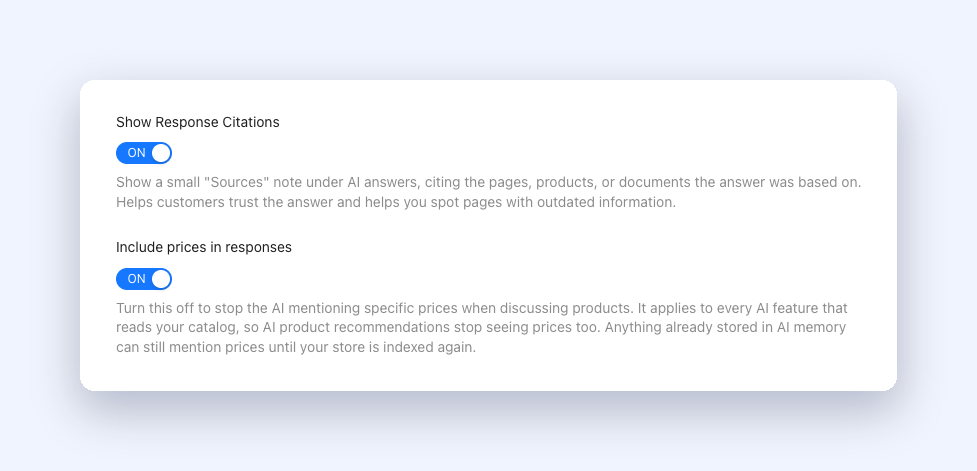
Go to StoreAgent → Settings → AI Chat → General. Include prices in responses sits with the other chat behaviour switches, right below Show Response Citations.
It ships ON. Nothing changes for an existing store until you switch it off yourself, and there is no migration or re-save needed to keep your current behaviour.
What Happens When You Switch It Off
This is the part worth understanding, because it is not what most plugins do with a setting like this.
StoreAgent does not tell the AI to avoid talking about prices. Instructions like that leak. A model that holds the number will eventually work it into an answer about stock, or a variation comparison, or a recommendation.
Instead, StoreAgent removes the numbers before the AI ever sees them. With the setting off, the chat tools that look up your catalogue drop these fields from every result, at every depth:
priceregular_pricesale_priceprice_minandprice_maxprice_rangewholesale_pricesproduct_priceon order line items
That covers product search results, variation results, the pricing lookup tool, variable-product parents and their variation lists, and the store-data endpoint. The model receives a product with a name, a description, categories, tags, ratings and stock, and no price anywhere in it.
Wholesale pricing is handled the same way. If you run Wholesale Suite, the wholesale figures it adds to product data are stripped along with everything else, so a logged-out visitor or the wrong customer tier cannot pull a wholesale price out of the chat.
Shoppers Can Still Filter By Price
Turning prices off does not turn price-based search off.
The minimum and maximum price parameters the chat uses to narrow a search are applied when the products are read, and they are never sent back in the response. So a shopper can ask for “something under $150” and get the right products, with no prices attached to any of them.
A quote-based store still wants the assistant to understand budget. It just does not want the assistant reading numbers out.
What The Chat Says When Someone Asks “How Much?”
Taking the data away is only half the job. Left alone, the assistant would still try to answer a direct price question, and a model with no number and a strong instruction to produce one is exactly how you get an invented price.
So StoreAgent also changes what the assistant is told to do when the setting is off. It stops being asked to fetch and quote a price, and it is told that pricing is not available through chat. Ask “how much is it?” and the reply says as much and points the shopper at the product page. It does not quote a figure, estimate one, or promise to check later.
Everything else about the product stays answerable. Stock, variations, specifications, availability and comparisons all keep working. Only the price is withheld.
AI Memory Is Covered Too, With No Re-Index
There is a second path a price can travel, and it is the one most stores would never think to check.
StoreAgent indexes your catalogue into AI memory so the assistant can answer from your content. Price is not stored as a separate field there. It gets written into the indexed text itself, so an answer built from memory could still surface a figure even with the tool data stripped.
That is now closed. When the setting is off, StoreAgent removes price sections and per-variation price lines from recalled content before the model reads it, including the “was” figure on a sale line.
Nothing gets re-indexed to make that work. Your stored content is untouched, your product hashes do not change, and no indexing quota is spent. The filtering happens when the content is read, so switching the setting on and off takes effect straight away in both directions.
The help text under the toggle has not caught up yet. It still says stored content can mention prices until your store is indexed again, which was true when the toggle shipped and is not any more.
One residue worth knowing about. The filtering is structural, so it keys off the way StoreAgent writes prices into indexed content. If an author typed a price into the body copy of a page, that sentence is just prose and has nothing to key off. The assistant’s instructions cover that case, but it is not stripped the way a real price field is.
It Applies Everywhere The AI Reads Your Catalogue
Read the setting as store-wide AI price hiding, not chat-only.
The same product lookup feeds StoreAgent’s AI product recommendations, and its ranking leans on price to suggest a sensible upsell. With prices hidden, those recommendations stop seeing prices too, and the suggestions get less precise as a result.
That tradeoff was deliberate rather than accidental, and it is stated in the setting’s own help text. If exact prices must never appear in an AI answer, weaker upsell ranking is a fair price to pay. If your catalogue is publicly priced and you only wanted to tidy up chat answers, leave the setting on.
What Stays Visible
Two things deliberately survive the strip.
Currency. Your store’s currency and currency symbol are store facts rather than prices, and the assistant needs them for context. They stay.
What a shopper already paid. On order lookups, the order’s own subtotal, total and tax stay visible so order-status questions keep working. The field that goes is the current catalogue price of the item, which had nothing to do with that order and was a live price leak through an order question.
Price data outside the chat context is untouched. Your admin screens, your product pages and the rest of the plugin behave exactly as before.
Who This Was Built For
Three kinds of store asked for this, each for a different reason:
- Quote-based and price-on-application catalogues. You do not publish prices at all, so an assistant quoting one undermines the whole sales process.
- Role-based and tiered pricing. One store running five pricing tiers pointed out that the single indexed price is wrong for most of their customers. Showing nothing beats showing the wrong tier.
- Wholesale-only and MAP-sensitive brands. Showing wholesale pricing to a logged-out visitor, or a price below the minimum advertised price, is a commercial problem rather than a cosmetic one.
If you recognise your store in any of those, this is a single switch away.
Get Started
Open StoreAgent → Settings → AI Chat → General, switch Include prices in responses off, and save. Then open your storefront and ask the widget about a product you know the price of, and again for a price range. The products should be right and the numbers should be gone.
If you are still setting your assistant up, our guide to AI chatbot product indexing covers how StoreAgent learns your catalogue in the first place.
Not using StoreAgent yet? Have a look at our plans and put an AI assistant on your store that respects how you actually price it.
Frequently Asked Questions
Where is the setting?
StoreAgent → Settings → AI Chat → General, labelled Include prices in responses. It is on by default.
Does this just tell the AI not to mention prices?
No. It removes the price fields from the product data before the AI sees them. The model has no number to quote.
Will price filtering still work?
Yes. Searching within a price range is applied when products are read and the figures are never returned, so “show me something under $150” keeps working with no prices in the answer.
What happens if a shopper asks for a price directly?
The assistant says pricing is not available through chat and points them to the product page. It does not guess a number.
Do I need to re-index my catalogue?
No. Prices are filtered out of recalled content when it is read, so nothing is re-indexed and no indexing quota is used.
Does it hide wholesale prices too?
Yes. Wholesale pricing added to product data by the Wholesale Suite integration is stripped along with the standard price fields.
Does this affect AI product recommendations?
Yes. The setting covers every AI feature that reads your catalogue, so recommendations stop seeing prices as well and their ranking gets less precise.
Can customers still see prices on my product pages?
Yes. This only changes what the AI is given. Your storefront, your product pages and your admin screens are untouched.
Can I turn it back on?
Yes, at any time. Switch it on, save, and prices return to AI answers immediately with nothing to rebuild.