Reviewed by
To give customers instant answers on your WooCommerce store, add an AI chatbot for website visitors trained on your live store data. Shoppers get accurate product, stock, shipping, and order answers in seconds, at any hour, without waiting for you to reply. Here’s how to set it up and which questions to cover first.
Shoppers in 2026 expect answers now. A question that sits in an inbox until tomorrow is usually a sale that already went elsewhere. “Instant” is no longer a nice-to-have. It’s the baseline customers compare you against, and for a store that means answers that arrive while the shopper is still on the page.
In this article, you’ll learn why instant answers matter, what makes an AI chatbot for website use actually useful in a WooCommerce store, and how to get one running today.
Why Instant Answers Matter for Your Store
Speed maps directly to revenue. Pre-purchase questions like sizing, compatibility, stock, and delivery dates happen at the exact moment of intent. Answer them in the moment and the shopper buys. Make them wait and momentum is lost.
According to HubSpot’s research, a fast response is one of the biggest drivers of customer satisfaction, and slow service is a leading reason buyers leave for a competitor. Instant answers also cut post-purchase anxiety, which reduces “where is my order?” emails and refund requests.
What Is an AI Chatbot for a Website, and Why Do WooCommerce Stores Need One?
An AI chatbot for website use is a software tool that answers visitor questions in real time using artificial intelligence. For a WooCommerce store, it goes further. It reads your live catalog, stock levels, and orders to give accurate, store-specific answers.
A scripted bot can say “shipping takes 3 to 5 days,” but it cannot tell a specific customer whether their order has shipped or whether a product is actually in stock right now.
That gap frustrates shoppers and costs sales. A WooCommerce-native AI chatbot for website visitors bridges it by connecting directly to your store data.
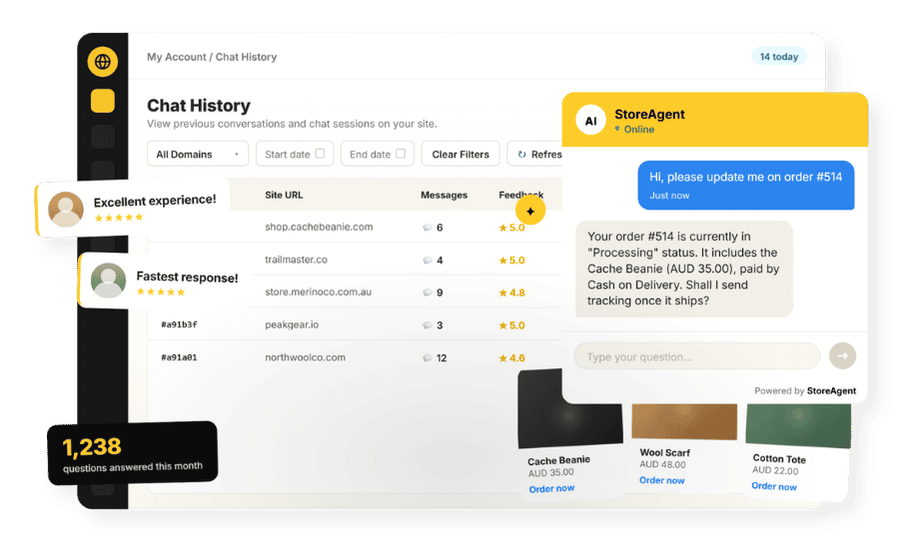
This is where StoreAgent’s WooCommerce chatbot differs from a generic solution. It reads your live products, prices, and order records so it answers the specific question, not a vague version of it.
What we’ve seen: stores add a generic chatbot, then field complaints that it gave a wrong answer about stock or an order. The fix is almost always the same: the bot wasn’t connected to live store data. An assistant that reads the catalog and order records avoids that whole class of useless replies.
What “Instant” Really Requires: Live Store Data, Not Canned Scripts
True instant answers need an assistant connected to your real data. StoreAgent can perform live product price lookups and order lookups for logged-in customers, so it answers the specific question from real records.
For order-status queries, the shopper needs to be logged in, which also protects their order privacy.
Product questions work for any visitor. Ask about price, a variation, or stock, and the assistant pulls the current data directly from your catalog.
How Fast Is Fast Enough?
For on-site chat, “instant” means seconds. A shopper weighing a purchase won’t wait on a page while a question hangs. Two things decide whether you hit that bar:
- Coverage hours: intent doesn’t keep business hours. Evenings and weekends are prime shopping time, and that’s exactly when a solo owner is offline.
- Answer source: a reply is only “fast” if it’s also right. Pulling from live store data means the first answer is the correct one, so there’s no slow back-and-forth.
An always-on assistant clears both at once, which is why it outperforms even a fast human who still has to sleep.
How Do You Choose The Right AI Chatbot For Your Website?
The best AI chatbot for website and ecommerce use does four things well: it integrates natively with WooCommerce, reads live data, sets up without a developer, and hands off gracefully when it hits its limits.
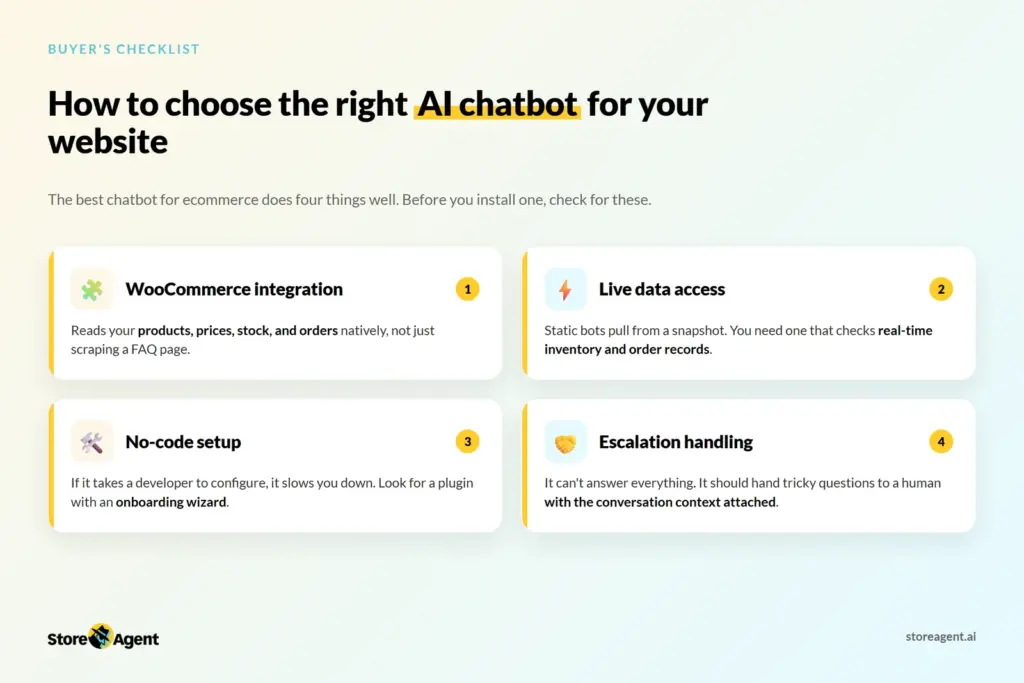
Before you install one, check for these:
- WooCommerce integration: the bot should read your products, prices, stock, and orders natively, not just scrape a FAQ page.
- Live data access: static chatbots pull from a snapshot. You need one that checks real-time inventory and order records.
- No-code setup: if it takes a developer to configure, it slows you down. Look for a plugin with an onboarding wizard.
- Escalation handling: the bot can’t answer everything. It should hand tricky questions to a human with the conversation context attached, so customers don’t have to repeat themselves.
StoreAgent checks all four. It installs as a WordPress plugin, connects to your WooCommerce data automatically, and includes a guided setup wizard. On paid plans, escalation emails the conversation summary to your support team so the handoff is clean.
How To Set It Up on WooCommerce
- Install the plugin and connect a free StoreAgent.ai account.
- Let it ingest your store, including products, pages, and policies, so it answers from real content.
- Add the chat widget site-wide, or place it on the product and order-tracking pages where instant answers matter most.
- Set escalation so anything it can’t handle reaches a human quickly, with the conversation context attached on paid plans.
If you also run a broader WordPress site, our guide to adding an AI chatbot for WordPress covers the wider setup. That guide uses the same AI chatbot for website framework, adapted for content sites and landing pages.
The Questions Customers Want Answered Instantly
An AI chatbot for website visitors should handle the questions that kill conversions when left unanswered:
- Stock: “Is this in stock, and when is it back?”
- Price and variations: “How much is the large in blue?”
- Shipping: “Will it arrive before the weekend?”
- Order status: “Has my order shipped?” (answered from live order data for logged-in customers)
- Product compatibility: “Does this work with my existing setup?”
- Returns and policies: “What’s your return window?”
You can read more about how the assistant uses order data and product prices to answer these.
When Instant Isn’t Enough
Some questions need a person: a complaint, an unusual request, or a sensitive issue. The goal is to answer the 80% instantly and hand the rest to a human fast, with the conversation context attached on paid plans, so the customer never has to repeat themselves.
Think of escalation as quality control. The chatbot handles volume; your team handles nuance. That split makes the whole system work without burning out your support staff.
Start Giving Instant Answers Today
Instant answers turn idle questions into completed sales and quiet anxious customers before they email. The stores that win on experience are the ones that reply while the shopper still cares.
- Treat speed as a revenue lever, not a courtesy.
- Connect the assistant to live store data so answers are accurate.
- Cover the after-hours window when shoppers are actually buying.
- Cover the high-intent questions first.
- Hand the hard cases to a human with full context.
Start free on the Lite plan and give your customers instant answers today.
Frequently Asked Questions
How Do I Give Customers Instant Answers on My Store?
Add an AI chatbot for website and WooCommerce trained on your live store data. It answers product, stock, shipping, and order questions in seconds, any time, without you having to reply manually.
Can a Chatbot Answer Questions About a Specific Order?
Only if it reads live order data. StoreAgent performs live order lookups for logged-in customers, so it can tell a shopper whether their order has shipped or give them the current order status directly in chat.
Is a Generic Chatbot Good Enough?
For vague FAQs, maybe. For accurate, store-specific answers about your products and orders, you need an assistant connected to your live WooCommerce data. Generic bots don’t know your current stock or order records.
Do Instant Answers Really Increase Sales?
They help. Pre-purchase questions happen at peak intent. Answering them immediately removes the hesitation that causes shoppers to abandon and look elsewhere.
What Should I Look for When Picking an AI Chatbot for My Website?
Look for native WooCommerce integration, live data access, no-code setup, and built-in escalation. A chatbot that can’t read your actual store data will give wrong answers, which is worse than no chatbot at all.
Do I Need to Code to Set This Up?
No. Install the plugin, connect a free account, and the assistant starts answering from your store with no coding or manual training required.
What Happens With Questions the AI Can’t Answer?
On paid plans, they escalate to a human with the full conversation summary attached, so the customer gets a fast handoff without repeating themselves.