Reviewed by
AI-powered upsell and cross-sell recommendations are now live in StoreAgent! The automation runs nightly, finds products with no relationships set, and brings suggested pairings to your dashboard for a one-click approval.
Manually setting cross-sells and upsells across an entire catalog is the kind of task that gets done on the first ten products and skipped on the next hundred. StoreAgent’s new automation handles the matching for you and brings the results to your dashboard. All you do is review and approve.
In this article, we’ll walk through how it works and how to use it.
Automated Upsell And Cross-Sell Matching In StoreAgent
StoreAgent adds a new background automation to your store. Every night, it scans your catalog for products that have no cross-sells or upsells set, finds relevant matches using the AI vector database, and notifies you in your StoreAgent dashboard when something is ready to review.
It’s available on all plans, including the free plan, as long as you have active usage credits.
How Do You Set Up Product Upsells AI In StoreAgent?
There are no complex settings to configure. Here’s the full setup:
Step 1: Enable Product Upsells AI in StoreAgent
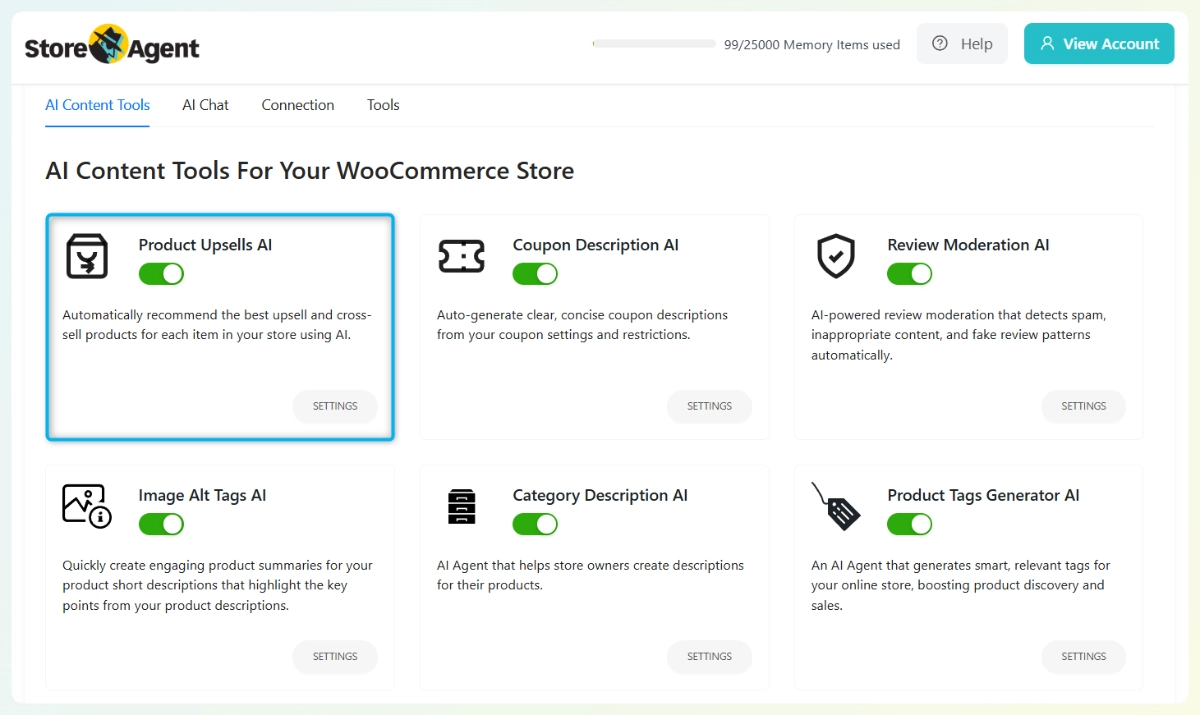
Go to StoreAgent > AI Content Tools. Find the Product Upsells AI card and toggle it on. Then click Settings to configure two options before the automation starts running.
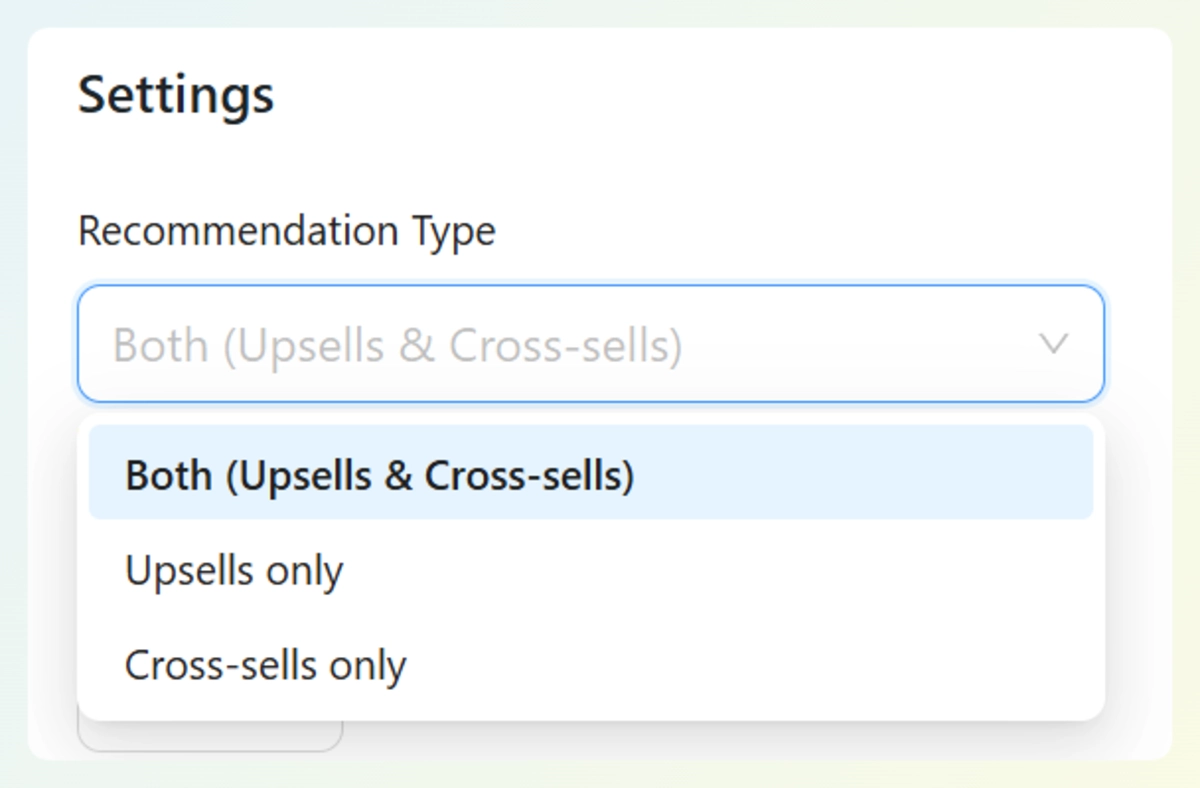
Under the Settings tab, choose your Recommendation Type: Both (Upsells and Cross-sells), Upsells only, or Cross-sells only. Set your Max Recommendations Per Type — the default is 5. Select your language, then save.
Step 2: Generate recommendations on individual products
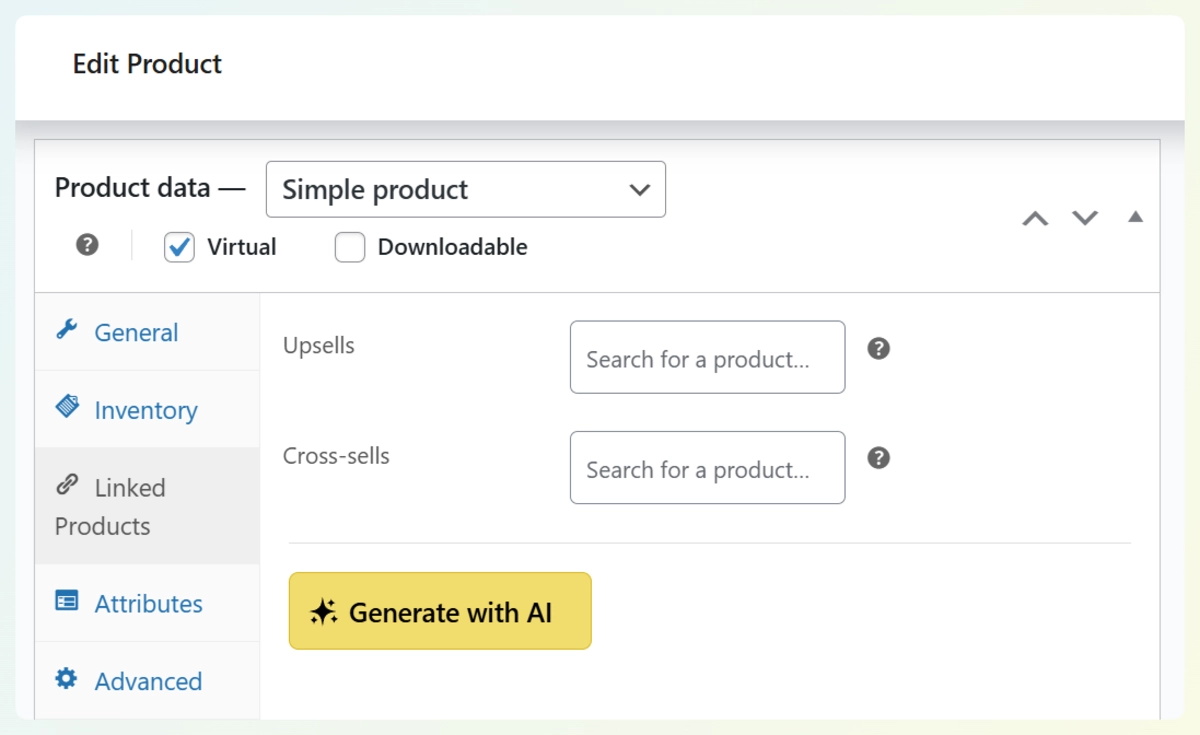
On any product edit screen, open the Linked Products tab. You’ll see the standard WooCommerce Upsells and Cross-sells fields, along with a Generate with AI button. Click it and StoreAgent queries the vector database to find the best matches from your catalog.
The suggestions populate the fields instantly. Review them, make any adjustments, and save the product. Nothing goes live until you do.
Step 3: Let the nightly automation cover the rest
Once Product Upsells AI is enabled, StoreAgent also scans your catalog every night for products with no cross-sells or upsells set. When it finds matches, a notification appears in your StoreAgent dashboard for one-click approval. You get both on-demand generation per product and background automation across your full catalog.
How Does The AI Pick The Right Match?
StoreAgent uses its database to find semantically relevant products, not just items in the same category. This is the same AI memory that powers StoreAgent Chat and product content tools.
Semantic matching means the AI understands how products relate in context. A travel pillow and a sleep mask aren’t in the same WooCommerce category, but they’re an obvious pairing for a customer about to buy one. Cross-sell AI at this level goes beyond keyword overlap and category tags. It reads product meaning.
The scan only targets products with no existing cross-sell or upsell relationships. If you’ve already set up pairings manually on certain products, StoreAgent won’t touch them.
These AI-powered upsell and cross-sell recommendations fill catalog gaps automatically, making it one of the more practical ai-powered upsell solutions for ecommerce stores running large catalogs.
Conclusion
AI-powered upsell and cross-sell recommendations are available now in StoreAgent. Update your plugin, enable Product Upsells AI in your AI Content Tools tab, and StoreAgent will start scanning tonight. For the full feature overview, see the AI upsell and cross-sell generator for WooCommerce.
For immediate results, use the Generate with AI button on any individual product. For full catalog coverage, let the nightly automation handle it. Either way, your cross-sell and upsell fields get filled with matches that actually make sense based on how your store describes its products!
If you’re not yet on StoreAgent, check our price plans to get started.
Frequently Asked Questions
What are AI-powered upsell and cross-sell recommendations in StoreAgent?
AI-powered upsell and cross-sell recommendations in StoreAgent is a background automation that scans your product catalog nightly, finds products with no cross-sell or upsell relationships set, and suggests relevant pairings using the AI vector database. You review and approve each suggestion from your StoreAgent dashboard with one click.
Does StoreAgent auto-publish upsell and cross-sell relationships?
No. StoreAgent never auto-publishes product relationships. Every suggestion requires your manual approval before it writes to the WooCommerce product fields. The AI surfaces the matches. You decide what goes live.
Will StoreAgent overwrite my existing cross-sells and upsells?
No. The automation only targets products with no cross-sell or upsell relationships already set. If you’ve manually configured pairings on a product, StoreAgent will not modify them.
How does StoreAgent decide which products to pair together?
StoreAgent uses its AI vector database to find semantically relevant matches based on your product descriptions. It goes beyond category tags and keyword overlap to understand how products relate in context, surfacing pairings that make sense for your customers.
Which StoreAgent plans include the Product Upsells AI feature?
Product Upsells AI is available on all StoreAgent plans, including the free plan, as long as you have active usage credits.