If you’re weighing storeagent vs eesel ai for your WooCommerce store, you’ve probably landed on eesel’s WooCommerce page and seen the headline promise: connect the store, drop in a snippet, and an AI agent handles orders, returns and product questions on autopilot. It reads well, and most of it is true.
Here’s what that page doesn’t put in the headline. eesel charges $0.40 for every chat session the agent handles, there is no free plan behind the $50 of trial credits, and nothing about the product lives inside WordPress. Its own FAQ says it plainly: eesel “runs as a lightweight script on your storefront” and “reads data through the WooCommerce REST API.” Your store is a data source it connects to, not a place it runs.
So storeagent vs eesel ai isn’t really a contest between two WooCommerce chatbots. It’s a choice between a WordPress plugin with a flat monthly bill and a helpdesk-first SaaS that meters you per conversation. This comparison covers where each one runs, what each AI can actually read and do in your store, and what you’d really pay in a busy month.
StoreAgent Vs eesel AI: The Short Answer
StoreAgent is the better choice for most WooCommerce stores because it installs as a plugin, reads live product and order data from inside WordPress, and bills a flat monthly price no matter how many conversations you have. eesel AI is priced per chat session, so the number you agreed to on signup is not the number you pay in December.
eesel is a capable product and it does two things StoreAgent doesn’t do at all: it can action returns and refunds under rules you set, and it plugs into the helpdesk your team already works in. Those are real advantages if you have a support team. They’re worth less if you are the support team.
| Comparison Factor | StoreAgent | eesel AI |
|---|---|---|
| Where the AI runs | WordPress plugin plus hosted AI | Documented: storefront script, nothing in wp-admin |
| How it reads your store | Indexed catalogue plus live reads at answer time | WooCommerce REST API sync |
| Order actions on WooCommerce | Read-only lookups for signed-in shoppers | Returns and refunds in semi-auto and autonomous modes |
| Pricing model | Flat monthly, unlimited websites on paid plans | $0.40 per chat session or ticket handled |
| Free plan | Yes, StoreAgent Lite | No, $50 of trial credits then agents pause |
| Content tools | Nine AI tasks in the same plan | Blog drafts at $4.00 per run |
| Store insights | Revenue, conversion and funnel dashboard | None, support reporting only |
| Human agent inbox | No, escalation by email | Yes, through your connected helpdesk |
| Helpdesk integrations | None | Zendesk, Gorgias, Freshdesk, Intercom, Help Scout |
| Languages | Detects and replies in the shopper’s language | 80+ languages out of the box |
Does eesel AI Run Inside WordPress?
No. There is no eesel plugin, no menu in your WordPress admin, and no listing on the plugin directory. You create an eesel account, authorise a WooCommerce REST API connection, and paste a script tag onto your storefront. Their own words in the WooCommerce FAQ: the widget “does not modify your WordPress database or interfere with other plugins.”
That is a design decision, not a flaw, and it has a genuine upside. Nothing to update, nothing to conflict with your page builder, and one dashboard that can hold a Shopify store, a WooCommerce store and a BigCommerce store side by side. If you run more than one platform, that matters.
It also has a cost, and it shows up in two places. The first is where your data lives. eesel syncs “products, variations, pricing, inventory, and categories” over the REST API, which means it works from a synced copy plus API calls, not from the WordPress objects themselves. The second is credentials. eesel’s own security note says “API access uses read-only credentials by default.” Read that next to the returns and refunds promise on the same page and the implication is clear: the moment you want the agent to action a refund, you are handing a third-party service write access to your store over the REST API. That is a decision worth making deliberately rather than during a two-click setup.
StoreAgent takes the other route. The plugin installs from your admin, you press connect, and the AI reaches your catalogue, posts, pages and custom post types through WordPress itself. There are no API keys to buy and no OpenAI account to set up, because the AI usage is included in the plan.
One thing I noticed reading eesel’s WooCommerce page: the setup story is four steps and about 200 words, while the sentence about read-only credentials sits in a security block near the bottom, under a heading about compliance. Both facts are on the page. Only one of them is on the way in.
What Each AI Can Actually See In Your Store
Take one realistic shopper message and route it through both tools: “Do you have this jacket in blue in a medium, and where’s my order from last week?” That single message asks for a live variation price and stock check, and an order lookup tied to a specific person.
StoreAgent’s WooCommerce AI chatbot splits it. General product knowledge comes from AI Memory, the index it builds of your products, posts, pages and custom post types. The details that change often do not. StoreAgent’s documentation is specific about this: the exact price, stock status and SKU of a particular variation are fetched live at the moment the shopper asks, so a chatbot answer doesn’t quote a price you changed last week. Per-variation pricing is handled explicitly, which is a common failure point on real WooCommerce catalogues.
The order half is gated on identity. StoreAgent looks up orders for signed-in shoppers only, verified through their WooCommerce account, and a guest is asked to sign in first rather than being told anything. Those live lookups are read-only by design, which is the honest limit of StoreAgent’s customer service AI agent: it can tell a shopper where their order is, and it cannot cancel it, refund it or change the address.
eesel answers the same message from its REST API sync, which it describes as real-time for products, variations, pricing, inventory and categories, plus live order data. On the returns half it goes further than StoreAgent does. Its FAQ says returns and refunds are handled “in Semi-auto and Autonomous modes. Set your rules and it follows them.” If a shopper wants to start a return in the chat and you have configured the rules, eesel can do that. StoreAgent cannot.
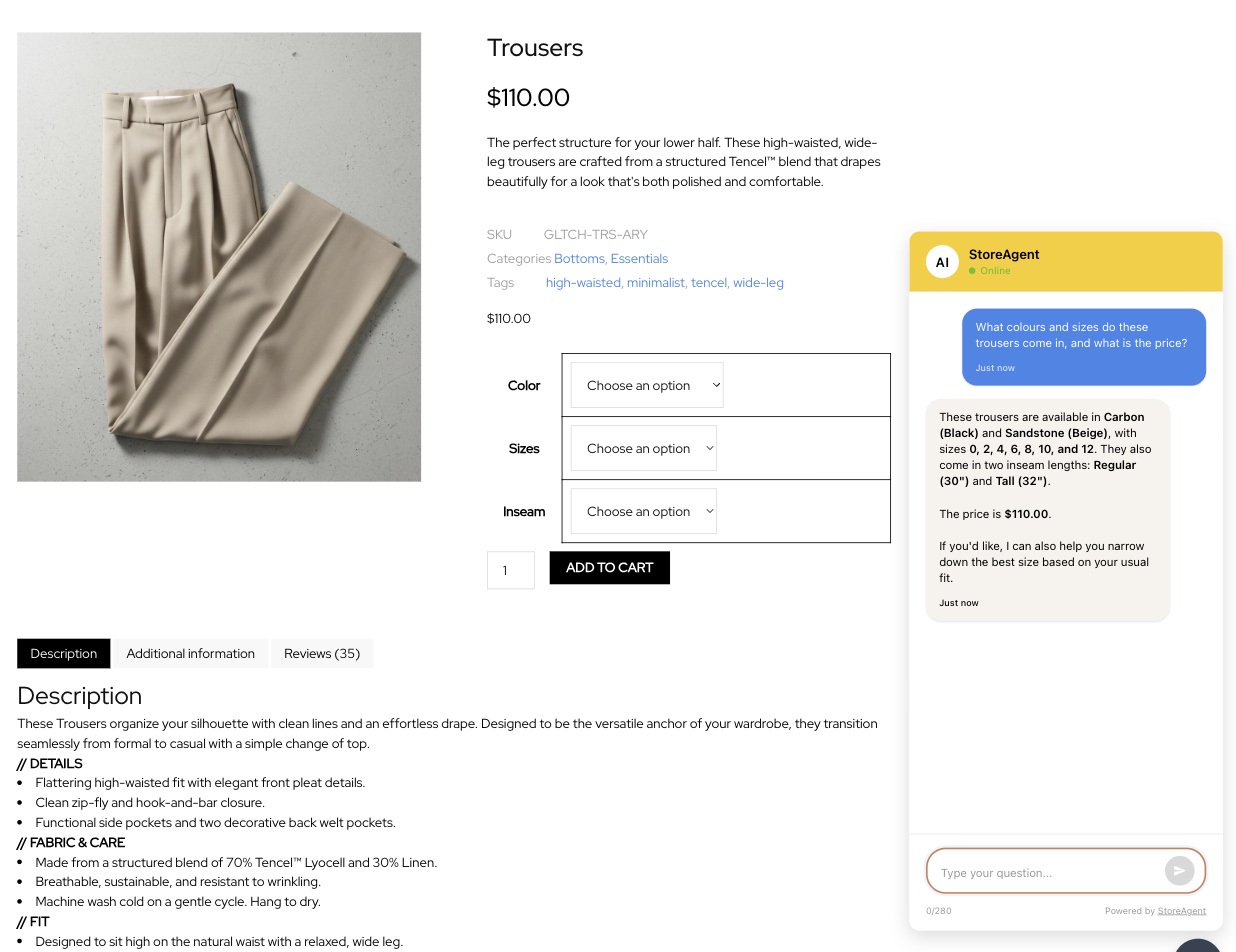
There is a StoreAgent gotcha worth knowing before you install it, because it looks like a bug the first time. The chat widget deliberately holds off appearing on your storefront until the first product index finishes. Install the plugin, open the shop in another tab, and you may find no chat bubble at all. That is on purpose, so shoppers never meet a chatbot that has nothing to work with, but nobody tells you in the moment.
What We’ve Seen: Store owners compare AI support tools on answer quality, pick the one that demos best, and only meet the pricing model in month three when a promotion triples their chat volume. Answer quality between serious tools converges fast. What doesn’t converge is how the bill behaves when the store gets busy. The question to ask before you buy isn’t “which one answers better?” It’s “what does a good month cost me, and what does a great month cost me?”
How StoreAgent And eesel AI Pricing Compare
This is the sharpest difference between the two, and it’s structural rather than a matter of a few dollars. StoreAgent sells monthly plans with a fixed quota. eesel sells tasks.
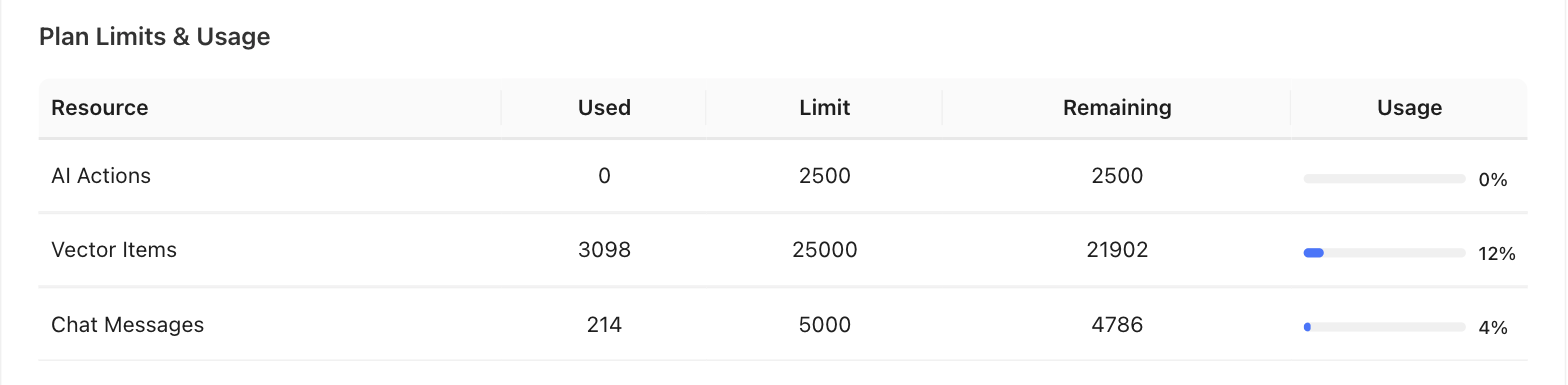
StoreAgent’s plans, all in USD, with every paid plan usable on unlimited websites:
| Plan | Price | AI chat replies | Memory items | AI tasks |
|---|---|---|---|---|
| Lite | Free | 50 one-time | 1,000 | 25 one-time |
| Growth | $19/mo | 500 | 5,000 | 500 |
| Pro | $49/mo | 5,000 | 25,000 | 2,500 |
| Business | $249/mo | 50,000 | 100,000 | 10,000 |
Lite credits are one-time and don’t renew, so it’s a way to test the tool rather than run a busy store on it. Support Escalation and chat log export start on Growth, and full chat history is listed on Pro and Business. Paid plans carry a 14-day money-back guarantee. One detail matters for the comparison below: StoreAgent counts each AI reply, not each conversation, and customer messages don’t count at all.
eesel prices per task, with no plan to sit on:
| What you buy | Price | What one unit covers |
|---|---|---|
| Light task | Free | Dashboard questions, simple lookups |
| Regular task | $0.40 | One support ticket or one chat session, all messages included |
| Heavy task | $4.00 | One blog post draft per run |
| Trial | $50 of credits | Everything unlocked, no card, agents pause when spent |
| Annual commit | 25% off | A year of usage paid up front |
| Enterprise | $1,000/mo | Flat platform fee charged on top of usage |
Credit where it’s due, the per-task model is transparent and eesel publishes the arithmetic itself: 100 tickets a month is $40, 500 is $200, 1,000 is $400, and 2,500 is $1,000. There’s no platform fee, no seat fee and no minimum, and you can cap spend with a monthly usage limit that defaults to $250. A quiet month genuinely costs you close to nothing.
Here’s what the difference looks like in practice (example data, not a real store). A WooCommerce shop handles 600 chat sessions in a month. On eesel that’s 600 regular tasks, so $240. On StoreAgent you’re counting replies rather than sessions, and 600 conversations at roughly five AI replies each is about 3,000 replies, which sits inside the Pro plan at $49 a month. Double the traffic and eesel doubles to $480 while StoreAgent stays at $49 until you pass 5,000 replies. Halve the traffic and eesel drops to $120 while StoreAgent stays at $49, which is the honest version: at genuinely low volume the metered model can win.
One number I had to hunt for: the spend cap defaults to $250 a month, and it lives in an FAQ answer rather than beside the price. It is the number that decides whether your agents are still answering on the last Friday of a sale week, so it deserves better placement than that.
Two more line items belong in the same calculation. eesel bills tasks “regardless of outcome,” so a reply that missed the point still costs $0.40. And when you hit the usage limit, the agents stop, which protects the bill but means your after-hours support goes quiet at exactly the moment volume spiked. If you want the full picture of what an AI chatbot actually costs, we’ve broken the categories down separately.
Beyond Support: What Else Each Tool Does
Both products are broader than a chat widget, but they get broader in opposite directions. eesel widens across your support stack. StoreAgent widens across your store.
eesel runs agents inside Zendesk, Gorgias, Freshdesk, Intercom and Help Scout, drafting replies, triaging tickets and answering in Slack or Microsoft Teams. It pulls knowledge from Google Drive, Confluence and Notion as well as your site. It also ships a blog writer, billed as a heavy task at $4.00 a run. If your support already lives in a helpdesk and your knowledge already lives in Notion, eesel is built for exactly that shape of company.
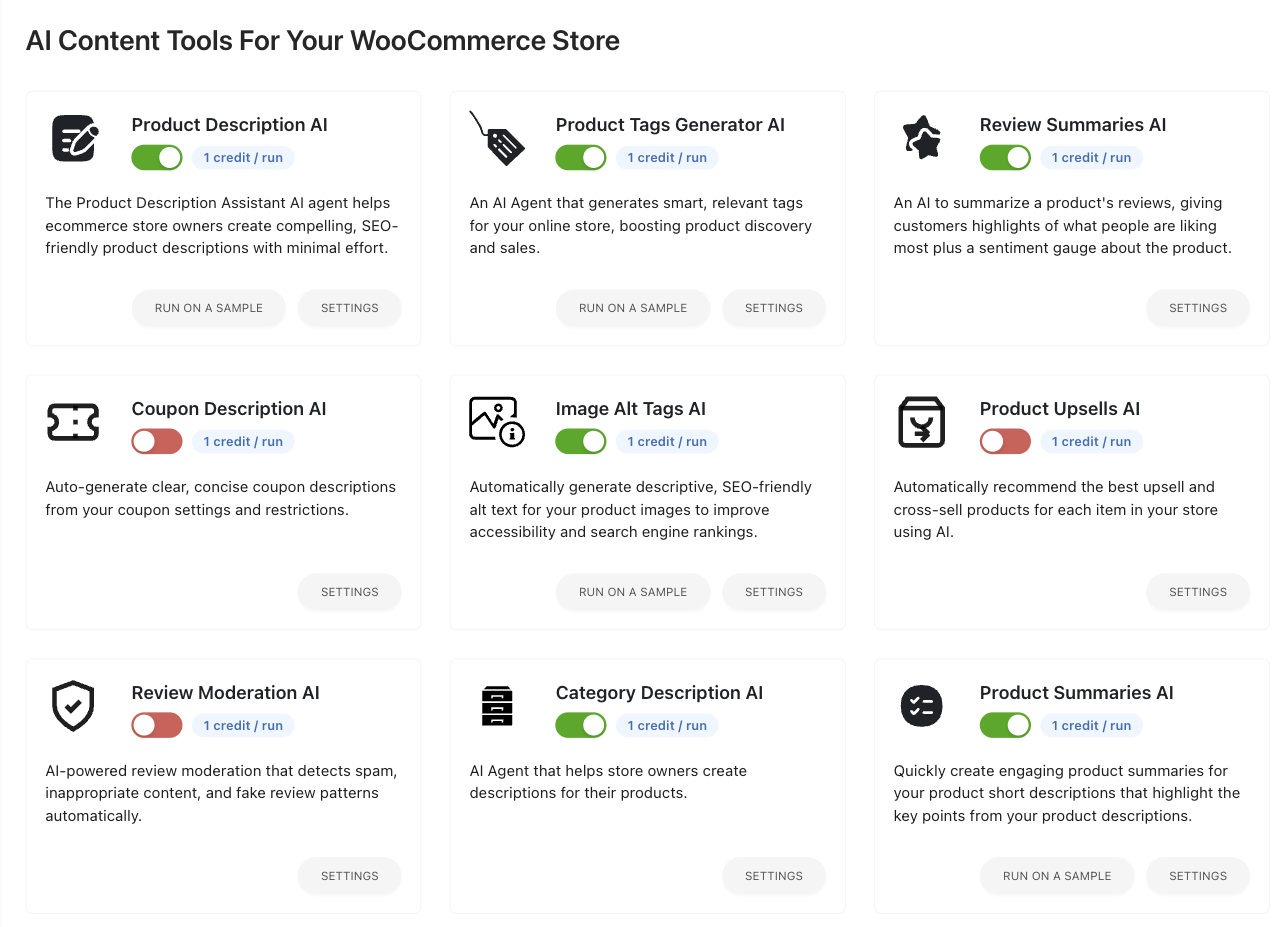
StoreAgent’s second and third modules are aimed at the catalogue instead. StoreAgent Content covers nine AI tasks: product descriptions, product summaries, product tags, category descriptions, review summaries, image alt tags, product upsells, review moderation and coupon descriptions. Eight of those work on any WooCommerce store; the coupon one stays switched off until you install the Advanced Coupons plugin, so count it only if you run that. They run one at a time or in bulk from the product list, and nothing goes live until you approve it. eesel has no equivalent, because writing your product pages isn’t what it’s for.
The third module is AI-powered store insights, and it’s the piece with no counterpart on the eesel side. StoreAgent’s dashboard reports revenue, conversion rate, chats and widget impressions, with a funnel that runs from a shopper seeing the widget through opening the chat and adding to cart to buying. Revenue is matched to real WooCommerce orders rather than estimated. eesel reports on support performance, which is a different question: it tells you how the tickets went, not how the store did.
There’s also a WooCommerce MCP connection, live on every plan, that lets Claude or ChatGPT work on the store through a managed gateway rather than an endpoint you host, using the 30 WooCommerce AI abilities StoreAgent registers through the WordPress Abilities API.
Where eesel AI Is Genuinely Strong
eesel is a serious product and it would be silly to pretend otherwise. It supports 80+ languages with automatic detection and works alongside WPML and Polylang, which is more explicit multilingual coverage than StoreAgent documents. It can act on returns and refunds under rules you write in plain language, where StoreAgent can only look things up. It runs several storefronts on different platforms from one dashboard. It has SOC 2 compliant processors, EU data residency and DPAs on request, and it says customer data is never used to train models. It lets you start every agent in draft mode so a human approves each reply before you hand over any autonomy, which is a sensible way to build trust. And it answers questions about WooCommerce Subscriptions, Memberships and Bookings through its own APIs.
The returns point deserves more than a line, because it isn’t cosmetic. Baymard Institute’s abandonment research finds that 13% of shoppers who abandon a cart name an unsatisfactory returns policy as the reason. A tool that can resolve a return inside the conversation is working on a real revenue problem, not a support metric.
Now the honest counterweight, because you should hear it from us rather than find out later. StoreAgent is not a helpdesk. There’s no human-agent inbox, no SMS channel, no voice, and no integration with Zendesk or Gorgias. When a shopper asks for a person, StoreAgent emails your store admin the full chat history with the customer’s address set as the reply-to, so replying to that email goes straight back to the shopper. That’s a faster human, not a ticketing system, and if you have a support team of five working in shared queues you will feel the gap.
What StoreAgent does have on the control side is a competitor blocklist. You name the rivals your assistant must never mention, recommend or compare against, add their alternate spellings and domains, and it treats them as off-limits from the next message onward. If you want to see how StoreAgent lines up against other tools in this category, the full set of StoreAgent comparisons is worth a look.
Frequently Asked Questions
Does eesel AI have a WooCommerce plugin?
No. eesel connects to WooCommerce through the REST API and adds its chat widget with a script snippet on your storefront. Its own FAQ states the widget does not modify your WordPress database. There is nothing to install in wp-admin and no listing on the WordPress plugin directory, so all configuration happens in eesel’s dashboard.
How much does eesel AI cost for a WooCommerce store?
$0.40 per chat session or support ticket the agent handles, with blog drafts at $4.00 each and dashboard lookups free. eesel publishes example totals of $40 for 100 tickets a month and $400 for 1,000. There’s no platform fee or minimum, and Enterprise adds a $1,000 monthly platform fee on top of usage.
Does eesel AI have a free plan?
No, it has a trial. You get $50 of usage credits and two free blog generations with every feature unlocked and no credit card required. When the credits run out your agents pause until you add a payment method. StoreAgent’s Lite plan is free to keep, though its chat and task credits are one-time rather than monthly.
Is StoreAgent a full helpdesk?
No, and that’s deliberate. There’s no shared agent inbox, no SMS and no voice channel. StoreAgent answers shoppers on your storefront and, when someone wants a human, emails your admin the conversation with the customer set as the reply-to address. If your team works tickets in a shared queue, you want a helpdesk alongside it or instead of it.
Can I try StoreAgent before paying?
Yes. The Lite plan is free and needs no credit card, though you do need a free StoreAgent.ai account to switch the AI features on. It includes 1,000 memory items plus 50 AI chat replies and 200 AI tasks as one-time credits. Paid plans add a 14-day money-back guarantee if you upgrade and change your mind.
Which AI Is Right For Your WooCommerce Store?
StoreAgent, for most WooCommerce stores, and the reason is the bill rather than the answers. Both tools read your catalogue and both answer well. Only one of them charges you more in the month your marketing works. Baymard Institute puts the average documented cart abandonment rate at 70.22% across 50 studies, and the conversations that recover some of those carts are exactly the conversations a per-session meter taxes hardest.
Here’s what to do with all this:
- Decide whether you want the AI inside WordPress or beside it before you compare features
- Check what each AI can read and what it can change, because read-only is a floor, not a flaw
- Model your busiest month, not your average one, on both pricing models
- Count the content and insights work you’d otherwise buy separately when you compare totals
- Choose eesel if you already run a helpdesk or need automated returns and 80+ languages
If you run a WooCommerce store and want AI that reads your real catalogue and your real orders without a meter running on every conversation, StoreAgent is built for exactly that. Start free on StoreAgent Lite and see what it answers before you spend anything.
Sources
- Baymard Institute, Cart Abandonment Rate Statistics — Supports: “average documented cart abandonment rate at 70.22% across 50 studies”
- Baymard Institute, Cart Abandonment Rate Statistics — Supports: “13% of shoppers who abandon a cart name an unsatisfactory returns policy”
Note: eesel AI platform requirements, WooCommerce integration behaviour and task pricing were verified directly against eesel AI’s own live WooCommerce integration page and pricing page on 2026-08-28. StoreAgent plan pricing, quotas and feature behaviour were verified against the live StoreAgent pricing page, knowledge base and plugin source the same day. Per the competitor linking policy, eesel AI pages are named in prose but deliberately not linked.