Reviewed by
Customer self-service is any way a customer answers their own question or resolves an issue without contacting a person, through tools like an FAQ, a knowledge base, a customer portal, order tracking, and an AI chatbot. Done well, it deflects most routine questions and resolves them instantly, around the clock, while freeing your team for the cases that genuinely need a human.
Most customers would rather solve a problem themselves than open a conversation and wait. They want the answer, not the interaction. Self-service leans into that: give people fast, reliable ways to help themselves, and you cut support volume while keeping customers happier.
For a WooCommerce store, the strongest setup pairs a clear help section with an AI chatbot that answers from your live store data. In this article, we’ll cover what customer self-service means for a store, the building blocks worth putting in place, and how to add an AI chatbot that ties them together. So, let’s get started!
Table of Contents
What Customer Self-Service Means For A Store
Customer self-service is the practice of giving shoppers the resources to find answers and complete tasks on their own, without your direct involvement. That covers a clear FAQ, helpful product pages, an order-tracking page, a returns or account portal, and, most powerfully, an AI assistant that answers specific questions on demand. Done well, self-service handles the routine and frees you for the conversations that genuinely need you.
The reason it matters comes down to three things customers want: deflection, speed, and availability. Self-service deflects repetitive questions before they reach your inbox, answers in seconds because there is no queue, and works around the clock.
A shopper at midnight in another time zone gets the same answer as one who messages during business hours.
The Benefits Of Customer Self-Service
Self-service helps customers and the business at the same time, which is rare. According to Harvard Business Review research, 81% of customers try to handle a problem themselves before reaching out to a live representative. People reach for the fast, low-effort path first.
For the store, the gains are concrete:
- Lower support cost. Every question answered without a reply is a ticket you never have to staff. For a small store, that can be the difference between keeping up and falling behind.
- Freed-up time. When the routine “where’s my order?” and “is this in stock?” questions handle themselves, you spend your hours on the conversations that actually move the business.
- Scalability. Self-service absorbs a traffic spike without you hiring. A sale that triples your visitors does not triple your inbox.
- Always-on availability. Cart abandonment already averages around 70% across documented studies, according to the Baymard Institute. A 24/7 answer keeps a late-night shopper moving toward checkout instead of waiting for you to wake up.
💡 If you want to see how this maps to dollars and hours, we go deeper in our breakdown of the ROI of AI customer service and our guide to reducing customer support costs with AI.
The Building Blocks Of Customer Self-Service
A complete self-service setup layers a few channels, each handling a different kind of question. You do not need every one on day one, but the strongest stores combine several so a shopper always has somewhere to turn.
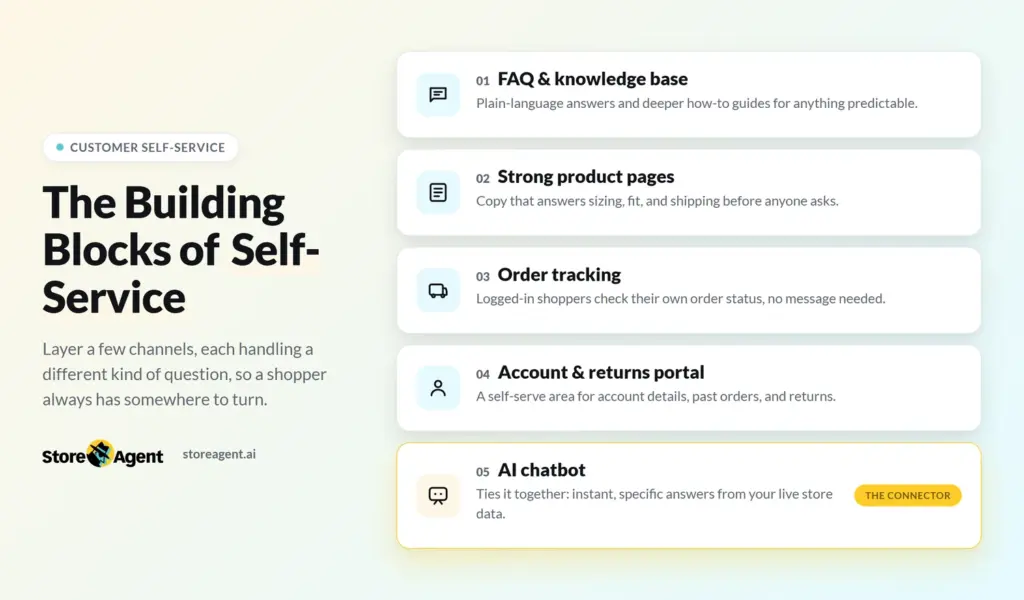
- FAQ and knowledge base. A clear FAQ covers your most common questions in plain language, and a knowledge base goes deeper with how-to articles, policies, and guides. This is the baseline for anything predictable.
- Strong product pages. Good product copy pre-empts sizing, compatibility, and shipping questions before they are ever asked, which is the cheapest deflection there is.
- Order tracking. A way for logged-in customers to check their own order status removes one of the single most common reasons people message a store at all.
- Account and returns portal. A self-serve area where customers manage their account, view past orders, and start a return handles tasks that would otherwise be a back-and-forth. Customers reach that area through the login page, so make it clear and on-brand. Custom Login for WooCommerce replaces the default WooCommerce login with a branded page.
- AI chatbot. The piece that ties it all together by answering anything specific, instantly, from your live store data, including the questions a static page never anticipated.
The FAQ and product pages handle the questions you can predict. The chatbot handles the ones you cannot: a shopper checks the product page, asks the chatbot if it is unclear, and only a bulk order or custom request reaches you. Each layer absorbs what it can, so you deflect the routine and escalate the exceptions.
Why An AI Chatbot Is The Backbone Of Self-Service
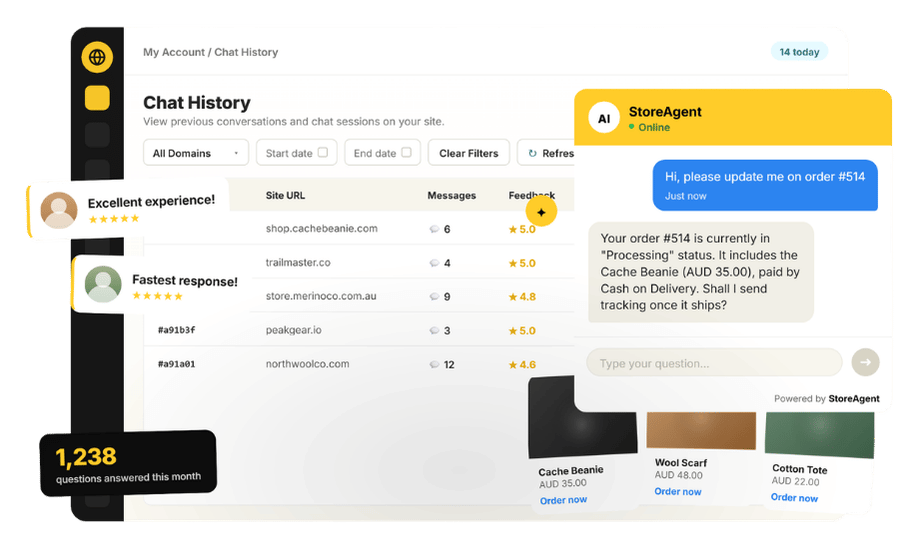
An AI chatbot is the backbone because it is the only building block that answers the questions you never thought to write down. A static FAQ can only cover what you anticipated. An AI assistant answers the specific, “does this exact thing work for me?” questions in the customer’s own words. StoreAgent’s WooCommerce AI chatbot reads your live products, prices, and orders, so a shopper gets a precise answer without ever waiting on you.
It also keeps itself current. Because it reads your live store rather than a fixed script, a price change or a new product shows up automatically, with no FAQ to update by hand.
A logged-in customer can even ask “where’s my order?” and get their status right in the chatbot, pulled from real-time order data and product prices.
What we’ve seen: stores pour effort into a long FAQ page and still get the same questions, because customers will not read a wall of text to find one answer. An AI chatbot that surfaces the single relevant answer on demand consistently outperforms the page it draws from: same information, far less friction.
How To Add Customer Self-Service To WooCommerce
Adding self-service to a WooCommerce store is mostly a matter of layering the channels above and putting an AI chatbot at the center. StoreAgent is a no-code WooCommerce plugin that turns your existing store content into a self-service assistant without you writing scripts or training a bot by hand.
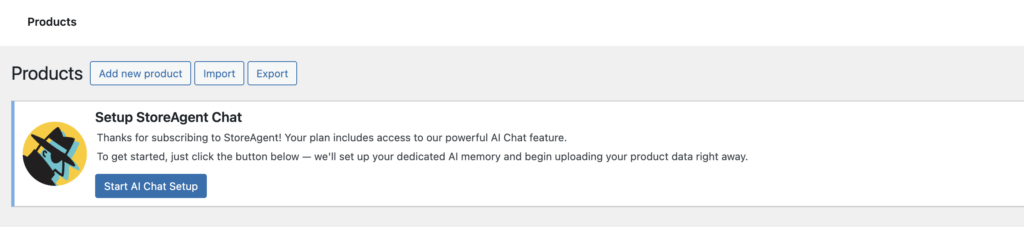
Here is the path from install to live widget:
- Install the plugin and connect a free account. Add StoreAgent to your WooCommerce site and connect a free StoreAgent.ai account, which is required to link your store to the assistant.
- Let it auto-ingest your store. StoreAgent automatically reads your catalog, prices, and pages, so it knows your products and policies without manual data entry.
- Place the chat widget. The assistant appears as a chat widget on your storefront, ready to answer questions 24/7 in multiple languages.
- Round out the rest. Tidy up your FAQ, strengthen product pages, and make sure logged-in order tracking is available, so the assistant sits on top of a solid base.
From there the chatbot handles the bulk of incoming questions, and you can grow into paid tiers as your needs do.
If you want the technical detail, see how to embed the chat widget with a shortcode.
Common Self-Service Mistakes To Avoid
Most self-service that disappoints fails in one of a few predictable ways. Avoid these and you are most of the way to a setup that actually deflects:
- A dead-end FAQ. A long page with no way to ask a follow-up just sends people back to email. Pair it with an AI chatbot so unanswered questions have somewhere to go.
- Hiding the human option. Self-service should not trap people. If someone needs a person, make that easy; forcing them through a maze erodes trust fast.
- Letting content go stale. Outdated policies or prices produce wrong answers. An assistant reading live data avoids this for store facts, but keep your written policies current too.
- Treating it as set-and-forget. Watch which questions still reach you and feed those answers back into your content. Self-service is something you tune, not something you launch once.
For more on getting the assistant itself right, our chatbot best practices for WooCommerce stores walks through the details.
Keep A Human Path Open
Self-service should never feel like a wall. Make it easy to reach a person for anything the chatbot cannot resolve, and on its paid plans StoreAgent escalates with full context, so the handoff is smooth and the customer never repeats themselves. The goal is fewer unnecessary conversations, not fewer ways to get help.
Some cases will always need a person: a sensitive complaint, a complex custom order, or a judgment call no script should make. The point of strong customer self-service is not to remove that path but to make sure only those cases reach it.
If you’re ready to give your store a customer self-service setup that actually works, start free on the Lite plan.
Frequently Asked Questions
What is customer self-service?
Customer self-service is any way a customer answers their own question or resolves an issue without contacting a person, through FAQs, a knowledge base, product pages, order tracking, and an AI chatbot. It reduces support volume and gives customers faster answers around the clock.
How do I add self-service to WooCommerce?
Combine a clear FAQ and strong product pages with an AI chatbot that answers from your store. StoreAgent installs as a no-code plugin, connects to a free StoreAgent.ai account, auto-ingests your catalog, and adds a chat widget that answers specific questions instantly.
Is an FAQ page enough on its own?
Rarely. A FAQ only covers anticipated questions, and customers often will not read it. An AI chatbot answers the specific, unanticipated questions on demand, which is why most stores pair the two rather than rely on a page alone.
Can customers check their own order status?
Yes. Logged-in customers can ask the StoreAgent assistant “where’s my order?” and get their order status right in the chatbot, pulled from live store data. Order lookup is limited to logged-in customers for accuracy and privacy.
Will self-service annoy customers who want a human?
Not if you keep a clear path to a person. Good self-service resolves the routine instantly and escalates anything complex to a human with full context. StoreAgent’s escalation is available on its paid plans.
Is it free to start?
Yes. StoreAgent offers a free Lite plan, with Growth at $19/month and Pro at $49/month as your needs grow. A free StoreAgent.ai account is required to connect your store.