“Is this in stock?” is one of the most common questions a shopper asks before they buy. It is also one of the easiest to get wrong. Until now, your StoreAgent chat assistant read prices live from WooCommerce, but stock came from the copy of your catalogue in AI memory. If you sold the last unit this morning, the assistant could still tell a shopper it was available.
StoreAgent now closes that gap. Every product the chat assistant looks up now comes back with a live inventory block read straight from WooCommerce at the moment it answers. Stock status, how many are left, whether backorders are allowed and whether stock is low all come from your store, not from a page StoreAgent indexed last week.
In this article, we’ll cover what the assistant can now answer, how it keeps to live data, how it respects your stock display settings, and what it means for variable products. So, let’s get started!
Table of Contents
- What The Assistant Can Now Answer
- Change Your Stock And The Answer Changes Too
- Live Stock Only, No Guessing
- Your Stock Display Format Is Respected
- Low Stock Alerts In The Chat
- Sizes, Colours And Other Variations
- Stock Answers In Support Chats Too
- Do You Need To Turn Anything On?
- For Developers
- Get Started
- Frequently Asked Questions
What The Assistant Can Now Answer
When a shopper asks about availability, the assistant reads the product’s current inventory from WooCommerce and answers from that. It can tell them:
- Whether the product is in stock, out of stock or available on backorder
- How many are left, when your store shows quantities
- Whether stock is low, based on your low stock threshold
- Whether they can backorder it
The answer uses the same availability text your storefront shows, such as “Only 2 left in stock” or “Available on backorder”. The assistant passes on the meaning in the shopper’s own language, so a shopper chatting in Spanish does not get an English sentence pasted into their reply.
Change Your Stock And The Answer Changes Too
Because the assistant reads stock at the moment it answers, you do not need to re-index anything after a stock change. Sell out of a product, and the next shopper who asks hears that it is out of stock. Restock it, and the assistant says it is back.
The same goes for backorders. Turn backorders on for a product that has run out, and the assistant tells shoppers it is available on backorder instead of turning them away.
StoreAgent also keeps exact stock counts out of AI memory on purpose. The indexed copy of your catalogue never carries a stock count, so an old snapshot has no number that could contradict the live one.
Live Stock Only, No Guessing
A live lookup only helps if the assistant uses it. StoreAgent gives the assistant a firm rule for stock questions: answer from the inventory it fetched in this turn of the conversation. It must not answer from indexed page text, and it must not reuse a stock answer from earlier in the chat.
The assistant also answers straight away. It does not reply with “I can check stock for you if you like”. It fetches the stock and tells the shopper.
StoreAgent backs the rule with a check in code. If a shopper asks a stock question and the reply claims the product is available, but no live stock data came back that turn, StoreAgent replaces the reply with a safe answer. A guess from an old product page does not reach your shopper.
The check looks at what the reply claims, so it leaves ordinary questions alone. A shopper asking “how many days are left on my subscription” or where their backordered order is gets a normal answer.
Your Stock Display Format Is Respected
Some stores do not want to publish exact stock counts. WooCommerce handles this with the Stock display format setting under WooCommerce > Settings > Products > Inventory, and StoreAgent follows it.
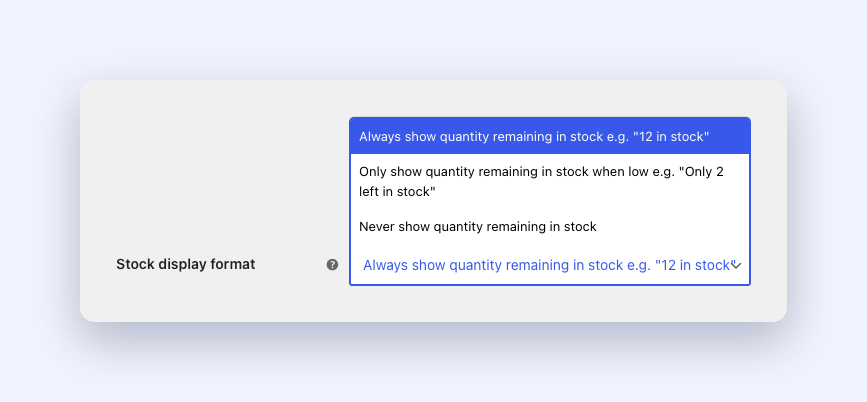
Here is how each option affects the chat:
- Always show quantity remaining in stock: the assistant can tell shoppers how many are left.
- Only show quantity remaining in stock when low: the assistant shares the number only once the product is at or below its low stock threshold. Above that, it says the product is in stock.
- Never show quantity remaining in stock: the assistant says whether the product is in stock and whether stock is low, but gives no number. It also will not offer to find the number out.
StoreAgent enforces this inside the plugin. When your settings hide the count, the plugin never sends the number to the AI, so the assistant has no figure it could quote by mistake. It still knows the product is tracked and whether it is low, which is what most shoppers want to hear.
Out of stock and backordered products never get a count either. The assistant tells the shopper the product is out of stock or on backorder, the same way your product page does.
Low Stock Alerts In The Chat
When a product is at or below its low stock threshold, the assistant tells the shopper that stock is low. For a shopper who is on the fence, “only a few left” is useful to know.
StoreAgent uses the same threshold WooCommerce uses. If you set a Low stock threshold on the product itself, that wins. If you leave it blank, the store-wide threshold from WooCommerce > Settings > Products > Inventory applies.
Sizes, Colours And Other Variations
Variable products carry stock on each variation, and shoppers usually ask about one of them. “Do you have the blue one in medium?” needs an answer about blue in medium, not about the product as a whole.
Every variation now carries its own inventory, so the assistant answers for the size or colour the shopper named. For “do you have any at all?”, it uses the parent product’s overall stock status, which WooCommerce keeps in step with the variations.
If a variation takes its stock from the parent product, the assistant reads the parent’s quantity for it, which matches what your store does.
Stock Answers In Support Chats Too
Stock questions do not only come up when a shopper is browsing. A customer who wants to reorder something often asks in a support conversation. StoreAgent keeps the live inventory data in those chats as well, so the assistant can confirm availability there from the same live data.
Do You Need To Turn Anything On?
No. Live stock answers are part of StoreAgent 1.1.9, and there is no new setting to switch on. Update the plugin and the assistant starts reading live stock on its next product lookup.
If you want to control whether shoppers see exact counts, set your Stock display format in WooCommerce. StoreAgent follows whatever you choose there.
For Developers
If you use a stock manager, an ERP or a multi-warehouse plugin that holds stock outside WooCommerce’s own fields, you can report your own figures with the saai_product_inventory_data filter. It receives the inventory array and the product object.
StoreAgent recalculates the low stock flag and the “can share quantity” flag after your filter runs, so both follow the figure you report. Your store’s stock display format still applies to that figure, so a filter cannot expose a count your settings hide.
Get Started
A wrong stock answer costs you twice. The shopper who orders something that already sold out asks for a refund, and the shopper told “out of stock” when you had plenty buys somewhere else. Live stock answers remove both.
If you already run StoreAgent, update to 1.1.9 and ask your own chat about a product you sell. Then change its stock and ask again.
Not using StoreAgent yet? Take a look at the plans and give your shoppers a chat assistant that knows what is on your shelves.
Frequently Asked Questions
Does the chatbot read stock live or from AI memory?
Live. The assistant reads stock from WooCommerce at the moment it answers. AI memory does not hold stock counts.
Do I need to re-index after changing stock?
No. The next answer picks up the change straight away.
Will the chatbot tell shoppers exactly how many I have?
Only if your Stock display format allows it. With “Never show quantity remaining in stock”, the assistant says in stock or out of stock with no number.
Does it tell shoppers when stock is low?
Yes. When a product is at or below its low stock threshold, the assistant says stock is low.
What about backorders?
When a product is on backorder, the assistant says it is available on backorder.
Does it work with variable products?
Yes. The assistant answers for the variation the shopper names, such as a size or colour, from that variation’s own stock.
Is there a setting to enable live stock?
No. It works on its own from StoreAgent 1.1.9.
Can I feed in stock from another inventory system?
Yes. Developers can use the saai_product_inventory_data filter to report figures from a stock manager, ERP or multi-warehouse plugin.