If you’re weighing StoreAgent vs AI Product Recommendations, you probably met the Azent Labs extension where most Woo store owners meet it: on the official WooCommerce Marketplace, filed under Conversion, with a one year licence at $39. The listing promises AI recommendations, personalised shopping and an AI shopping assistant chat widget, and the extension does ship all of that. Marketplace placement is real distribution and a real trust signal.
Here is what that page doesn’t say. The $39 buys the plugin, not the intelligence. Step 2 of the official setup documentation reads “Enter your OpenAI API key and enable Enable OpenAI”, which means you open an OpenAI account, put a card on it, and pay per token for every recommendation and every chat reply the extension generates, for as long as you run it. The docs offer token limits and a guest access toggle as the way to manage that, which tells you the vendor knows the bill is the risk.
So StoreAgent vs AI Product Recommendations isn’t really a contest between two AI tools. It’s a choice between one price that covers the AI and two prices where the second one floats. This comparison covers what each AI can reach inside a WooCommerce store, where each one puts its answers on the storefront, and what you’d really pay across a year.
StoreAgent Vs AI Product Recommendations: The Short Answer
StoreAgent is the better buy for most WooCommerce stores because the AI is included in the plan price, the chatbot reads live prices and stock at the moment it answers, and nothing in your store depends on an OpenAI account you have to manage yourself. The Azent Labs extension costs less on paper and then hands you a second, uncapped bill you cannot forecast before you start.
AI Product Recommendations does one thing StoreAgent does not do at all: it renders its own recommendation blocks on the shop page, the product page, the cart and the checkout, including picks driven by an individual shopper’s browsing history. If placed recommendations across the funnel are the job you are hiring for, read the counterweight section before you decide.
| Comparison Factor | StoreAgent | AI Product Recommendations |
|---|---|---|
| Who pays for the AI | Included in the plan price | Documented: you supply an OpenAI API key |
| Pricing model | Flat monthly, $0 to $249 | Annual licence plus your own OpenAI usage |
| Cost of a busy month | Quota stops, no extra charge | Open-ended, set by token usage |
| Free plan | Yes, StoreAgent Lite | No, 30-day money-back guarantee only |
| Live price and stock reads | Yes, checked at answer time | Not documented |
| Order lookups in chat | Yes, for the signed-in shopper | Not documented |
| Storefront recommendation blocks | No, chat plus WooCommerce’s own fields | Yes, on shop, product, cart and checkout |
| Personalised to one shopper’s history | No | Yes, AI Personalized Recommendations |
| Content tools | Descriptions, tags, alt text, categories, review summaries | None, recommendations and chat only |
| Connect your own AI assistant | Managed WooCommerce MCP, scoped and revocable | Documented: optional MCP toggle |
Does The $39 Licence Cover The AI?
No. The licence covers the plugin, its updates and vendor support. The AI runs on your OpenAI account, on your card, metered by OpenAI rather than by Azent Labs. The setup documentation is clear about it in step 2, and the FAQ on the same page answers the cost question by saying costs depend on your OpenAI API usage.
This matters more for a recommendations product than it does for a chatbot, because of where the calls come from. A chat reply happens when a shopper decides to type something. A recommendation block fires on page views, and page views are not something you control. Put the blocks on the shop page, the product page, the cart and the checkout, as the documentation invites you to, and your token spend tracks your traffic rather than your conversations. A good traffic month and a bad traffic month cost you differently, and you find out after the fact.
The extension does have a floor. Its marketplace FAQ says it falls back to rule-based recommendations if you never set up the AI, so the plugin still functions without a key. That is honest of them, and worth knowing. It also means the $39 version of this product and the AI version of this product are two different things, and only one of them is free of a second bill.
StoreAgent draws the line somewhere else. There is no API key anywhere in the product. The pricing page states it plainly: no API keys, no surprise bills, one flat monthly price covers the AI. When a plan’s quota runs out the work stops until the next month and the invoice does not move. You can argue that a quota is less convenient than an open meter. You cannot argue about what it costs.
What Each AI Can Actually See In Your Store
Take one shopper message: “Do you have this jacket in navy, and where’s my order from last week?” Two questions, two different data sources, and this is where a shopping assistant stops being a demo.
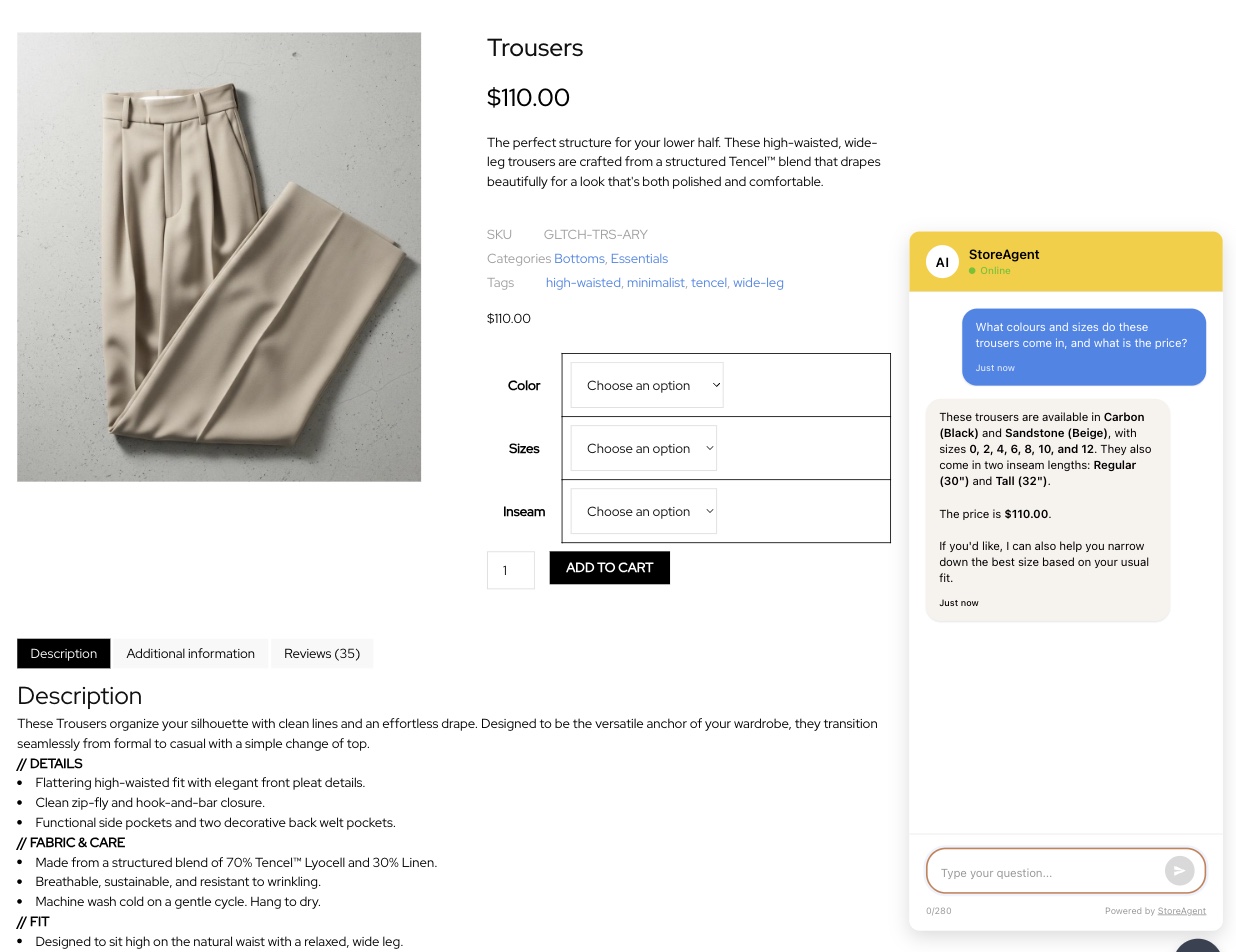
StoreAgent answers both from inside your store. It indexes products, variations, categories, reviews, pages, posts and custom post types into AI memory, then does a live read for the details that move. The exact price and SKU of a specific variation are fetched at the moment the shopper asks, and stock is checked live, so a sell-out shows in chat straight away with no re-index. Order lookups run for the signed-in shopper against their own orders, and the data is trimmed before the AI ever sees it. StoreAgent’s documentation is specific: the chat gets only the state and country from an order’s addresses, and never the customer’s name, email, phone number, street address, city, postcode, order notes, card details or anyone else’s orders. A guest who has not signed in gets no order lookup at all, and you can switch order lookups off entirely.
The Azent Labs documentation describes a different scope. The AI Shopping Assistant answers questions about store inventory and makes recommendations, and the recommendation features work from store data and from browsing and purchase history. What the documentation does not describe anywhere is a live price read, a variation-level lookup or an order lookup for a logged-in customer. The Languages and Keywords tab exists so you can feed the AI keywords that improve product matching, which suggests matching is the hard part rather than retrieval.
One thing I noticed reading those two pages side by side: they disagree about languages. The marketplace listing claims 40+ languages with automatic detection. The official documentation says 35+. Neither page is wrong in any way that would hurt a shopper, but it is the kind of drift that tells you how closely the marketing page and the docs are kept in step.
The other thing I checked was the listing’s own data rather than its copy. The page reports version 1.4.0, zero recorded installations, no rating and no reviews, with a “Click to rate” prompt where the stars usually sit. On a marketplace where buyers lean on install counts, nobody has publicly vouched for this one yet. Plenty of good plugins start that way, so read it as a signal about your position rather than about the code: you would be among the first buyers to find out how it behaves on a real catalogue.
What We’ve Seen: Store owners compare a one-off licence against a monthly subscription, see the licence win by a mile, and buy it. Then the OpenAI invoice arrives in month two and the comparison looks different, because nobody priced the half of the product that sits outside the licence. The question to ask before you buy isn’t “what does this plugin cost?” It’s “what does this plugin cost plus the AI it needs to work, in a month when the store is busy?”
There is a StoreAgent quirk worth knowing before you install, because it surprises people. StoreAgent’s WooCommerce AI chatbot holds the widget off your storefront until the first product index reaches its ready threshold. Install it, open the shop in another tab, and there may be no chat bubble yet. That is the plugin refusing to put an assistant in front of shoppers before it knows your catalogue, and the settings screen shows the indexing progress while you wait, but it does look like nothing happened.
How StoreAgent And Azent Labs Pricing Compare
This is the sharpest split, and it is arithmetic rather than opinion. Here are StoreAgent’s plans, all billed monthly in USD:
| Plan | Price | AI chat replies | Memory items | AI tasks |
|---|---|---|---|---|
| Lite | Free | 50 one-time | 1,000 | 200 one-time |
| Growth | $19/mo | 500 | 5,000 | 500 |
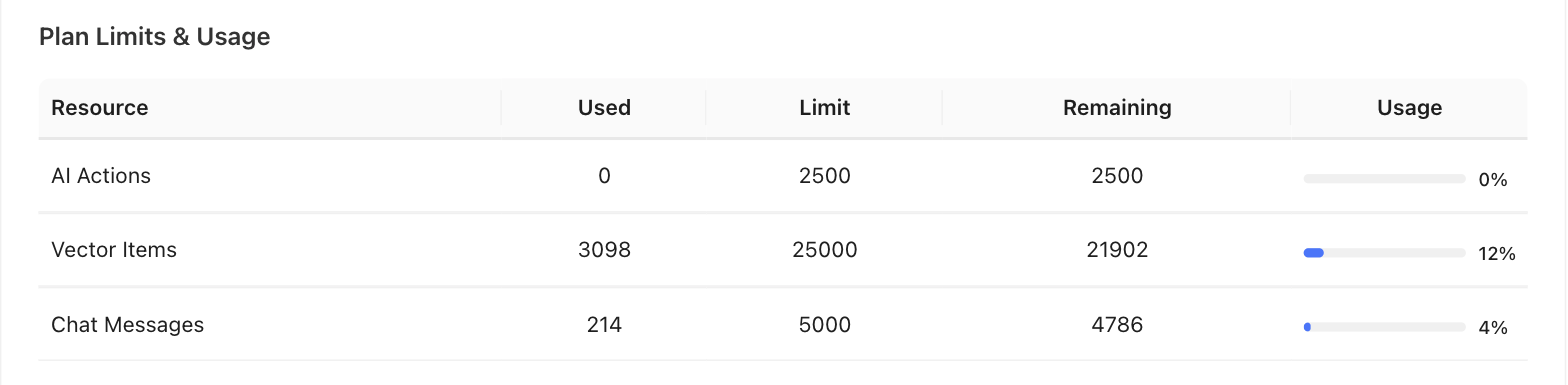
| Pro | $49/mo | 5,000 | 25,000 | 2,500 |
| Business | $249/mo | 50,000 | 100,000 | 10,000 |
Lite credits are one-time and don’t renew, so it’s a way to test the tool rather than run a busy store on it. AI tasks are shared by the content agents and by MCP actions. Support Escalation starts on Growth, and full chat history is listed on Pro and Business. Every paid plan runs on unlimited websites and carries a 14-day money-back guarantee.
AI Product Recommendations bills the way a WooCommerce.com extension bills, as a prepaid licence:
| Plan | Price | Term | Includes |
|---|---|---|---|
| 1 year | $39 | 12 months | Updates, vendor support, 30-day money-back guarantee |
| 2 year | $62.40, 20% off $78 | 24 months | The same, prepaid |
| OpenAI usage | Not set by the vendor | Ongoing | Billed to your own OpenAI account, per token |
Two notes on that table. The marketplace geolocates its currency, so the same listing reads $39 in USD and AUD 57 from Australia; check which one your checkout is quoting before you compare anything. And the listing does not state how many sites one subscription covers, which is worth asking the vendor directly if you run more than one store.
Here is what the difference looks like in practice (example data, not a real store): a WooCommerce shop wants AI recommendations and an assistant on the storefront for a year. The Azent Labs route is $39 for the licence plus twelve months of OpenAI charges driven by traffic, so the only number you can write down in advance is the $39. The StoreAgent route is $228 for twelve months of Growth or $588 of Pro, both of which you can write down in advance, with the content agents and the dashboard in the same price. Whether the first route is cheaper depends on a figure neither vendor will quote you. If you want the method rather than one example, we broke down what an AI chatbot actually costs across the category, including the bring-your-own-key tools.
Beyond Recommendations: What Else Each Tool Does
AI Product Recommendations is a four-feature extension and it is consistent about its scope: the Shopping Assistant, Product Recommendations, Personalized Recommendations, and Upsell and Cross-sell Recommendations, each with its own settings panel and its own shortcode. Nothing in it writes product copy, category descriptions, alt text or review summaries, and nothing in it reports on what the AI earned you beyond the built-in analytics the listing mentions.
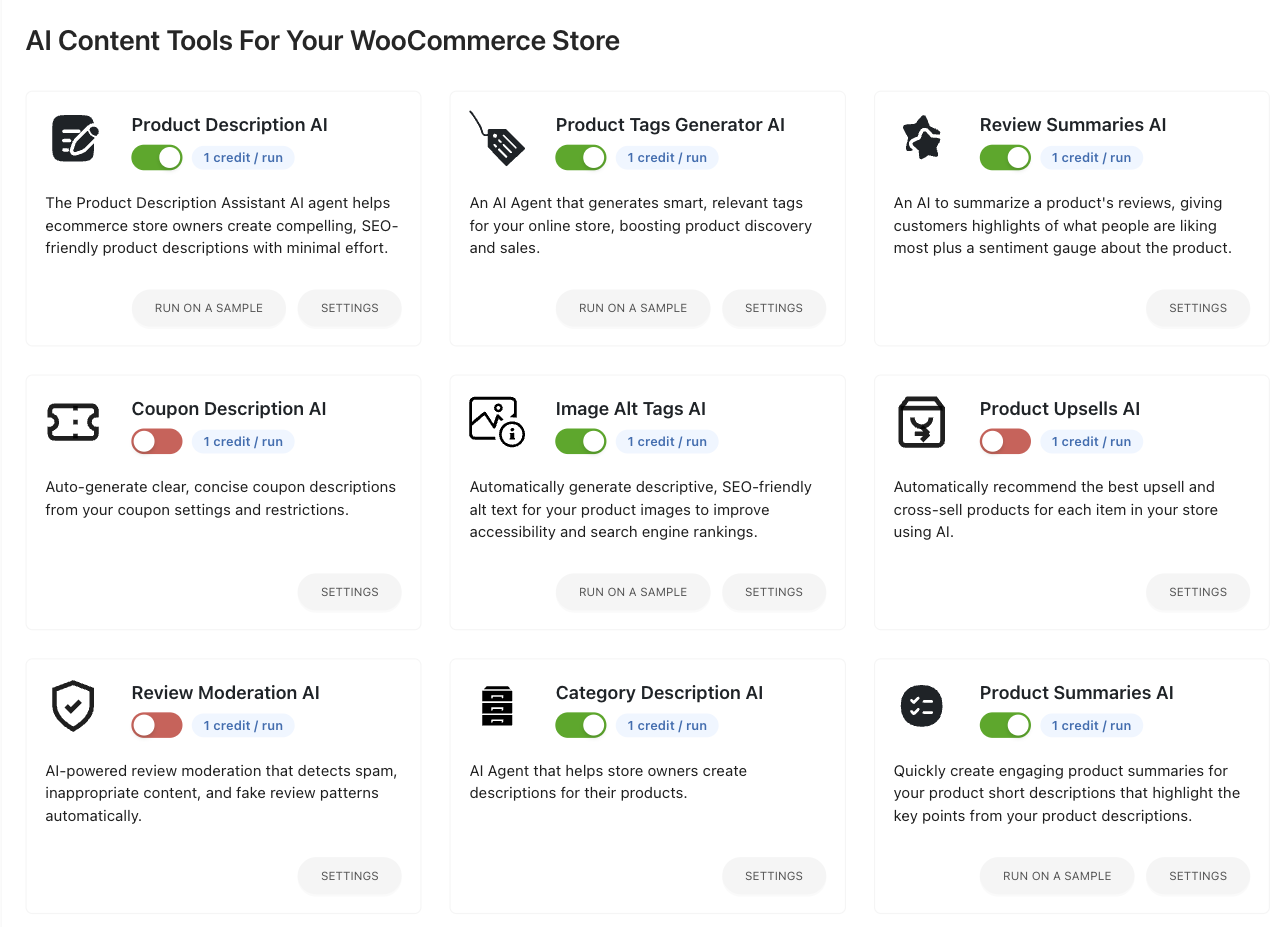
StoreAgent runs the chatbot as one of three jobs. The second is WooCommerce AI content generation: agents that write product descriptions, short product summaries, category descriptions, product tags, review summaries and image alt text, on one product, on a sample, or in bulk across the catalogue. Review Moderation AI triages incoming reviews, and for stores running Advanced Coupons the coupon agents write and configure coupons. Nothing goes live until you approve it.
Recommendations are where the two products overlap most and work least alike. StoreAgent’s AI upsell and cross-sell generator scans the catalogue nightly for products with no pairings set, matches them using the store’s own vector database so it pairs by meaning rather than by shared category, and writes the picks into the standard WooCommerce Upsells and Cross-sells fields. Azent Labs renders its own blocks on top of your theme. StoreAgent fills the fields your theme already reads, so the pairings show up where your customers expect them. StoreAgent never overwrites pairings you set by hand, suggestions arrive in your dashboard for one-click approval, and the agent runs on every plan including the free one.
The third job is measurement. AI-powered store insights give you a written briefing, KPI cards for revenue, conversion rate, chats and impressions, and a funnel that runs from widget impression through opening the chat and adding to cart to purchase. Because it lives inside WooCommerce, assisted purchases match real orders rather than estimates. That funnel earns its place when you consider that Baymard Institute puts the average documented cart abandonment rate at 70.22% across 50 studies. Most shoppers who start don’t finish, and the funnel tells you which step yours stop on.
Both products offer MCP, and the two implementations are not comparable. For Azent Labs it is a checkbox in the General tab, marked optional, described as Model Context Protocol support for advanced AI integrations. StoreAgent runs a managed WooCommerce MCP gateway instead: nothing hosts an endpoint on your store, you sign in on your own site to approve a connection, you pick read-only or read and write for that connection, write actions stay hidden from read-only clients, every call is logged for 30 days, and you can revoke an assistant in one click. It exposes StoreAgent’s own abilities plus every other WooCommerce AI ability your store registers, including WooCommerce’s own. It is on every plan, including Lite, and it is off until you turn it on.
Where AI Product Recommendations Is Genuinely Strong
Azent Labs built something StoreAgent has no answer to, and it would be silly to pretend otherwise. This extension places recommendations on the storefront itself. Its documentation lists automatic display on shop pages, product pages, the cart and the checkout, plus four shortcodes if you want to drop a block somewhere specific. It separates general recommendations from personalised ones driven by a shopper’s own browsing and purchase history. It gives each feature its own strategy, trigger and placement settings, and a Keywords tab for tuning how products get matched. If what you want is a recommendation carousel at checkout, this is a product built for that and StoreAgent is not.
Two more points in its favour. It sits on the official WooCommerce Marketplace, which means a vetted listing, a 30-day money-back guarantee and billing through an account you already have. And the rule-based fallback means the plugin still earns its licence on a store that never connects an AI at all.
Now the honest counterweight, because you should hear it from us rather than find out later. StoreAgent does not render recommendation blocks on your storefront. Its recommendations reach shoppers two ways: inside the chat, where the assistant suggests products and the preview card carries an Add To Cart button, and through the WooCommerce upsell and cross-sell fields the upsell agent fills, which your theme displays where it always has. There is no shop-page carousel, no checkout block and no per-shopper personalisation engine. StoreAgent is also not a helpdesk: there is no human agent inbox, no seats, no SMS and no voice. When a shopper asks for a person, the chatbot takes their email and sends your team the full transcript with that address set as reply-to, so you answer from the inbox you already use. That is a faster human, not a ticketing system.
One last thing to weigh on the Azent Labs side rather than against it. The listing shows no installs and no reviews yet, and the vendor’s own site lists no support policy, no team and no address. That is normal for a new marketplace vendor and it is not a strike against the code. It does mean you are relying on the WooCommerce.com support policy and the 30-day guarantee rather than on other buyers’ experience. If you want to see how the rest of the field handles the same job, our StoreAgent comparisons cover the other AI tools competing for this slot on a Woo store.
Frequently Asked Questions
Does AI Product Recommendations need an OpenAI API key?
Yes, for the AI features. Step 2 of the official setup documentation tells you to enter your OpenAI API key and switch on Enable OpenAI, and the FAQ confirms costs depend on your OpenAI usage. Without a key the extension falls back to rule-based recommendations, so it still works, just not with AI behind it.
What does the Azent Labs extension actually cost to run?
The licence is $39 for one year or $62.40 for two. The AI is separate and uncapped, billed by OpenAI on your own account at whatever your traffic generates. The documentation offers token limits and a guest access toggle to keep that in check, which means the running cost is something you manage rather than something you are quoted.
Does StoreAgent show product recommendations on the storefront?
Not as its own blocks, and that’s a real gap. StoreAgent recommends products inside the chat, with an Add To Cart button on the preview card, and its upsell agent fills WooCommerce’s native Upsells and Cross-sells fields so your theme renders them in the usual places. If you want a recommendation carousel on the shop page or at checkout, StoreAgent does not do that.
How much does StoreAgent cost compared to AI Product Recommendations?
StoreAgent runs $19, $49 or $249 a month, with a free Lite plan, no overage charges and no API key to buy. AI Product Recommendations is a $39 annual licence plus your own OpenAI bill. Which is cheaper over a year depends on your traffic, and only one of the two numbers is knowable in advance.
Can I try StoreAgent before paying?
Yes. StoreAgent Lite is free and stays free, with 1,000 memory items plus 50 AI chat replies and 200 AI tasks as one-time credits. No credit card and no OpenAI key. AI Product Recommendations has no free tier; it carries a 30-day money-back guarantee through the WooCommerce Marketplace instead.
Which AI Is Right For Your WooCommerce Store?
StoreAgent, for most WooCommerce stores, and the reason is cost certainty rather than feature count. A $39 licence with an open-ended OpenAI account behind it only looks cheaper than a $19 plan that covers the model, because the two numbers measure different things. AI Product Recommendations wins when storefront placement is the whole job: carousels on the shop, cart and checkout pages, and picks tuned to one shopper’s browsing history.
Here’s what to do with all this:
- Find out who pays for the model before you compare any two headline prices
- Ask whether the AI reads live prices, stock and orders rather than an indexed copy of them
- Price a busy traffic month, not an average one, because page views drive token spend
- Decide whether you need content and insights too, since that changes which tool you are shopping for
- Be honest about where you want recommendations to appear, and buy the one that puts them there
One last thing worth keeping in view whichever way you go. Salesforce research found that 72% of customers say it’s important to know whether they’re talking to an AI agent, so whichever assistant you put on the storefront, let it say what it is.
If you run a WooCommerce store and want AI that reads your real catalogue and your real orders without a second bill attached, StoreAgent is built for exactly that. Start free on StoreAgent Lite and see what it answers before you spend anything.
Sources
- Baymard Institute, Cart Abandonment Rate Statistics — Supports: “average documented cart abandonment rate of 70.22% across 50 studies”
- Salesforce, State of the Connected Customer — Supports: “72% of customers say it’s important to know whether they’re talking to an AI agent”
Note: the AI Product Recommendations marketplace listing, its official documentation and the Azent Labs vendor pages were read directly on 2026-11-02, including the listing’s own product data for version, install count and rating. StoreAgent plan pricing and quotas were verified against the live StoreAgent pricing page the same day. Per the competitor linking policy, Azent Labs pages are named in prose but deliberately not linked.