If you’re weighing StoreAgent vs MxChat for your WooCommerce store, you’ve probably come at it from the WordPress plugin directory. MxChat sits there with a 5.0 rating, 2,000 active installs and a feature list that reads like a whole AI department: six providers, 100+ models, RAG over your pages and products, content generation, video generation, an admin assistant. The licence is a one-time $69.97. Next to a monthly subscription, that looks like an easy decision.
Here’s what that page doesn’t say. The licence is the only thing that’s one-time. MxChat doesn’t include the AI, so before the chatbot answers a single question you create an account with OpenAI, Anthropic, Google, xAI or DeepSeek, paste an API key into the onboarding wizard, and pay that provider directly for every reply and every re-index from then on. MxChat is upfront about the model, calling it bring-your-own-key with no per-message fees. It just can’t tell you what your monthly total will be. And the WooCommerce features specifically are not in the free plugin at all.
So StoreAgent vs MxChat isn’t really a fight over feature lists. It’s a choice between a managed AI for WooCommerce at a flat monthly price and a very broad WordPress AI toolkit that you assemble, key up and run yourself. This comparison covers what each AI can actually do in your store, what you’d really pay once the provider bill is counted, and where MxChat genuinely does more than StoreAgent.
StoreAgent Vs MxChat: The Short Answer
StoreAgent is the better choice for most WooCommerce stores because the AI is included in the plan, the WooCommerce features are on every tier including the free one, and the price on the plan is the whole price. MxChat asks you to bring an AI provider account, and its WooCommerce add-on documentation states plainly that WooCommerce features are Pro-only.
MxChat is a genuinely capable plugin, and on one dimension it does more than StoreAgent: its chatbot can add products to the cart and send a shopper to checkout. StoreAgent’s chat answers and links, it doesn’t take cart actions. Those are different products, and knowing which one you’re buying matters more than the sticker price.
| Comparison Factor | StoreAgent | MxChat |
|---|---|---|
| Who supplies the AI | Included in the plan, no key to paste | You do, via your own provider account |
| AI provider bill | None, usage is in the plan | Yours, billed by whichever provider you pick |
| WooCommerce features | On every plan, including free Lite | Documented: Pro-only |
| Cart actions in chat | No, answers and links only | Yes, add to cart and checkout |
| Order lookup in chat | Yes, for the signed-in shopper | Yes, for logged-in customers |
| Live price reads | Price and stock read at answer time | Product cards query the catalogue live |
| Pricing model | Flat monthly, unlimited websites | One-time licence per site key, plus provider usage |
| Free plan | Yes, StoreAgent Lite | Yes, the core plugin, without WooCommerce |
| Content tools | Woo content agents, bulk and WP-CLI | AI content generator, plus a Pro editor add-on |
| Store insights | Revenue, conversion and funnel dashboard | Sales attribution on WooCommerce orders |
Does MxChat Include The AI You Run It On?
No. MxChat is the software that talks to an AI, not the AI. Its core documentation makes this the very first step of setup: the onboarding wizard opens on “Chat model”, where you “pick your AI provider and model, and paste your API key inline”. The second step is the embedding model that indexes your knowledge base, and the docs note that if it’s the same provider as your chat model, “your key is reused automatically”. Two AI jobs, both running on your account.
That’s a legitimate design, and plenty of technical store owners prefer it. You choose the model, you can point at a local or self-hosted endpoint, and nobody adds a markup to your tokens. The catch is that you now own an operational surface you didn’t have before, and MxChat’s own documentation shows its shape.
There’s model churn: the docs record that DeepSeek retired its older API model names on 24 July 2026, “which broke chat on every site still pointing at one of them”. There’s silent failure: the same page tells OpenAI Vector Store users to update to 3.2.18, because on earlier versions “every Vector Store search failed against OpenAI’s API and the failure was swallowed, so the chatbot answered with no knowledge base at all, confidently, and with no error anywhere for you to notice”. And changing your embedding model means re-indexing your whole knowledge base, in provider tokens you pay for. MxChat found and fixed each of these. They exist as a class because the retrieval path runs through your keys and your chosen vector store.
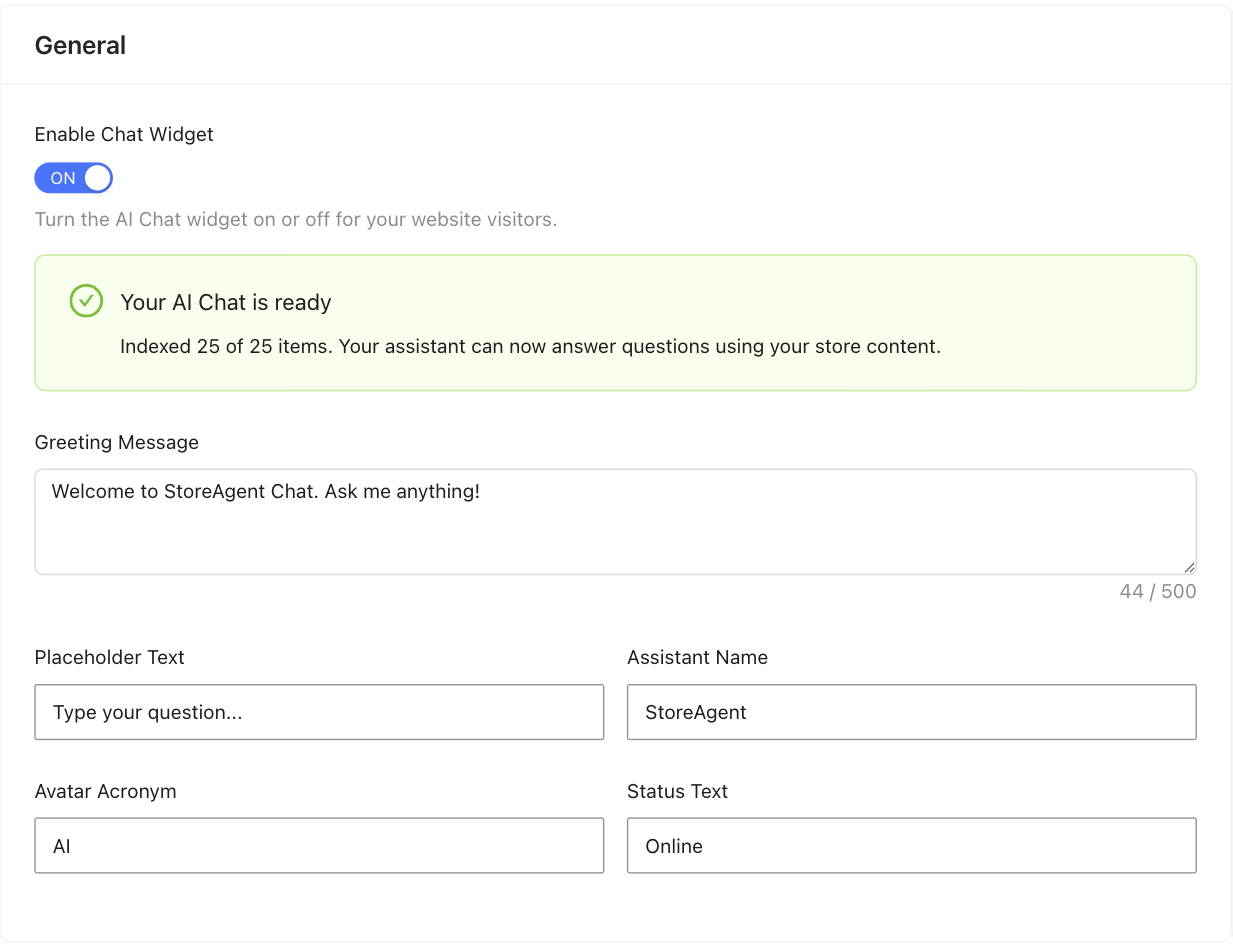
StoreAgent takes the opposite position, and this is the fork the whole StoreAgent vs MxChat decision turns on. There’s no provider account and no key. As StoreAgent’s own documentation puts it, the AI is included in your plan, and there’s “no separate bill arriving from an AI provider at the end of the month”. You don’t pick a model, which is exactly the trade: less control, no key management, no model-retirement homework, and a number on the invoice you can forecast.
What Each AI Can Actually Do In Your Store
Take one shopper message and run it through both: “Do you have this jacket in navy under $150, and where’s my order from last week?”
Questions like that are the whole reason to put an AI on a storefront. Baymard Institute puts the average documented cart abandonment rate at 70.22%, averaged across 50 studies, and an unanswered product question is one of the cheapest causes to remove. So the test that matters is not which feature list is longer, but which AI can reach your actual data when a shopper asks.
Both tools handle it. MxChat’s WooCommerce add-on documentation describes filtered product search where price, category, tag, attribute and on-sale filters compose in natural language, an Order History intent for logged-in customers, SKU lookup that resolves an exact code before the AI is even asked, and product cards rendered in chat with a working Add to Cart button. It matches against your store’s real product categories rather than guessing at names. That is a properly built WooCommerce integration, not products dropped in a search index.
StoreAgent covers the same ground from the other direction. StoreAgent’s WooCommerce AI chatbot reads price and stock live at the moment it answers, including per-variation pricing, so a variation price you changed a minute ago is the figure the shopper is told. Signed-in shoppers can ask about their own orders. It detects the shopper’s language and replies in it, can offer a coupon inside the conversation to move a hesitant buyer, and holds a competitor blocklist so it never names a rival brand you’ve listed.
The honest difference on this scenario is the last step. MxChat can put the navy jacket in the cart and walk the shopper to checkout. StoreAgent will answer the question and link the product, and the shopper adds it themselves. If in-chat cart actions are the thing you want, MxChat has them and StoreAgent doesn’t.
Two things are worth knowing before you set either one loose. MxChat’s docs record that its catalogue lookup for AI cart resolution is capped at 100 products for performance, which matters on a large catalogue when the AI is resolving “add the red one”. And its changelog is candid about the tuning this took: before version 1.7.9, with streaming on, the “Only AI-Mentioned Products” setting was silently ignored, so, in their words, “the assistant could name one cricket bat while the cards showed batting pads”. That’s fixed, and it illustrates how much calibration a chat-to-catalogue pipeline needs.
StoreAgent has its own gotcha, and it caught me out reading the release notes rather than the sales page: the chat widget deliberately does not appear on your storefront until the first product index finishes. Install it, open your shop in another tab, and you may find no chat bubble at all. That’s intentional, so shoppers only reach the assistant once it can actually answer, but it does not look intentional at the time.
What We’ve Seen: Store owners compare a lifetime licence against a monthly subscription and stop there, because that comparison is easy and the numbers are right in front of them. Then the first provider invoice arrives, and it turns out the variable cost was the real cost all along. The question to ask before you buy isn’t “which licence is cheaper?” It’s “what does this cost me every month once the AI is running, and who do I call when it stops?”
How StoreAgent And MxChat Pricing Compare
This is the sharpest split between the two, and it’s arithmetic rather than opinion. Here are StoreAgent’s plans, all billed monthly:
| Plan | Price | AI chat replies | Memory items | AI tasks |
|---|---|---|---|---|
| Lite | Free | 50 one-time | 1,000 | 25 one-time |
| Growth | $19/mo | 500 | 5,000 | 500 |
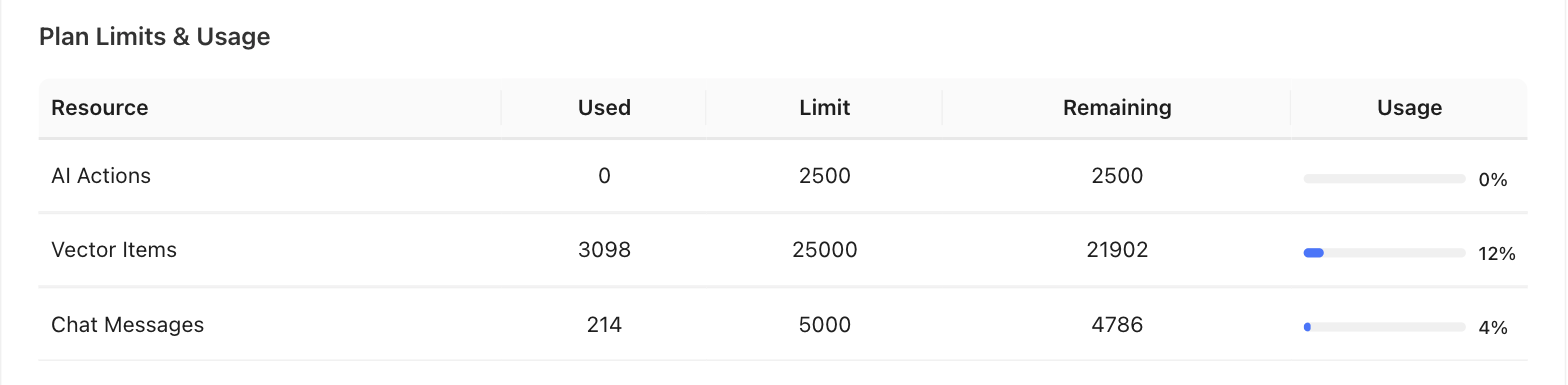
| Pro | $49/mo | 5,000 | 25,000 | 2,500 |
| Business | $249/mo | 50,000 | 100,000 | 10,000 |
Lite credits are one-time and don’t renew, so it’s a way to test the tool rather than run a busy store on it. Support Escalation starts on Growth, and full chat history is listed on Pro and Business. Only the AI’s replies count against the quota; customer messages don’t. Every paid plan runs on unlimited websites and carries a 14-day money-back guarantee.
MxChat bills once for the licence, and separately never, because the metering happens on your provider account instead:
| Licence | One-time price | Site keys | WooCommerce | What is metered |
|---|---|---|---|---|
| Core | Free on WordPress.org | Unlimited | No | Your AI provider usage |
| Pro | $69.97 | 1 | Yes | Your AI provider usage |
| Agency | $174.97 | 5 | Yes | Your AI provider usage |
| Agency+ | $279.97 | 10 | Yes | Your AI provider usage |
Read those two tables together and the shape of the decision appears. MxChat’s licence is cheaper than a year of StoreAgent Growth, and that is real and worth saying out loud: $69.97 once against $228 for twelve months, with every add-on included. If you already run an OpenAI or Anthropic account and already watch its spend, MxChat is the cheaper software.
What the licence price doesn’t tell you is the running cost, and that’s where StoreAgent vs MxChat stops being a like-for-like comparison. Here’s what the difference looks like in practice (example data, not a real store): a WooCommerce shop handling 600 chat conversations a month. On StoreAgent Growth that’s $19, and the answers are inside it. On MxChat it’s $0 in licence after month one, plus whatever 600 conversations of chat completions and an indexed catalogue of embeddings cost on your chosen model, on a bill you read after the fact rather than before. That could land well under $19 on a small catalogue and a cheap model, or well over it on a large catalogue and a frontier model. The uncertainty is the product difference, not a criticism. We’ve written more on what an AI chatbot actually costs once provider usage is counted.
One more line in the licence table deserves attention. MxChat Pro is one site key. StoreAgent’s paid plans run on unlimited websites at the same monthly price, so if you run three stores the comparison moves: three MxChat site keys means the Agency licence at $174.97, against the same $19 or $49 you were already paying StoreAgent.
Beyond Chat: What Else Each Tool Does
Neither of these is only a chatbot, and this is where the two products stop overlapping and start diverging.
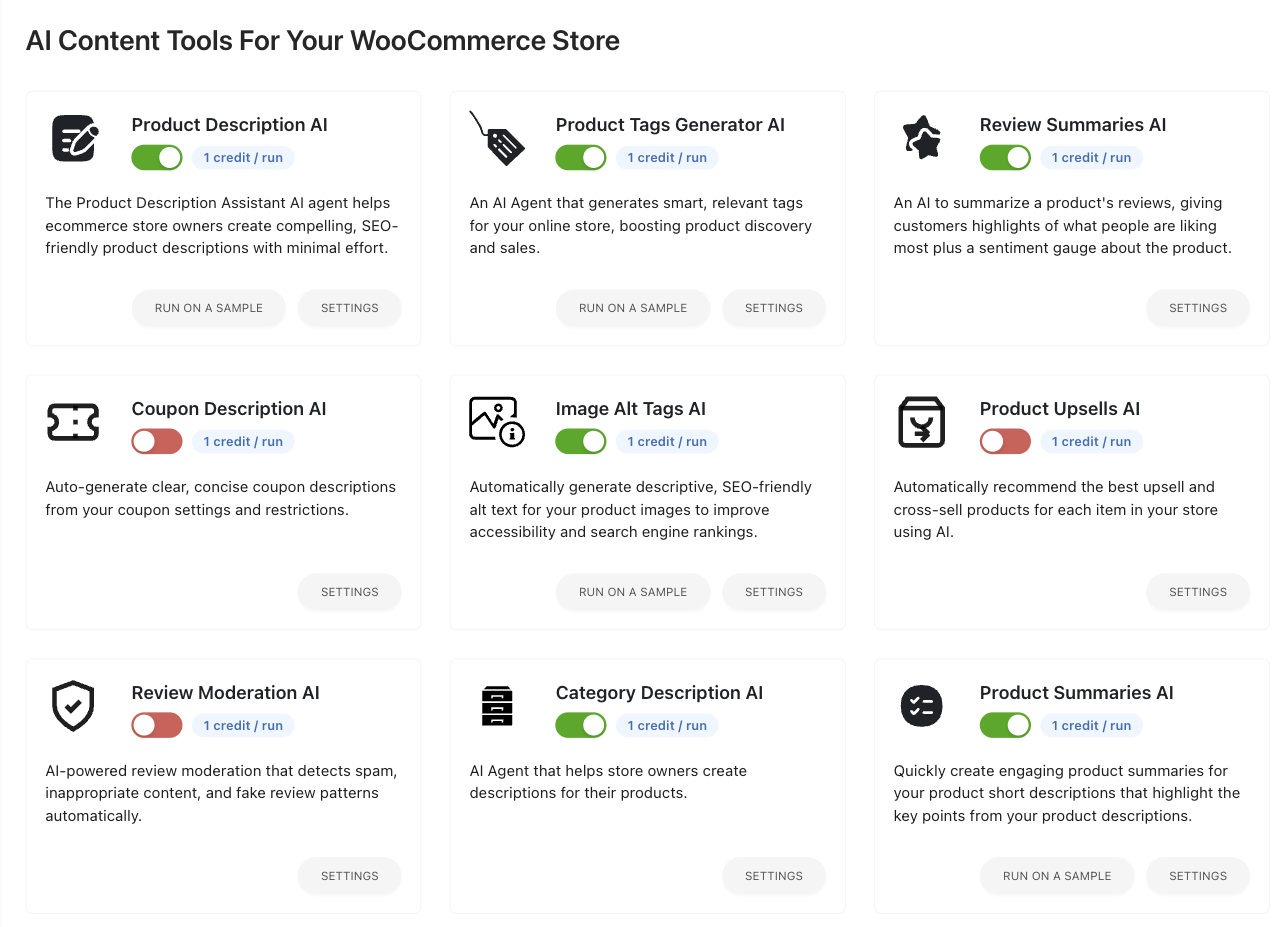
StoreAgent’s second half is WooCommerce content, generated from your product data rather than from the product name. The agents cover product descriptions and short descriptions, category descriptions, product tags, image alt tags, review summaries, coupon descriptions, upsell and cross-sell suggestions, review moderation and product Q&A. You can run any of them on one product, on a sample, or in bulk across the catalogue from the products list or by WP-CLI, and each shows its credit cost before you commit. Everything is saved as a draft you approve. That’s the full spread of WooCommerce AI content generation, priced in the same plan as the chatbot.
The third part is measurement. StoreAgent’s AI-powered store insights put four KPI cards in front of you, Revenue, Conversion rate, Chats and Impressions, each with a sparkline and a comparison against the previous period, over a funnel running from “Saw the widget” through “Opened the chat” and “Added to cart” to “Purchased”. The point of that funnel is to tell you whether the assistant is earning its keep, in dollars, and where shoppers drop off if it isn’t. StoreAgent also exposes its agents to other AI tools on your site through the WordPress Abilities API, and a managed WooCommerce MCP connection is live on every plan so Claude or ChatGPT can call those WooCommerce AI abilities directly.
MxChat’s second half is much wider and much less Woo-specific. Fourteen add-ons ship with the Pro licence, including an MCP server, AI site search, an advanced content editor with bulk landing-page generation from CSV, an admin assistant inside wp-admin, video generation through Veo 3.1 and Sora 2, image analysis, chat-triggered forms, unlimited specialised bots with their own knowledge bases, AI-generated chatbot themes, and a script tag that puts the same bot on a non-WordPress site. On raw breadth of AI features per dollar, MxChat wins this section outright.
Whether that breadth is worth anything depends on whether you’d use it. Fourteen add-ons on one store is also surface area you configure, key up and keep current. A store owner who wants product copy written and shopper questions answered is buying a different thing from an agency that wants a video generator and ten site keys.
Where MxChat Is Genuinely Strong
MxChat is a well-built plugin and it would be silly to suggest otherwise. A 5.0 rating across 29 reviews at 2,000 active installs is not a fluke, and the release cadence is fast. Model choice is a real advantage: six providers, 100+ models, and custom OpenAI-compatible endpoints including local ones, which is the only way to run this class of tool without sending store data to a third party at all. The WooCommerce add-on is also thoughtful in places StoreAgent hasn’t gone. Its Shipping Destination Check reads your real shipping zones and refuses to quote a price it can’t know, describes a pickup-only zone as pickup, and asks for a postcode rather than guessing when a country is only partly served. Its sales attribution stamps chat-originated orders, adds a Source column to WooCommerce Orders on both HPOS and the legacy table, and exports to CSV. And it can add to cart and check out, which StoreAgent cannot.
That shipping tool solves a problem worth solving. Baymard Institute’s research on why shoppers abandon carts, setting aside those who were only browsing, puts extra costs such as shipping, tax and fees at 40% of the remaining reasons, with slow delivery next at 20%. Answering “do you even ship to me, and how” inside the conversation is aimed straight at that.
Now the honest counterweight, because you should hear it from us rather than find out later. StoreAgent is not a multichannel helpdesk. There’s no human-agent inbox, no SMS channel and no voice. It also doesn’t take cart actions in chat, so the in-conversation add-to-cart and checkout that MxChat’s Pro add-on offers are simply not on the list. What StoreAgent does instead is escalate: on paid plans, an unresolved conversation is emailed to you as a summary with the customer set as reply-to, so replying to that email goes straight back to the shopper rather than into a ticket queue. That’s a faster human, not an inbox, and those are different purchases. If you need a shared agent inbox, run one alongside it.
MxChat is also the better answer for two specific buyers. If you’re an agency putting a chatbot on ten client sites, ten Pro keys for $279.97 once is hard to argue with. And if you must keep inference on your own infrastructure, MxChat’s custom-endpoint support does that and StoreAgent doesn’t. If neither describes you, the other StoreAgent comparisons cover the WooCommerce AI tools you’re most likely weighing alongside StoreAgent vs MxChat.
Frequently Asked Questions
Does MxChat work with WooCommerce?
Yes, through a separate WooCommerce add-on, and it’s capable: product cards, add to cart, checkout, order history for logged-in customers, filtered search and shipping-zone answers. The requirement to know is licensing. The add-on’s own documentation states that WooCommerce features are Pro-only, so the free plugin from WordPress.org will not give you them.
Does MxChat need my own OpenAI API key?
Yes, or a key from another supported provider. MxChat’s setup wizard asks you to pick a chat model and paste an API key before the bot answers anything, and the embedding model that indexes your content runs on a key too. You pay that provider directly for usage. MxChat adds no markup, which also means it cannot quote you a monthly total.
Can StoreAgent’s chatbot add products to the cart?
No, and it’s worth being clear about it. StoreAgent’s chat answers product, stock and order questions and links the shopper to the right product, and the shopper adds it to the cart themselves. The dashboard tracks add-to-cart as a funnel stage, but the assistant does not take that action. MxChat’s Pro WooCommerce add-on does.
How much does StoreAgent cost compared to MxChat?
StoreAgent runs $19, $49 or $249 a month with the AI included, on unlimited websites. MxChat Pro is $69.97 once for one site key, plus whatever your AI provider charges every month after that. The licence is cheaper; the total depends on your catalogue size, your traffic and the model you choose.
Can I try StoreAgent before paying?
Yes. The Lite plan is free with no credit card, and includes 1,000 memory items plus 50 AI chat replies and 200 AI tasks as one-time starter credits. You do need a free StoreAgent.ai account to activate the AI features. Those credits do not renew, so Lite is for testing rather than running a busy store. Paid plans add a 14-day money-back guarantee.
Which AI Is Right For Your WooCommerce Store?
StoreAgent, for most single-store WooCommerce owners, and the reason is that the thing MxChat asks you to supply is the thing most store owners least want to manage. An AI provider account, a key in a settings field, a model that can be retired underneath you and a bill you can only read in arrears are all fine if you enjoy that surface. If you don’t, you’re paying a lower licence fee for a higher operating load. MxChat wins clearly in two shapes: an agency deploying to many client sites, and a store with a hard requirement to run inference on its own infrastructure.
Here’s what to do with all this:
- Check who supplies the AI before you compare any licence prices
- Add your likely provider bill to the licence, because that is the real monthly number
- Decide whether you want cart actions in chat, which is the one thing StoreAgent does not do
- Count how many of the extra features you would actually use rather than how many exist
- Count your site keys if you run more than one store
If you run a WooCommerce store and want AI that reads your real catalogue and your real orders without a provider account in the middle, StoreAgent is built for exactly that. Start free on StoreAgent Lite and see what it answers before you spend anything.
Sources
- Baymard Institute, Cart Abandonment Rate Statistics — Supports: “average documented cart abandonment rate at 70.22%, averaged across 50 studies”
- Baymard Institute, Cart Abandonment Rate Statistics — Supports: “extra costs such as shipping, tax and fees at 40% of the remaining reasons, with slow delivery next at 20%”
Note: MxChat plan pricing, licence terms, API key requirements and WooCommerce add-on capabilities were verified directly against MxChat’s own live documentation, add-ons page and pricing page on 2026-09-02, and its WordPress.org listing the same day. StoreAgent plan pricing, quotas and feature claims were verified against the live StoreAgent site, knowledge base and plugin readme on 2026-09-02. Per the competitor linking policy, MxChat pages are named in prose but deliberately not linked.