A shopper emails your store and asks for a copy of everything you hold about them. A week later, someone else asks you to delete their data. If you sell in the EU, you have one month to answer both. Until now your AI chat was a blind spot in that process, because WordPress had no idea the chat existed.
StoreAgent now plugs into the privacy tools that WordPress already ships. You get suggested privacy policy text for the chat, a StoreAgent Chat group in personal data exports, and a StoreAgent Chat line in personal data erasures. You handle it all from the same wp-admin screens you already use for every other plugin.
In this article, we’ll cover the suggested policy text, how to export a shopper’s chat history, how erasure works and what it reports, which conversations the tools can and cannot reach, and a related privacy control for order lookups. So, let’s get started!
Table of Contents
- Why Store Owners Asked For This
- Suggested Privacy Policy Text For The Chat
- Export A Shopper’s Chat History
- Erase A Shopper’s Chat Data
- How StoreAgent Knows Which Chats Belong To Whom
- What The Tools Cannot Reach
- A Related Control: Turn Off Order Lookups
- For Developers
- Get Started
- Frequently Asked Questions
Why Store Owners Asked For This
GDPR gives your shoppers the right to know what you collect, the right to a copy of it, and the right to have it erased. Your store is the controller, so those requests land with you, not with the plugins you use.
WordPress and WooCommerce handle this with three built-in tools: the Privacy Policy Guide, Tools > Export Personal Data and Tools > Erase Personal Data. Plugins that store personal data are expected to hook into them. Before this update, StoreAgent did not, and store owners selling in the EU told us that stopped them turning the chat on.
These tools support your GDPR compliance. You still run your own privacy review, and the chat now fits into it like any other plugin.
Suggested Privacy Policy Text For The Chat
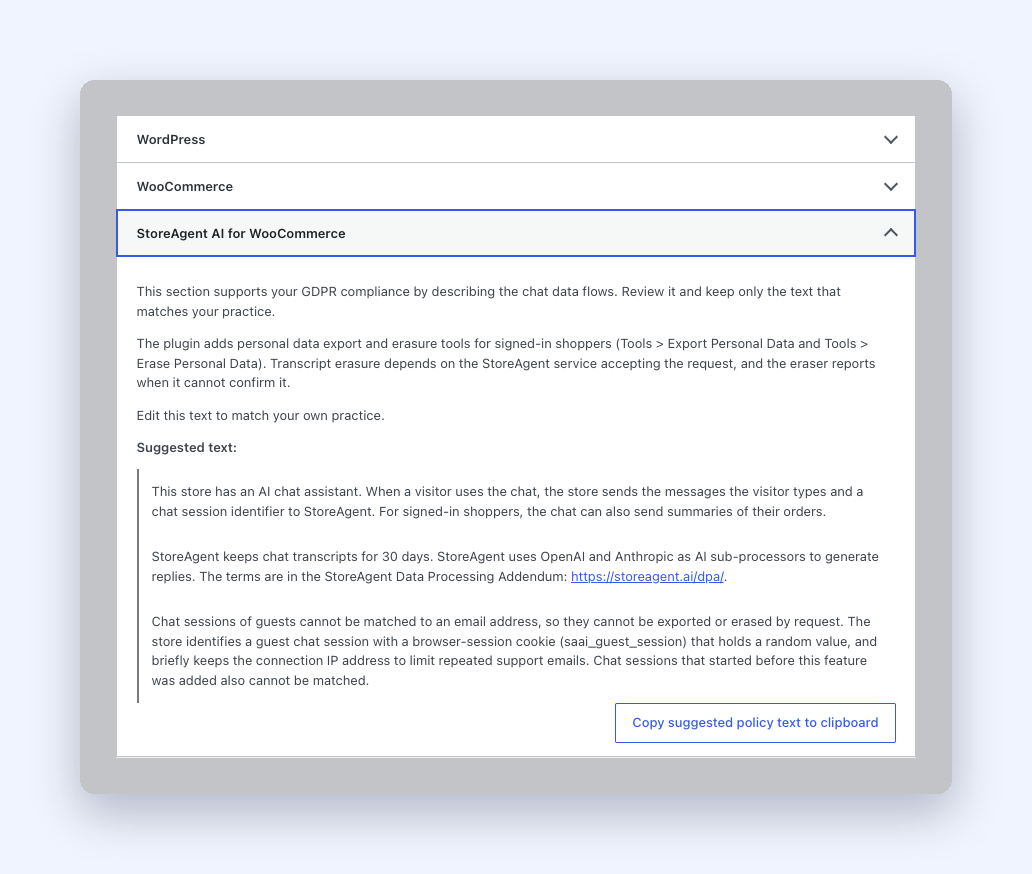
Go to Settings > Privacy and open the Policy Guide. With the chat widget enabled, you will see a section called StoreAgent AI for WooCommerce.
The suggested text tells your shoppers:
- That the store has an AI chat assistant, and that it sends the messages a visitor types and a chat session identifier to StoreAgent.
- That for signed-in shoppers, the chat can also send summaries of their orders.
- That StoreAgent keeps chat transcripts for 30 days.
- That StoreAgent uses OpenAI and Anthropic as AI sub-processors, with a link to the StoreAgent Data Processing Addendum.
- How guest chats are identified: a browser-session cookie called
saai_guest_sessionthat holds a random value, plus the connection IP address, kept briefly to limit repeated support emails.
Click Copy suggested policy text to clipboard and paste it into your own privacy policy page. A few lines in the section are notes for you, such as “Edit this text to match your own practice”. Those notes stay behind when you copy, so only the shopper-facing text ends up on your policy page.
The section only appears while the chat widget is enabled. Turn the chat off and the StoreAgent section drops out of the Policy Guide.
Export A Shopper’s Chat History
When a signed-in shopper asks for their data, handle it the same way you would for any other request:
- Go to Tools > Export Personal Data.
- Enter the shopper’s email address and add the request.
- Once the shopper confirms (or you skip confirmation), download the export.
The export file now includes a StoreAgent Chat group. Each row shows the session, the date, the sender (Shopper or Assistant) and the message itself. StoreAgent fetches each chat session’s messages from the StoreAgent service one session at a time, so a shopper with a long chat history does not time out the export.
The export only includes chat sessions that belong to that shopper’s account. Another customer’s conversations never appear in it.
Erase A Shopper’s Chat Data
Erasure works from the screen next door:
- Go to Tools > Erase Personal Data.
- Enter the shopper’s email address and add the request.
- Run the erasure.
The StoreAgent Chat eraser removes the chat data your store holds for that shopper: the links between their account and their chat sessions, and their chat tool session. It then asks the StoreAgent service to delete the transcripts for those sessions, in batches of up to 100.
If StoreAgent cannot confirm the deletion, you will know. The result line says StoreAgent could not confirm the deletion and gives the reason. Those sessions stay on the shopper’s record so you can run the request again later. StoreAgent also clears every transcript after 30 days on its own schedule.
Erasing one shopper only touches that shopper. Other customers’ chat sessions stay as they were.
How StoreAgent Knows Which Chats Belong To Whom
Chat transcripts on the StoreAgent service do not carry a WordPress user ID or an email address. That keeps personal details out of the transcripts, so the store needs its own record to answer “which chats are this person’s?”
So from this update on, when a signed-in shopper chats, your store keeps a small list of that shopper’s chat session IDs in their user profile. A session is added when they send a message while signed in, including a guest chat that carries on after they log in. Entries drop off 32 days after the last activity, just past the 30-day transcript window, because an older session cannot hold a transcript anymore.
What The Tools Cannot Reach
Two kinds of chats cannot be matched to an email address, so they cannot be exported or erased by request:
- Guest chats. A shopper who never signs in has no email attached to their chat, so there is nothing to match.
- Chats from before this update. The list of sessions starts when you update, and there is no backfill.
The suggested policy text tells your shoppers this up front. Both kinds of chats still expire after 30 days.
A Related Control: Turn Off Order Lookups
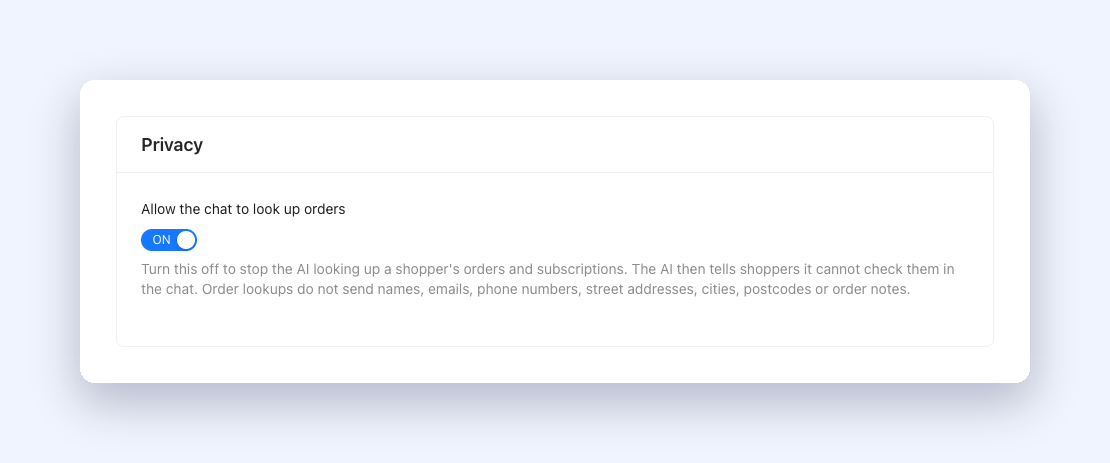
Alongside these tools, StoreAgent now sends less shopper data when the chat looks up an order. Order lookups do not send names, emails, phone numbers, street addresses, cities, postcodes, order notes or customer IDs.
Guest chats changed too. A guest session used to be keyed on a hash of the shopper’s IP address and browser. It now uses a random value in a browser-session cookie, so the session key no longer carries anything derived from the shopper’s IP.
If you want the chat to stay out of orders entirely, there is a new Privacy card under StoreAgent > Settings > AI Chat > General with an Allow the chat to look up orders setting. It is on by default. Turn it off and the chat stops looking up a shopper’s orders and subscriptions, and tells shoppers it cannot check them in the chat.
For Developers
The shopper session list lives in the _saai_chat_sessions user meta key. To change how long sessions stay on the list, use the saai_chat_privacy_map_days filter (default 32 days). The exporter and eraser both register under the storeagent-chat ID.
Get Started
Update StoreAgent AI for WooCommerce, make sure the chat widget is enabled, then open Settings > Privacy > Policy Guide and copy the StoreAgent text into your privacy policy. That one step covers the transparency side. Export and erasure work from then on with no extra setup.
Not using StoreAgent yet? Take a look at the plans and see what an AI assistant can do for your WooCommerce store.
Frequently Asked Questions
Does this make StoreAgent GDPR compliant?
Compliance belongs to your store as a whole. These tools support your GDPR compliance by documenting what the chat collects and letting you answer access and erasure requests for chat data from wp-admin.
Where do I find the privacy policy text?
Under Settings > Privacy > Policy Guide, in the section called StoreAgent AI for WooCommerce. It only appears while the chat widget is enabled.
Do I need to turn anything on?
No. The exporter and eraser are active as soon as you update. The policy text shows up while the chat widget is enabled.
How long does StoreAgent keep chat transcripts?
30 days. Transcripts older than that are removed automatically.
Can I export or erase a guest’s chats?
No. Guest chats have no email address attached, so WordPress cannot match them to a request. They expire after 30 days.
What happens if the erasure cannot reach StoreAgent?
The eraser still removes the data held on your store, then reports the transcripts as retained with the reason. The sessions stay on the shopper’s record so you can run the request again.
Which AI providers does the policy text name?
OpenAI and Anthropic, as AI sub-processors, with a link to the StoreAgent Data Processing Addendum.