Reviewed by
You’ve spent months optimizing product titles, descriptions, and meta data. Your on-page SEO looks solid. But there’s a traffic source you’re probably ignoring: Google Image Search. For ecommerce stores, image search is a meaningful source of organic traffic, and the signal Google leans on most to understand your product images is alt text. AI alt text for WooCommerce closes that gap automatically, without you writing a description for every image by hand.
If most of your product images have no alt text, Google can’t index them properly, screen readers can’t describe them, and you’re missing out on a discovery channel your competitors may already be using. According to Amra and Elma, only 26% of websites use alt text for their images, which means the majority of online stores have a gap here.
This guide to AI alt text for WooCommerce explains why alt text matters specifically for WooCommerce stores, shows you how bad the problem typically is, and walks you through automating the fix with AI. So, let’s get started.
Table of Contents
What Is Image Alt Text (And Why Should WooCommerce Store Owners Care)?
Alt text (alternative text) is a short written description attached to an image in your website’s HTML. It serves two audiences: search engines that can’t “see” images, and people using screen readers who rely on text descriptions to understand visual content. For WooCommerce stores specifically, it matters in three ways.
SEO: Google Image Search and product visibility
Google can’t visually interpret your product images. Alt text is the primary signal it uses to understand what an image shows. Product images with descriptive alt text can appear in Google Image Search results, Google Shopping carousels, and AI Overviews, making your products more discoverable.
According to Google Search Central, writing descriptive alt text is a core best practice for image SEO. When your alt text includes product-specific details like color, material, and style, Google can better match your images to relevant searches.
Accessibility: screen readers and ADA compliance
According to the World Health Organization, at least 2.2 billion people worldwide have a vision impairment. Screen readers rely on alt text to describe images aloud. If your product images have no alt text, screen reader users experience your product pages as blank gaps where the most important visual information should be.
Beyond the ethical case, accessibility lawsuits targeting ecommerce sites are increasing. According to UsableNet, over 4,000 digital accessibility lawsuits were filed in 2024, with ecommerce websites representing 77% of targets.
Google Shopping and rich results
Alt text helps Google understand your product images for Shopping results and rich product displays. Better image understanding means better product matching in Shopping feeds, carousels, and AI-powered product discovery features.
For the complete guide to image SEO beyond alt text, see our WooCommerce image optimization guide.
The Alt Text Problem: Why 80% Of WooCommerce Stores Fail
Most WooCommerce stores fail at alt text for three reasons: the sheer scale of images to describe, poor-quality descriptions when they do exist, and no system to keep up as the catalog grows. Here’s how each one plays out.
The scale challenge
Consider the math. An average WooCommerce store with 200 products and three to five images per product has 600 to 1,000 images needing alt text. Writing good alt text manually takes 30 to 60 seconds per image. That’s 5 to 17 hours of work, just for your existing catalog. Every new product you add compounds the problem.
The quality challenge
Even when alt text exists, it’s often useless. The most common “alt text” on WooCommerce stores is the file name: “DSC_0847-scaled.jpg” or “IMG_4521.png.” This tells Google and screen readers absolutely nothing about your product.
Other common failures include single-word descriptions like “shoe” (too vague), keyword-stuffed strings like “buy cheap red shoes best price sale discount” (spammy and potentially penalized), and duplicate alt text across every image on a product page.
The maintenance challenge
Alt text isn’t a one-time task. Every new product image needs it. Product updates (new colors, sizes, seasonal variants) need updated alt text. Lifestyle photos, sale banners, and category images all need unique descriptions. Without a system, the alt text gap only grows over time.
What We’ve Seen: When we audited 50 WooCommerce stores across different niches, the alt text gap was worse than expected. The average store had alt text on only 18% of product images. The most common “alt text” we found was the file name (e.g., “DSC_0847-scaled.jpg”), which tells Google and screen readers absolutely nothing about the product. Stores that added descriptive alt text to their top 20 products saw Google Image Search impressions increase within two to three weeks.
How AI Alt Text Generation Works
AI alt text for WooCommerce works by reading each product image alongside the details already on its product page, then writing a short description of what the image shows. The quality depends on how much product context the tool can see, which is where WooCommerce-native tools pull ahead of generic ones.
Generic AI alt text vs. product-aware AI alt text
Not all AI alt text tools work the same way. Generic tools analyze the image visually and describe what they “see.” For a product photo, that might produce something like “blue item on white background.” Accurate, but not useful for ecommerce SEO.
Product-aware AI alt text tools combine visual analysis with the product context already on the page. Instead of guessing from the pixels alone, the tool reads details like the product’s title, description, and existing information, then works them into the description. The result: “Women’s blue merino wool crew neck sweater” instead of “blue clothing item on white surface.”
The difference matters because Google needs product-specific information to rank your images for relevant searches. Generic descriptions don’t contain the keywords and product details that drive image search traffic.
What makes WooCommerce-native alt text better
A WooCommerce-native alt text tool reads the context around each image, right inside your store:
- Product page details: The title, description, and existing text on the product the image belongs to
- Existing image data: Any current alt text, caption, or title already set on the image
- Image context: Whether the image sits on a product page, in a gallery, or elsewhere, so the description fits where it appears
StoreAgent’s Alt Text Agent does this natively, right inside WooCommerce. No CSV exports, no copy-pasting between tools, and no API keys required.
How To Automate Alt Text For Your WooCommerce Store
You automate AI alt text for WooCommerce in four steps: audit your current coverage, prioritize your highest-traffic images, generate descriptions with an AI tool, then review and maintain them. Here’s how to work through each one.
Step 1: Audit your current alt text coverage
Before generating new alt text, find out where you stand. Check your WordPress Media Library for images with missing or placeholder alt text. Look specifically for:
- Missing alt text: The alt field is completely empty
- Filename as alt text: Strings like “IMG_4521.jpg” or “product-photo-1.png”
- Keyword-stuffed alt text: Unnatural strings packed with search terms
Use our guide to find and fix missing alt text for a step-by-step audit walkthrough.
Step 2: Prioritize your product images
Don’t try to fix everything at once. Start where the traffic impact is highest:
- Best-selling product main images (20-50 images, highest traffic impact)
- All product main images (200+ images, full catalog coverage)
- Product gallery images (400-800 images, supporting product pages)
- Category page images (10-30 images, navigation and discovery)
- Blog post images (50-100 images, supporting content)
Decorative images like backgrounds and dividers should use empty alt text (alt=””) to tell screen readers to skip them.
Step 3: Generate alt text with StoreAgent’s Alt Text Agent
The StoreAgent AI Image Alt Text Generator reads the product context around each image (title, description, and existing details) and generates contextual alt text. You generate descriptions image by image or product by product from your Media Library and product editor, then review before they’re applied.
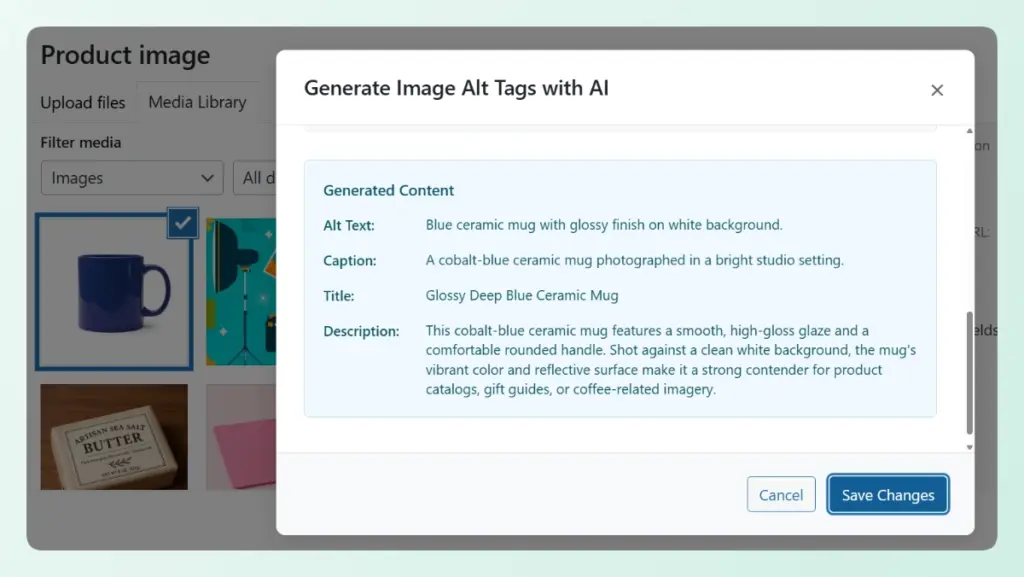
The workflow is straightforward: the agent generates alt text based on the product context, you review and approve each suggestion, and the approved alt text is applied to your image.
💡 Learn how the Alt Text Agent writes descriptions for your products for the full detail.
StoreAgent’s Alt Text Agent generates product-aware alt text right inside WooCommerce, with no API key to set up. Work through your products and close your alt text gap without writing every description by hand. Try it free.
Step 4: Review, refine, and maintain
Always review AI-generated alt text before publishing. Check for accuracy: does the alt text match what’s actually in the image? Is the product name correct? Are the attributes (color, size) accurate for that specific variation?
Set up a monthly review for new products so nothing slips through the cracks. Check your Media Library for recently uploaded images that still need alt text, and generate descriptions for them the same way.
Alt Text Best Practices For WooCommerce Product Images
Good alt text for WooCommerce product images is specific, descriptive, and written for humans first: it names the product and its key attributes in under 125 characters, without keyword stuffing. Follow these guidelines for alt text that works for both SEO and accessibility:
- Be specific and descriptive: Write “Women’s red leather ankle boot with 2-inch heel” not just “shoe”
- Include product attributes naturally: Color, material, size, and style should appear when relevant
- Don’t keyword-stuff: Write for humans and screen readers first. “Buy cheap red shoes best price sale discount” is spam, not alt text
- Keep it under 125 characters: Screen readers handle shorter alt text more smoothly
- Differentiate gallery images: Use “front view,” “side profile,” or “product in use” to distinguish multiple images of the same product
- Skip decorative images: Use empty alt=”” for backgrounds, dividers, and purely decorative elements
Here’s a quick reference (example data):
- Bad: (empty) or “DSC_0847-scaled.jpg” or “shoe”
- Risky: “buy cheap red shoes best price sale discount”
- Good (manual): “Women’s red leather ankle boot with 2-inch heel”
- Good (AI-generated, product-aware): “Women’s red Italian leather ankle boot, 2-inch stacked heel”
The AI-generated version includes product-specific attributes a human writer might skip, and it keeps a consistent format across your images. That consistency is the real advantage of AI alt text for WooCommerce.
Explore StoreAgent’s free AI tools to see how alt text generation fits alongside chatbot support and content creation, or check StoreAgent features for a full overview of what’s available.
FAQ: AI Alt Text For WooCommerce
Does alt text actually affect WooCommerce SEO rankings?
Yes. Alt text is a confirmed Google ranking signal for image search, and it helps Google understand your product pages overall. According to Google Search Central, alt text is one of the key factors Google uses when evaluating images. Stores with comprehensive alt text consistently appear in Google Image Search results that stores without it miss entirely.
Is AI-generated alt text as good as manually written?
For product images, AI-generated alt text that uses product context is often more consistent than manual writing. It includes product details humans might skip and keeps a standard format across your images. That said, always review AI-generated alt text before publishing.
How long does it take to add alt text to my entire catalog?
Manually, a 200-product store with four images per product needs 5 to 17 hours. With AI alt text for WooCommerce, each description generates in seconds instead of the 30 to 60 seconds it takes to write one by hand, and you review and approve as you go. Working product by product, you get through your catalog far faster than writing every description from scratch.
Will adding alt text help my Google Shopping listings?
Indirectly, yes. Better image alt text helps Google understand your product images, which improves matching in Shopping results and image-based product discovery. While alt text alone doesn’t control Shopping placement, it’s one of the signals Google uses to connect your product images to relevant searches.
Do I need alt text for every single image?
Product images: yes, always. Decorative images (backgrounds, dividers, spacers): use empty alt=”” to tell screen readers to skip them. Blog images: yes, describe what the image shows and how it relates to the content.
Start Fixing Your WooCommerce Image Alt Text Today
Missing alt text is a silent problem. It doesn’t trigger error messages or break your store, but it quietly costs you image search traffic, accessibility compliance, and Google Shopping visibility every day.
Here’s what to do next:
- Understand why alt text matters for SEO, accessibility, and Google Shopping
- Audit your current coverage to find how many images are missing descriptions
- Generate alt text with AI starting with your best-selling products
- Follow best practices to keep your alt text descriptive and natural
Stop losing traffic to missing alt text. Fixing your AI alt text for WooCommerce is quick with StoreAgent’s Alt Text Agent, which generates product-aware descriptions right inside your store. No API key to set up, no separate tool to learn. Start free today.