
Once you have successfully connected your StoreAgent account to your website, the onboarding wizard will appear to guide you through the final configuration. This ensures all your AI tools are perfectly synced and ready to work for your store.
This wizard helps you customize how artificial intelligence interacts with your products and customers. You will achieve a fully automated setup that handles everything from content creation to real-time support.
The process is organized into four easy stages: Welcome, Choose Tools, Setup Chat, and Complete. Following these steps ensures your AI has the correct data to provide accurate information to your shoppers.
Completing this setup unlocks the full potential of your StoreAgent integration. You will be ready to automate your workflow and enhance your customer’s shopping experience immediately.
Step 1: Welcome to StoreAgent
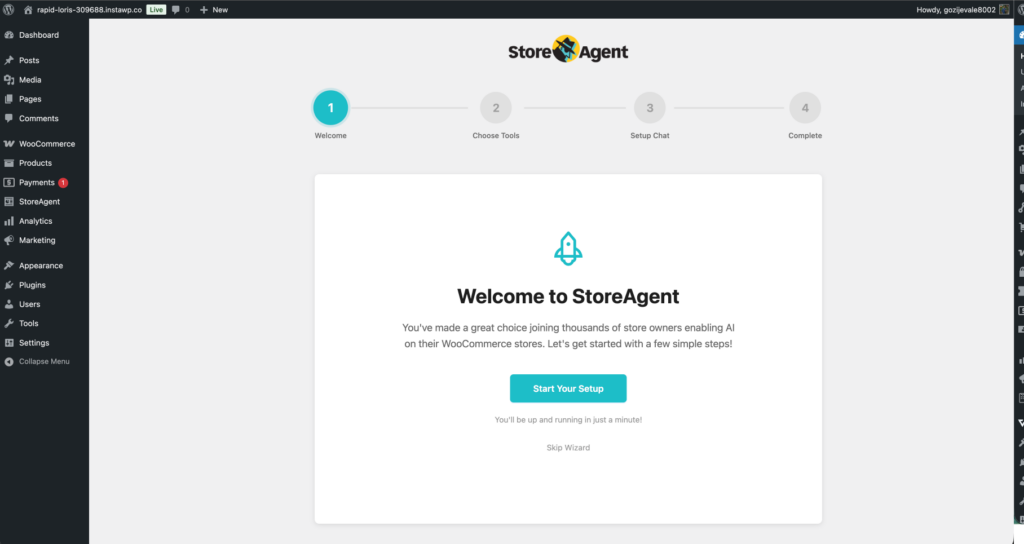
The Welcome screen is your starting point now that your account is linked. It confirms that you are ready to enable AI across your WooCommerce store.
- Click the Start Your Setup button to begin the guided configuration.
- If you prefer to explore the settings on your own, you can select Skip Wizard, though we recommend the wizard for a complete setup.
Step 2: Choose Your Content Tools
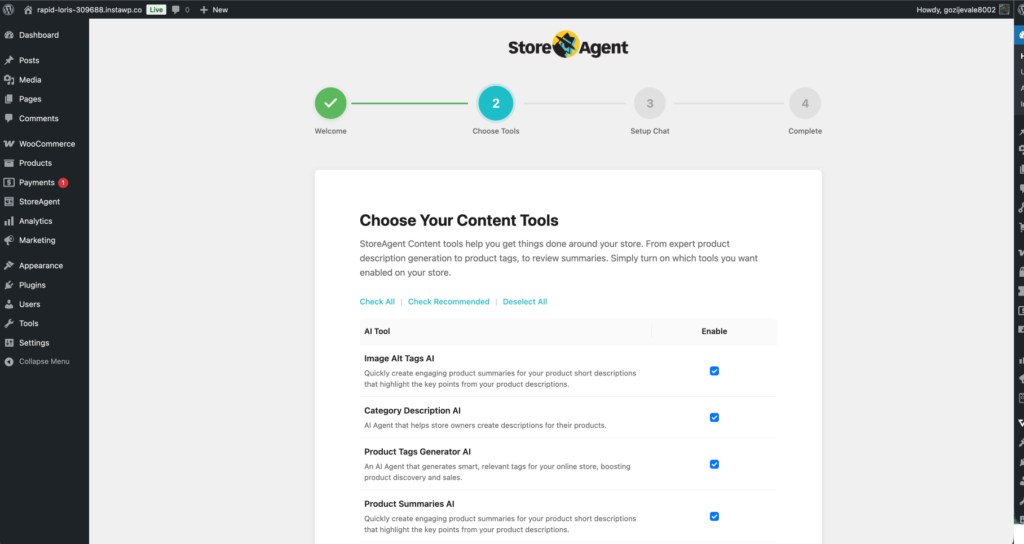
In this section, you select which specific AI capabilities you want to activate. These tools are designed to automate your copywriting and improve SEO.
- Review the available AI Tool options:
- Image Alt Tags AI: Automatically creates descriptive text for product images.
- Category Description AI: Generates engaging descriptions for your product categories.
- Product Tags Generator AI: Creates relevant tags to help customers find products easily.
- Product Summaries AI: Writes short, punchy summaries for your product listings.
- Product Description AI: Drafts comprehensive, SEO-friendly descriptions for every item.
- Review Summaries AI: Highlights key customer sentiments from your product reviews.
- Tick the checkboxes under the Enable column for the tools you wish to use.
- Use the Check Recommended link to quickly select our most popular automation tools.
- Click Next Step to proceed.
Step 3: Set Up AI Chat
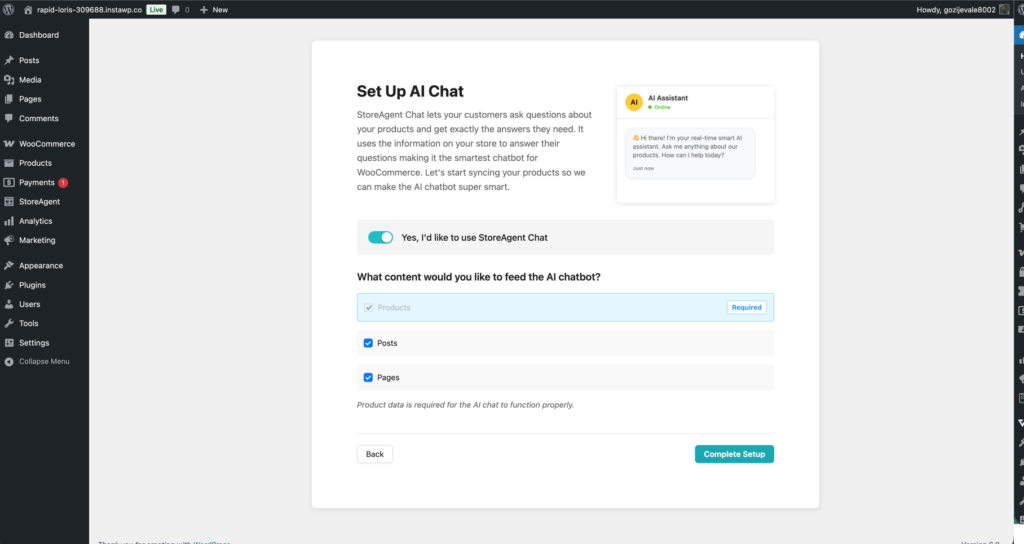
The StoreAgent Chat tool acts as a 24/7 digital assistant that answers customer questions using your actual store data.
- Click the toggle to enable Yes, I’d like to use StoreAgent Chat.
- Select the data sources you want the AI to learn from under What content would you like to feed the AI chatbot?:
- Products (Required): Essential for the AI to answer stock, price, and feature questions.
- Posts: Select this to allow the AI to answer questions based on your blog articles.
- Pages: Select this so the AI can reference your FAQ, shipping, or policy pages.
- Click Complete Setup to finalize your configuration.
Step 4: Finalize and Review
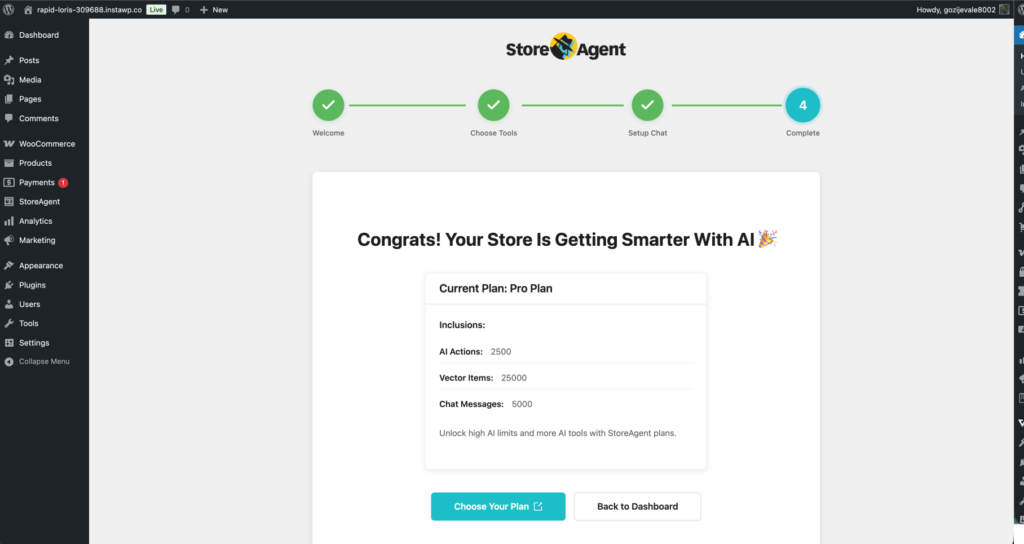
Your setup is now complete, and your store is officially powered by AI. The final screen provides a summary of your Current Plan.
- AI Actions: Shows your monthly limit for generating content like descriptions and tags.
- Vector Items: Indicates how much store data the AI has indexed for chat accuracy.
- Chat Messages: Displays the number of customer interactions allowed per month.
To finish, click Back to Dashboard to view your new AI control center. If you have a large inventory and need higher limits, you can click Choose Your Plan to upgrade.
Help and Support
We have a dedicated support team for StoreAgent, well-versed in our AI-powered tools, WooCommerce, and eCommerce best practices. If you ever need assistance, we’re here to help.
• Support Team
If you’re a StoreAgent user, you can reach out to our support team by submitting a support ticket. Our team is ready to assist with any questions or technical issues you may have.
• Knowledge Base
Before reaching out, you might find the answer in our knowledge base, which includes detailed guides, FAQs, and troubleshooting tips.
We’re committed to making your experience with StoreAgent as smooth as possible. Don’t hesitate to reach out whenever you need support!
