Reviewed by
This ecommerce customer service checklist covers five things you set up in order: choose the channels you can actually staff, document answers to your top 10 questions, add an AI assistant that replies instantly from your synced store data, set escalation rules so hard cases reach a human, and review the logs to keep improving.
According to Baymard Institute, the average cart abandonment rate is around 70%, with slow or unavailable support among the key reasons shoppers leave without buying.
In this article, we’ll cover the customer service standards worth building toward, each of the five setup steps in detail, the common mistakes that trip up most small stores, and a quick-start customer service checklist you can work through in a single sitting.
Table of Contents
Customer Service Standards To Aim For
Before you pick a single tool, decide what good support means for your store. Standards give you a target to build the system around. Across the research, four standards matter most for ecommerce: responsiveness, clarity, empathy, and consistency.
Shoppers expect fast, accurate answers, and patience is short during a purchase decision. PwC’s research on customer experience found that one in three customers will walk away from a brand they love after a single bad experience, which is why these benchmarks are worth setting on day one.
- Responsiveness: set a response-time goal you can keep. For email, under 24 hours is a reasonable floor for a small store; for chat, instant where automated and same-day where it reaches you.
- Clarity: answer the actual question in plain language, with the next step spelled out. Vague replies create a second round of questions.
- Empathy: acknowledge frustration before solving. A short “Sorry your order arrived damaged, let’s fix it” changes the tone of the whole exchange.
- Consistency: the same question should get the same answer every time, whoever or whatever replies. This is exactly what a documented source of truth makes possible.
Write these down as your service-level agreement, even an informal one. The five setup steps below are how you actually hit them.
💡 For a deeper look at how automation affects these benchmarks, see our breakdown of the benefits of AI in customer service.
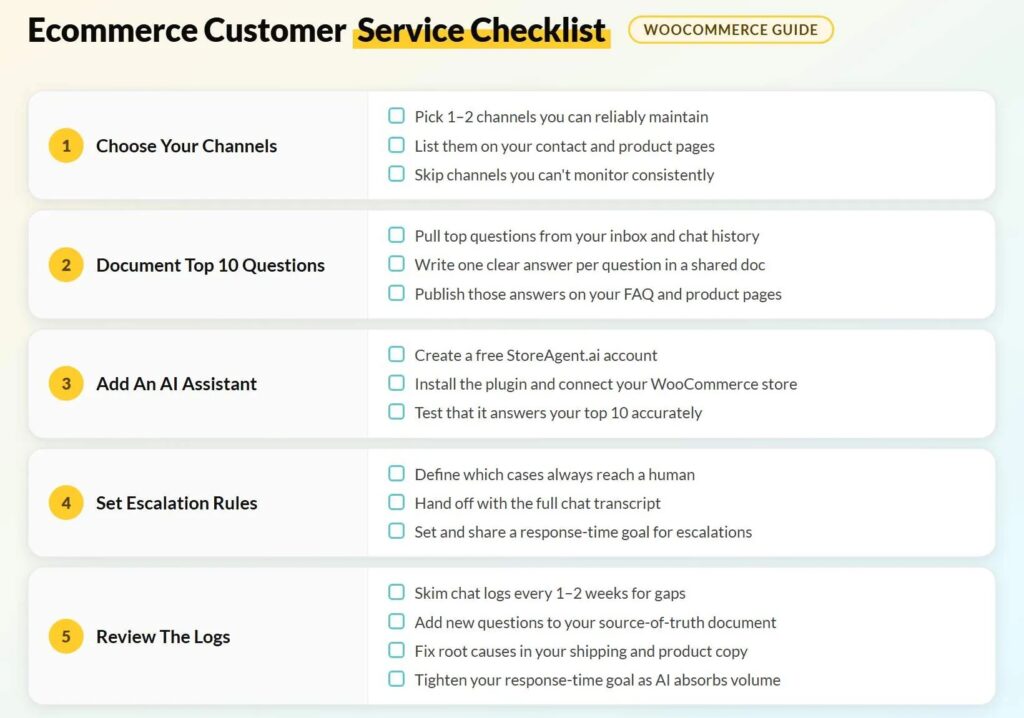
1. Choose The Channels You Can Actually Maintain
Start narrow. Every channel you open is a promise to monitor it, and one or two well-tended channels beat four neglected ones. An ignored inbox damages trust more than not offering that channel at all.
For most WooCommerce stores, on-site chat plus email is the right starting pair: chat catches buyers mid-decision on the product page, and email handles anything that needs a paper trail.
- Pick one or two channels you can answer reliably. On-site chat plus email is a strong default. It covers both the pre-purchase question and the post-purchase follow-up.
- List your channels on your contact and product pages. Make it clear exactly how customers can reach you. Shoppers who can’t find a contact option assume there isn’t one, and that’s when they leave.
- Skip channels you can’t monitor. Phone and five social inboxes look helpful on paper but feel abandoned in practice. A channel with no response is worse than no channel at all.
The reason on-site chat sits at the center of this stack is that it is the only channel that can be automated to answer instantly without you.
2. Document Your Top 10 Questions As One Source Of Truth
Your most-asked questions are the backbone of everything that follows. Writing the answers down once gives you the consistency standard from above, reveals gaps in your product pages, and creates the exact material an AI assistant uses to answer for you in the next step.
This single document is the foundation of your FAQ, your chat assistant, and your team’s tone, all at once.
- Review your inbox and chat history. List the questions you answer most often. Shipping times, return policy, sizing, stock, and order status will make up most of the list for a typical store.
- Write one clear answer for each question. Keep all answers in a single shared document so the response is consistent whether you, a team member, or an AI assistant is replying.
- Use those answers to tighten your FAQ and product pages. Publish the answers where shoppers can find them before they ask. Get these ten right and you’ve already pre-answered the bulk of your support volume.
3. Add An AI Assistant For Instant Answers
This is the step that makes solo ecommerce customer support sustainable. Instead of you answering the same questions all day, an AI assistant answers them instantly, around the clock, drawing on the answers and store data you already have. It is also the step that does the most work for the least effort: once it is connected it keeps running without you, so the time you invest setting it up is paid back every day after.
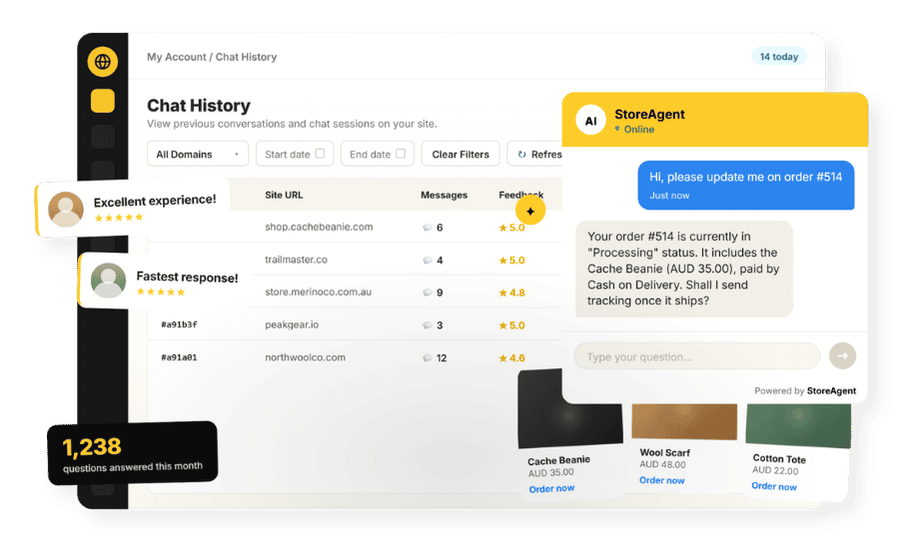
StoreAgent’s WooCommerce AI chat is a no-code plugin built for this exact role. It syncs your product catalog and store pages automatically, then answers shopper questions in real time, in multiple languages, 24/7.
Because it draws on your synced product data, it can tell shoppers what’s in stock, quote the right price, and describe variants without you having to step in. It’s the kind of front-line assistant that used to require an enterprise help desk, and it starts free.
We cover the underlying capability in more detail in how StoreAgent uses order data and product prices.
Setting it up is genuinely an afternoon task:
- Create a free StoreAgent.ai account. An active StoreAgent.ai account is required to connect the plugin to your store. Sign up free and you’re ready to move to the next step.
- Install the plugin and connect your store. It syncs your catalog and pages automatically, so there’s nothing to train manually.
- Confirm it answers your top 10 questions accurately. Run through your documented top 10 and check that the AI assistant handles stock availability and product details correctly before you go live.
The free Lite plan covers instant answers from your store data. Paid plans ($19 Growth, $49 Pro) add the human-escalation routing you will set up in the next step.
If you want proof this works, our roundup of examples of AI chatbot success shows how stores have cut their repetitive volume.

4. Set Escalation Rules That Always Reach A Human
Automation should never trap a customer with a real problem. Clear escalation rules keep the routine automated while sensitive cases reliably reach a human, every time and not just when you happen to notice. This is also where empathy lives in your system: the cases that need a person are exactly the ones where a canned answer does the most damage.
- Decide which cases always reach a human. Complaints, damaged or missing orders, refund disputes, and anything emotionally charged should go straight to you. If it requires judgment or a personal touch, it’s not a job for an AI assistant.
- Hand off with the full chat transcript. Make sure escalated cases include full context so the customer never has to repeat themselves. A cold handoff where the customer explains the problem twice is its own frustration.
- Set and share a response-time goal for escalated cases. Tell the customer upfront what to expect. Clear expectations reduce frustration even before you reply.
With StoreAgent, human escalation and feedback routing are available on the paid plans rather than the free Lite tier, which is worth knowing as you plan.
💡 The mechanics of a clean hand-off are covered in AI chatbot escalation and feedback collection.
5. Review The Logs And Improve Your Response-Time Goal
A support system drifts if you never look at it. A few minutes every week or two keeps your answers current and steadily cuts the volume that reaches you, by fixing the root causes of repeat questions at the source. This is the audit loop that the best support teams run constantly, scaled down to fit a solo owner’s calendar.
- Skim your chat logs every week or two. Note any question the assistant handled poorly or any pattern you’re seeing for the first time.
- Add recurring questions to your source-of-truth document. Update your product pages too. If the same question keeps appearing, the answer belongs where shoppers look before they ask.
- Fix root causes so questions stop appearing. Unclear shipping copy, missing sizing detail, and vague return policy wording are common culprits. Fix the source and the question disappears from your queue.
- Check your response-time goal against reality. Tighten it as the AI assistant absorbs more volume and the manual workload drops. The goal should get easier to hit over time, not harder.
💡 If you want to measure progress properly, our guide to the AI chatbot metrics that matter covers deflection rate, resolution time, and the handful of numbers worth tracking.
Common Mistakes To Avoid
Most small stores skip parts of their customer service checklist in the same few predictable ways, and each is easy to avoid once you know to watch for it.
- Over-committing to channels: offering phone, five social inboxes, and live chat you cannot staff. Pick what you can answer well and meet your response-time goal.
- A dead-end FAQ: a long help page with no way to ask a follow-up just pushes people back to email. Pair it with chat so a stuck customer can get unstuck.
- No escalation path: automating everything with no route to a human frustrates the customers who most need help, and they are the ones who leave reviews.
- Skipping the review: setting it up once and never revisiting means answers go stale and repeat questions never get fixed at the source.
Your Quick-Start Ecommerce Customer Service Checklist
Here is the whole setup as a scannable recap. Tick all five and you have an ecommerce customer support system most small stores never build.
- Service standards set: response-time goal, clarity, empathy, consistency
- Channels chosen and listed on the site (on-site chat + email)
- Top 10 questions documented with clear answers in one place
- AI assistant installed, connected, and answering from store data
- Escalation rules set for complex cases, with context hand-off
- Review reminder scheduled (every 1 to 2 weeks)
The biggest single step in your customer service checklist is the AI assistant. It carries your standards automatically once it’s running, without you having to lift a finger.
If you’re ready to see what StoreAgent can do for your store, start free with StoreAgent’s WooCommerce AI chat on the Lite plan, and explore our plans and pricing on the pricing page when you’re ready for human escalation.
Frequently Asked Questions
What should an ecommerce customer support setup include?
It should include defined service standards, one or two channels you can actually staff, a documented set of answers to your top questions, an AI assistant for instant replies, clear escalation rules for complex cases, and a regular review habit. Together those form a complete customer service checklist that any small store can set up in an afternoon.
How long does it take to set up?
Most of it fits in an afternoon. Documenting your top questions and connecting an AI assistant are the main tasks, and both are quick and need no coding. The review step is ongoing but takes only minutes each cycle.
What is the most important step?
Adding an AI assistant that answers instantly from your store data. It handles the bulk of routine questions automatically and around the clock, which is what makes one-person ecommerce customer support sustainable.
Do I need paid tools to follow this checklist?
No. You can complete every step using free tools, including StoreAgent’s free Lite plan for the AI assistant. You only need a paid plan if you want automated human-escalation routing, which is available on the Growth and Pro tiers.
How often should I review my support setup?
Every one to two weeks is enough for most small stores. Skim the chat logs, add any new recurring questions to your answers, and fix the root cause of anything that keeps coming up so the volume keeps falling.
How do I reduce the number of support questions my WooCommerce store gets?
Start by documenting your top 10 most common questions and using those answers to improve your FAQ page and product descriptions. When shoppers can find the answer before they ask, volume drops on its own. Adding an AI chatbot that handles routine questions automatically takes this further, absorbing the bulk of repetitive inquiries so you’re only dealing with cases that actually need a person.