Reviewed by
Below are 23 free customer service response templates for online stores, grouped by scenario: greetings and first contact, order and shipping updates, returns and refunds, product and stock questions, difficult situations, and positive feedback.
Copy, personalize the bracketed details, and use them as-is. Better yet, feed your best answers into an AI assistant so the routine ones send themselves. Here are the templates.
A customer service response template is a pre-written reply for a recurring situation, with placeholders for the details you swap in each time. Good templates do three things: they save you from writing the same answer from scratch, they keep replies consistent no matter who sends them, and they let you reply faster when a buyer is waiting.
The catch is that a template left fully generic reads as cold, so treat every one below as a starting point, not a script to send word for word.
Table Of Contents
How To Use These Customer Service Response Templates
These customer service response templates are a foundation, not a macro to paste verbatim. To get consistency and speed without sounding robotic, keep a few principles in mind:
- Keep them in one place. A single shared doc means every reply is consistent, whether it comes from you or a teammate, and it is the source you will later feed into an assistant.
- Match your brand voice. Adjust the wording so it sounds like you, not a corporate macro. Customers can tell the difference, and a warm reply does more than a polished one.
- Personalize the specifics. Swap in the name, product, dates, and links every time. A template that still reads as generic is worse than a short original reply.
- Decide what to automate. The routine, factual ones (order status, shipping, stock) are ideal for an assistant to send; keep the sensitive ones for a human.
Speed matters more than it looks. According to Baymard Institute’s cart abandonment research, the average documented online cart abandonment rate sits at 70.22%, and a shopper left waiting on a simple question is one more reason a sale slips away.
If you want the bigger picture on running support efficiently, our guide to the benefits of AI in customer service covers how response time and consistency feed into customer satisfaction.
Greeting And First-Contact Templates
The first reply sets the tone. These acknowledge the customer quickly so they know a real person (or a capable assistant) is on it.
1. First-contact acknowledgement
“Hi [Name], thanks for reaching out! I’ve got your message about [topic] and I’m looking into it now. I’ll have an answer for you shortly. In the meantime, feel free to add anything that might help.”
2. Welcome / new customer greeting
“Hi [Name], welcome to [store name] and thanks for your first order! If you have any questions about or shipping, just reply here. We’re glad to have you.”
3. After-hours auto-acknowledgement
“Hi [Name], thanks for your message! Our team is offline right now but we’ll reply within [timeframe]. If it’s about an existing order, you can check its status any time here: [link].”
Order And Shipping Templates
4. Order confirmation follow-up
“Hi [Name], thanks for your order! Your is being prepared and we’ll email tracking as soon as it ships. You can check your order status any time here: [link]. Anything you need in the meantime, just reply.”
5. Shipping delay
“Hi [Name], I’m sorry your order is taking longer than expected. [Reason, if known]. Your updated estimated delivery is [date], and here’s your tracking: [link]. Thanks for your patience, and reach out any time and I’ll keep you posted.”
6. “Where is my order?”
“Hi [Name], happy to help! Your order [#number] [status, e.g. shipped on date / is out for delivery]. Track it here: [link]. Let me know if anything looks off.”
7. Order modification request
“Hi [Name], no problem, I can [change the address / swap the size / cancel] as long as it hasn’t shipped. I’ve updated order [#number] to [detail]. You’ll get a fresh confirmation by email. Anything else before it goes out?”
Returns And Refunds Templates
8. Refund approved
“Hi [Name], your refund of [amount] has been approved and processed. It should appear on your original payment method within [timeframe]. Sorry it didn’t work out this time, and we’d love to see you again.”
9. Return instructions
“Hi [Name], no problem at all. To return your , please [steps]. Once we receive it, your refund or exchange will be processed within [timeframe]. Here’s our full return policy: [link].”
10. Return outside the policy window
“Hi [Name], thanks for letting me know. Your order falls just outside our [number]-day return window, but I’d still like to help, so here’s what I can offer: [store credit / exchange / partial refund]. Let me know if that works for you.”
11. Exchange request
“Hi [Name], happy to arrange an exchange. Send the back using [method], and I’ll have your [new size / color / item] on the way as soon as it arrives. Want me to reserve the replacement now so it doesn’t sell out?”
Product And Stock Templates
12. Out of stock
“Hi [Name], thanks for your interest in ! It’s currently out of stock, but we expect it back around [date]. Want me to let you know the moment it’s available? You can also save it to your wishlist here: [link].”
13. Product question
“Hi [Name], great question. [Direct answer about sizing / compatibility / materials]. You can see full details on the product page here: [link]. Anything else you’d like to check before ordering?”
14. Back-in-stock notification
“Hi [Name], good news, is back in stock! You asked me to flag it, so here you go: [link]. Stock is limited this round, so grab it soon if you still want it.”
15. Recommendation request
“Hi [Name], happy to point you in the right direction. Based on [what you mentioned], I’d look at
or , and here’s why: [reason]. Want me to compare them side by side?”Difficult Situations Templates
16. Responding to a complaint
“Hi [Name], I’m really sorry about [issue]. That’s not the experience we want for you. Here’s what I’ll do to fix it: [resolution]. Thank you for telling us; it genuinely helps us do better.”
17. Damaged or wrong item
“Hi [Name], I’m sorry your order arrived [damaged / incorrect]. No need to send anything back yet, but could you reply with a photo? I’ll get a [replacement / refund] sorted right away.”
18. Angry or escalated customer
“Hi [Name], I hear you, and you’re right to be frustrated. I’m taking this on personally so it gets sorted. Here’s my plan: [steps], and I’ll update you by [time]. You can reach me directly at [contact].”
19. Saying no without losing the customer
“Hi [Name], I wish I could do [request], but [honest reason]. What I can offer instead is [alternative]. I know it’s not exactly what you asked for, so let me know if that helps.”
Billing And Account Templates
20. Billing or charge question
“Hi [Name], let me clear that up. The charge of [amount] on [date] was for [order / subscription]. Here’s the breakdown: [details]. If anything still looks wrong, reply and I’ll dig in further.”
21. Account access / password reset
“Hi [Name], no problem, let’s get you back in. Use this link to reset your password: [link]. Once you’re logged in, your orders and details will be right where you left them. Tell me if the link doesn’t work.”
Positive Feedback And Thank-You Templates
Happy customers deserve a reply too. A warm response to praise turns a one-time buyer into a repeat one and often into a reviewer.
22. Thank-you for positive feedback
“Hi [Name], this made our day, thank you so much! I’ll pass it along to the team. If you ever want to share it publicly, a quick review here helps other shoppers a lot: [link]. Either way, we appreciate you.”
23. Responding to a public review
“Hi [Name], thanks for taking the time to review ! We’re so glad it’s working out. [Reference one specific thing they said.] If you ever need anything, we’re one message away.”
What we’ve seen: the stores that benefit most from templates don’t just paste them. They load their best answers into an AI assistant so the routine replies (order status, shipping, stock) go out instantly, and they keep the templates for the human-handled cases like complaints and review responses. That split is where templates stop being busywork and start saving real time.
Personalizing A Template So It Feels Human
The difference between a template that builds loyalty and one that feels canned is usually a single human touch. A few quick tips:
- Open with their name and the specific issue, not a generic “Dear customer.” It signals you actually read their message.
- Acknowledge feeling before logistics on anything negative. “I’m sorry this happened” lands before “here’s the fix.”
- Drop the corporate hedging. “We apologize for any inconvenience this may have caused” reads as a script; “Sorry about that, here’s how I’ll fix it” reads as a person.
- Add one specific detail where you can: their order, the product, the timeline. Specificity is what makes a template stop feeling like one.
For high-volume factual replies you’ll send constantly, the better move is to stop sending them by hand at all. Let an assistant handle those so your personal time goes to the messages that benefit from it.
Templates carry the most weight when they sit inside a wider customer service checklist that also fixes your response-time goal, the channels you can staff, and when a conversation reaches a human, so every reply lands inside a system instead of standing on its own.
If you’re weighing that trade-off, our breakdown of a WooCommerce AI chatbot vs live chat shows where each one earns its keep.
Turn Your Templates Into Instant Answers With WooCommerce AI Chat
Templates still require you to send them. An AI assistant trained on your store can answer the routine ones automatically, pulling live order and product details so the reply is accurate every time.
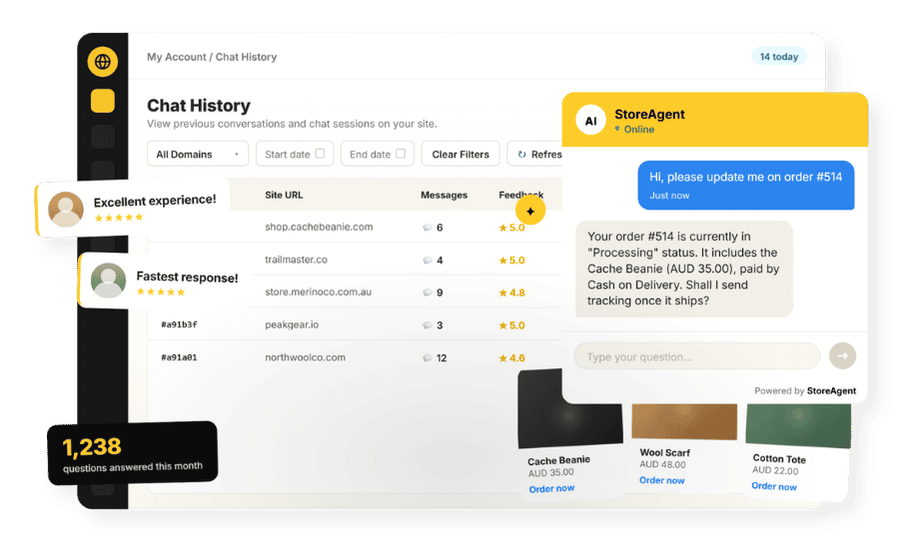
That is what StoreAgent does: it’s a no-code WooCommerce chatbot that auto-ingests your catalog and pages, answers in plain language 24/7 and in multiple languages, and reads live order data for logged-in customers so a “where is my order?” reply comes back with the real status instead of a template you have to fill in.
WooCommerce runs a huge share of online stores. W3Techs data puts it at nearly half of all ecommerce systems, and StoreAgent was built specifically for that platform.
The scenarios you template most often (order confirmation, shipping delay, stock, product questions) are exactly the factual, repetitive ones it handles best, while complaints and review responses stay with you.
StoreAgent’s WooCommerce AI chat draws answers straight from your store, and you can reinforce its knowledge with your own returns policy or FAQ docs through document upload.
On paid plans it can also hand a conversation to a human when something needs a personal touch. You’ll need a free StoreAgent.ai account to connect your store, then start free on the Lite plan and review pricing if you want escalation and higher limits.
Keep your customer service response templates for the conversations that still need you. If you’re ready to turn the routine replies into instant answers, explore our plans and pricing today.
Frequently Asked Questions
Are these customer service response templates free to use?
Yes. All 23 templates are free to copy. Adjust the tone to match your brand and personalize the bracketed details for each customer before you send.
How do I keep replies consistent?
Keep your customer service response templates in one place and load your best answers into an AI assistant, so routine replies are consistent whether you send them or the assistant does.
Should I automate these responses?
Automate the routine, factual ones (order status, shipping, stock) with an AI assistant, and keep human-written templates for sensitive cases like complaints, damaged items, and review responses.
How do I personalize a template?
Swap in the bracketed details (name, product, dates, links) and adjust the wording to sound like you. A template is a starting point, not a script to send verbatim.
Can AI send these templates automatically?
Yes, for the factual ones. A WooCommerce AI chatbot like StoreAgent can answer order, shipping, stock, and product questions on its own by reading your live store data, so those replies send instantly without you pasting a template.