Reviewed by
The number one question I hear from store owners is always about growth. Where’s the next batch of customers coming from? For many stores, the answer is going multilingual. But setting up a WooCommerce multilingual store the traditional way meant heavy plugins, bloated databases, and checkout pages that crawled.
According to CSA Research’s “Can’t Read, Won’t Buy” report, of online shoppers prefer buying in their native language. Meanwhile, 40% will never buy from a website in a different language. The case for going multilingual is obvious. And the hard part has always been doing it without slowing down your store.
Since testing StoreAgent’s AI Language Settings, that answer has completely changed. Instead of translating existing content word-for-word, StoreAgent writes your product descriptions natively in the target language from scratch.
In this guide, I’ll show you how it works and how to set it up in your WooCommerce store.
Wondering if the “faster and cheaper” claim holds up? Here’s how the two approaches compare when localizing a 1,000-product catalog.
| Traditional Plugin + Agency | StoreAgent (Pro Plan) | |
|---|---|---|
| Monthly tool cost | From $79/year (plugin only) | $49/month |
| Translation cost | $0.10–$0.25 per word | Included in plan |
| 1,000 products, 1 language | ~$15,000–$37,500 in agency fees | 1,000 of your 2,500 monthly tasks |
| 1,000 products, 3 languages | ~$45,000–$112,500 in agency fees | ~2 months on Pro, or 1 month on Business ($249/month) |
| Time to complete | Days to weeks | Minutes to hours |
| Database impact | 3,000+ duplicate content rows | None |
| Content quality | Literal, word-for-word | Native, culturally accurate |
| Multilingual AI chatbot | Not included | Included in all plans |
| Free plan available | No | Yes (25 tasks to test first) |
How I Wrote This Guide
I’m Katrine, a content writer at Rymera Web Co., specializing in WooCommerce and ecommerce content for StoreAgent. I’ve been covering ecommerce solutions since 2019.
For this guide, I tested StoreAgent’s AI Language Settings on a live demo store, working through the bulk content generation workflow and multilingual chat responses firsthand. My goal is to give you an honest, practical guide you can follow on your own store.
Is A WooCommerce Multilingual Store Really Worth It?
WooCommerce multilingual refers to a store configured to display product content and customer support in more than one language for international shoppers.
And yes, it directly increases conversions. According to CSA Research, 76% of shoppers prefer buying in their native language, and 40% will never buy from a store that doesn’t offer it.
Language affects more than just understanding. When shoppers can’t read your product page, their trust drops. Then, cart abandonment follows.
In my experience, writing for each market makes buying easier. It also helps you connect with international buyer personas you may not have considered yet.
There’s also the SEO piece worth mentioning. Search engines rank pages higher when content matches how locals actually search. A product page written in French will outrank a badly translated one every time. So language localization helps with both conversions and search traffic.
Why Do Traditional WooCommerce Multilingual Plugins Slow Down Your Site?
Traditional plugins slow your site by duplicating database entries for every translated product, tag, and category.
So how much does this actually cost you?
A store with 1,000 products translated into 3 languages can generate over 3,000 duplicate content rows, causing slower queries and delayed checkout times for your customers.
The real cost of word-for-word translation
I know store owners who paid agencies thousands to translate their WooCommerce store. The per-word rates add up fast. A 1,000 SKU catalog with decent descriptions can cost five figures.
And what about the content quality itself? Literal translation misses local idioms and region-specific search terms. Any WooCommerce multi language plugin that works through string duplication won’t capture how local shoppers actually search.
Regional phrasing, local idioms, and culturally specific terms get stripped out in the process, leaving product copy that reads as foreign and ranks poorly.
Native AI generation vs. Plugin-based translation
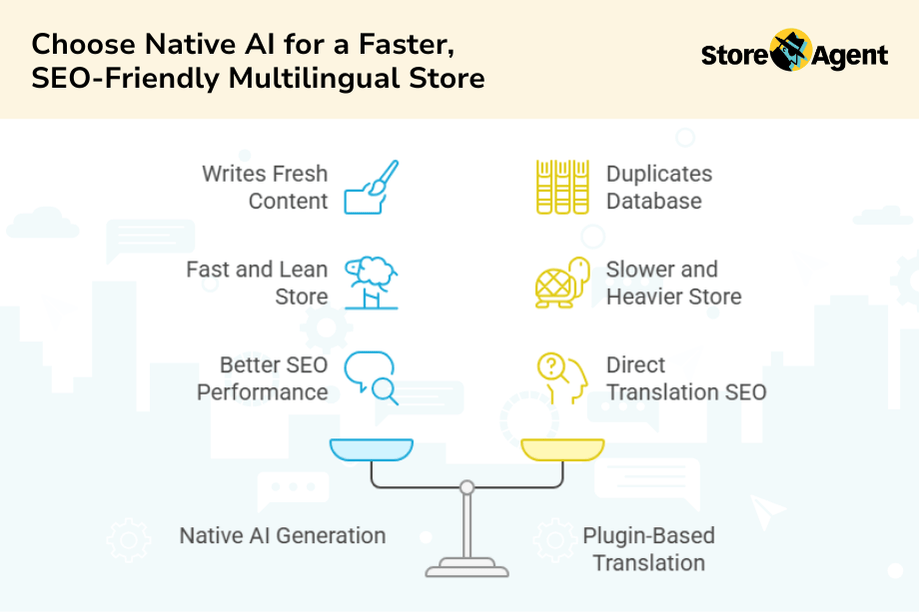
This is where StoreAgent works differently. Traditional plugins duplicate your database. StoreAgent does the opposite. It writes fresh content in your target language instead of translating old text. As a result, your WooCommerce multilingual store stays fast and lean.
One thing worth knowing: StoreAgent generates content in one language per run. It does not store multiple language versions of the same product simultaneously.
If your goal is a true WooCommerce multilingual store where shoppers can switch between languages on the frontend, you’ll need a separate language-switching plugin to handle that. StoreAgent handles the hardest part, writing accurate, native localized content at scale.
Since the AI writes the way local customers actually speak and search, the content also performs better in multilingual e-commerce SEO than any direct translation could.
How Do You Make A WooCommerce Store Multilingual Using AI?
You can make your WooCommerce store multilingual instantly by configuring StoreAgent’s AI Language Settings. I’ve done this with stores that have hundreds of products, and the whole setup takes about 20 minutes.
Step 1: Define your target markets
Open Google Analytics first. Look at where your international traffic is coming from. You might be getting visits from Germany, France, or Japan without realizing it.
Pick one or two languages to start. Trying to launch in five languages at once usually leads to burnout.
Step 2: Configure AI Language Settings in StoreAgent
Inside StoreAgent, you set a default output language for each AI agent. Set the Product Description AI to Spanish, and every description it generates will be written natively in Spanish. This means your SEO product descriptions already include local search terms from day one.
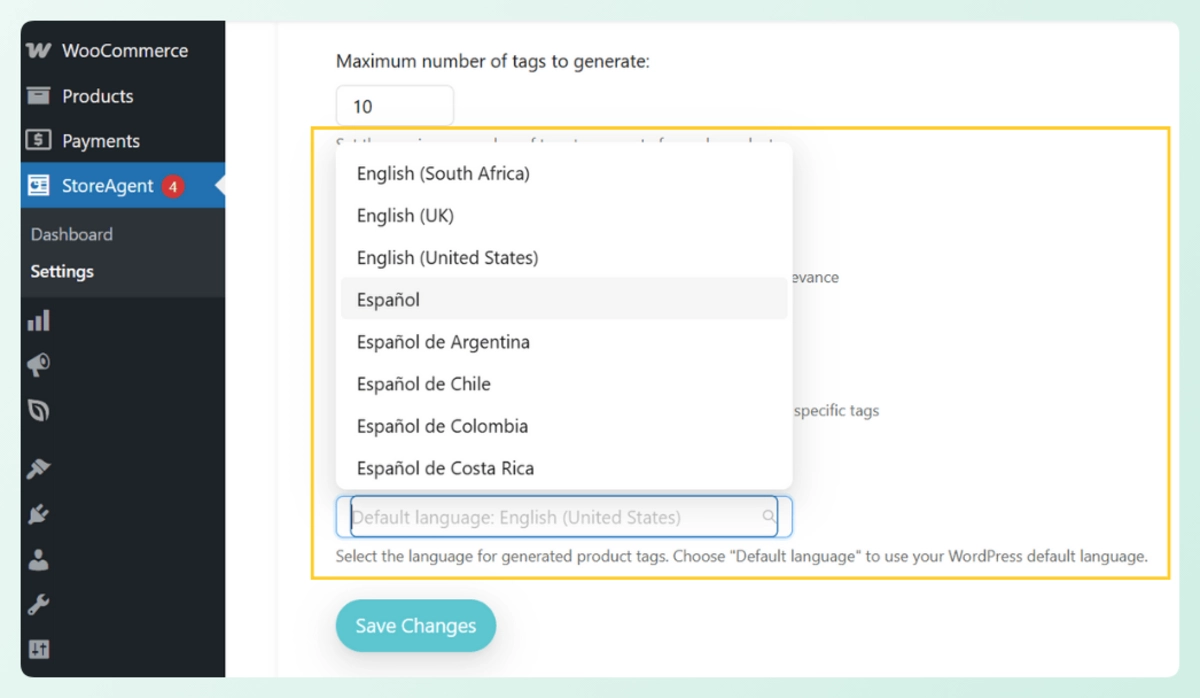
For mixed-language catalogs, the per-product inline language selector lets you assign a different language to individual products without touching your global settings.
Step 3: Bulk generate localized content
With your language set, it’s time to generate. Go to your WooCommerce Products table and:
- Select the products you want to localize using the checkboxes
- Open the bulk actions dropdown
- Select the content type you want, such as:
- Product Description AI for full product copy
- Review Summaries AI to surface customer sentiment in the target language
- Product Tags Generator AI for locally relevant tags
- Product Summaries AI for short scannable descriptions
- Click Apply
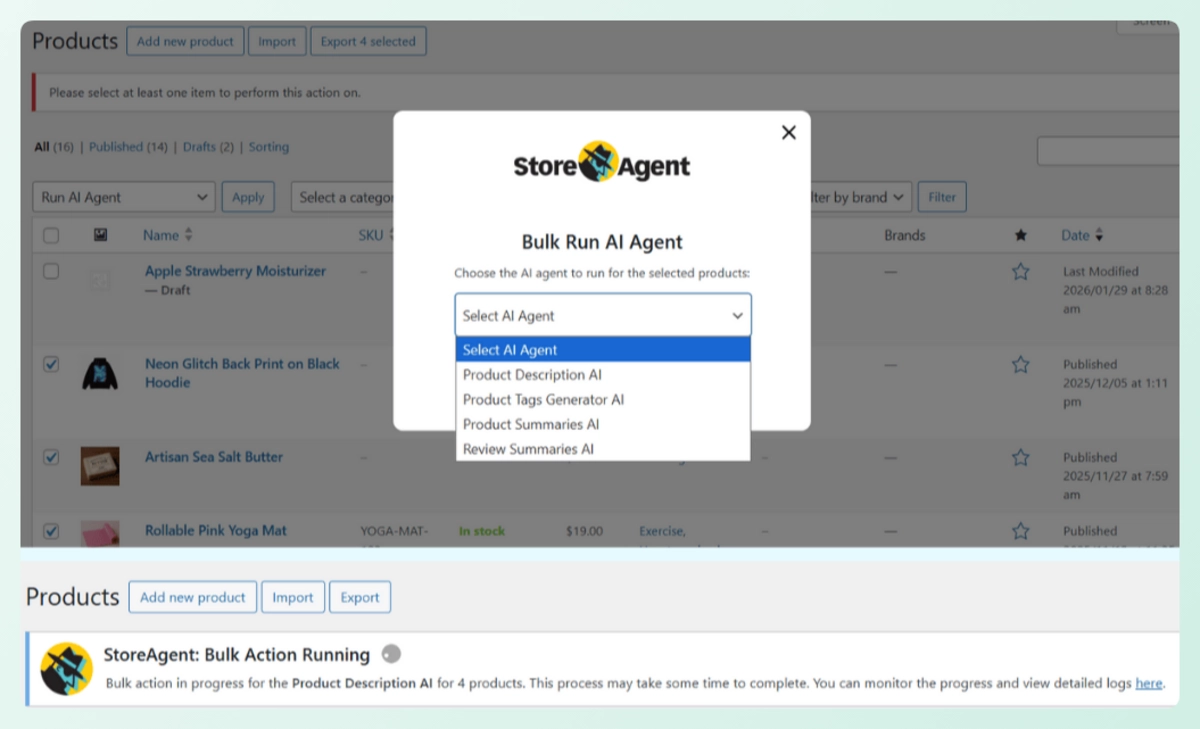
StoreAgent runs through every selected product and writes native, SEO-ready content in your chosen language. No copy-pasting, no prompt engineering, no waiting on an agency. A batch of 100 products takes minutes.
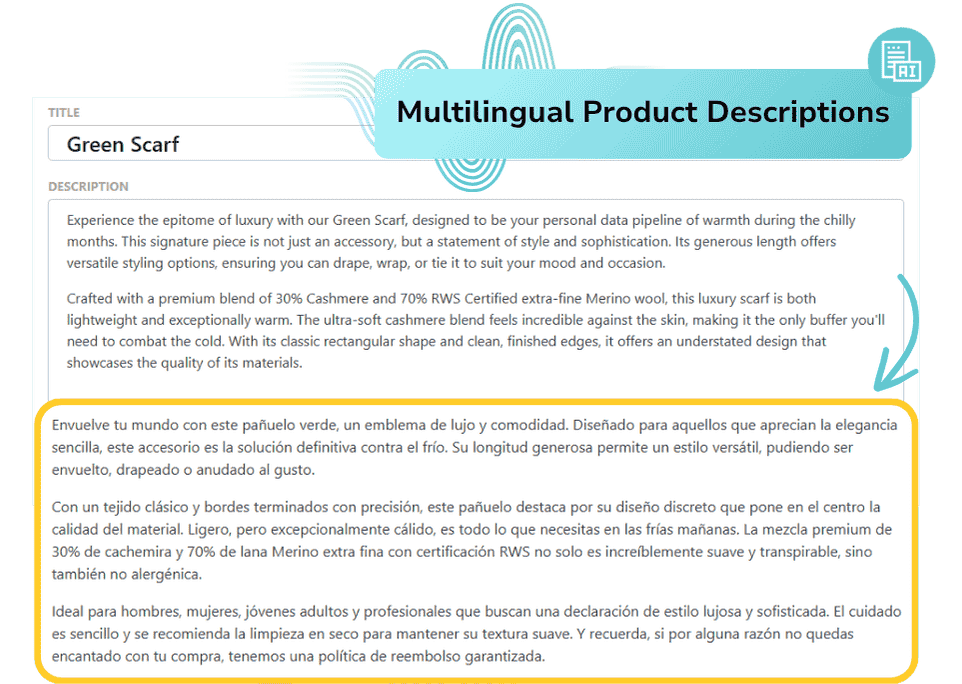
When you’re ready for your next language, go back to Language Settings, update the output language, re-select your products, and run the agent again. Each batch is fast, so working through two or three languages in one session is very doable.
Step 4: Let StoreAgent Chat handle multilingual customer support
StoreAgent Chat has always been natively multilingual. It detects the language a customer types in and responds in that same language automatically, with no manual configuration needed.
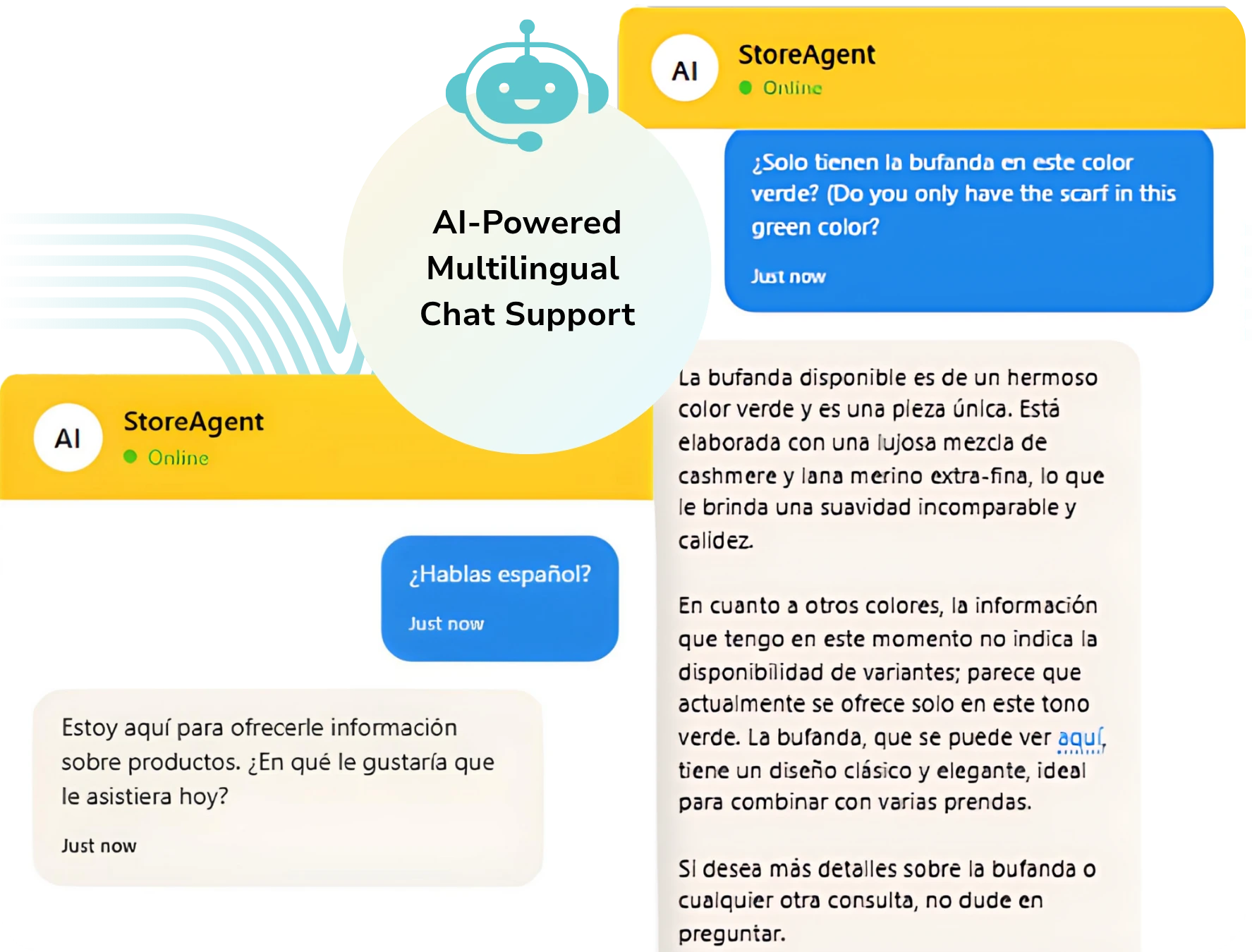
Here’s the part I think is genuinely impressive. The localized product content you generated in Step 3 feeds directly into StoreAgent Chat’s knowledge base.
That means the chatbot answers product questions accurately, in the customer’s language, using the content you just created. The whole shopping experience, from browsing to support, is localized without any extra work.
Conclusion
Building a WooCommerce multilingual store doesn’t have to mean sacrificing speed or breaking the bank. The old approach of string-by-string translation plugins created bloated databases and slow checkout pages.
StoreAgent takes a different path. It writes native content for each market from scratch, keeps your site lean, and even handles customer support in multiple languages automatically.
Here’s what we covered:
- Why going multilingual boosts sales
- What slows down translation plugins
- Four steps to set up StoreAgent
When you’re ready to finally reach those international markets without the technical headaches, StoreAgent’s pricing plans are designed to scale with your store. Pick your target market, generate native content in minutes, and start selling.
The global market is waiting. Your first international sale could come today.
Frequently Asked Questions
Does Google automatically index multilingual WooCommerce product pages?
Yes, but only if the pages are crawlable and correctly structured. Google will index any published page it can reach. However, without hreflang tags and a clear URL structure, it may not serve the right language version to the right audience in search results. Publishing the page is not enough on its own for effective international SEO.
How many languages does StoreAgent support?
StoreAgent supports hundreds of languages for both AI content generation and the Chat feature. This covers all major global markets and languages, including French, Spanish, German, Japanese, Arabic, Filipino, and more. Language selection is available directly inside the WooCommerce dashboard with no external tools required.
Can I translate only some of my WooCommerce products and not others?
Yes. StoreAgent’s bulk generation lets you select specific products from your Products table. You choose exactly which products to run the AI agent on, so you can localize one category, one brand, or one language group at a time without touching the rest of your catalog.
Can I show different prices for different languages in WooCommerce?
Not automatically by language alone. WooCommerce handles pricing by currency, not by language. If you want to show different prices for different markets, you need a multi-currency setup alongside your WooCommerce multilingual content.
Can shoppers switch between languages on my WooCommerce store?
Not by default. WooCommerce does not include a language switcher. Adding one requires a frontend multilingual plugin that detects or lets customers select their preferred language. The content itself still needs to exist in each language before the switcher has anything to display.