

 Reviewed by
StoreAgent already handles your content and customer chat. Now, the AI coupon generator brings that same automation to your WooCommerce promotions.
Through the new integration with Advanced Coupons, you can describe a promotion in plain language and let StoreAgent build the coupon setup for you. With StoreAgent handling the initial setup, you skip the repetitive part and go straight to reviewing and publishing.
In this article, we’ll walk you through what the AI coupon generator does, how to use it, and what to check before your coupon goes live.
What Is The StoreAgent AI Coupon Generator?
The AI coupon generator is a StoreAgent integration that works inside Advanced Coupons to build WooCommerce coupon setups from plain-language descriptions. You type what the promotion should do, and StoreAgent configures the coupon based on your input, including discount type, minimum spend, usage conditions, and cart rules.
Once the coupon is generated, you review the settings, make any changes you want, and publish when you’re ready. If it’s an offer you’ll run again, you can save the setup as a template for future campaigns.
This follows the same pattern StoreAgent already uses for product descriptions and image alt text. You describe what you need, the AI handles the configuration, and you control what actually goes live.
What this integration adds to your StoreAgent workflow:
- Coupon setup from a prompt: Describe your offer in plain language and get a configured WooCommerce coupon back.
- Automatic cart conditions: StoreAgent reads your prompt and applies the right cart conditions automatically, like a minimum spend threshold, without you setting them up yourself.
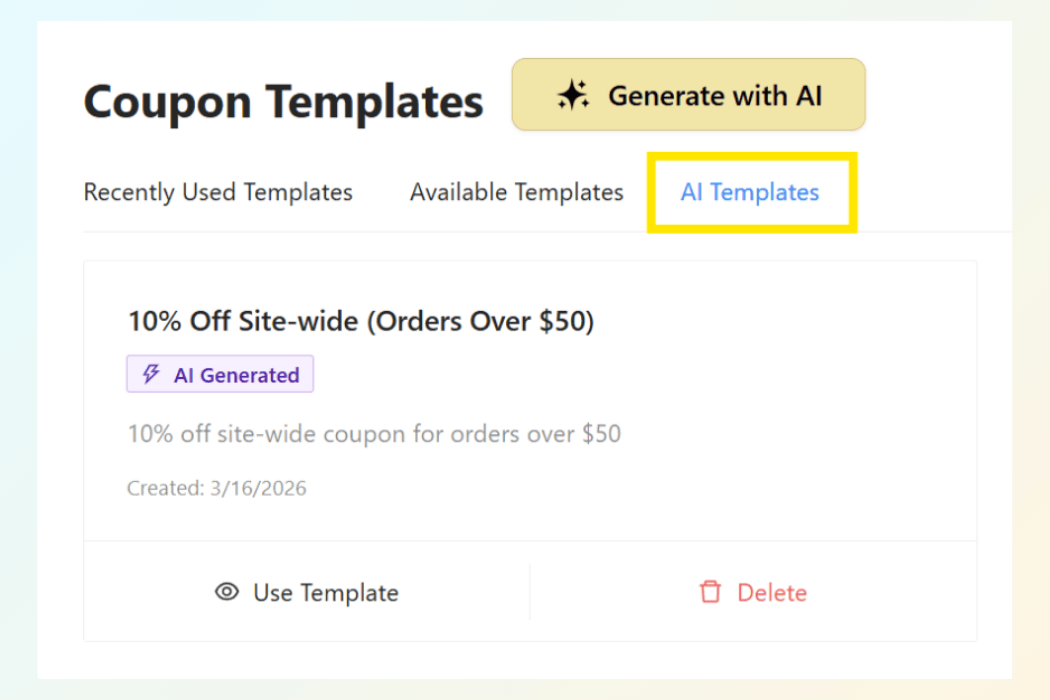
- Template saving for repeat campaigns: Save any generated coupon as a reusable template. Premium Advanced Coupons users can access saved templates under Coupons > Coupon Templates > AI Templates.
- Full review before publishing: StoreAgent builds the draft. You approve every setting before the coupon goes live. The final call is always yours.
How Do You Use StoreAgent’s AI Coupon Generator?
You need both StoreAgent and Advanced Coupons installed and active in your WooCommerce store. Once both are running, the process takes just three steps.
Step 1: Open the coupon creation window
Go to Coupons > Add New from your WordPress dashboard. When the creation pop-up appears, select Generate with AI. This opens the StoreAgent coupon window where the AI takes over.
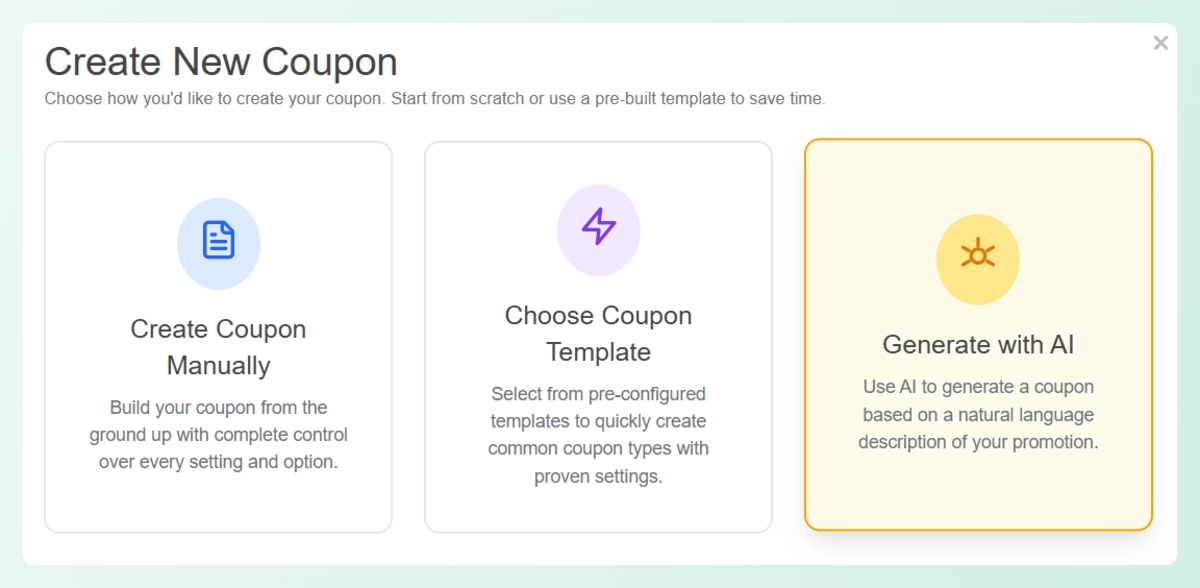
💡 You can also access this from Coupons > Coupon Templates by clicking Generate with AI.
Step 2: Describe your promotion
Type a short description of the offer you want to create. StoreAgent reads plain language, so there’s no special format to follow. Here are a few examples you can try:
- 20% off for first-time customers on orders over $50
- Free shipping for orders over $75
- $10 off orders above $100 for returning customers
- 15% off site-wide this weekend
For this walkthrough, we’ll use: 10% off site-wide for orders over $50. Once your description is ready, click Generate with AI.
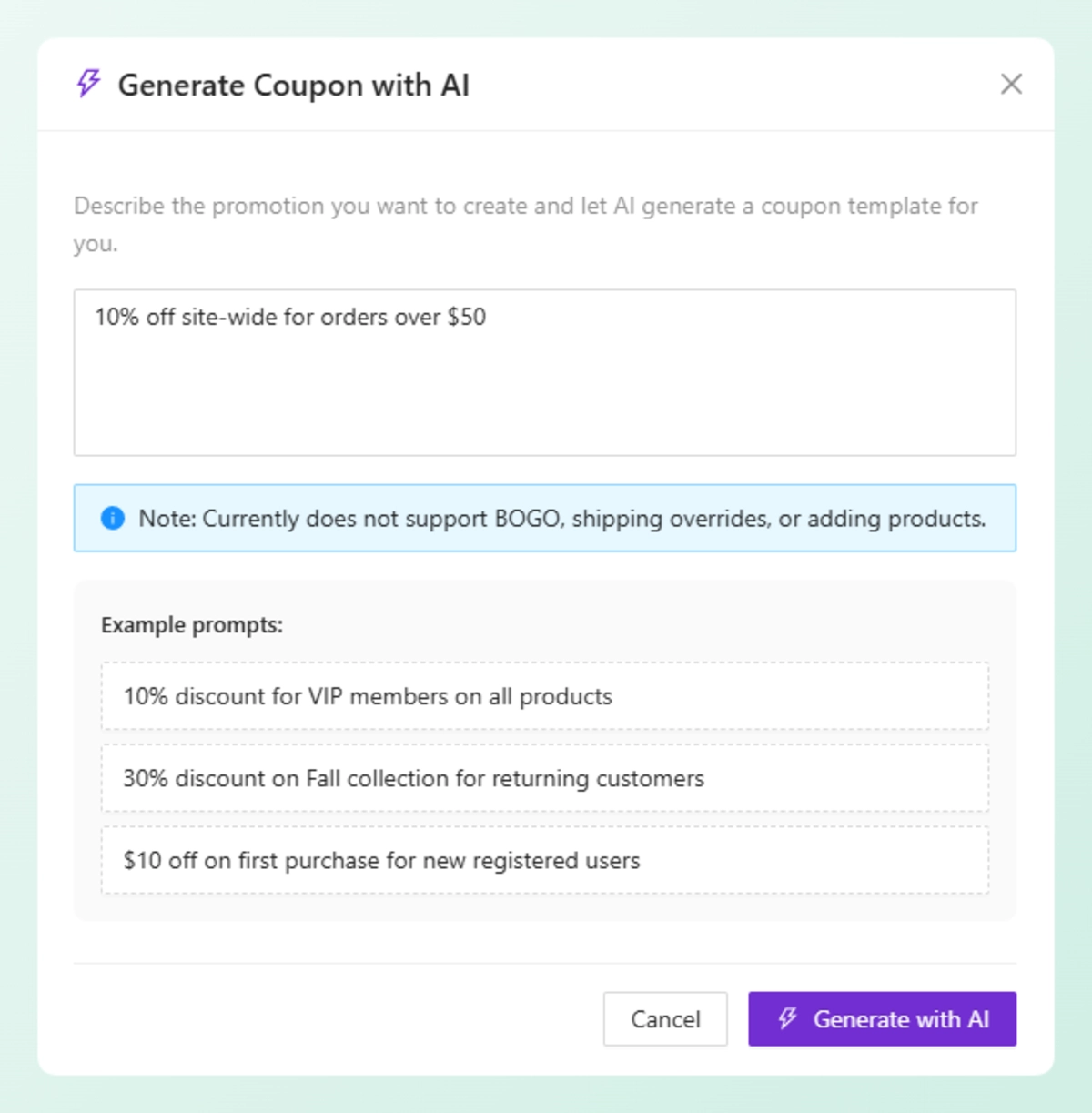
💡 Not sure how to phrase your offer? Use the example prompts inside the window as a starting point.
Step 3: Review the generated coupon
StoreAgent reads your prompt and configures the key coupon settings automatically. For “10% off site-wide for orders over $50,” the generated setup included:
- Discount type and amount
- Minimum spend requirement
- Basic usage restrictions
- Coupon description
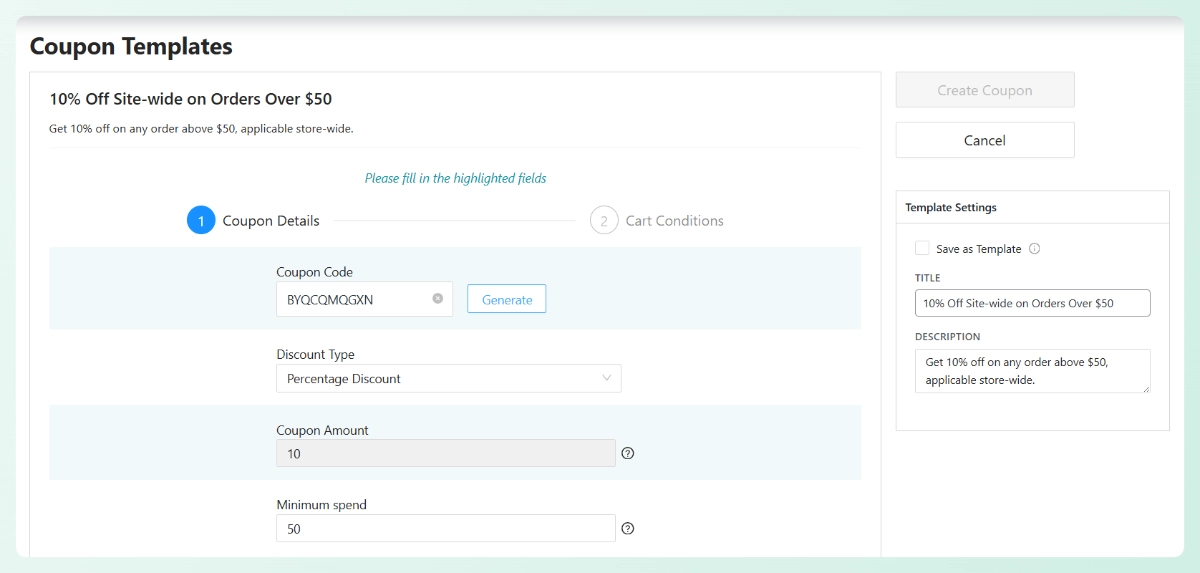
You’ll need to add a coupon code name before publishing. Type one in manually or click Generate for an automatic one.
Check the Cart Conditions section as well. In our example, StoreAgent set a condition requiring the cart subtotal to reach $50 before the discount applies. That matches the prompt exactly, no manual rule-setting needed.
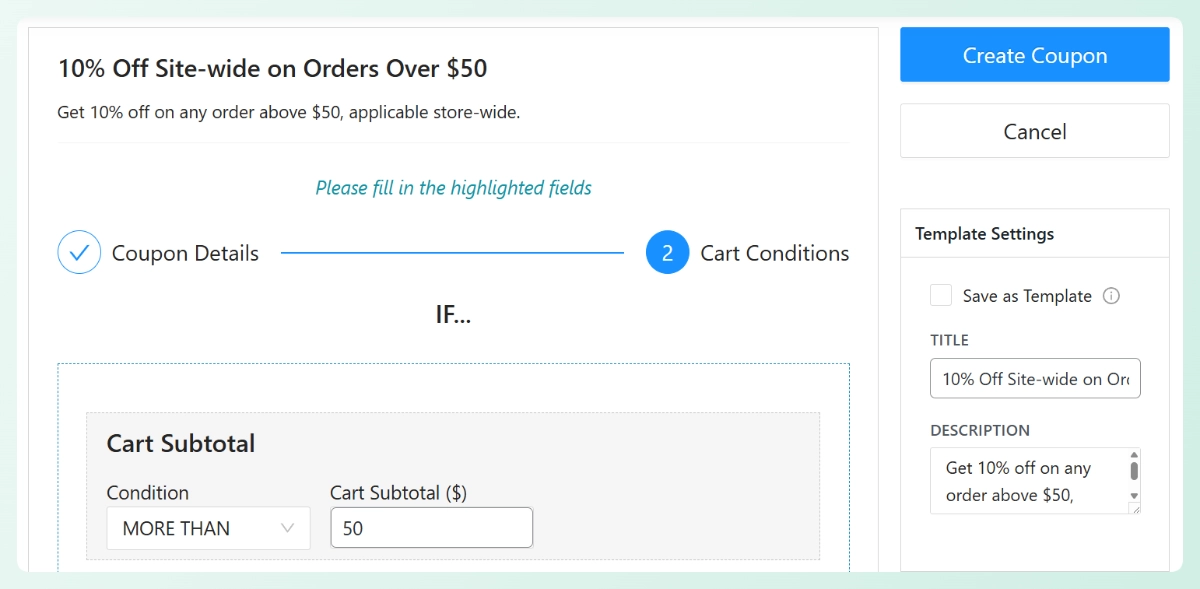
If you’re on Advanced Coupons Premium, you’ll also see a Save as Template option on the right side of your screen. Use it to save the generated setup for future campaigns. Saved templates are available under Coupons > Coupon Templates > AI Templates.
When everything looks right, click Create Coupon to publish. That’s it!
IMPORTANT: Before publishing, review the generated settings to confirm they match your intended offer. You can still edit the discount details, conditions, and restrictions at this stage.
📖 Related Read: Already generating coupons with AI? StoreAgent can also write the coupon description for you automatically. Learn how it produces ready-to-publish description in one click.

What Should You Check Before Publishing a WooCommerce Coupon?
StoreAgent generates a solid starting point, but a quick review before publishing keeps things accurate. Here’s what to go through:
- Discount type and amount: Confirm the coupon type (percentage, fixed cart, or other) and check that the amount matches your intended offer.
- Minimum spend or cart conditions: If your offer depends on a cart total threshold, verify that the generated cart condition reflects what you described. This matters most for conditional offers like “10% off orders over $50.”
- Usage restrictions: Check any limits by customer type, product, or category. This prevents the coupon from applying where it shouldn’t.
- Template option: If this is a promotion you’ll run again, save it as a template now. Rebuilding the same setup from scratch later is slower than reusing what already works.
Get Started With StoreAgent
WooCommerce coupon creation is now one more task StoreAgent handles for you. Describe the offer, review the setup, and publish. The repetitive configuration work is done for you.
If you haven’t set up StoreAgent yet, visit storeagent.ai/pricing to find the right plan for your store. Already on a plan? Make sure Advanced Coupons is installed and active, and you’re ready to start using the AI coupon generator today.
Frequently Asked Questions
What do I need to use the AI coupon generator?
You need both StoreAgent and Advanced Coupons installed and active. The AI coupon generator works with the free version of Advanced Coupons. Advanced Coupons Premium is only required if you want to save coupons as templates or use Premium cart conditions like BOGO rules and scheduling.
What types of WooCommerce coupons can StoreAgent generate?
StoreAgent can generate percentage discounts, fixed cart discounts, and fixed product discounts. It can also configure free shipping coupons and apply conditions like minimum spend, product restrictions, and category exclusions, based on what you describe in your prompt.
Can the AI coupon generator create product-specific or category-specific coupons?
Yes. If your prompt mentions specific products or categories, StoreAgent includes those as restrictions in the generated coupon setup. For example, “20% off all shoes” will apply product category restrictions automatically. You can review and adjust those inclusions before publishing.
Does StoreAgent generate the coupon code automatically?
StoreAgent generates the coupon configuration, but the coupon code itself is separate. After generation, you can type a code name manually or click the Generate button inside the coupon window to create one automatically before publishing.


