

 Reviewed by
If you want to increase ecommerce conversion rate, you need to understand one simple truth: traffic alone doesn’t pay the bills. You’ve mastered Facebook ads and SEO. Maybe you’re even killing it on TikTok shop. Thousands of visitors land on your store every week. But your sales dashboard tells a different story.
You’re pouring money into getting people to your site, but they leave without buying. And you’re left wondering what’s broken.
So here’s what we’ll cover. First, the fundamentals of conversion rate optimization. Then six specific strategies you can implement right now to increase ecommerce conversion rate for your online store.
Quick glance: How to increase conversions
- Write crystal clear product descriptions that answer every question
- Implement smart live chat that helps without being annoying
- Make product reviews instantly digestible with summaries
- Optimize site navigation so products are easy to find
- Simplify your checkout process to remove friction
- Add trust signals exactly where shoppers look for them
What Is E-Commerce CRO?
E-commerce conversion rate optimization is the practice of increasing the percentage of website visitors who complete a desired action. It’s about removing friction and building trust at every step of the customer journey.
CRO covers everything from product page layout to checkout flow to customer support. The idea is simple. Find out why people leave without buying, then fix those specific problems. Some fixes take five minutes. Others require bigger changes to how you run your store.
Small improvements compound over time. If you raise your conversion rate from 1 percent to 2 percent, you just doubled your sales without spending a dime on extra traffic.
What Is A Good E-Commerce Conversion Rate?
A good ecommerce conversion rate typically falls between 1 and 3 percent across most industries. But that number varies wildly depending on what you sell and where your traffic comes from.
Here is the honest answer. Comparing yourself to random averages can drive you crazy. A store selling expensive engagement rings will have a lower conversion rate than a store selling cheap phone cases. People think longer before spending two thousand dollars versus twenty dollars.
What matters more is your trend line. Is your conversion rate going up over time? Are you improving month after month? That is the real measure of success. Focus on beating your own numbers, not some benchmark you found on the internet.
How Do You Calculate Conversion Rate?
Take your total number of purchases over a specific period. Divide it by your total number of visitors during that same period. Then multiply by 100.
Conversions ÷ Total Visitors × 100 = Conversion Rate
Example: 500 purchases divided by 20,000 visitors equals 0.025. Multiply by 100 and you get 2.5%.
Track this number consistently. Watch how it changes when you make improvements to your store. But don’t stop there. Segment your conversion rate by traffic source, by device, by product category. That’s where the real insights hide.
How To Increase Ecommerce Conversion Rate On Online Stores
These seven strategies address the most common reasons shoppers leave without buying. Each one targets a specific friction point in the customer journey.
1. Write clear product descriptions
Product descriptions must answer what shoppers actually want to know. Dimensions, materials, care instructions, and compatibility details all matter more than marketing language.
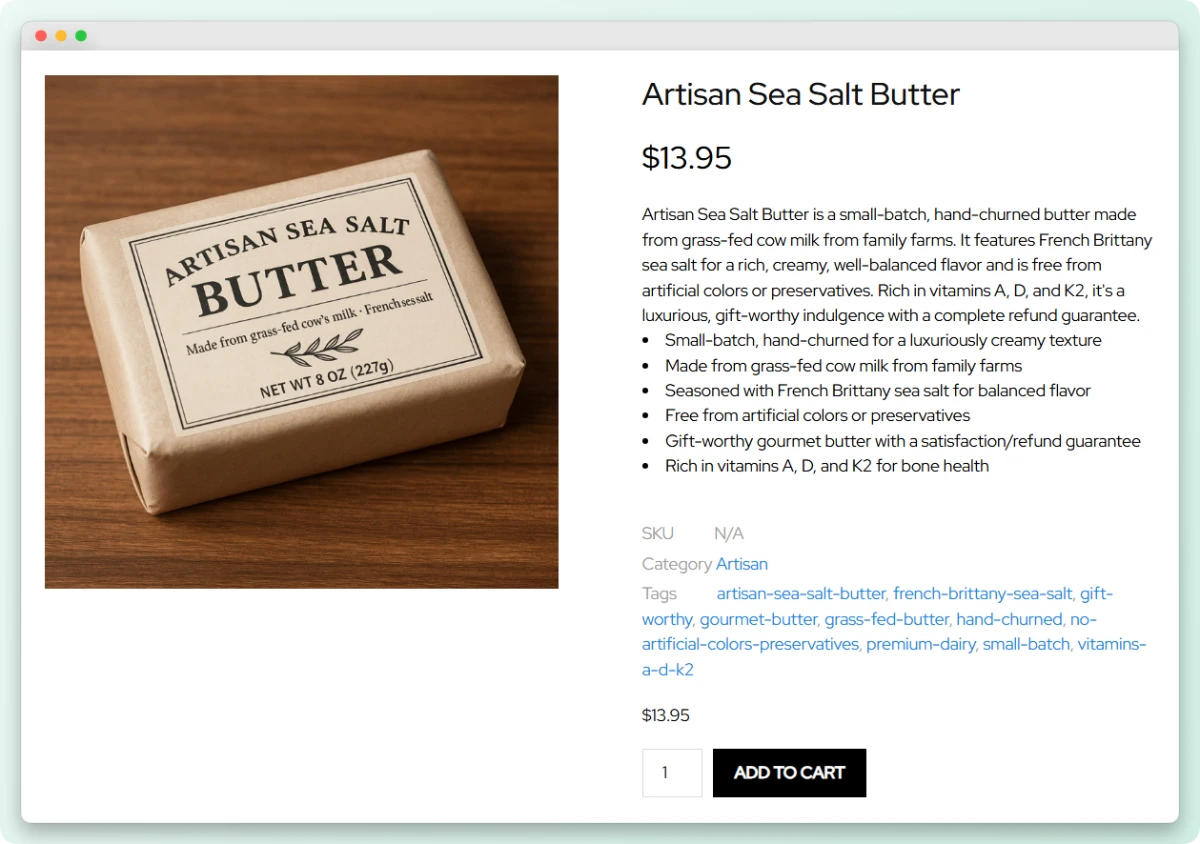
Your descriptions need to answer specific questions:
- What’s it made of?
- How big is it? (Include exact measurements)
- What does it feel like?
- Who is it for?
- How do you use it?
- How do you clean it?
Writing detailed descriptions for hundreds of products by hand takes time, though. StoreAgent’s Product Description AI Agent automates this across your entire catalog, generating clear copy that answers real customer questions.
To learn how Product Description AI can help you write clear product descriptions, read: How To Write Good Product Descriptions (+ Helpful AI Tips)
2. Implement smart, non-intrusive Live Chat
Live chat saves sales when done right. Stores that implement smart chat see a measurable increase in ecommerce conversion rate.
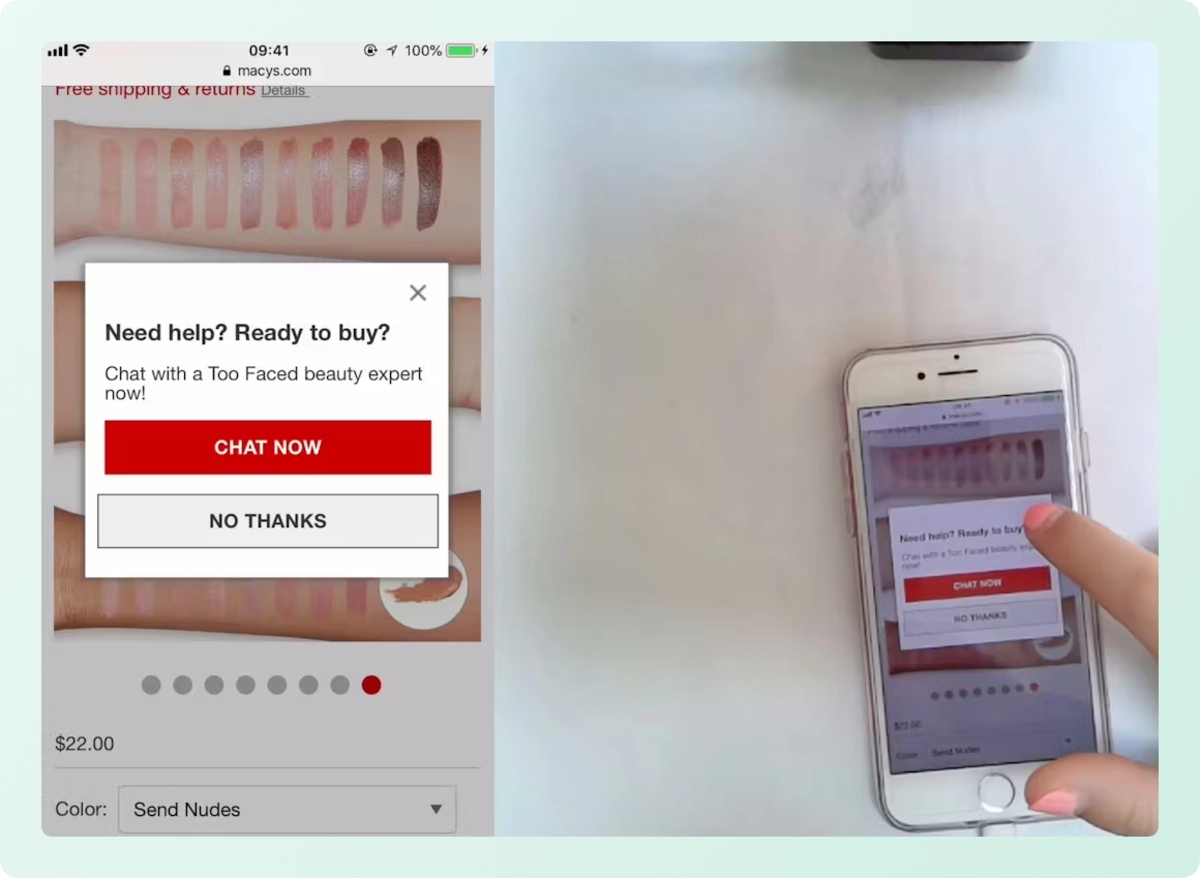
The mistake most stores make is the auto pop-up. You land on a page and suddenly a chat window appears. “Hi! Can I help you?” You haven’t even looked at anything yet. So you close it, annoyed.
Smart chat works differently:
- Waits quietly until the shopper needs something
- Never interrupts browsing
- Provides instant answers when questions arise
- Disappears when not needed
Non user initiated pop ups frustrate customers. But on demand help? That’s crucial. When someone has a question about sizing at 11 PM, they don’t want to wait for an email response tomorrow. They want answers now.
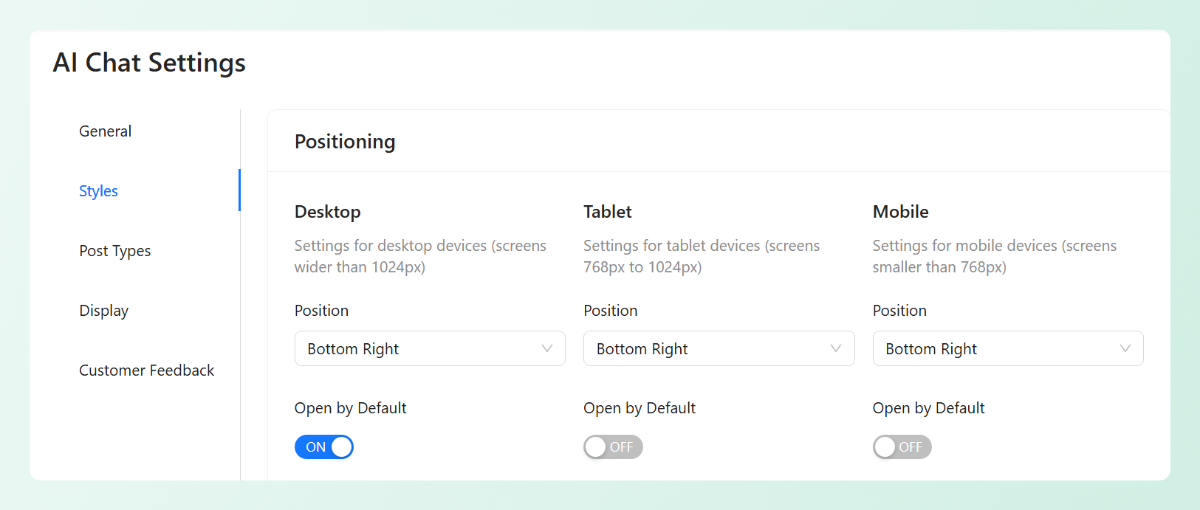
StoreAgent Chat gives you full control over these settings. You decide whether it’s open by default or hidden until needed. You choose where it appears on each device. And when shoppers do type a question, it provides instant answers pulled directly from your WooCommerce data.
3. Make product reviews instantly digestible
Up to 95 percent of shoppers read reviews before purchasing, according to Baymard Institute research. Nobody wants to be the first buyer of a questionable product.
But reading through fifty reviews to find patterns takes too long. Shoppers want the summary. They also want to know what other customers loved and hated without digging through pages of text.
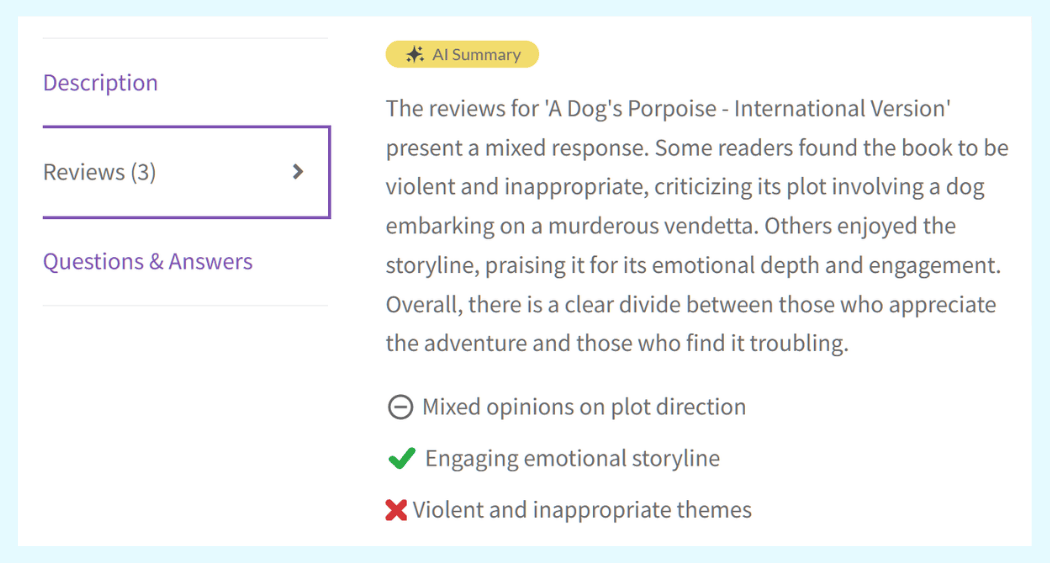
StoreAgent’s Review Summaries AI Agent scans all your product reviews and creates instant pros and cons summaries. Shoppers see right away that twelve people mentioned the shirt runs small. That instant confidence speeds up purchase decisions and can increase ecommerce conversion rate.
4. Optimize site navigation and search
Navigation should be obvious. When someone lands on your site, they should know immediately where to find what they’re looking for. If they have to hunt for product categories or guess where things are, they’ll leave.
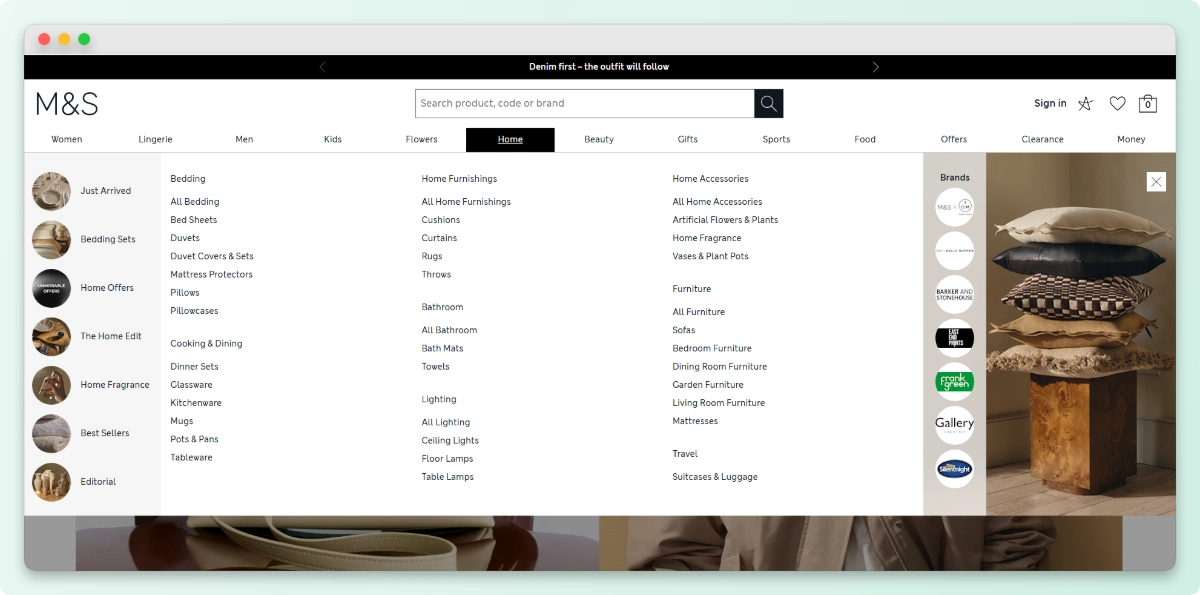
Put your main product categories in the top navigation bar. On desktop, they should be visible without hovering. On mobile, they should show up right when someone opens the menu. Don’t make people click extra times just to see what you sell.
Add a “View All” option in each category. Sometimes shoppers want to browse everything, not just what you feature first. Give them that choice.
Search matters just as much. When someone types a query, they expect relevant results. If they search “wool coat” and get mostly hats, they’ll assume you don’t have what they need. Your search needs to understand what people are actually looking for.
StoreAgent’s Product Tags Generator helps with this by automatically applying the right tags to your products.
It looks at each item and adds:
- Category tags (men’s, women’s, accessories)
- Attribute tags (material, size, color)
- Feature tags (waterproof, organic, handmade)
When products have proper tags, they show up in the right searches and categories. One store owner told us their category page views went up 40% after fixing their product tagging. Shoppers stopped getting frustrated and started finding what they came for. customers expected to find them.
5. Simplify the checkout process
The average checkout contains 11.8 form fields according to Baymard Institute research. Every extra field gives customers another reason to quit.
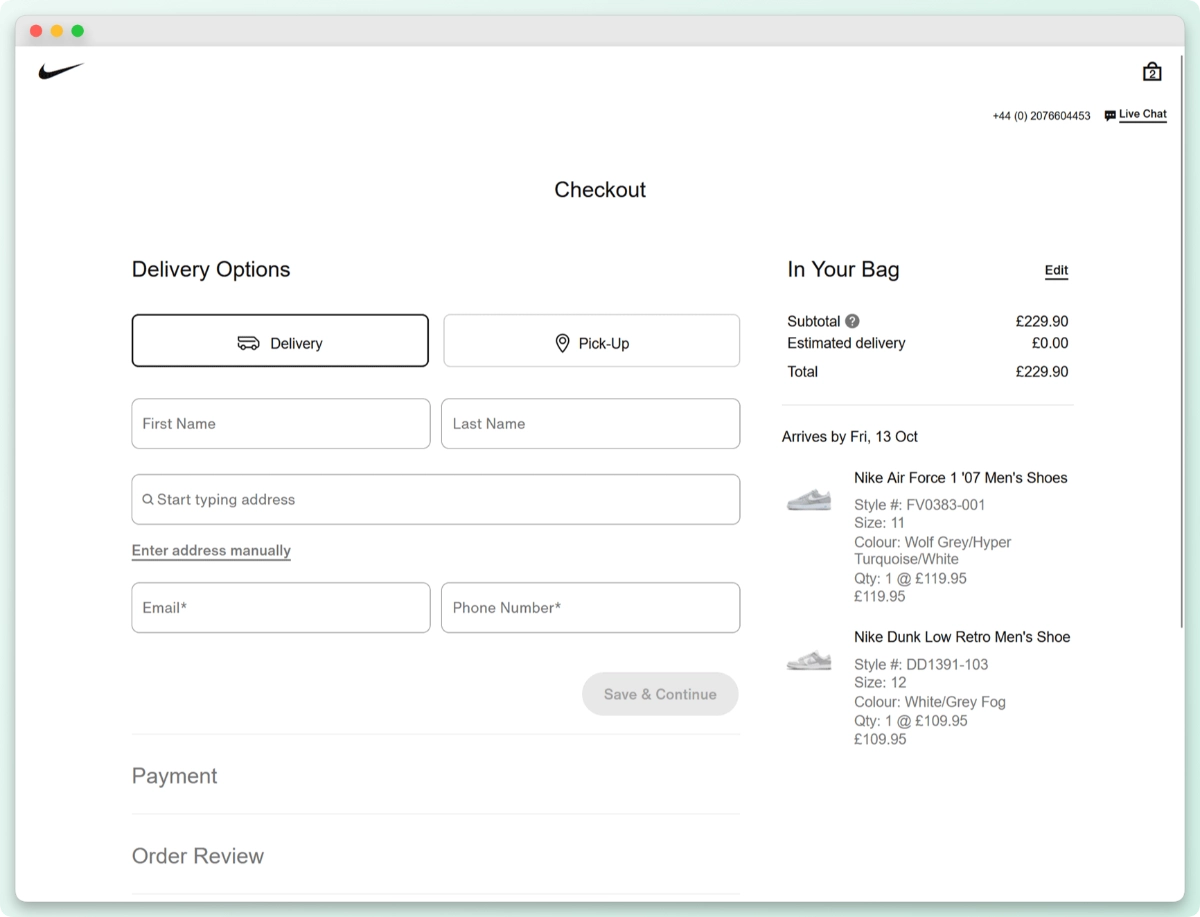
Look at your checkout right now. Do you really need phone number? Do you really need separate billing and shipping address toggles that confuse everyone? Only ask for information you absolutely need to complete the sale.
Here’s what a simplified checkout looks like:
- Hide coupon fields behind a clickable link
- Auto fill where possible
- Show progress so shoppers know how many steps remain
- Offer guest checkout prominently
- Minimize required fields to absolute essentials
Every field you remove directly helps increase ecommerce conversion rate by reducing the effort required to buy.
According to Baymard Institute, 18% of users have abandoned orders due to checkout UX issues. They found the process either too long or too complicated.
Also, simplify for mobile. Mobile checkout should be even faster than desktop. Big buttons. Minimal typing. Auto fill where possible. If you’re not testing your checkout on an actual phone, you’re guessing.
6. Add trust signals and essential policies
Trust signals matter. But placement matters more. Adding visible reassurance is an easy way to increase ecommerce conversion rate with almost no development work.
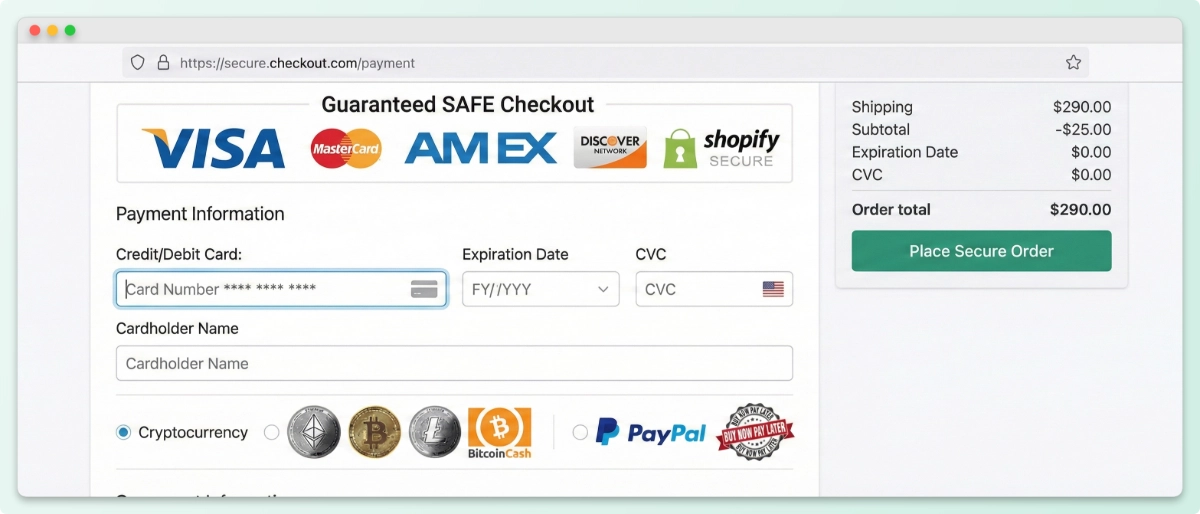
Shoppers look for security cues early. They want to know your site is safe before they enter payment info. Padlock icons. Site seals. Clear SSL indicators. These things matter.
What really moves the needle is shipping and return policies:
- Free returns policy shown near add to cart button
- Shipping timelines displayed on product page
- Money back guarantee mentioned at checkout
- Customer support contact info easy to find
I watched a client add a simple one line “Free returns within 30 days” next to their add to cart button. Their conversion rate on that product increased 12% overnight.
That’s the kind of simple win that shows how small changes can dramatically increase ecommerce conversion rate.
Conclusion
Improving your conversion rate comes down to removing obstacles at every step. From product discovery to final checkout, each interaction either builds confidence or creates doubt, which is why understanding how to increase ecommerce conversion rate matters more than ever.
- What Is E-Commerce CRO?
- What Is a Good Ecommerce Conversion Rate?
- How Do You Calculate Conversion Rate?
- Ways to Increase Ecommerce Conversion Rate
Start with one or two areas from this list. Maybe your product descriptions need work. Maybe your checkout has too many fields. Small improvements in these areas add up to real revenue gains over time.
Start for free with StoreAgent’s suite of WooCommerce AI tools automates the tasks so you can fix conversion killers faster and get back to growing your business.
Frequently Asked Questions
Should I force customers to create an account before checking out?
No. Guest checkout should always be an option. Forcing account creation adds friction and causes abandonment. According to Baymard Institute, 34% of shoppers abandon orders when forced to create an account. You can encourage account creation after purchase by offering order tracking and faster future checkouts.
How do I know if my slow conversion rate is caused by bad traffic or bad site experience?
Check your analytics by segment. Look at conversion rate by traffic source. If paid traffic converts at 2% but organic traffic converts at 0.5%, the problem might be search intent, not your site. If all sources convert poorly regardless of where they came from, the issue is likely on your site. Also check bounce rate and time on site for clues.
Does page speed really affect conversion rates?
Yes. Slow sites lose sales. Google research shows that as page load time goes from one second to five seconds, the probability of bounce increases by 90%. One second to ten seconds increases bounce probability by 123%. Use Google’s PageSpeed Insights to check your site. Compress images, use caching, and consider a faster hosting provider if needed.
What’s the most common mistake stores make with mobile checkout?
The most common mistake is treating mobile like a smaller desktop. On mobile, typing is harder. Autofill often doesn’t work correctly. Buttons are too small to tap accurately. Fields require zooming. Mobile checkout should minimize typing, use large tap targets, enable autofill properly, and show the keyboard only when needed. Test your checkout on an actual phone, not just a browser resize.
How many products should have reviews before I run ads to them?
At least five to ten reviews per product provides enough social proof for most shoppers. Products with zero reviews convert poorly because nobody wants to be the first buyer. Focus your ad spend on products with established reviews. For new products, consider sending free samples to customers in exchange for honest reviews to build initial social proof.


