
If your products have a dozen or more reviews each, shoppers don’t read them all. They scan. Review Summaries AI reads every approved review on a product and writes a short, balanced summary that shoppers see right above the review list. This article walks through turning it on, setting how often summaries refresh, editing what a summary says, and fixing the common problems.
Prerequisites
- StoreAgent AI for WooCommerce installed, activated, and connected to your StoreAgent.ai account.
- WooCommerce with at least one product that has approved reviews. By default Review Summaries AI waits until a product has at least 3 approved reviews before generating a summary.
- StoreAgent plugin v1.1.6 or later (earlier versions had a “Regenerate with AI” bug, see Troubleshooting below).
Step 1: Enable Review Summaries AI
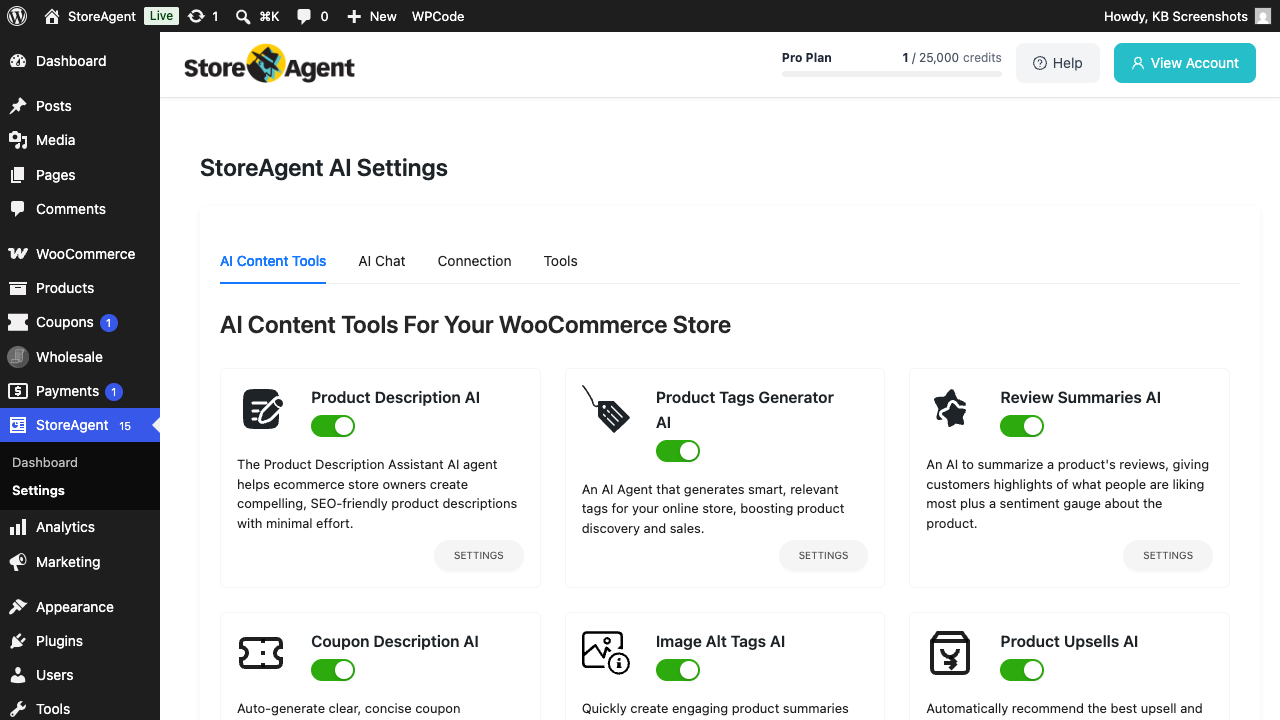
- Go to StoreAgent → Settings → AI Content Tools in your WordPress admin.
- Find the Review Summaries AI card and toggle the switch on.
Step 2: Configure the agent
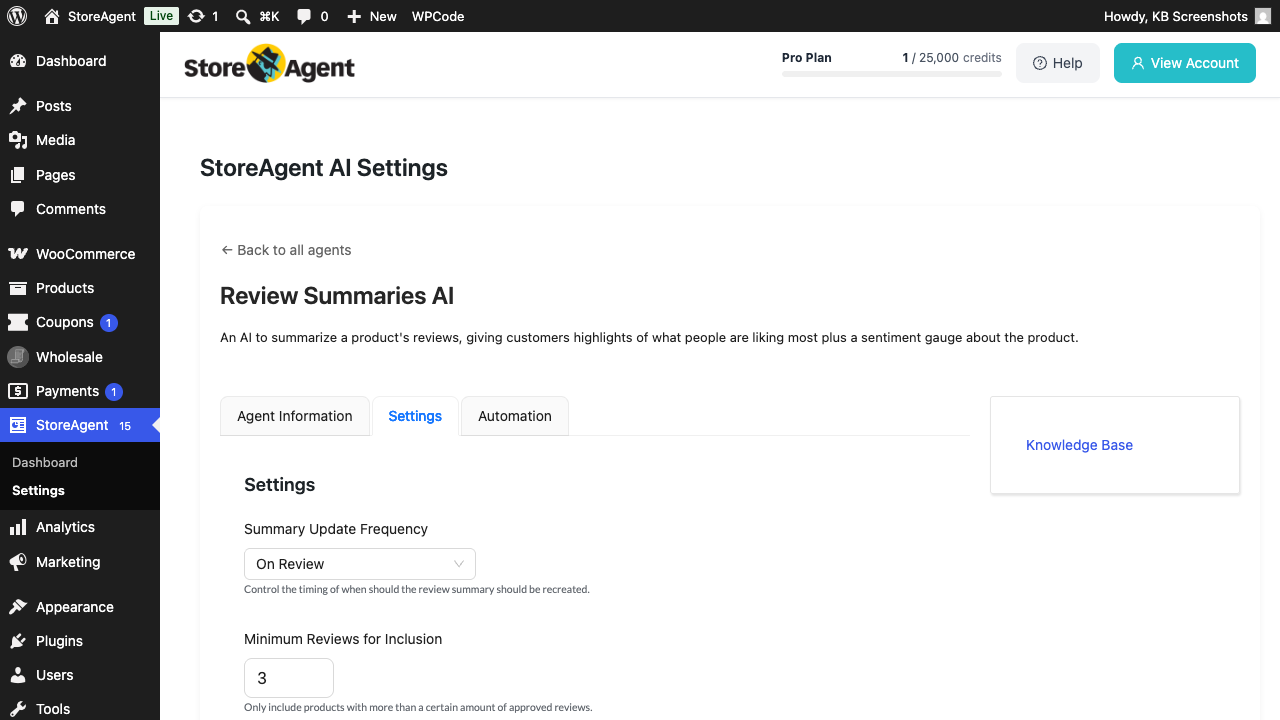
- On the same Review Summaries AI card, click SETTINGS.
- Choose your Summary Update Frequency from the dropdown: On Review (default: regenerate every time a new review is approved), Daily, or Weekly.
- Set Minimum Reviews for Inclusion: the smallest number of approved reviews a product needs before the agent will generate a summary. Default is 3.
- Optionally enable Show Disclaimer to display a short “AI-generated content may contain errors” line under each summary. The default disclaimer text is editable.
- Set the Language: dropdown if you want summaries in a language different from your WordPress site language.
- Click Save Changes.
Step 3: Edit or regenerate a summary
Summaries refresh automatically on the schedule you picked in Step 2. You can also edit a summary by hand, or ask for a fresh one at any time.
- Go to Products → All Products and open the product you want a fresh summary for.
- Scroll to the AI Generated Reviews Summary panel.
- Edit the text in the Review Summary box if you want to change the wording, then update the product to save it.
- Click Regenerate with AI to replace the summary and the key takeaways with a fresh set.
What customers see
On the product page, open the Reviews tab. The summary sits above the review list under an AI Summary label. It runs 2 to 4 sentences and covers the main themes across the reviews: what shoppers like, what they raise as concerns, and the overall sentiment.
Below the summary, shoppers see the key takeaways. Each one carries an icon for its sentiment: a green tick for positive, a grey dash for neutral, and a red cross for negative.
If you enabled Show Disclaimer in Step 2, a small question mark button appears next to the AI Summary label. Shoppers click it to read the disclaimer text.
Troubleshooting
No summary appears on a product page
Confirm the product has at least the number of approved reviews set in Minimum Reviews for Inclusion (default 3). If it does, also confirm Review Summaries AI is enabled in StoreAgent → Settings → AI Content Tools. The first summary is queued via Action Scheduler and may take a couple of minutes to appear. The summary also renders inside the Reviews tab, so it stays hidden if reviews are turned off for that product.
“Regenerate with AI” returns “Required parameters are missing”
This was a bug in earlier plugin versions (fixed in v1.1.6, issue #404). Update StoreAgent to the latest release, then try Regenerate again. If you’re already on the latest version and still see the error, file a support ticket with the product ID and your WordPress error log excerpt.
Summary is in the wrong language
The summary language follows this order. First, the Language: setting on the Review Summaries AI panel. Then the StoreAgent global content language. Then your WordPress site language. Set the Language: field on the Review Summaries AI panel to override the other two.
Summary mentions something not in the reviews
The summary is generated from the text of approved reviews only. If a generated summary references something that doesn’t match what reviewers actually wrote, click Regenerate with AI on the product. If the issue persists, raise it via a support ticket. Include the product ID and a quoted line from the bad summary so we can debug it.
Frequently asked questions
Does the summary refresh automatically when a new review is posted?
Yes. If you set Summary Update Frequency to On Review (the default), every new approved review triggers a refresh. Daily and Weekly schedules refresh on a fixed cadence instead.
Are reviews flagged as spam included?
No. Only reviews with status approved count toward both the minimum threshold and the summary text. Pending, spam, and trashed reviews are excluded.
Does generating a summary count against my plan?
Yes. Each summary generation uses AI Tasks from your StoreAgent plan. The cost is the same no matter how many reviews go into the summary.
Need help?
If you have a question or run into any issues, we’re here to help.
- Premium users: Open a support ticket
- Free users: Visit our community forum

