

 Reviewed by
You can now train AI chatbot knowledge on your entire website, not just your products!
We are thrilled to announce our new WordPress AI chatbot content ingestion feature, which allows StoreAgent to learn from your Pages, Posts, and Custom Post Types instantly. This update transforms your chatbot from a simple product assistant into a complete store expert that understands your policies, blog content, and brand story.
Up until now, StoreAgent was amazing at knowing your products. It knew every price, size, and description in your WooCommerce catalog. But we know your store is more than just products. Your customers have questions about your return policy, your shipping times, and maybe even the tips you share on your blog.
That’s why we wanted to give you more power.
Pages, posts, and even custom post types are now fair game. Your AI Chatbot just got a major brain upgrade, and we think you’re going to love it.
Why Should You Train Your Chatbot On More Than Just Products?
Think about the last time a customer asked a question. Was it strictly about a product? Probably not always.
Shoppers often ask things like, “What is your refund policy?” or “Do you ship to Canada?” According to Zendesk, 51% of consumers expect fast, convenient, 24/7 support from bots when they want immediate answers.
Previously, the AI might have struggled because that answer was hiding on a “Shipping & Returns” page, not a product page.
When you train AI chatbot logic on Pages and Posts, you close that gap. Your AI chatbot for customer support can now read your “About Us” page to tell your brand story. It can read your blog posts to give expert advice.
Essentially, your chatbot becomes a true expert on your entire business, not just your inventory. It’s a small change that makes a huge difference in how helpful your support can be.
To take this expertise even further, you can now use AI Chat document upload to provide your chatbot with specific documents, ensuring it has access to offline data and internal resources not published on your site.
Can My AI Chatbot Read My WordPress Pages And Posts?
Yes, and we didn’t just flip a switch to “read everything.” We built a system that gives you complete control over what your AI learns.
You are no longer limited to WooCommerce Products. You can now enable AI Memory for:
- Pages: Perfect for policy pages, contact info, and FAQs.
- Posts: Great for sharing knowledge from your blog articles.
- Custom Post Types: Do you use a plugin for “Events” or “Team Members”? You can train AI chatbot models on those, too.
We know you don’t want the AI reading everything. For instance, you probably don’t want it training on a private “Thank You” page or a draft article. So, we added granular controls.
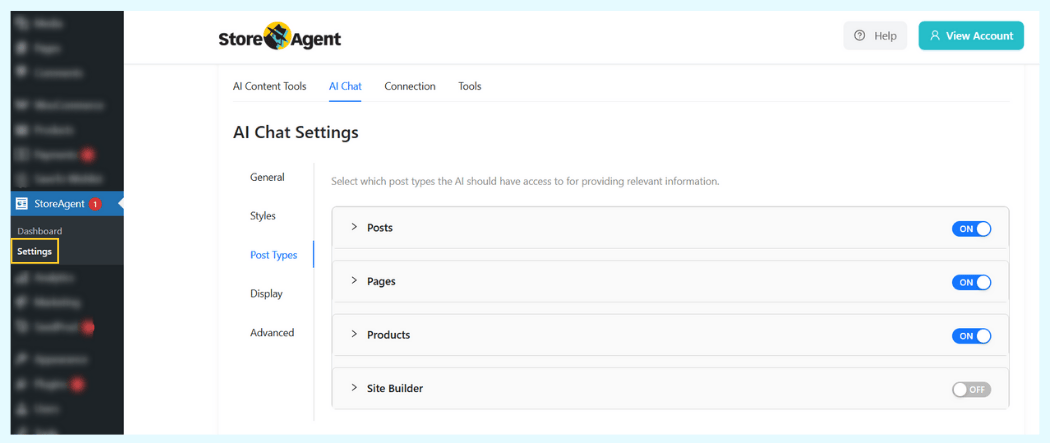
You can toggle AI Memory on or off for entire post types, or right down to the individual post level.
How Do I Add Custom Post Types To My AI Chatbot?
Getting started is incredibly easy. We designed the settings to be intuitive so you can start expanding your AI’s knowledge in minutes.
Step 1: Enable your post types
First, tell StoreAgent which parts of your site it should look at.
- Go to StoreAgent > Settings > AI Chat.
- Click on the new Post Types tab.
- You will see a list of all public post types on your site (Posts, Pages, etc.).
- Toggle the switch to Enable for any type where you want to train AI chatbot data.

Once enabled, you can also define specific Metadata Keys. This is handy if you use custom fields for things like “Subtitle” or “Internal Note” that you want the AI to know about.
Step 2: Sync your content
After enabling a post type, StoreAgent needs to read the content.
- Go to your Pages or Posts list in WordPress.
- You will see the new AI Memory column.
- Click the toggle switch to add a specific page to AI Memory.
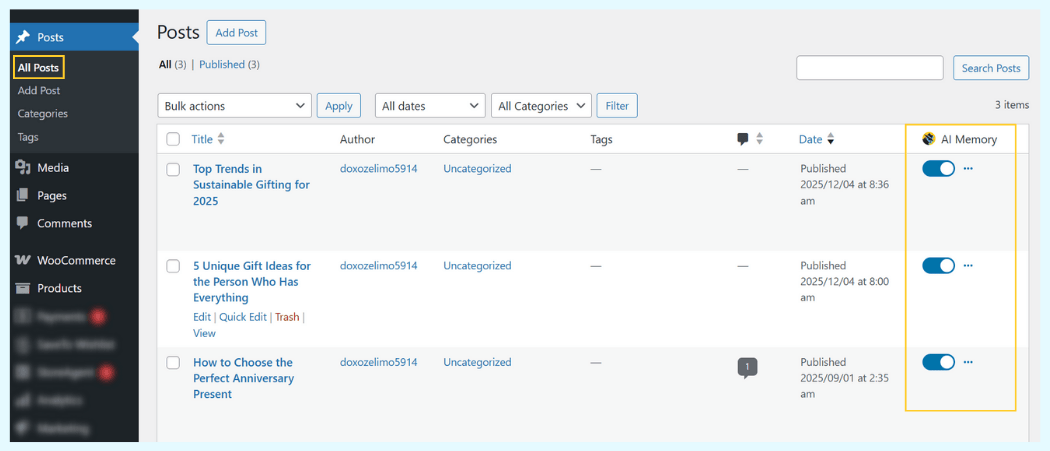
Need to add a lot of content at once? We added Bulk Actions, too. Just select the posts you want, choose “Add to AI Memory” from the bulk actions dropdown, and click Apply.
That’s it! You successfully managed to train AI chatbot logic on your site’s content.
How Can I Hide The Chat Widget On Specific Pages?
Giving your AI more knowledge is great, but you also need control over where it talks to customers. Along with the data ingestion update, we’ve overhauled the Display Settings.
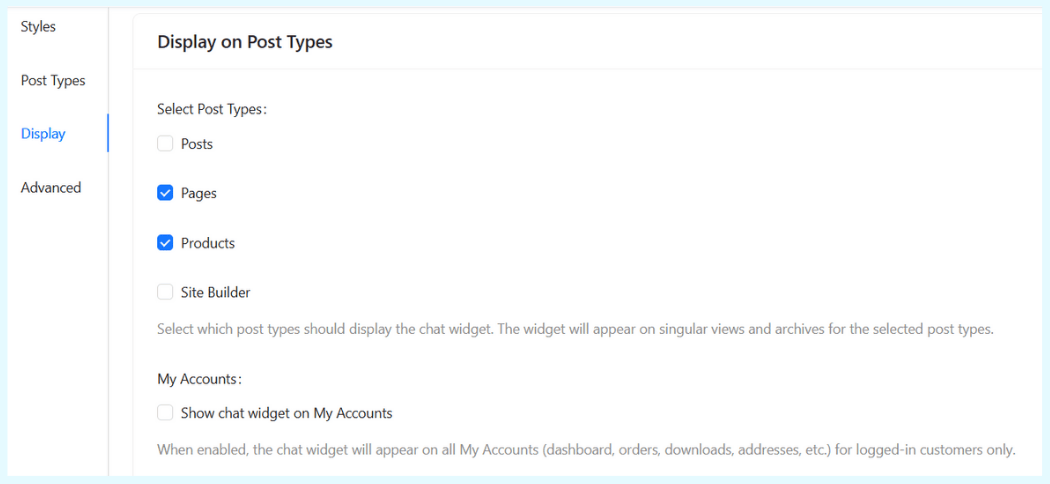
You might want the chat widget on your Shop page but not on your “Checkout” page. Or maybe you want it on your Blog posts but not on your “My Account” page.
Now you can do that easily.
Go to StoreAgent > Settings > AI Chat > Display. Here you can:
- Select Post Types: Choose which post types show the widget (e.g., only Products and Pages).
- Exclude Specific Pages: Search for and select specific pages where the widget should never appear.
- My Account Visibility: Toggle whether the widget shows on the WooCommerce My Account page.
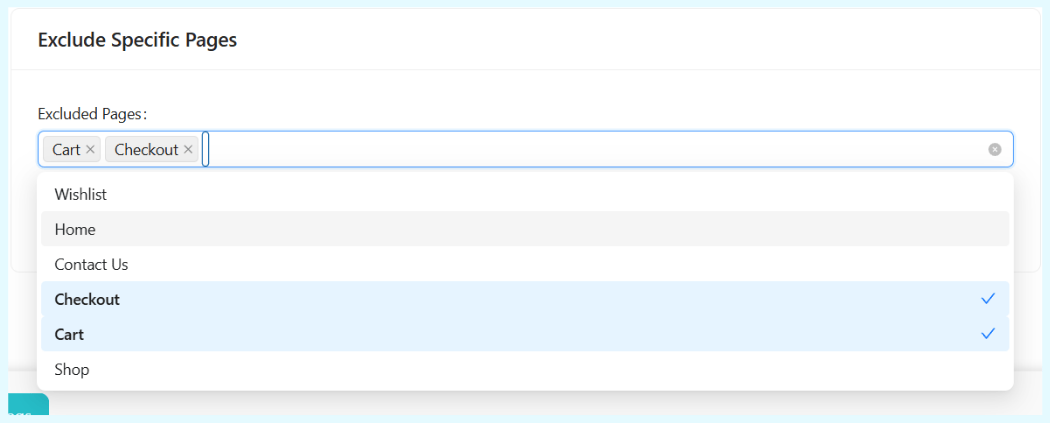
This gives you the flexibility to offer help exactly where it’s needed, without cluttering pages where it’s not.
How Fast Does The AI Update When I Change My Content?
Previously, our system synced your product data once a day. We realized that wasn’t fast enough for a busy store. When you train AI chatbot systems, speed matters.
In this update, we moved to Hourly Data Upload Scheduling. Now, when you update a page or change a product price, that new info syncs to the AI much faster. Basically, this ensures your chatbot always gives accurate, up-to-the-minute answers.
If you are already using StoreAgent, don’t worry about your existing data. We have included an automatic Meta Key Migration. Your existing product data has been automatically upgraded to work with the new system.
You don’t need to lift a finger. Just log in, enable your new post types, and watch your AI get smarter.
See It In Action
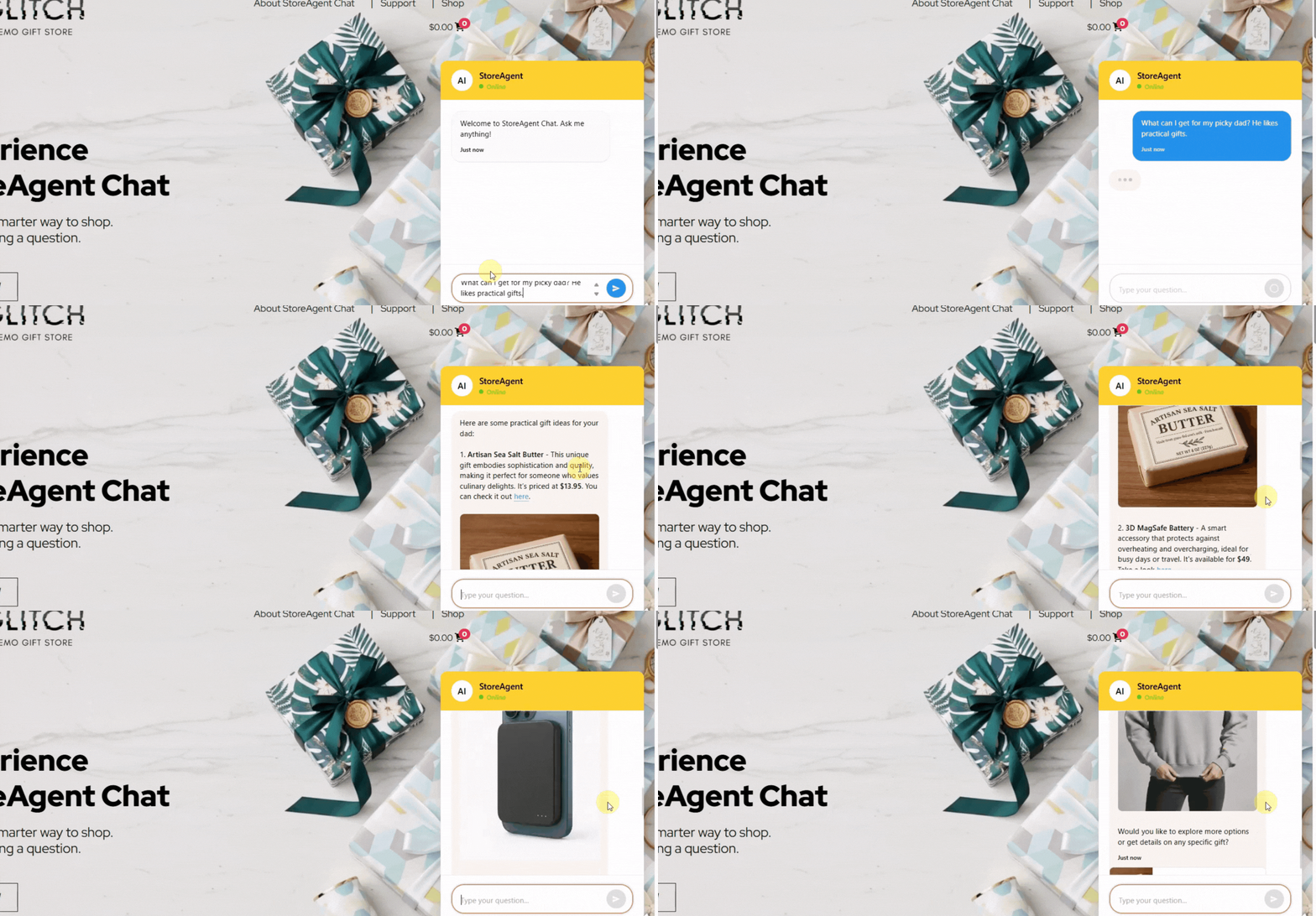
Notice how it pulls gift ideas directly from the blog post “5 Unique Gift Ideas for the Person Who Has Everything” which we just trained it on:
Ready To Build A Smarter Store Assistant?
We are so excited to see how you use this new feature. By letting you train AI chatbot models on your policies, blog posts, and custom pages, we’re moving closer to a truly intelligent store assistant.
Here is a quick recap of what we covered in this update:
- Why You Should Train AI Chatbot on More Than Products
- Post Types Your AI Chatbot Can Now Read
- How to Add Custom Post Types to Your AI Chatbot
- Hiding the Chat Widget on Specific Pages
- Faster Hourly Content Syncs
This feature is available right now in the latest version of StoreAgent. Check out our plans today to start expanding your AI’s horizons!


