

 Reviewed by
When a customer adds a product to their wishlist on your WooCommerce store, what happens next? For most store owners, the answer is nothing. Wishlists become digital shelves where products go to collect dust. That’s exactly why SaveTo Wishlist Pro exists—to turn those passive saved items into automated sales and customer insights without extra work.
I used to think wishlists were just a nice-to-have feature. But after working with hundreds of stores, I’ve learned they’re one of the most underused goldmines in ecommerce. A wishlist shouldn’t be a dead end. It should move shoppers from “just looking” to “buying now.”
In this guide, I’ll show you how SaveTo Wishlist Pro helps you track trends, automate price-drop alerts, and turn saved items into revenue. Plus, I’ll share how AI tools like StoreAgent can take your wishlist strategy even further.
Table of Content
Why Should You Upgrade To SaveTo Wishlist Pro?
Purchase data tells you what already happened. Wishlist data tells you what could happen. When a customer saves an item, they’re raising their hand and saying, “I’m interested, but not quite ready.” That’s intent you can act on.
The free version of a wishlist plugin gives shoppers a place to stash items. That’s helpful, but it’s passive. SaveTo Wishlist Lite covers all the basics that a modern shop needs to keep visitors happy:
- Multiple lists: Shoppers can organize their finds into different groups.
- Guest access: People can save items without needing an account.
- Custom looks: You can style the buttons to match your site.
- Account pages: Users get a clean space to view their saved products.
While those tools help the shopper, SaveTo Wishlist Pro is designed to help you build a bigger business.
It tracks how people interact with your store and gives you the tools to turn those interests into actual sales. You can see which products are hot and let the system send out price drop alerts automatically.
What I like about SaveTo Wishlist Pro is that it works around the clock. You’re not manually following up with every customer who saves an item. The software handles that for you.
What Core Features Does SaveTo Wishlist Pro Offer?
Moving from a basic tool to the pro version opens up a whole new world of possibilities. I’ve tested these features myself, and honestly, they’re game-changers for stores with even a modest catalog. Let’s walk through them.
1. Advanced Analytics: What your customers are eyeing
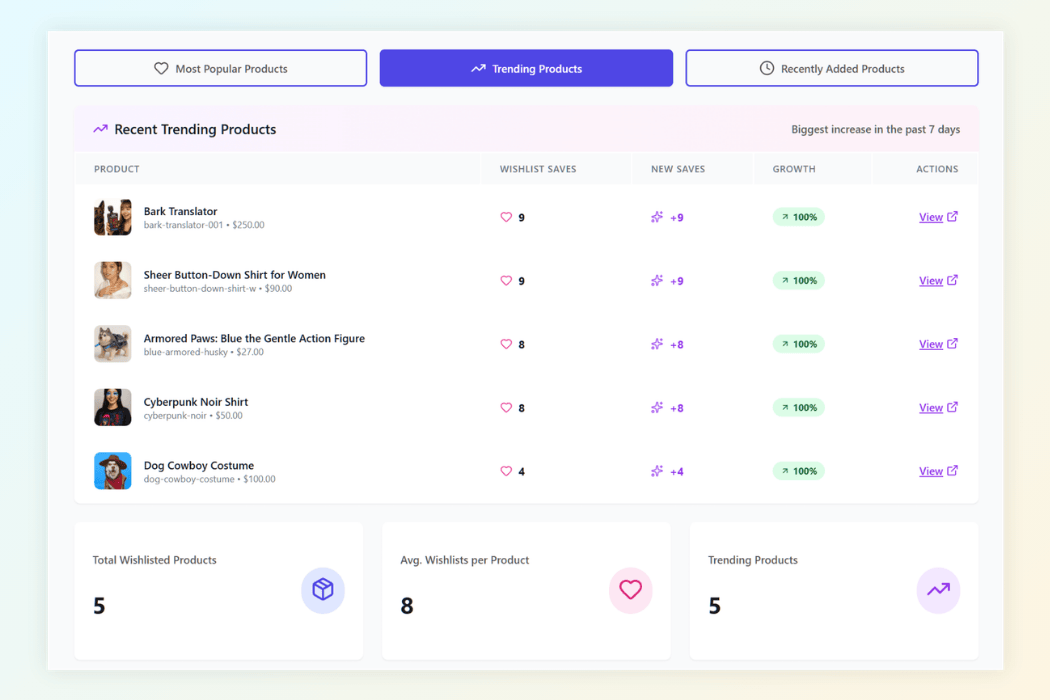
You can’t improve what you don’t measure. Advanced analytics take the guesswork out of your business by showing you exactly which items are catching people’s attention. This happens even if they haven’t bought yet.
Here’s what SaveTo Wishlist Pro’s analytics give you:
- Product insights: See which items are trending this week or month. You’ll know what’s hot before it sells out.
- Category and brand insights: Find out which parts of your store are winning. Maybe a specific brand is getting saved more than others. That’s a signal to stock deeper.
- Engagement tracking: See how often items are added, moved, or removed. High movement usually means high interest.
- Time-based trends: Spot seasonal patterns so you can prepare for holidays before the rush hits.
- Customer behavior: Group shoppers by what they save. You can use this to personalize emails or retargeting ads.
Check your trending products report every week. When an item is trending, people want it but might be waiting for a better price. Run a small, limited-time sale on that specific product. That nudge is often enough to move items from wishlist to cart.
2. Automations: Put your wishlist on autopilot
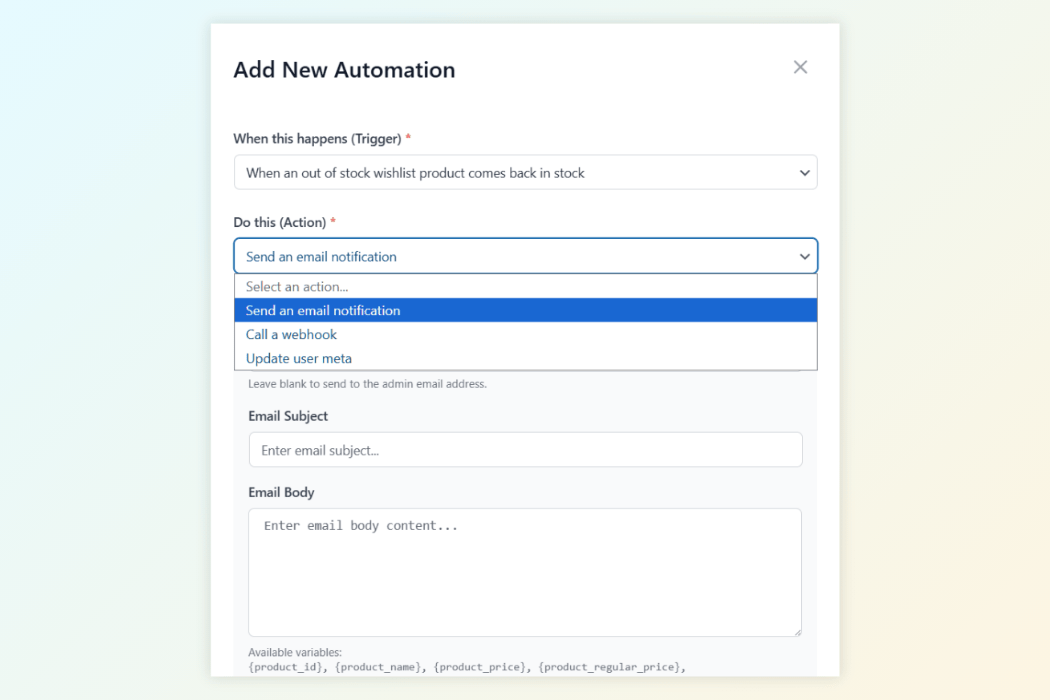
Managing a store involves a hundred small tasks. SaveTo Wishlist Pro’s automations handle the repetitive ones so you can focus on the big picture. When you connect automations to wishlist activity, you create a system that works while you sleep.
The hard fact: Data from Klaviyo’s 2025 ecommerce benchmarks shows that automated follow-ups based on wishlist activity can recover up to 15% of abandoned interest.
Here’s what the automation feature includes:
- Smart triggers: The system reacts instantly when a customer creates a wishlist, adds an item, or when a saved product goes on sale.
- Automatic actions: You decide what happens next. You can send an email, tag the customer, or notify your team.
- Customer tags: Automatically add notes to a customer’s profile based on what they save. This helps with segmentation later.
- Advanced workflow management: Build your own rules with conditions. You’re not stuck with one-size-fits-all.
- Bridge to other apps: Use webhooks to send data to your email list, CRM, or analytics tools the moment something changes.
What I love about this setup: you can create a “price drop alert” automation in minutes. Set it and forget it. The moment a saved item goes on sale, the customer gets an email. It felt so easy to use the first time I tested it.
3. Webhooks: Connect wishlist data to Other apps
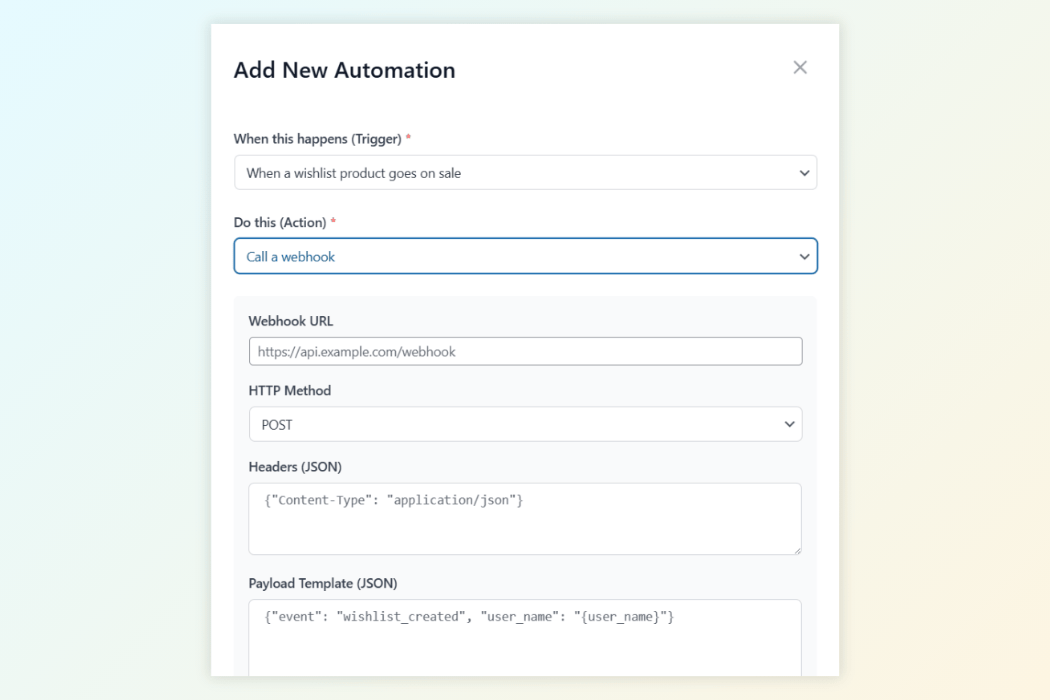
Sending data between different apps can be a headache if they don’t talk to each other. Webhooks act like a universal messenger. They take wishlist events and send them instantly to any app that can receive data.
With SaveTo Wishlist Pro’s webhooks, you control:
- Event triggers: Send data the moment a wishlist is created, updated, or shared.
- Custom endpoints: Choose exactly where the data goes. It could be a spreadsheet, a CRM, or an automation tool like Zapier or Make.
- JSON payloads: The information is sent in a clean, modern format that other apps understand.
- Real-time delivery: No waiting around. Data moves as soon as the action happens.
This keeps all your business platforms connected. You can stream wishlist data to marketing platforms like Mailchimp or Klaviyo, automation hubs, or custom dashboards. When you use these connections, your records stay updated across your entire business without manual entry.
4. Wishlist Sharing & Permissions: Turn customers into advocates
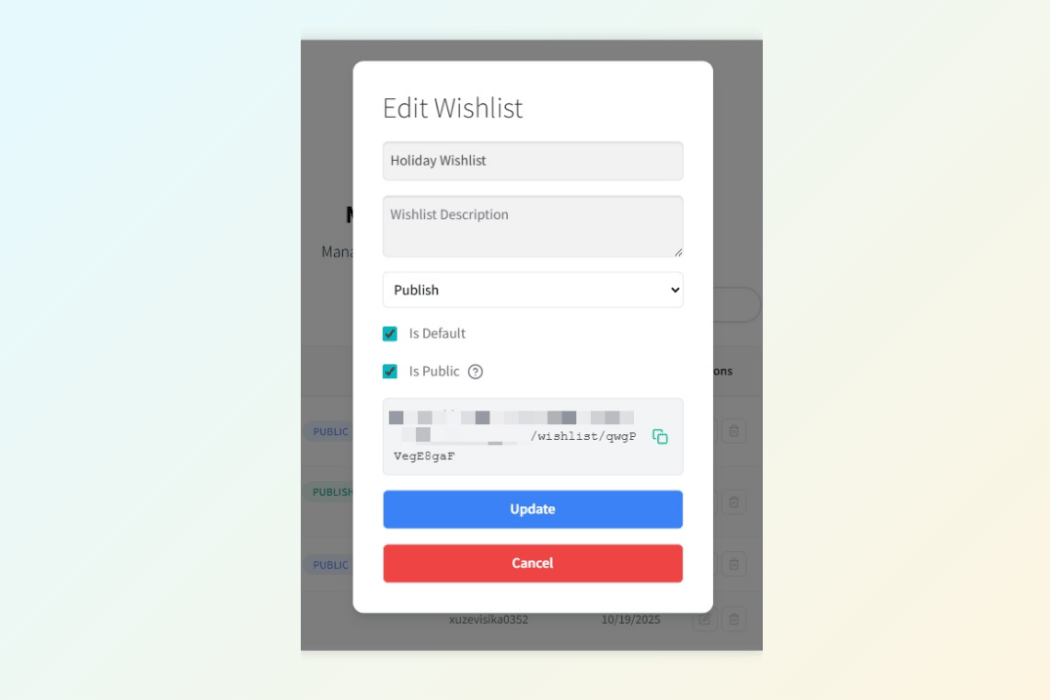
Shopping is more social when people can share. Wishlist sharing turns a private list into a way for customers to market your products for you. Whether they’re planning a wedding, a group gift, or just sharing ideas, these tools help.
Here’s how SaveTo Wishlist Pro handles sharing:
- Advanced sharing: Customers can send lists via email or create a private link with a unique code.
- Permission control: Let customers decide who can just view versus who can edit a shared list.
- Public wishlist directory: You can enable a space where shoppers browse public lists. It’s optional, but it helps with product discovery.
- Custom email styles: Match the look of sharing emails to your brand.
- Activity tracking: See when shared lists are opened. This tells you how often products are being passed along.
These sharing tools turn a wishlist into a referral engine. When shoppers share with friends, they’re doing your marketing for free.
How Do You Upgrade To SaveTo Wishlist Pro?
If you’re already using SaveTo Wishlist Lite, moving up to the Pro version is a smooth next step. Here’s how it works:
- Get the Pro plugin from the SaveTo Wishlist Pro page.
- Install and activate it while keeping the Lite version active.
- Enter your license key in the plugin settings under SaveTo Wishlist > License.
- Stay updated. The Pro version handles its own updates, keeping everything running smoothly.
Once activated, you’ll have access to analytics, automations, webhooks, and sharing features instantly. No complex setup required. I tested the upgrade process myself, and it took less than five minutes.
How StoreAgent AI Takes Wishlist Marketing Further
Here’s where things get exciting. Wishlist data tells you what customers want. But AI helps you act on that data faster and more personally.
StoreAgent is a suite of AI tools built specifically for WooCommerce. It bridges the gap between the technical side of running a store and the content side of marketing it. Manual writing doesn’t scale, especially when you’re trying to personalize follow-ups for hundreds of saved items. StoreAgent solves that.
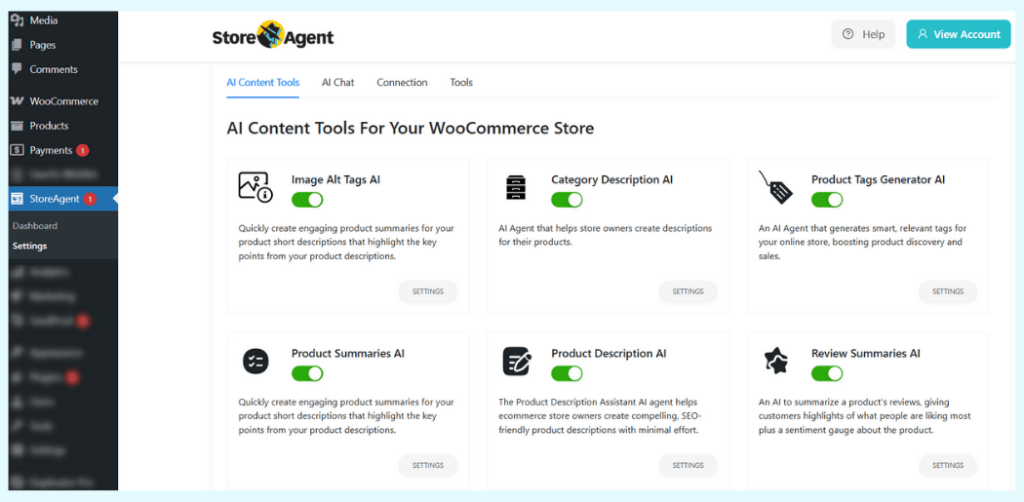
What I like about this approach: You can use wishlist data to inform your AI tools. For example:
- If you see a trending category in SaveTo Wishlist Pro, use StoreAgent’s Product Descriptions AI to rewrite those product pages with fresh, benefit-driven copy that speaks to what shoppers are saving.
- Use Product Tags AI to add new, relevant tags to trending items so they show up in more searches.
- Deploy StoreAgent Chat to answer questions about saved items 24/7. It can handle stock status, shipping times, or price matches without you hiring more support staff.
My advice? Don’t just track wishlist data. Act on it.
I tested this workflow with a small pet supply store. They noticed a spike in saved items for eco-friendly toys. Within a day, they used StoreAgent to rewrite those product descriptions with a “sustainable” angle and added tags like “eco-friendly dog toys.” Sales from that category doubled in two weeks.
The point is: SaveTo Wishlist Pro tells you where to focus. StoreAgent helps you execute at scale.
Conclusion
Look, wishlists are one of the most underused tools in ecommerce. Most store owners install a plugin and forget about it. But when you use SaveTo Wishlist Pro the right way, those saved items become your clearest window into customer intent. You stop guessing and start acting on real data.
Here’s what we covered:
- Why should you upgrade to SaveTo Wishlist Pro
- SaveTo Wishlist Pro’s advanced analytics
- Automations that put your wishlist on autopilot
- Webhooks that connect wishlist data to other apps
- Wishlist sharing and permissions
- How StoreAgent AI takes wishlist marketing further
If you’re ready to stop letting wishlist items collect dust, give SaveTo Wishlist Pro a try. And if you want to scale your content and customer support while you’re at it, check out how StoreAgent’s AI tools can help. They work even better together!


