Reviewed by
AI chatbot escalation and feedback collection is now available in StoreAgent Chat!
This new feature helps you recover frustrated customers by collecting ratings right inside your chat widget and automatically offering support links when conversations don’t go well.
Your AI assistant can finally ask customers how the conversation went. More importantly, AI chatbot escalation turns negative ratings into support tickets before frustrated shoppers leave your site.
We built this because AI chatbot feedback collection shouldn’t end with a thumbs down. Every interaction now has a clear next step that keeps customers engaged with your store.
Why We Built AI Chatbot Escalation And Feedback Collection
Most store owners collect feedback but can’t act on it fast enough. A customer clicks thumbs down, leaves your site, and you only see the rating hours later in your dashboard.
We wanted to fix that disconnect. The new AI chat feedback system works directly inside your conversations. When someone rates their experience poorly, they immediately see an option to contact your support team.
This creates what we call a “recovery moment.” Instead of losing the customer, AI chatbot escalation gives them a direct path to real help.
How To Set Up StoreAgent’s AI Chat Feedback Collection And Escalation
Getting started takes about two minutes. Everything lives in your AI Chat Settings under Customer Feedback.
Turn on customer feedback
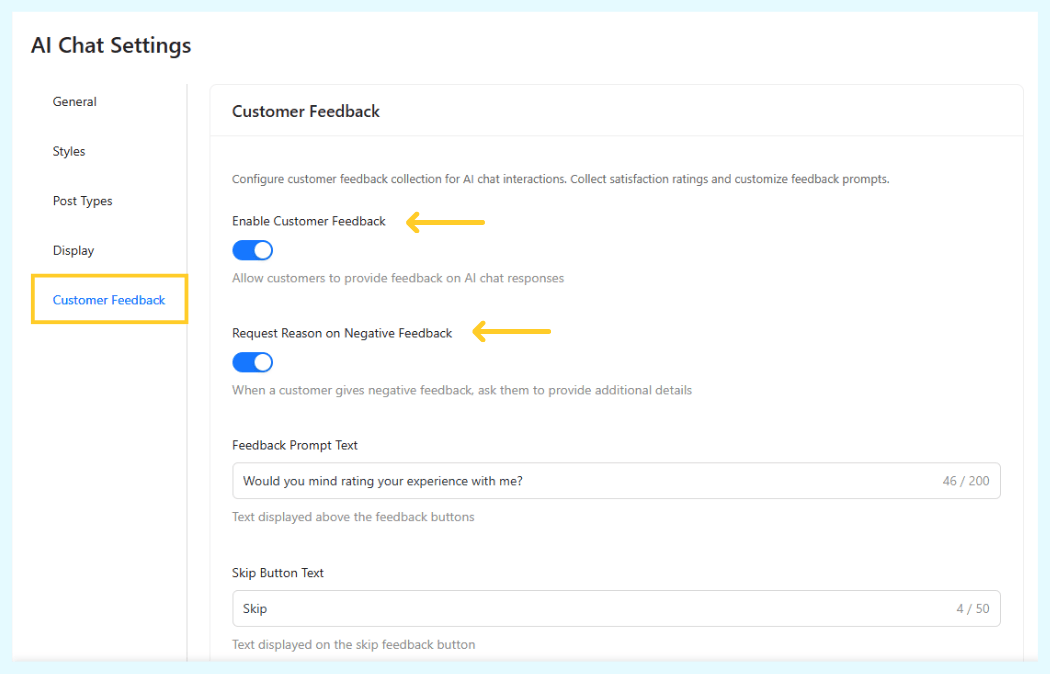
- Go to AI Chat Settings and click Customer Feedback
- Toggle on “Enable Customer Feedback”
- Customize your feedback prompt (this appears above the rating buttons)
- Set your skip button text if customers want to exit without rating
Ask for details on negative ratings
- Toggle on “Request Reason on Negative Feedback”
- When customers give a thumbs down, they’ll see a follow-up asking what went wrong
Enable support escalation (paid plans only)
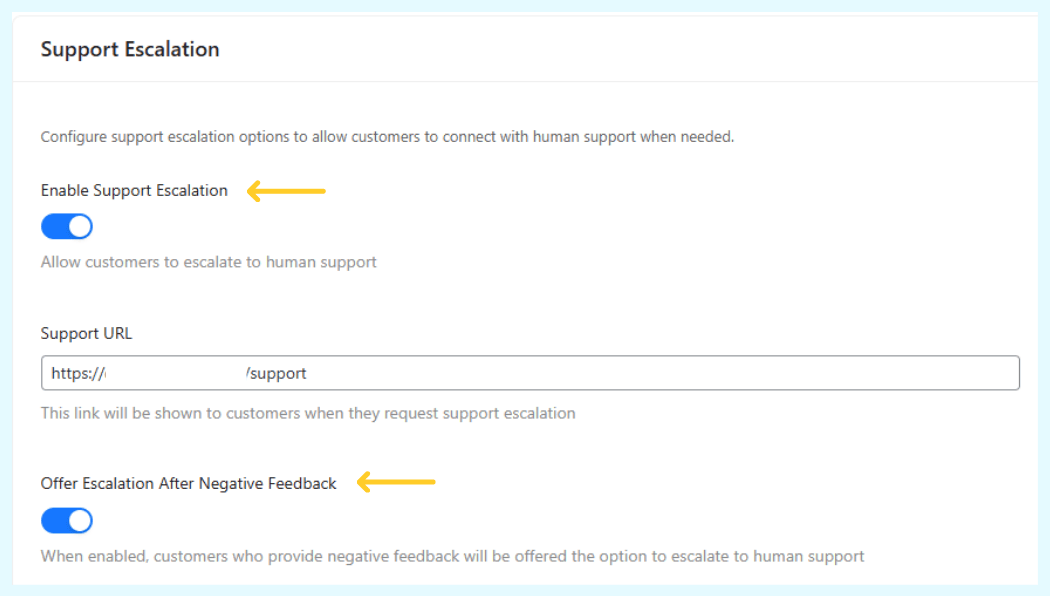
- Toggle on “Enable Support Escalation”
- Add your Support URL (your contact page, ticket system, or help desk link)
- Toggle on “Offer Escalation After Negative Feedback”
Note that support escalation requires a paid plan. Free users can still collect feedback ratings, but the automatic AI chatbot escalation option is premium-only.
How The AI Chat Feedback System Works
The customer experience is simple and natural. Here’s what happens in a typical conversation with chatbot feedback collection enabled.
Customers rate their chat experience
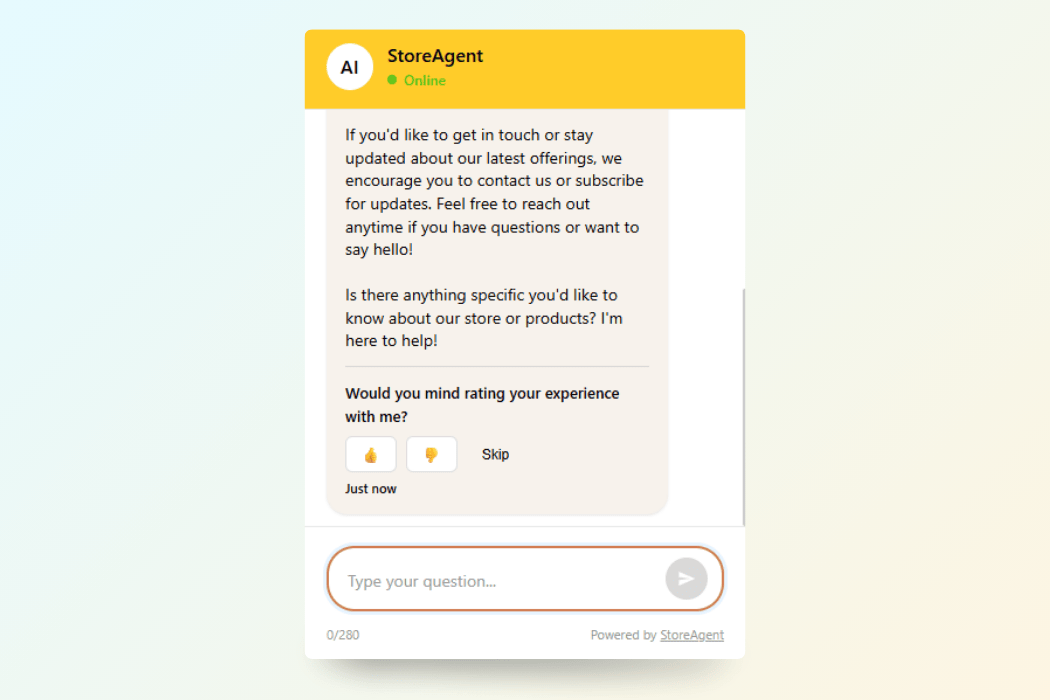
After chatting with your AI assistant, customers see a friendly prompt: “Would you mind rating your experience with me?” They can click thumbs up, thumbs down, or skip entirely.
You control the exact wording of this prompt. Some stores keep it casual, while others match their brand’s formal tone. The choice is yours.
Negative ratings trigger follow-up questions
When you enable “Request Reason on Negative Feedback,” customers who click thumbs down get asked to explain what went wrong. This gives you valuable context instead of just a number.
These responses show up in your chat history. You can review them later to spot patterns and improve your AI’s knowledge base. This makes chatbot feedback collection more actionable for your team.
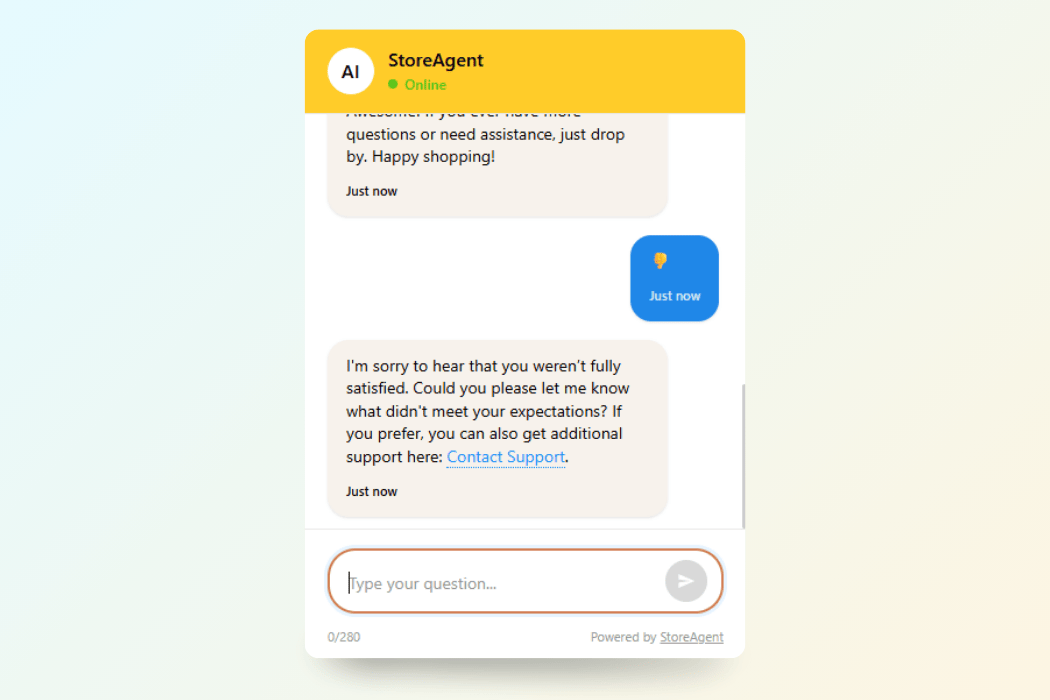
AI Chatbot Escalation connects customers to real help
Here’s where the magic happens. When AI chatbot escalation is enabled, customers who leave negative feedback immediately see your support link.
They don’t need to hunt for a contact page or fill out a separate form. The AI says something like: “I’m sorry I couldn’t help. Would you like to contact our support team?” Then it shows the link you configured.
This happens automatically. Your team doesn’t need to monitor anything or manually reach out. The system creates the connection the moment a customer expresses frustration.
You control everything from one dashboard
All these AI chat feedback settings live in your Customer Feedback panel. Toggle features on or off whenever you want. Change your support URL if you switch help desk systems. Update your feedback prompts to test different wording.
The system respects your settings in real time. When you disable a feature, it stops appearing in customer chats immediately.
Bonus Updates In This Release
We added more improvements that make your daily workflow smoother. These might seem small, but they solve real frustrations we heard from store owners.
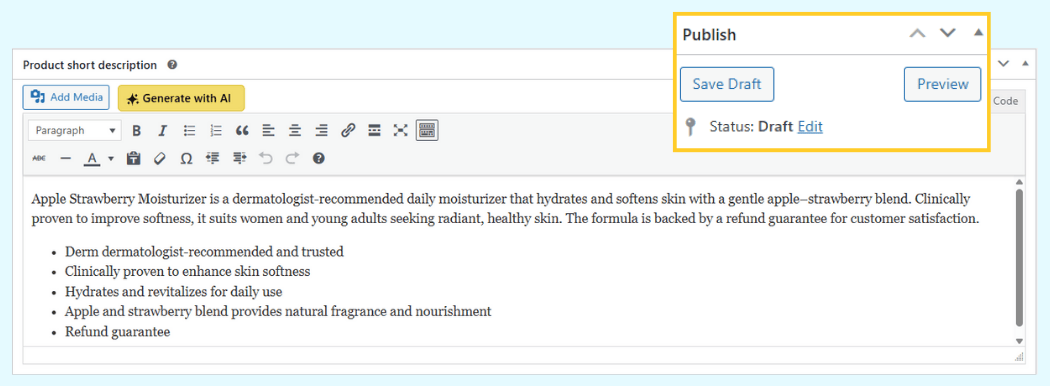
- Generate AI content for draft products – Your Product Summaries AI now works on items still in Draft status. Before this update, you had to publish products before generating their descriptions. Now you can prep your entire catalog while your site is in maintenance mode without exposing draft items to customers.
- Simpler admin chat settings – We’re updating the confusing “Admin Chat Mode” setting that caused double-negative confusion. The new version uses plain language to explain what each toggle position does. When enabled, you test with real AI responses. When disabled, you see safe demo responses instead.
- Detection tag for faster support – StoreAgent now adds a small meta tag to your site’s code. This helps our support team verify that your plugin is active and running correctly. When you contact support, we can instantly confirm your setup status without asking you to check multiple settings.
Summary
The new AI chatbot escalation and feedback features help you recover customers who have poor chat experiences. Instead of losing them to frustration, you offer immediate help through your support team.
Combined with draft product support and clearer settings, this update removes several workflow bottlenecks that store owners face daily. The chatbot feedback collection system ensures you capture satisfaction data at the perfect moment—right after the conversation ends.
Here’s what we covered:
- Why We Built AI Chatbot Escalation and Feedback
- How to Set Up AI Chat Feedback Collection
- How the AI Chat Feedback System Works
- Bonus Updates in This Release
These features help you understand customer satisfaction and respond faster when conversations don’t go perfectly. Get started with StoreAgent and start collecting feedback that actually leads to action.