Reviewed by
The Image Alt Tags AI Agent is finally here for StoreAgent users, bringing a powerful AI alt text generator for WooCommerce directly into your media library! We are thrilled to introduce this new tool, which writes SEO-friendly descriptions for every image on your site automatically.
You know that missing alt text hurts your SEO and accessibility scores. Yet, writing descriptions for thousands of product photos feels like an impossible task.
In this guide, we will show you exactly how the new Image Alt Tags AI Agent works. So, let’s get started!
What Is An Image Alt Tag?
An image alt tag (technically called “alt text”) is a written description of an image in your website’s code. It tells search engines and screen readers exactly what is in the photo.
For example, instead of a file named IMG_5992.jpg, the alt tag would read: “Men’s leather hiking boot in dark brown side view.” This text is invisible to most visitors but crucial for Google and users with visual impairments.
Because of this importance, many store owners are now turning to an AI image alt text generator to handle this descriptive work at scale while maintaining high SEO standards.
How The Image Alt Tags AI Agent Automates Content
The Image Alt Tags AI Agent is an AI-powered tool by StoreAgent that automatically generates metadata for WordPress media libraries. It uses computer vision to analyze images and write SEO-friendly text instantly.
When you select an image, the agent produces four specific types of content:
- Accessible alt text: The agent generates descriptive alt tags that improve website accessibility and search engine rankings.
- Clean titles: It creates concise titles useful for file organization and gallery headlines.
- Frontend captions: It drafts context-aware captions for use in blog posts and portfolio displays.
- Detailed descriptions: It writes comprehensive descriptions suitable for product pages and digital asset management.
StoreAgent allows users to customize these outputs. You can provide specific keywords or context, ensuring the AI image alt tag data aligns with your site’s SEO strategy.
How To Use The Image Alt Tags AI Agent
We integrated the tool seamlessly into your existing WordPress dashboard. You won’t need to learn a new app or export your files.
1. Configure your default settings
Before you start generating tags, you can choose which fields the AI should fill by default. This saves you from checking boxes every time.
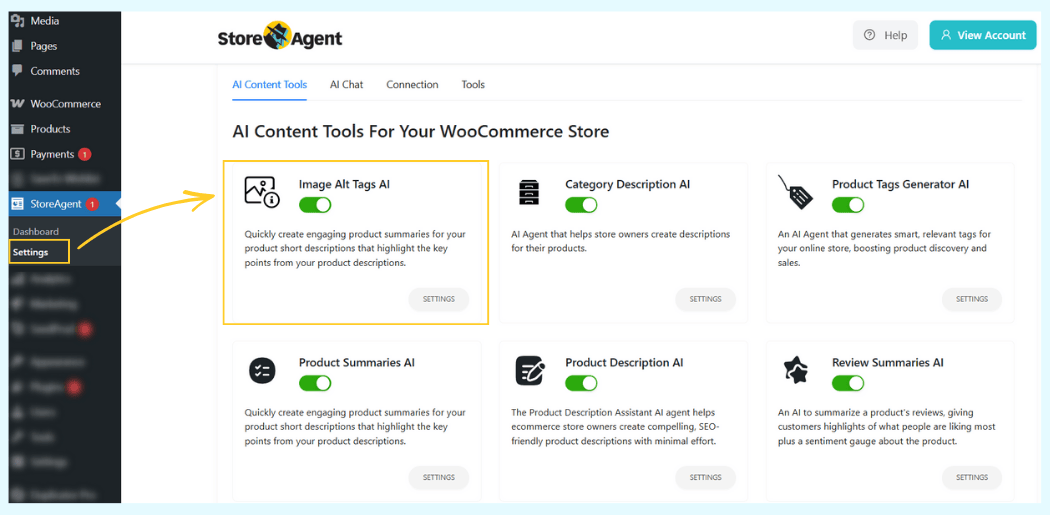
- Go to StoreAgent > Settings in your WordPress dashboard.
- Click on the AI Content Tools tab.
- Locate the Image Alt Tags AI card and toggle the switch to On.
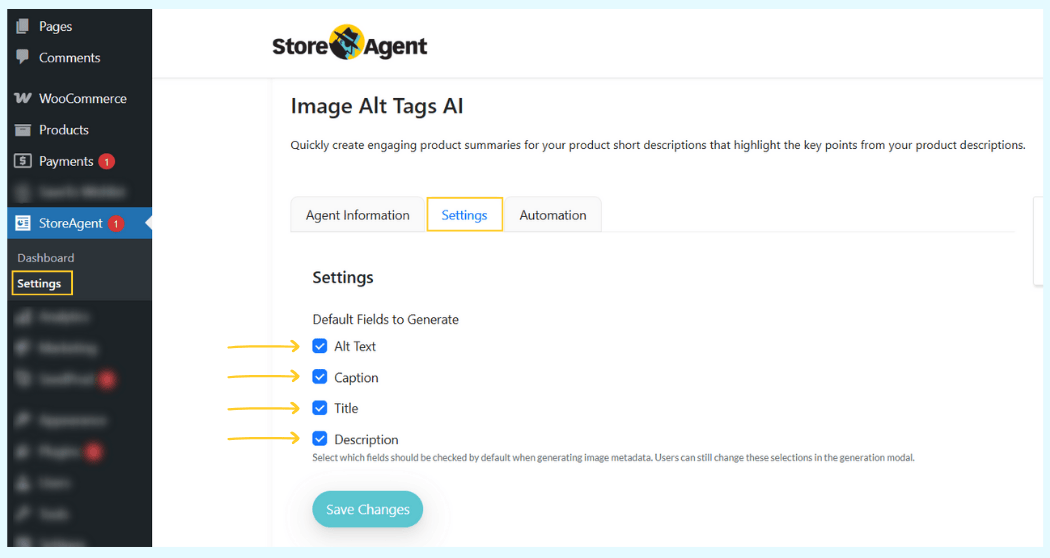
- Click Settings on the card.
- Under “Default Fields to Generate,” check the boxes for Alt Text, Caption, Title, or Description.
- Click Save Changes.
2. Generate tags for images
Now you can start optimizing images. You can do this from the Media Library or while editing a product.
From the Media Library:
- Go to Media > Library in your dashboard.
- Click on any image to open the details modal.
- Look for the Generate Image Alt Tags with AI section on the right.
- Click Generate with AI to fill the fields instantly.
From a Product Page:
- Click Set product image to save.log of unoptimized images without spending your weekend typing descriptions.
- Go to Products and click to edit any product.
- In the right sidebar, click Set product image (or click the existing image).
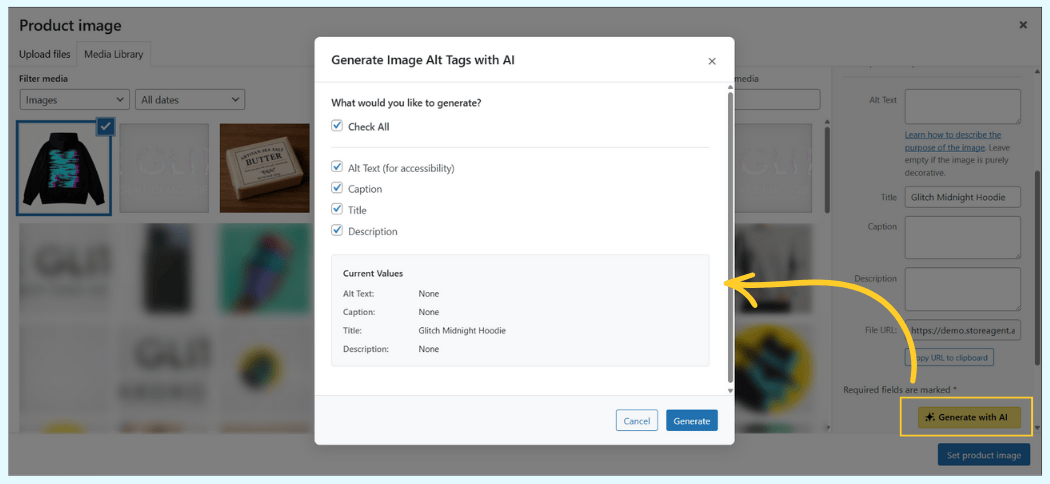
- In the modal, click Generate with AI on the right side.
Testing The Image Alt Tags AI Agent
To show you exactly how accurate this is, let’s run a test on our demo store, “The Glitch.” We uploaded a product image of our signature “Glitch Hoodie – Midnight Edition.”
The original file name was terrible: hoodie_final_v2_edit.jpg. It had zero metadata.
We opened the image and clicked “Generate with AI.”
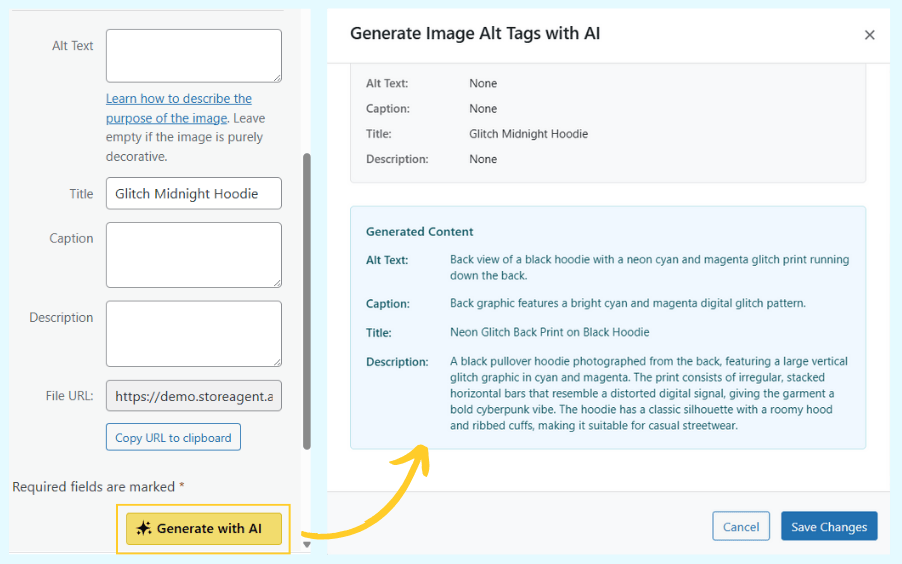
Here is exactly what the Image Alt Tags AI Agent wrote in 3 seconds:
- Alt Text: “Back view of a black hoodie with a neon cyan and magenta glitch print running down the back.”
- Title: “Neon Glitch Back Print on Black Hoodie”
- Caption: “Back graphic features a bright cyan and magenta digital glitch pattern.”
- Description: “A black pullover hoodie photographed from the back, featuring a large vertical glitch graphic in cyan and magenta. The print consists of irregular, stacked horizontal bars that resemble a distorted digital signal, giving the garment a bold cyberpunk vibe. The hoodie has a classic silhouette with a roomy hood and ribbed cuffs, making it suitable for casual streetwear.”
The AI didn’t just describe “a hoodie.” It identified the style (streetwear/cyberpunk), the specific design elements (distorted digital signal), and even the exact colors (neon cyan and magenta).
This is the level of detail that helps you rank for specific long-tail keywords.
How Does Image Alt Text Impact SEO And Accessibility?
You might wonder if automating this is worth it. The answer is yes, because accurate metadata drives traffic and ensures compliance.
Google Images traffic
A huge portion of shopping searches happen on Google Images. If you sell “red leather boots,” and your image has no text, Google cannot “see” the boots.
When you add descriptive text, you help Google index your product photos, bringing free, high-intent traffic directly to your product pages.
Screen reader accessibility
The internet should be open to everyone. Screen readers rely on alt text to describe images to visually impaired users.
The Image Alt Tags AI fixes accessibility gaps by ensuring every product has a clear, helpful description, protecting your store from compliance issues.
Context for broken images
Sometimes images fail to load due to slow connections. When that happens, the browser displays the alt text instead.
A customer seeing “Front view of denim jacket” is much more likely to stay on your site than a customer seeing a confusing broken link icon.
Bonus Update: Better Language Support For Product Descriptions
We have also upgraded the Product Description AI to better support global stores.
With this update, the interface now fully adapts to your site’s language settings.
When you are selecting keywords, sizes, or ingredients, the form labels and options will seamlessly match your preferred language, providing a smoother and more native experience for international store owners.
Automate Your Image Alt Tags Today
The Image Alt Tags AI Agent effectively removes one of the most tedious parts of managing a WooCommerce store.
You can stop ignoring empty metadata fields and finally have a media library that is fully optimized for search engines and accessible to all users.
To recap, here’s what we covered:
- How the AI Agent Automates Content Creation
- Step-by-Step Usage Guide
- Live Demo on a Real Product
- SEO and Accessibility Benefits
Update your plugin today and try the new Image Alt Tags AI Agent. If you are ready to automate your store’s SEO and save hours of manual work, check out our pricing plans and other features.